# Client Area
# Home screen
### Business-VPN module **[WHMCS](https://puqcloud.com/link.php?id=77)**
##### [Order now](https://panel.puqcloud.com/index.php?rp=/store/whmcs-module-business-vpn) | [Download](https://panel.puqcloud.com/link.php?id=33) | [FAQ](https://panel.puqcloud.com/link.php?id=39)
##### Basic information on client panel page
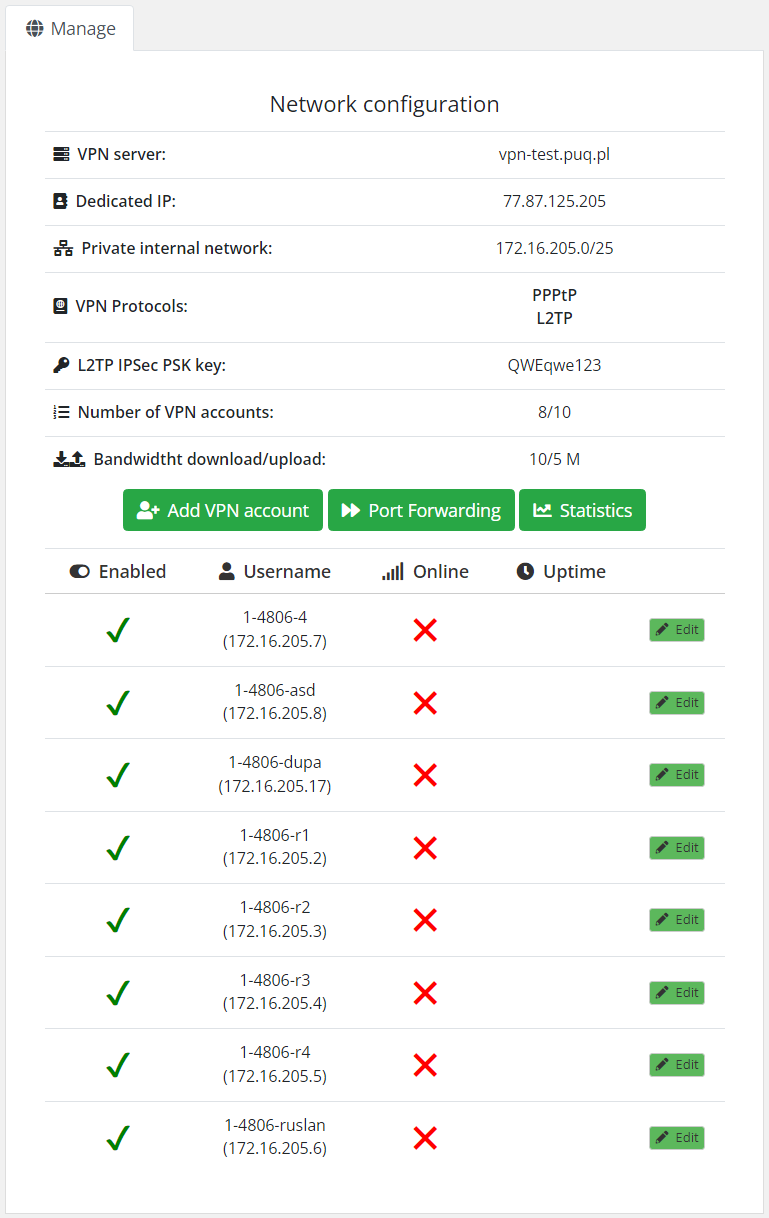
**VPN server:** The VPN server address that is entered when creating a VPN connection for the end user
**Dedicated IP:** The public IP address that is reserved for the service and through which all users of the VPN service will be represented on the Internet.
**Private internal network:** Private subnet whose IP addresses are available to the client to create VPN accounts. When adding a new VPN account, it will be assigned an IP address from this internal pool of addresses.
**VPN Protocols:** VPN protocols that are available *(by default you can easly enable two protocols in Mikrotik router: PPPtP i L2TP* )
**L2TP IPSec PSK key:** In the case of L2TP, this is the encryption key
**Number of VPN accounts:**Number of used and available VPN client accounts from the pool available based on the defined package.
**Bandwidtht download/upload:** The bandwidth rate that will be available on each VPN client account
##### Function buttons for service management.
- **Add VPN account:** To create a new VPN account
- **Port Forwarding:** To configure port forwarding from a public IP address to a private one
- **Statistics:** To access connection statistics of VPN
##### List of VPN accounts with technical/dynamic data and also buttons **Edit** and **Reset connections**
[](https://doc.puq.info/uploads/images/gallery/2023-03/image-1678182276050.png)
# Add VPN account
### Business-VPN module **[WHMCS](https://puqcloud.com/link.php?id=77)**
##### [Order now](https://panel.puqcloud.com/index.php?rp=/store/whmcs-module-business-vpn) | [Download](https://panel.puqcloud.com/link.php?id=33) | [FAQ](https://panel.puqcloud.com/link.php?id=39)
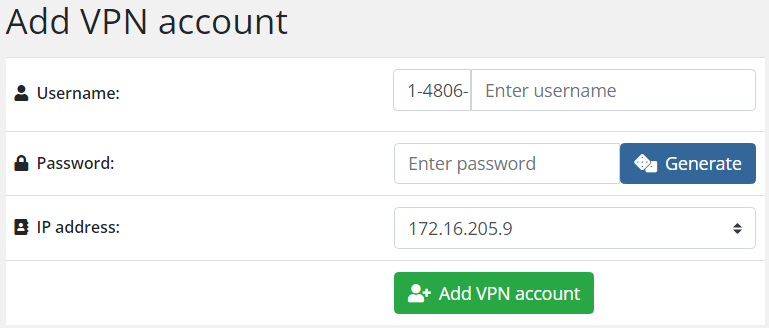
##### This is how the page for adding a new VPN account looks like.
Each VPN account has a unique client ID, the ID is generated according to the scheme <user\_id>-<service\_id>-Manually entered value. <user\_id>-<service\_id> are generated automatically by module. You can modify manually the last part.
[](https://doc.puq.info/uploads/images/gallery/2023-03/image-1678182542613.png)
To create a new account, the client must enter the following.
Username, Password, Select an available IP address from the dropdown list. Then click the **Add VPN account** button.
# Edit VPN account
### Business-VPN module **[WHMCS](https://puqcloud.com/link.php?id=77)**
##### [Order now](https://panel.puqcloud.com/index.php?rp=/store/whmcs-module-business-vpn) | [Download](https://panel.puqcloud.com/link.php?id=33) | [FAQ](https://panel.puqcloud.com/link.php?id=39)
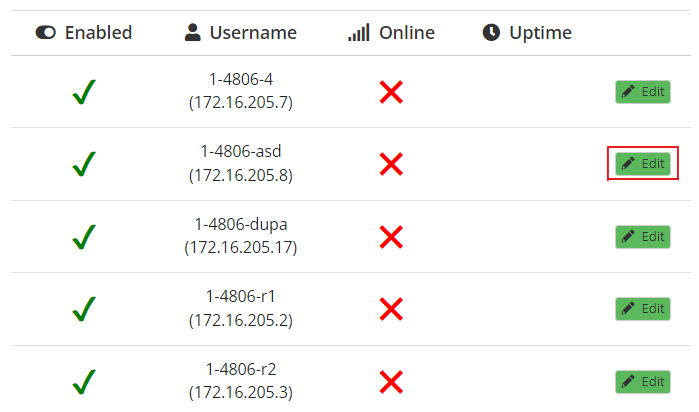
##### In order to edit a VPN account, you must click on the **Edit** button on the selected account.
[](https://doc.puq.info/uploads/images/gallery/2023-03/image-1678182767487.png)
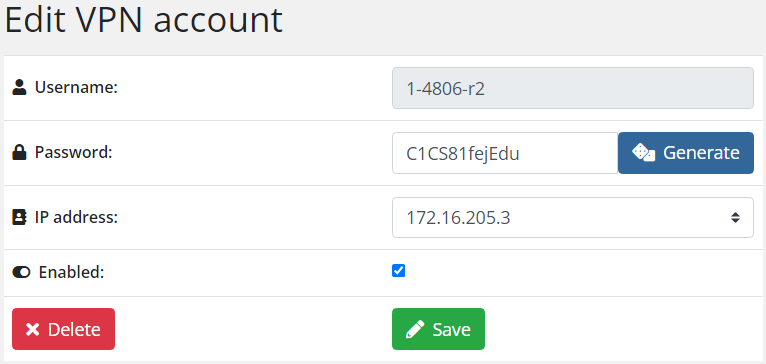
##### You can edit the following parameters:
- Password
- IP address
- Enable/Disable VPN account
##### Also on the editing page there is an opportunity to delete a VPN account.
By pressing the DELETE button
[](https://doc.puq.info/uploads/images/gallery/2023-03/image-1678182828345.png)
# Statistics
### Business-VPN module **[WHMCS](https://puqcloud.com/link.php?id=77)**
##### [Order now](https://panel.puqcloud.com/index.php?rp=/store/whmcs-module-business-vpn) | [Download](https://panel.puqcloud.com/link.php?id=33) | [FAQ](https://panel.puqcloud.com/link.php?id=39)
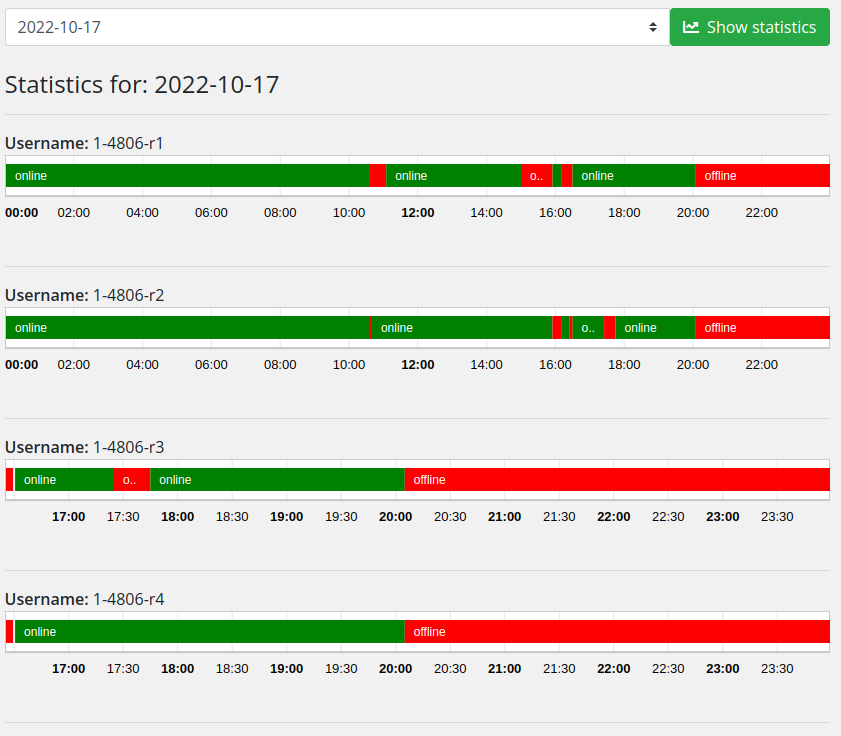
##### The module provides visual online statistics of VPN accounts.
It is possible to select a specific data to display statistics.
Statistics are available for the last 60 days.
[](https://doc.puq.info/uploads/images/gallery/2022-10/image-1666088806675.png)