Before you start, it is important to read and familiarize yourself with the following articles at this link: [https://doc.puq.info/books/docker-modules](https://doc.puq.info/books/docker-modules)
The **WHMCS Docker Grafana module** is designed for automated provisioning and management of **Grafana instances on a Docker server. It seamlessly integrates with WHMCS, allowing businesses to sell and manage **Grafana services efficiently. - - - - - - ## **Key Features** ### **🚀 Automated Container Management** - Automatic creation of an **Grafana container upon service order. - Automated package upgrades and administrator password reset. ### **🔒 Service Control & Security** - Service creation - Service suspension and reactivation. - Service termination - Full reinstallation - IP access control ### **🛠️ Advanced Diagnostic Tools** - Built-in tools for diagnosing and managing containers. ### **🌍 Multilingual Support** - Supports multiple languages, including **Arabic, Azerbaijani, Catalan, Chinese, Croatian, Czech, Danish, Dutch, English, Estonian, Farsi, French, German, Hebrew, Hungarian, Italian, Macedonian, Norwegian, Polish, Romanian, Russian, Spanish, Swedish, Turkish, and Ukrainian**. ### **⚙️ Fully Customizable Workflows** - Uses **n8n workflows** to automate processes, allowing full customization for business-specific needs. - - - - - - ## **System Requirements** To run the WHMCS Docker **Grafana** module, ensure you have: ✅ **WHMCS version 8+** ✅ **An n8n server** for workflow automation ✅ **A server with Docker installed** for container management ([Installation Guide](https://doc.puq.info/books/docker-modules/page/installing-docker-for-puqcloud-modules)) - - - - - - ## **Installation & Setup** ### **1️⃣ Environment Preparation** - Install **WHMCS 8+**. - Set up an **n8n server** for automation workflows. - Ensure **Docker** is installed and running. ([Installation Guide](https://doc.puq.info/books/docker-modules/page/installing-docker-for-puqcloud-modules)) ### **2️⃣ Module Installation** - Upload and activate the **WHMCS Docker Grafana module**. - Configure the module settings to connect with your Docker server and n8n workflows. ### **3️⃣ Workflow Customization** - Utilize **n8n workflows** to automate service provisioning and management. - Modify workflows as needed for custom business logic. ### **4️⃣ Testing & Deployment** - Perform a **test order** to verify automatic container creation. - Check all service management functions (creation, suspension, unsuspension, termination). - - - - - - ## **Why Choose This Module?** ✅ **Seamless automation** – Reduces manual work and speeds up service deployment. ✅ **Highly customizable** – Modify workflows to fit any business model. ✅ **User-friendly** – Integrated within WHMCS with a simple setup process. - - - - - - This module makes selling and managing **Grafana instances** through WHMCS easy, automated, and flexible! 🚀 [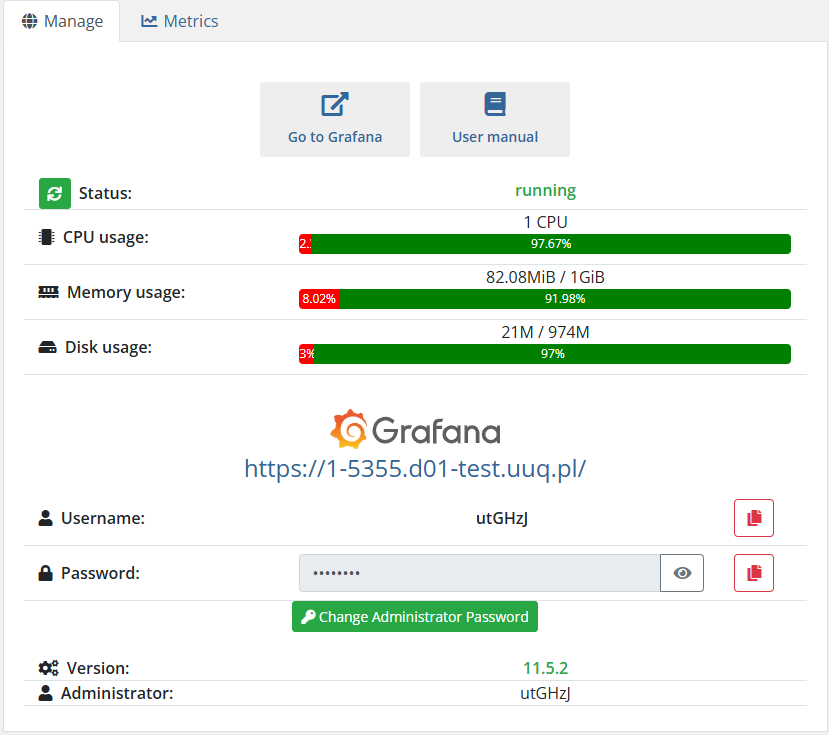](https://doc.puq.info/uploads/images/gallery/2025-03/image-1742759866818.png) [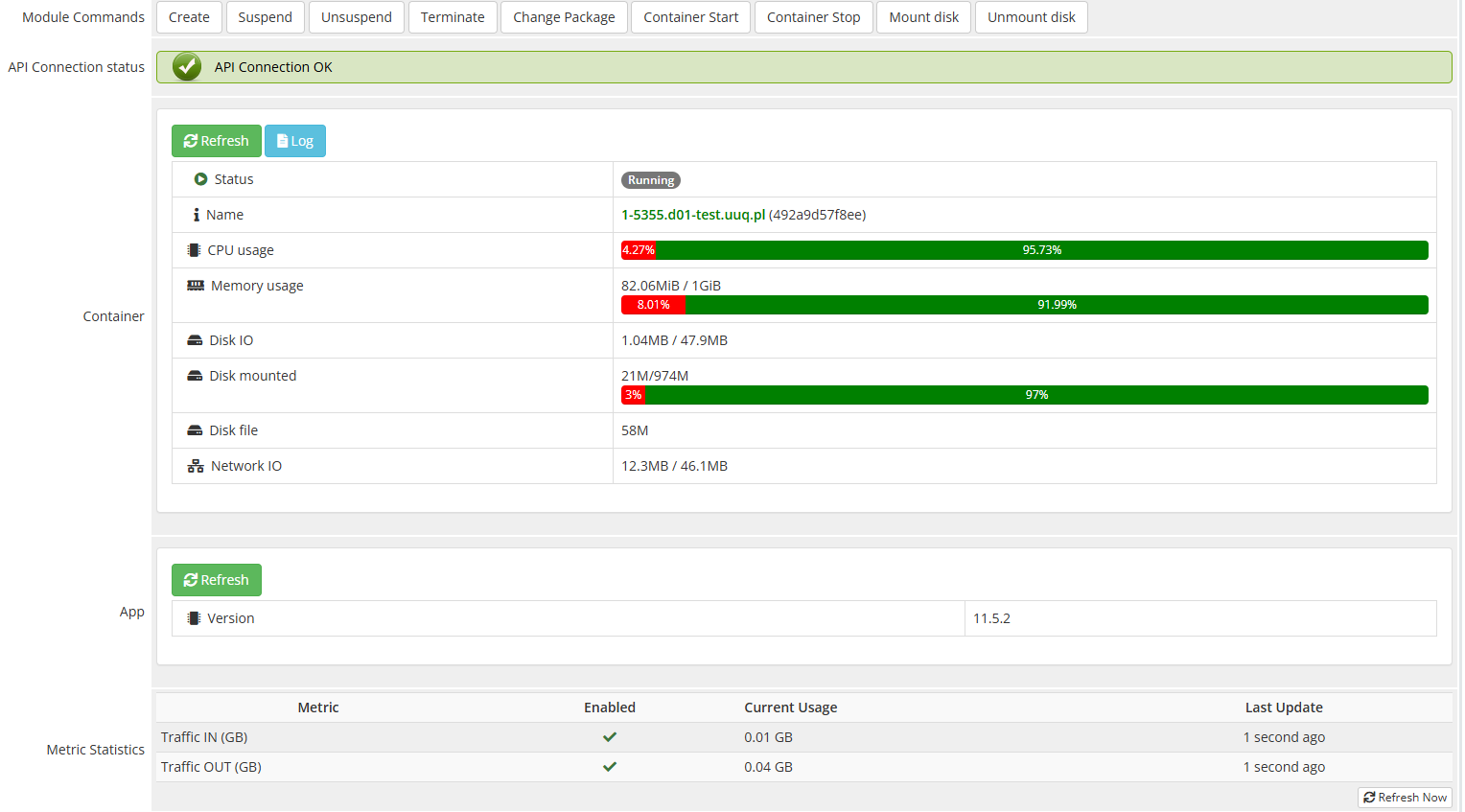](https://doc.puq.info/uploads/images/gallery/2025-03/image-1742759913643.png) [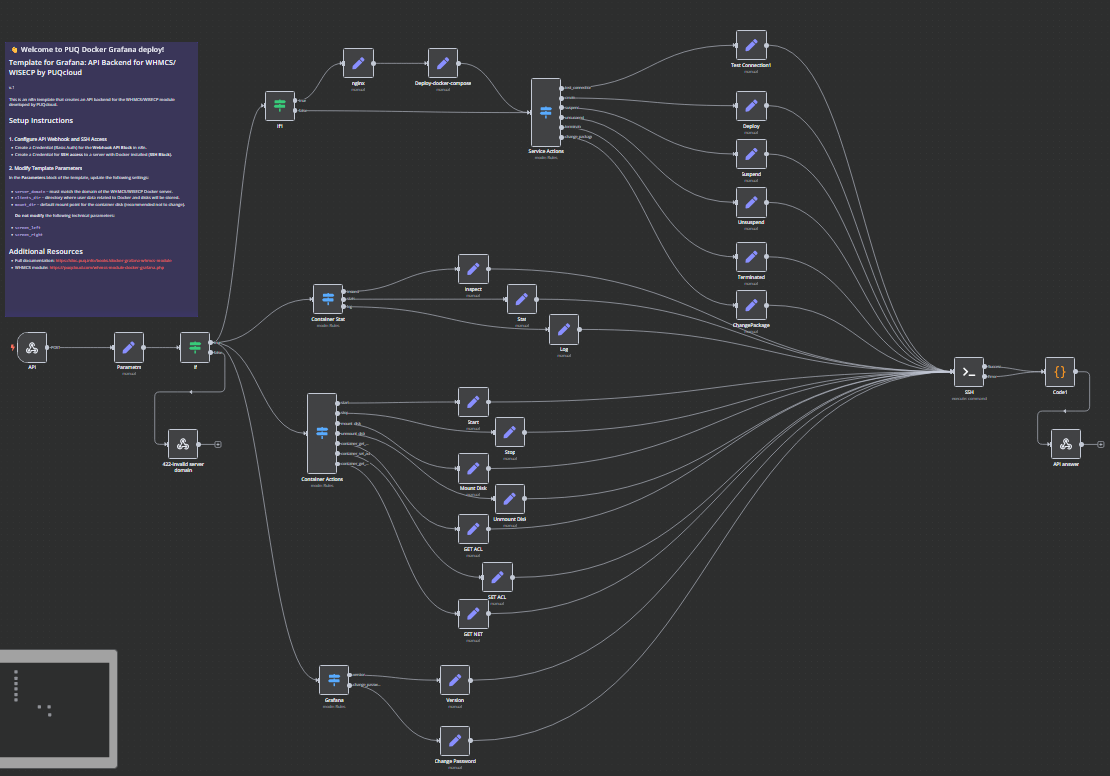](https://doc.puq.info/uploads/images/gallery/2025-03/image-1742759965249.png)# What is Grafana ### Docker Grafana module **[WHMCS](https://puqcloud.com/link.php?id=77)** ##### [Order now](https://puqcloud.com/whmcs-module-docker-grafana.php) | [Download](https://download.puqcloud.com/WHMCS/servers/PUQ_WHMCS-Docker-Grafana/) | [FAQ](https://faq.puqcloud.com/) | [n8n](https://puqcloud.com/link.php?id=117) Grafana is an open-source platform for monitoring, visualization, and analysis of time-series data. It allows users to create dashboards and graphs to gain insights from various data sources in real-time. Originally developed by Torkel Ödegaard in 2014, Grafana has grown into one of the most popular tools for observability and analytics, used by developers, IT operations teams, and businesses worldwide. ## Key Features of Grafana 1. **Custom Dashboards** – Users can build interactive dashboards with panels that display data from multiple sources. 2. **Wide Range of Data Sources** – Supports Prometheus, InfluxDB, Elasticsearch, MySQL, PostgreSQL, Loki, and many more. 3. **Alerting System** – Configurable alerts with notifications via Slack, PagerDuty, email, and other channels. 4. **User Management & Authentication** – Role-based access control (RBAC) and integration with OAuth, LDAP, and other authentication systems. 5. **Plugins & Extensibility** – Numerous plugins available for additional visualizations and data sources. 6. **Annotations** – Add context to graphs with notes about specific events. 7. **Multi-Tenancy** – Supports multiple organizations with isolated dashboards and data sources. 8. **Enterprise Support** – A commercial version provides enhanced security, scalability, and team collaboration features. ## Where is Grafana Used? Grafana is widely used in various industries and IT environments, including: ### 1. **IT Infrastructure Monitoring** - Used for tracking system performance, CPU usage, memory consumption, network statistics, and application uptime. - Works with Prometheus, Zabbix, and Nagios to visualize real-time metrics. ### 2. **Cloud & DevOps Monitoring** - Monitors Kubernetes clusters, Docker containers, and cloud-based services like AWS, Azure, and Google Cloud. - Helps DevOps teams with CI/CD pipelines by integrating with Jenkins, GitLab CI/CD, and other tools. ### 3. **Application Performance Monitoring (APM)** - Monitors application logs, traces, and request latencies by integrating with Loki, Jaeger, and OpenTelemetry. - Helps developers diagnose performance bottlenecks and optimize application behavior. ### 4. **Business Analytics & Finance** - Used in financial institutions for tracking market trends, sales performance, and operational analytics. - Can visualize data from SQL databases like MySQL and PostgreSQL for business intelligence purposes. ### 5. **IoT and Industrial Monitoring** - Monitors sensor data from IoT devices in real-time. - Used in industries like manufacturing, energy, and smart cities to track environmental conditions and equipment status. ## What Data Sources Can Grafana Work With? Grafana supports a wide variety of data sources, making it a highly flexible visualization tool: - **Time-Series Databases:** Prometheus, InfluxDB, Graphite - **SQL Databases:** MySQL, PostgreSQL, Microsoft SQL Server - **Logging and Tracing Tools:** Elasticsearch, Loki, Jaeger, OpenTelemetry - **Cloud Services:** AWS CloudWatch, Google Cloud Monitoring, Azure Monitor - **Monitoring Tools:** Zabbix, Nagios, New Relic, Datadog - **IoT and Industrial Data:** OPC-UA, MQTT, ThingsBoard ## How Grafana Works Grafana operates as a web-based application, typically deployed as a service accessible via a browser. The workflow involves: 1. **Connecting Data Sources:** Configure one or more data sources like Prometheus, InfluxDB, or MySQL. 2. **Building Dashboards:** Create panels displaying metrics in graphs, tables, or heatmaps. 3. **Setting Alerts:** Define thresholds and notification channels for real-time alerts. 4. **User Access Management:** Configure authentication and permissions for different users and teams. 5. **Extending with Plugins:** Add visualization types, new data sources, or integrations with external systems. [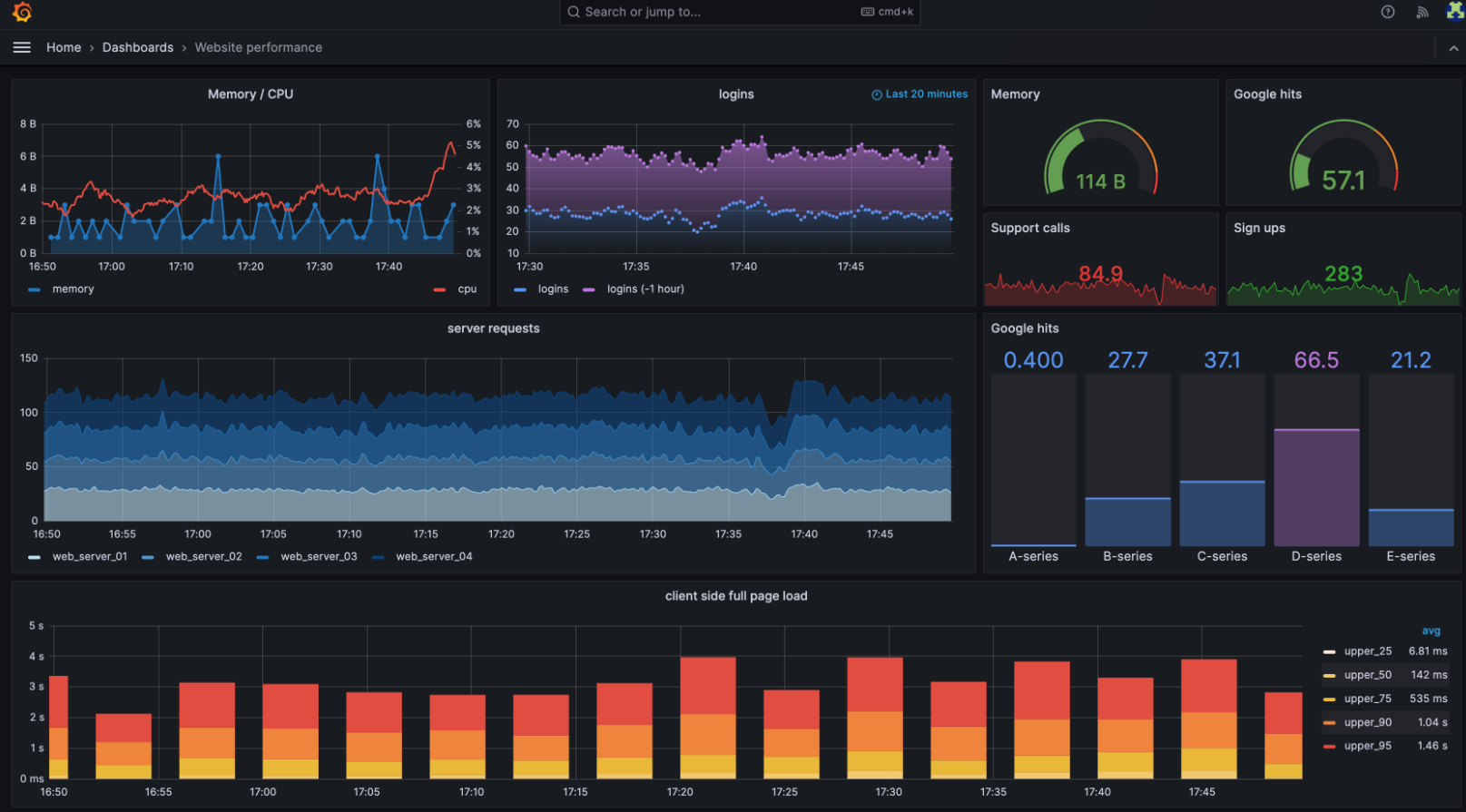](https://doc.puq.info/uploads/images/gallery/2025-03/image-1742760210378.png) ## Conclusion Grafana is a powerful and versatile tool for visualizing and monitoring data across various domains. Its ability to integrate with numerous data sources and provide interactive dashboards makes it an essential tool for IT professionals, developers, and businesses. Whether you need to monitor cloud infrastructure, track application performance, analyze business data, or oversee industrial processes, Grafana provides an intuitive and highly customizable solution.# Changelog ### Docker Grafana module **[WHMCS](https://puqcloud.com/link.php?id=77)** ##### [Order now](https://puqcloud.com/whmcs-module-docker-grafana.php) | [Download](https://download.puqcloud.com/WHMCS/servers/PUQ_WHMCS-Docker-Grafana/) | [FAQ](https://faq.puqcloud.com/) | [n8n](https://puqcloud.com/link.php?id=117) ##### v1.0 Released 24-03-2025 First version# Installation and configuration guide # Basic concepts and requirements ### Docker Grafana module **[WHMCS](https://puqcloud.com/link.php?id=77)** ##### [Order now](https://puqcloud.com/whmcs-module-docker-grafana.php) | [Download](https://download.puqcloud.com/WHMCS/servers/PUQ_WHMCS-Docker-Grafana/) | [FAQ](https://faq.puqcloud.com/) | [n8n](https://puqcloud.com/link.php?id=117)Before you start, it is important to read and familiarize yourself with the following articles at this link: [https://doc.puq.info/books/docker-modules](https://doc.puq.info/books/docker-modules)
The **WHMCS Docker Grafana module** is part of the **WHMCS Docker module series** developed by **PUQcloud**. This module enables service providers to offer **Grafana Docker containers** as a service to their clients, allowing for seamless automation and integration. The system consists of three core components: ### **🖥️ WHMCS Module** The **core component**, installed in WHMCS, manages service provisioning and automation from the WHMCS side. ### **📡 Debian 12 Server** A server running **Debian 12** with the following pre-installed: ✅ **Docker** – For container management We have prepared instructions for installing and configuring Docker [https://doc.puq.info/books/docker-modules/page/installing-docker-for-puqcloud-modules](https://doc.puq.info/books/docker-modules/page/installing-docker-for-puqcloud-modules) ### **🔗 n8n Server** This server facilitates communication between the WHMCS module and the Docker server, ensuring smooth workflow execution. To explore n8n’s full potential, visit the **[official n8n website](https://n8n.io/)** for documentation, tutorials, and community support. - - - - - - ## **Key Features & Concepts** ### **⚙️ Workflow Automation** n8n provides a **graphical workflow builder**, allowing users to automate various tasks, such as: ✔️ **Sending notifications** ✔️ **Configuring firewalls** on external routers ✔️ **Managing DNS settings** ✔️ **Custom automation processes** tailored to specific needs ### **🔄 Flexibility & Customization** The module offers **personalized settings** and supports **elastic automation**, giving clients full control over their n8n workflows. # WHMCS setup (install/update) ### Docker Grafana module **[WHMCS](https://puqcloud.com/link.php?id=77)** ##### [Order now](https://puqcloud.com/whmcs-module-docker-grafana.php) | [Download](https://download.puqcloud.com/WHMCS/servers/PUQ_WHMCS-Docker-Grafana/) | [FAQ](https://faq.puqcloud.com/) | [n8n](https://puqcloud.com/link.php?id=117)**Module is coded ionCube v13**
Supported php version: - php 7.4 WHMCS 8.11.0 - - php 8.1 WHMCS 8.11.0 + - php 8.2 WHMCS 8.11.0 +To install and update a module, you must perform one and the same action.
##### 1. Download the latest version of the module. PHP 8.2 ```Powershell wget http://download.puqcloud.com/WHMCS/servers/PUQ_WHMCS-Docker-Grafana/php82/PUQ_WHMCS-Docker-Grafana-latest.zip ``` PHP 8.1 ```Powershell wget http://download.puqcloud.com/WHMCS/servers/PUQ_WHMCS-Docker-Grafana/php81/PUQ_WHMCS-Docker-Grafana-latest.zip ``` PHP 7.4 ```Powershell wget http://download.puqcloud.com/WHMCS/servers/PUQ_WHMCS-Docker-Grafana/php74/PUQ_WHMCS-Docker-Grafana-latest.zip ```All versions are available via link: [https://download.puqcloud.com/WHMCS/servers/PUQ\_WHMCS-Docker-Grafana/](https://download.puqcloud.com/WHMCS/servers/PUQ_WHMCS-Docker-Grafana/)
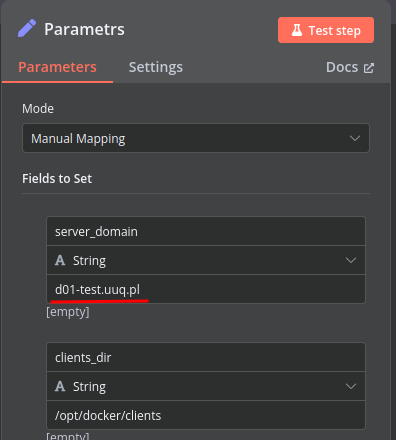
##### 2. Unzip the archive with the module. ```Powershell unzip PUQ_WHMCS-Docker-Grafana-latest.zip ``` ##### 3. Copy and Replace "puqDockerGrafana" from "PUQ\_WHMCS-Docker-Grafana" to "WHMCS\_WEB\_DIR/modules/servers/" # Preparing Docker Server ### Docker Grafana module **[WHMCS](https://puqcloud.com/link.php?id=77)** ##### [Order now](https://puqcloud.com/whmcs-module-docker-grafana.php) | [Download](https://download.puqcloud.com/WHMCS/servers/PUQ_WHMCS-Docker-Grafana/) | [FAQ](https://faq.puqcloud.com/) | [n8n](https://puqcloud.com/link.php?id=117) ### To install the Docker server for this module, please follow the instructions at the following link: ##### [https://doc.puq.info/books/docker-modules/page/installing-docker-for-puqcloud-modules](https://doc.puq.info/books/docker-modules/page/installing-docker-for-puqcloud-modules) # Setting up n8n workflow ### Docker Grafana module **[WHMCS](https://puqcloud.com/link.php?id=77)** ##### [Order now](https://puqcloud.com/whmcs-module-docker-grafana.php) | [Download](https://download.puqcloud.com/WHMCS/servers/PUQ_WHMCS-Docker-Grafana/) | [FAQ](https://faq.puqcloud.com/) | [n8n](https://puqcloud.com/link.php?id=117) ## Overview The **Docker Grafana WHMCS module** uses a specially designed workflow for **n8n** to automate deployment processes. The workflow provides an API interface for the module, receives specific commands, and connects via SSH to a server with Docker installed to perform predefined actions. ## Prerequisites - You must have your own **n8n** server. - Alternatively, you can use the official **n8n** cloud installations available at: [n8n Official Site](https://n8n.partnerlinks.io/o692v7cg297k) ## Installation Steps ### Install the Required Workflow on n8n You have two options: #### **Option 1: Use the Latest Version from the n8n Marketplace** - The latest workflow templates for our modules are available on the official n8n marketplace. - Visit our profile to access all available templates: [PUQcloud on n8n](https://n8n.io/creators/puqcloud/) #### **Option 2: Manual Installation** - Each module version comes with a workflow template file. [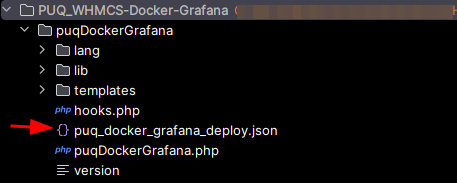](https://doc.puq.info/uploads/images/gallery/2025-03/image-1742761984608.png) - You need to manually import this template into your n8n server. [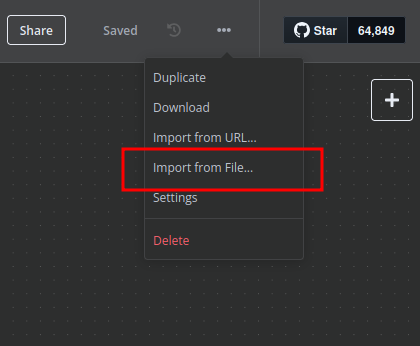](https://doc.puq.info/uploads/images/gallery/2025-03/image-1741284912356.png) ## n8n Workflow API Backend Setup for WHMCS/WISECP ### Configure API Webhook and SSH Access - Create a **Basic Auth Credential** for the Webhook API Block in n8n. [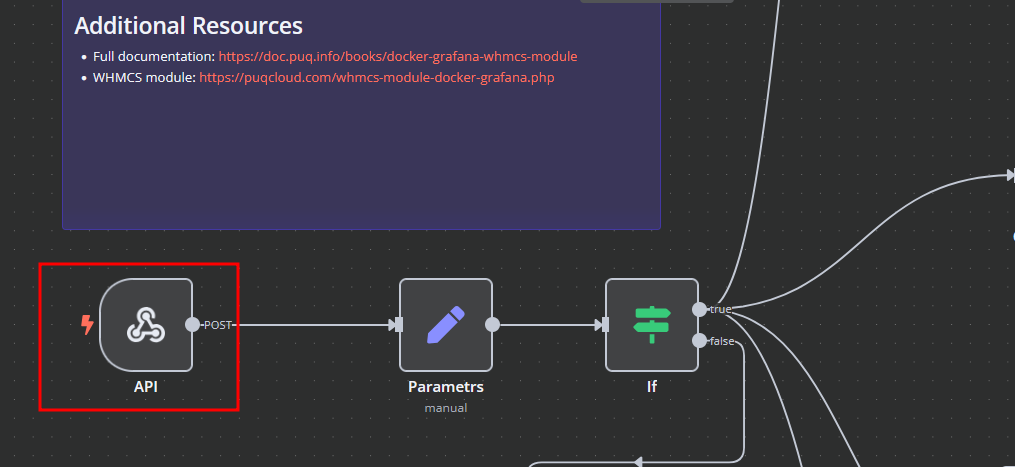](https://doc.puq.info/uploads/images/gallery/2025-03/image-1742762035398.png) [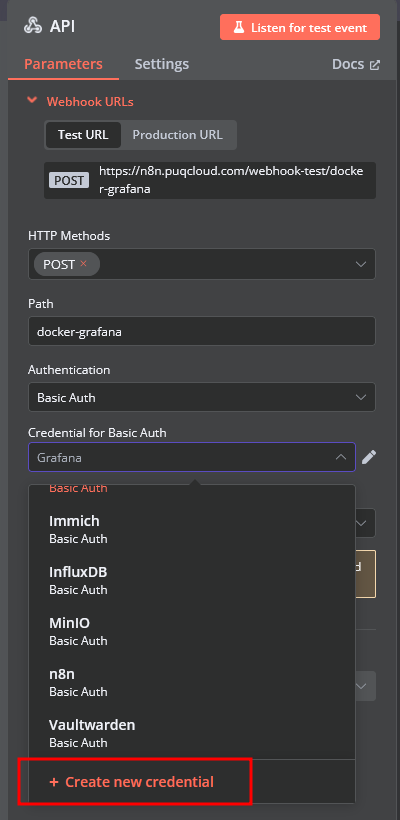](https://doc.puq.info/uploads/images/gallery/2025-03/image-1742762094805.png) [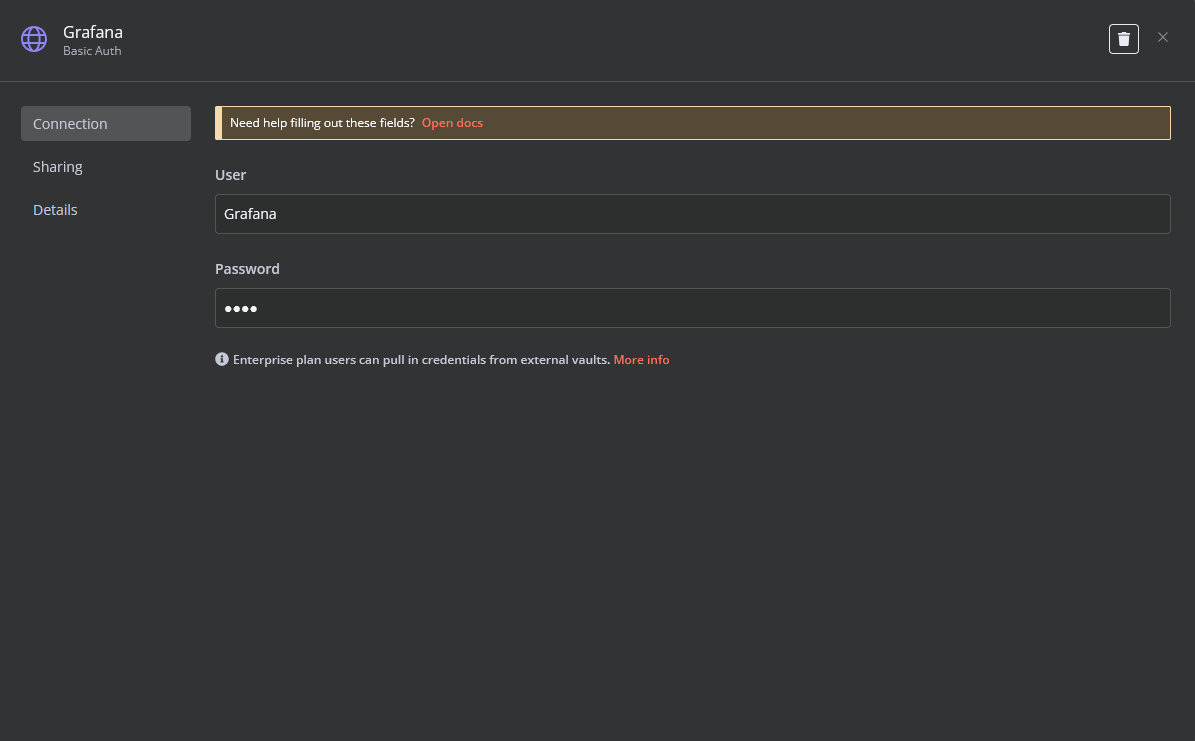](https://doc.puq.info/uploads/images/gallery/2025-03/image-1742762124703.png) - Create an **SSH Credential** for accessing a server with Docker installed. [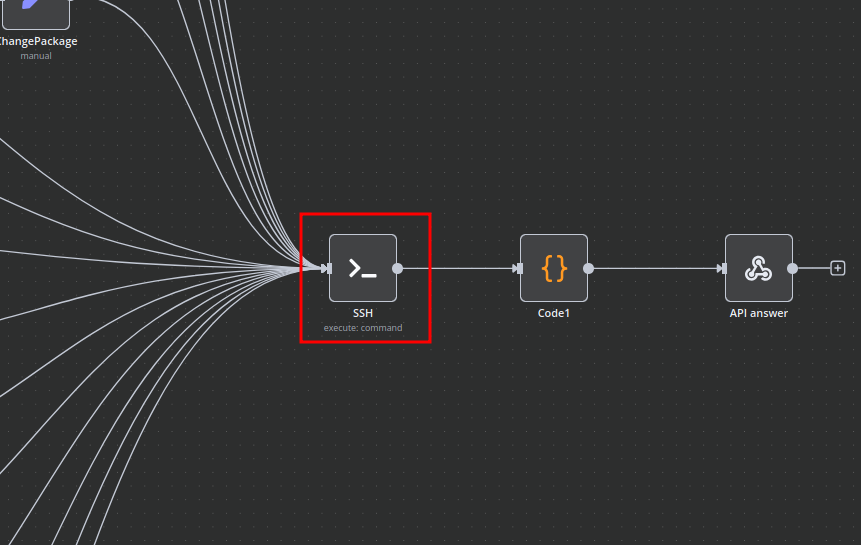](https://doc.puq.info/uploads/images/gallery/2025-03/image-1741285118412.png) [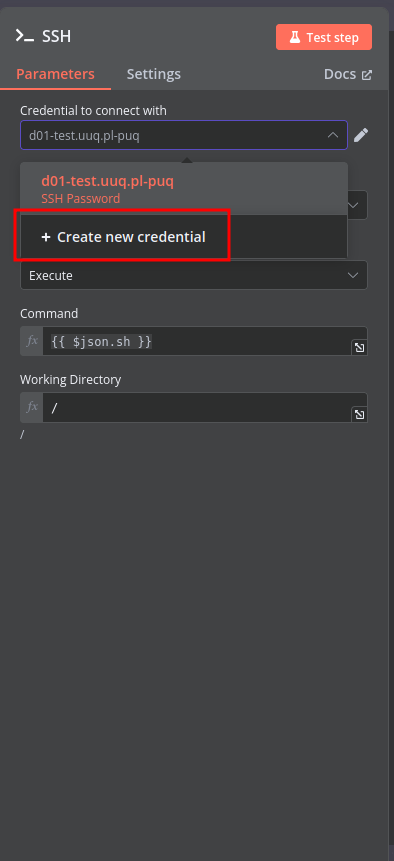](https://doc.puq.info/uploads/images/gallery/2025-03/image-1741285147192.png) [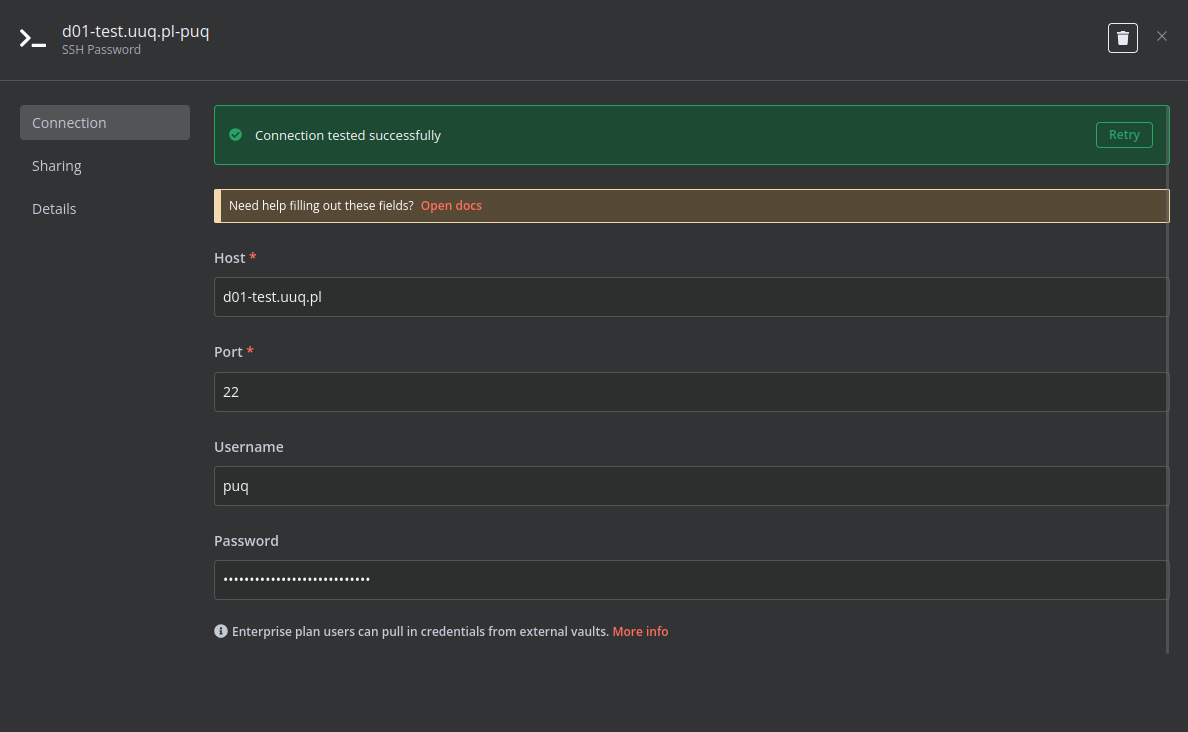](https://doc.puq.info/uploads/images/gallery/2025-03/image-1741285198822.png) ### Modify Template Parameters In the **Parameters** block of the template, update the following settings: [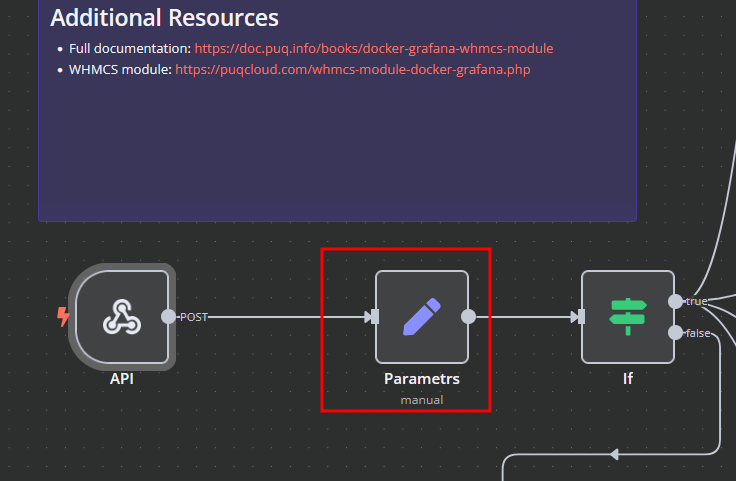](https://doc.puq.info/uploads/images/gallery/2025-03/image-1742762157130.png) [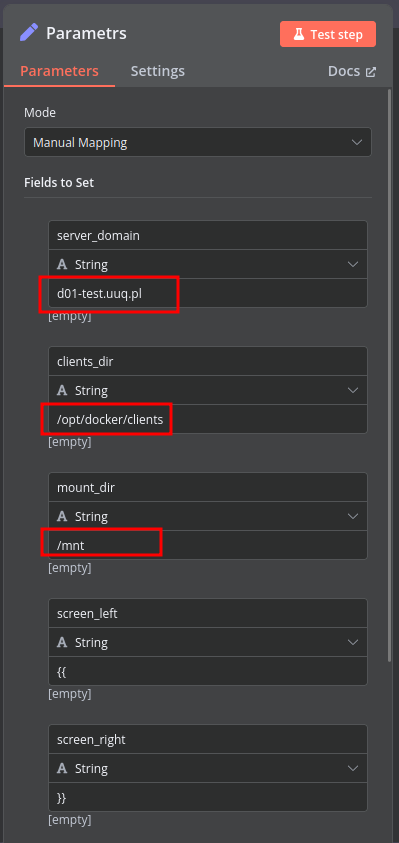](https://doc.puq.info/uploads/images/gallery/2025-03/image-1741285412110.png) - `server_domain` – Must match the domain of the WHMCS/WISECP Docker server. - `clients_dir` – Directory where user data related to Docker and disks will be stored. - `mount_dir` – Default mount point for the container disk (recommended not to change). **Do not modify** the following technical parameters: - `screen_left` - `screen_right` ### **Deploy-docker-compose** In the **Deploy-docker-compose** element, you have the ability to modify the Docker Compose configuration, which will be generated in the following scenarios: - When the service is created - When the service is unlocked - When the service is updated [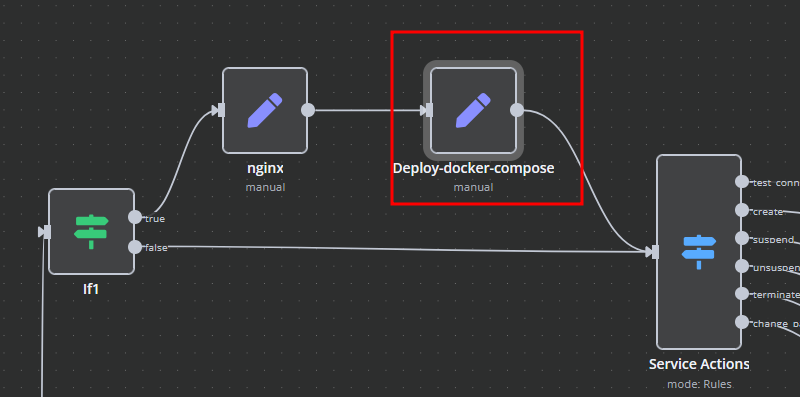](https://doc.puq.info/uploads/images/gallery/2025-03/image-1741875704524.png) [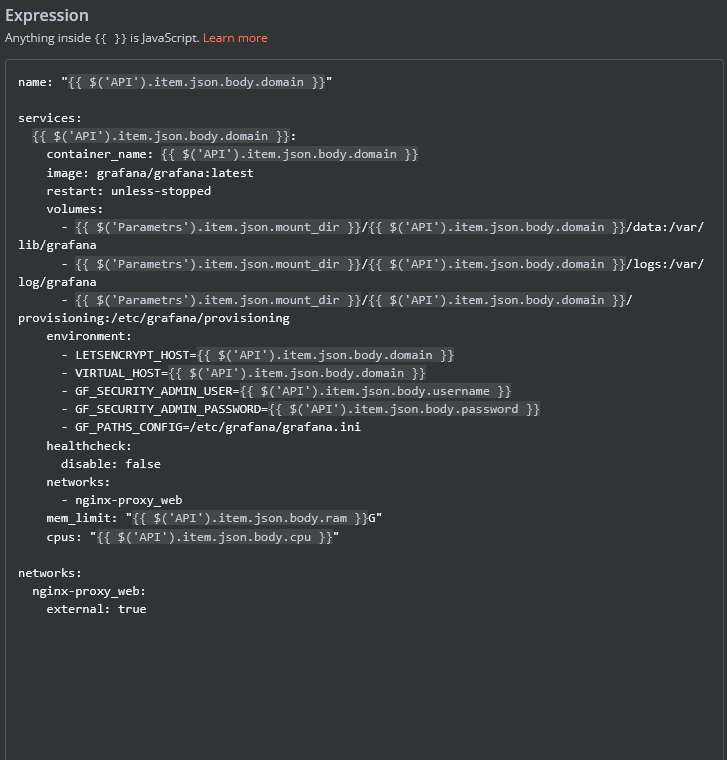](https://doc.puq.info/uploads/images/gallery/2025-03/image-1742762181184.png) ### **nginx** In the **nginx** element, you can modify the configuration parameters of the web interface proxy server. - The **main** section allows you to add custom parameters to the **server** block in the proxy server configuration file. - The **main\_location** section contains settings that will be added to the **location /** block of the proxy server configuration. Here, you can define custom headers and other parameters specific to the root location. [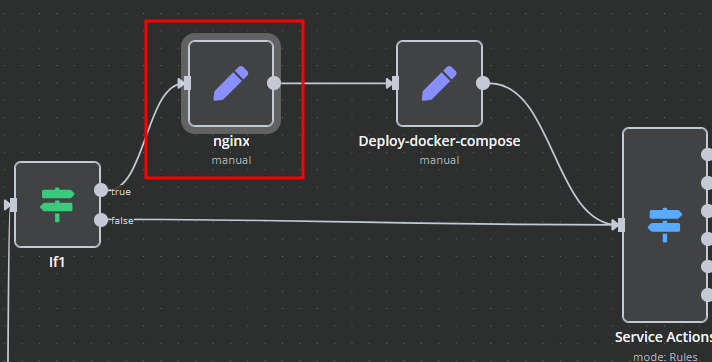](https://doc.puq.info/uploads/images/gallery/2025-03/image-1741875960357.png) [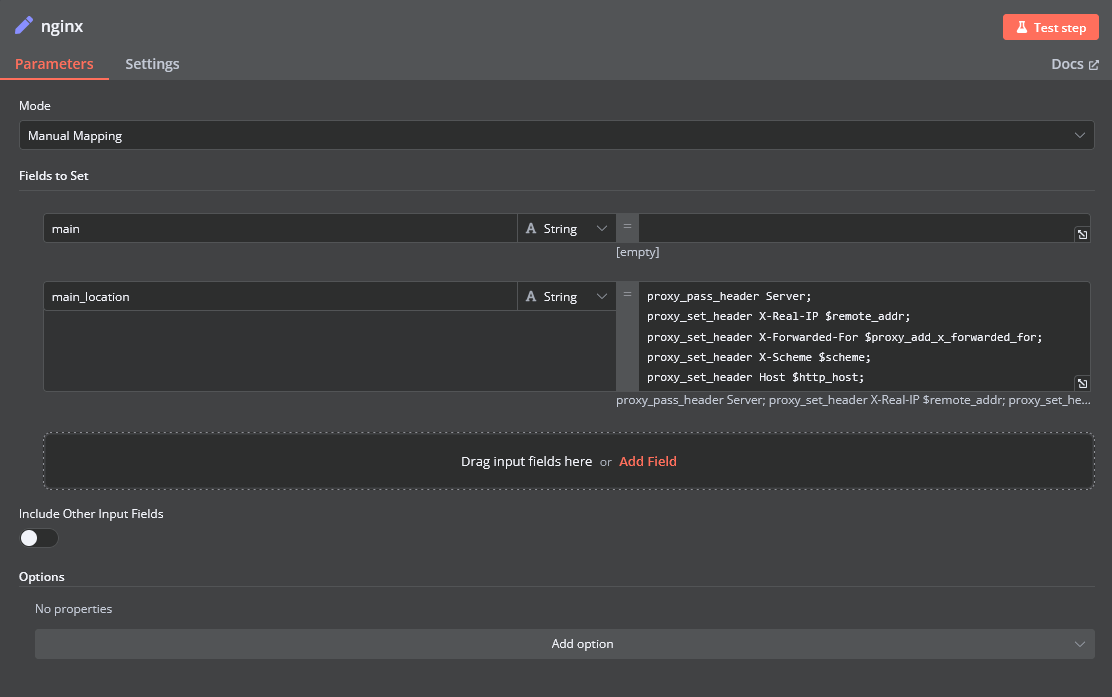](https://doc.puq.info/uploads/images/gallery/2025-03/image-1742762207286.png) ### **Bash Scripts** Management of Docker containers and all related procedures on the server is carried out by executing Bash scripts generated in **n8n**. These scripts return either a JSON response or a string. - All scripts are located in elements directly connected to the **SSH** element. - You have full control over any script and can modify or execute it as needed. [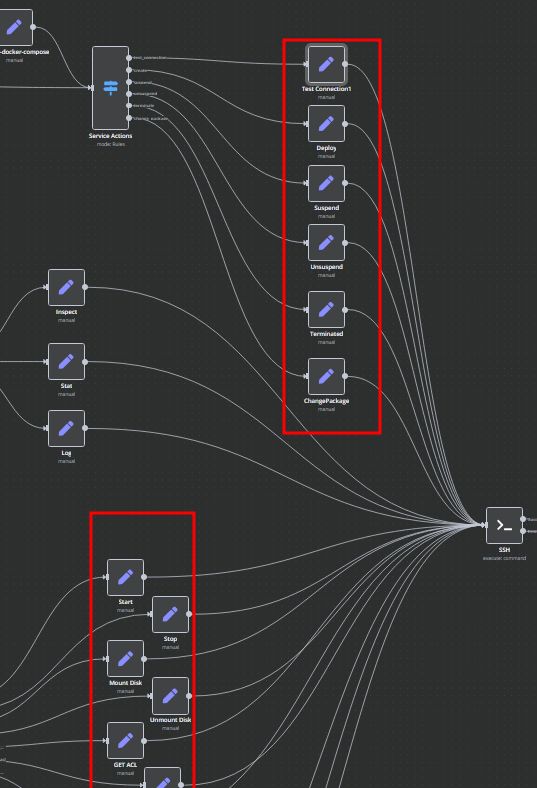](https://doc.puq.info/uploads/images/gallery/2025-03/image-1741876353319.png) # Add server ### Docker Grafana module **[WHMCS](https://puqcloud.com/link.php?id=77)** ##### [Order now](https://puqcloud.com/whmcs-module-docker-grafana.php) | [Download](https://download.puqcloud.com/WHMCS/servers/PUQ_WHMCS-Docker-Grafana/) | [FAQ](https://faq.puqcloud.com/) | [n8n](https://puqcloud.com/link.php?id=117) ##### Add a new server to the system WHMCS. ``` System Settings->Servers->Add New Server ``` - Enter the correct **Name** and **Hostname** [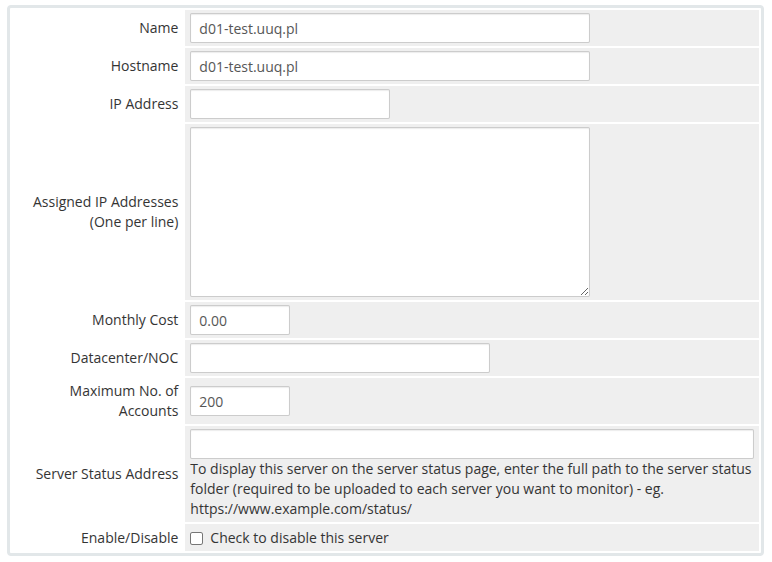](https://doc.puq.info/uploads/images/gallery/2025-03/image-1741287291552.png)**Attention: Important Information** The **hostname** field represents the actual domain of the server running Docker and must match the **server\_domain** parameter in the **n8n workflow**. If they do not match, communication will not function correctly. Additionally, this domain must be configured so that all its subdomains resolve to the IP address of the server running Docker.
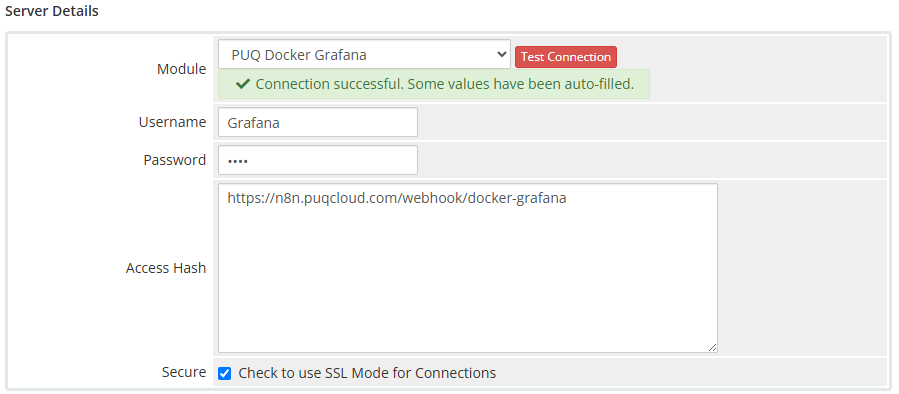
[](https://doc.puq.info/uploads/images/gallery/2025-03/image-1741287929855.png) In the **Server Details** section, select the **"PUQ Docker Grafana"** module and enter the correct **username** and **password** for the **API endpoint** in the n8n workflow.Additionally, in the **Access Hash** field, insert the **URL of the API entry point** for the n8n workflow.
[](https://doc.puq.info/uploads/images/gallery/2025-03/image-1742762415704.png) [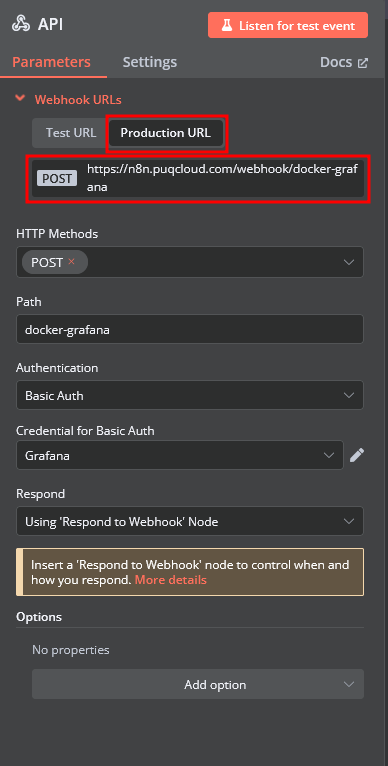](https://doc.puq.info/uploads/images/gallery/2025-03/image-1742762449168.png) # Product Configuration ### Docker Grafana module **[WHMCS](https://puqcloud.com/link.php?id=77)** ##### [Order now](https://puqcloud.com/whmcs-module-docker-grafana.php) | [Download](https://download.puqcloud.com/WHMCS/servers/PUQ_WHMCS-Docker-Grafana/) | [FAQ](https://faq.puqcloud.com/) | [n8n](https://puqcloud.com/link.php?id=117) ##### Add new product to WHMCS ``` System Settings->Products/Services->Create a New Product ``` In the **Module settings** section, select the **"PUQ Docker Grafana"** module - **License key –** A pre-purchased license key for the **"PUQ Docker Grafana"** module. For the module to work correctly, the key must be active - **Disk space** – defines the allocated disk size for the Docker container. - **CPU** – sets the CPU usage limit for the Docker container. - **RAM** – specifies the amount of RAM allocated to the Docker container. - **Link to instruction** – URL to a guide that will be displayed in the client panel if provided. - **Main domain** – defines the primary domain for the web interface of the application. If not set, the main domain will be taken from the **hostname** parameter in the server settings. - **Subdomain** – a personal subdomain assigned to each service. If left empty or if the subdomain is already taken, it will be automatically generated in the format **{user\_id}-{service\_id}**. - ### Supported Macros for **App Subdomain**: - **{user\_id}** – Client ID - **{service\_id}** – Service ID - **{random\_digit\_x}** – Random number (x defines the length) - **{random\_letter\_x}** – Random letter (x defines the length) - **{unixtime}** – Unix timestamp - **{year}, {month}, {day}, {hour}, {minute}, {second}** – Date and time values