# Docker Immich WHMCS module
# Description
### Docker Immich module **[WHMCS](https://puqcloud.com/link.php?id=77)**
##### [Order now](https://puqcloud.com/whmcs-module-docker-immich.php) | [Download](https://download.puqcloud.com/WHMCS/servers/PUQ_WHMCS-Docker-Immich/) | [FAQ](https://faq.puqcloud.com/) | [n8n](https://puqcloud.com/link.php?id=117)
Before you start, it is important to read and familiarize yourself with the following articles at this link:
[https://doc.puq.info/books/docker-modules](https://doc.puq.info/books/docker-modules)
The **WHMCS Docker Immich module** is designed for automated provisioning and management of **Immich** instances on a Docker server. It seamlessly integrates with WHMCS, allowing businesses to sell and manage **Immich** services efficiently.
- - - - - -
## **Key Features**
### **🚀 Automated Container Management**
- Automatic creation of an **Immich** container upon service order.
- Automated package upgrades and administrator password reset.
### **🔒 Service Control & Security**
- Service creation
- Service suspension and reactivation.
- Service termination
- Full reinstallation
- IP access control
### **🛠️ Advanced Diagnostic Tools**
- Built-in tools for diagnosing and managing containers.
### **🌍 Multilingual Support**
- Supports multiple languages, including **Arabic, Azerbaijani, Catalan, Chinese, Croatian, Czech, Danish, Dutch, English, Estonian, Farsi, French, German, Hebrew, Hungarian, Italian, Macedonian, Norwegian, Polish, Romanian, Russian, Spanish, Swedish, Turkish, and Ukrainian**.
### **⚙️ Fully Customizable Workflows**
- Uses **n8n workflows** to automate processes, allowing full customization for business-specific needs.
- - - - - -
## **System Requirements**
To run the WHMCS Docker **Immich** module, ensure you have:
✅ **WHMCS version 8+**
✅ **An n8n server** for workflow automation
✅ **A server with Docker installed** for container management ([Installation Guide](https://doc.puq.info/books/docker-modules/page/installing-docker-for-puqcloud-modules))
- - - - - -
## **Installation & Setup**
### **1️⃣ Environment Preparation**
- Install **WHMCS 8+**.
- Set up an **n8n server** for automation workflows.
- Ensure **Docker** is installed and running. ([Installation Guide](https://doc.puq.info/books/docker-modules/page/installing-docker-for-puqcloud-modules))
### **2️⃣ Module Installation**
- Upload and activate the **WHMCS Docker Immich module**.
- Configure the module settings to connect with your Docker server and n8n workflows.
### **3️⃣ Workflow Customization**
- Utilize **n8n workflows** to automate service provisioning and management.
- Modify workflows as needed for custom business logic.
### **4️⃣ Testing & Deployment**
- Perform a **test order** to verify automatic container creation.
- Check all service management functions (creation, suspension, unsuspension, termination).
- - - - - -
## **Why Choose This Module?**
✅ **Seamless automation** – Reduces manual work and speeds up service deployment.
✅ **Highly customizable** – Modify workflows to fit any business model.
✅ **User-friendly** – Integrated within WHMCS with a simple setup process.
- - - - - -
This module makes selling and managing **Immich instances** through WHMCS easy, automated, and flexible! 🚀
[](https://doc.puq.info/uploads/images/gallery/2025-03/image-1742321705354.png)
[](https://doc.puq.info/uploads/images/gallery/2025-03/image-1742321783241.png)
[](https://doc.puq.info/uploads/images/gallery/2025-03/image-1742321824146.png)# What is Immich
### Docker Immich module **[WHMCS](https://puqcloud.com/link.php?id=77)**
##### [Order now](https://puqcloud.com/whmcs-module-docker-immich.php) | [Download](https://download.puqcloud.com/WHMCS/servers/PUQ_WHMCS-Docker-Immich/) | [FAQ](https://faq.puqcloud.com/) | [n8n](https://puqcloud.com/link.php?id=117)
## What is Immich? An Overview of the Self-Hosted Photo and Video Storage Platform
Immich is an open-source, self-hosted solution for photo and video storage that emphasizes user privacy and control. Unlike cloud services where your data is stored on third-party servers, Immich allows you to host your media library on your own hardware. This gives you complete control over your data and helps ensure its privacy.
## Key Features and Characteristics of Immich
- **Self-Hosted:** Your photos and videos are stored on your own servers, providing maximum control over data privacy and security.
- **Open Source:** As an open-source project, Immich allows anyone to inspect, contribute to, and adapt the software to suit their needs.
- **Privacy-Focused Functionality:** Immich is designed with privacy in mind, and your data is not shared with or used by third parties.
- **Active Development:** Immich is still in active development, so users should be prepared for potential bugs and changes. The developers caution against using Immich as the sole storage method for your photos and videos.
Before you start, it is important to read and familiarize yourself with the following articles at this link:
[https://doc.puq.info/books/docker-modules](https://doc.puq.info/books/docker-modules)
The **WHMCS Docker Immich module** is part of the **WHMCS Docker module series** developed by **PUQcloud**. This module enables service providers to offer **Immich Docker containers** as a service to their clients, allowing for seamless automation and integration.
The system consists of three core components:
### **🖥️ WHMCS Module**
The **core component**, installed in WHMCS, manages service provisioning and automation from the WHMCS side.
### **📡 Debian 12 Server**
A server running **Debian 12** with the following pre-installed:
✅ **Docker** – For container management
We have prepared instructions for installing and configuring Docker
[https://doc.puq.info/books/docker-modules/page/installing-docker-for-puqcloud-modules](https://doc.puq.info/books/docker-modules/page/installing-docker-for-puqcloud-modules)
### **🔗 n8n Server**
This server facilitates communication between the WHMCS module and the Docker server, ensuring smooth workflow execution.
To explore n8n’s full potential, visit the **[official n8n website](https://n8n.io/)** for documentation, tutorials, and community support.
- - - - - -
## **Key Features & Concepts**
### **⚙️ Workflow Automation**
n8n provides a **graphical workflow builder**, allowing users to automate various tasks, such as:
✔️ **Sending notifications**
✔️ **Configuring firewalls** on external routers
✔️ **Managing DNS settings**
✔️ **Custom automation processes** tailored to specific needs
### **🔄 Flexibility & Customization**
The module offers **personalized settings** and supports **elastic automation**, giving clients full control over their n8n workflows.
# WHMCS setup (install/update)
### Docker Immich module **[WHMCS](https://puqcloud.com/link.php?id=77)**
##### [Order now](https://puqcloud.com/whmcs-module-docker-immich.php) | [Download](https://download.puqcloud.com/WHMCS/servers/PUQ_WHMCS-Docker-Immich/) | [FAQ](https://faq.puqcloud.com/) | [n8n](https://puqcloud.com/link.php?id=117)
**Module is coded ionCube v13**
Supported php version:
- php 7.4 WHMCS 8.11.0 -
- php 8.1 WHMCS 8.11.0 +
- php 8.2 WHMCS 8.11.0 +
To install and update a module, you must perform one and the same action.
#####
1. Download the latest version of the module.
PHP 8.2
```Powershell
wget http://download.puqcloud.com/WHMCS/servers/PUQ_WHMCS-Docker-Immich/php82/PUQ_WHMCS-Docker-Immich-latest.zip
```
PHP 8.1
```Powershell
wget http://download.puqcloud.com/WHMCS/servers/PUQ_WHMCS-Docker-Immich/php81/PUQ_WHMCS-Docker-Immich-latest.zip
```
PHP 7.4
```Powershell
wget http://download.puqcloud.com/WHMCS/servers/PUQ_WHMCS-Docker-Immich/php74/PUQ_WHMCS-Docker-Immich-latest.zip
```
All versions are available via link: [https://download.puqcloud.com/WHMCS/servers/PUQ\_WHMCS-Docker-Immich/](https://download.puqcloud.com/WHMCS/servers/PUQ_WHMCS-Docker-Immich/)
##### 2. Unzip the archive with the module.
```Powershell
unzip PUQ_WHMCS-Docker-Immich-latest.zip
```
##### 3. Copy and Replace "puqDockerImmich" from "PUQ\_WHMCS-Docker-Immich" to "WHMCS\_WEB\_DIR/modules/servers/"
# Preparing Docker Server
### Docker Immich module **[WHMCS](https://puqcloud.com/link.php?id=77)**
##### [Order now](https://puqcloud.com/whmcs-module-docker-immich.php) | [Download](https://download.puqcloud.com/WHMCS/servers/PUQ_WHMCS-Docker-Immich/) | [FAQ](https://faq.puqcloud.com/) | [n8n](https://puqcloud.com/link.php?id=117)
### To install the Docker server for this module, please follow the instructions at the following link:
#####
[https://doc.puq.info/books/docker-modules/page/installing-docker-for-puqcloud-modules](https://doc.puq.info/books/docker-modules/page/installing-docker-for-puqcloud-modules)
# Setting up n8n workflow
### Docker Immich module **[WHMCS](https://puqcloud.com/link.php?id=77)**
##### [Order now](https://puqcloud.com/whmcs-module-docker-immich.php) | [Download](https://download.puqcloud.com/WHMCS/servers/PUQ_WHMCS-Docker-Immich/) | [FAQ](https://faq.puqcloud.com/) | [n8n](https://puqcloud.com/link.php?id=117)
## Overview
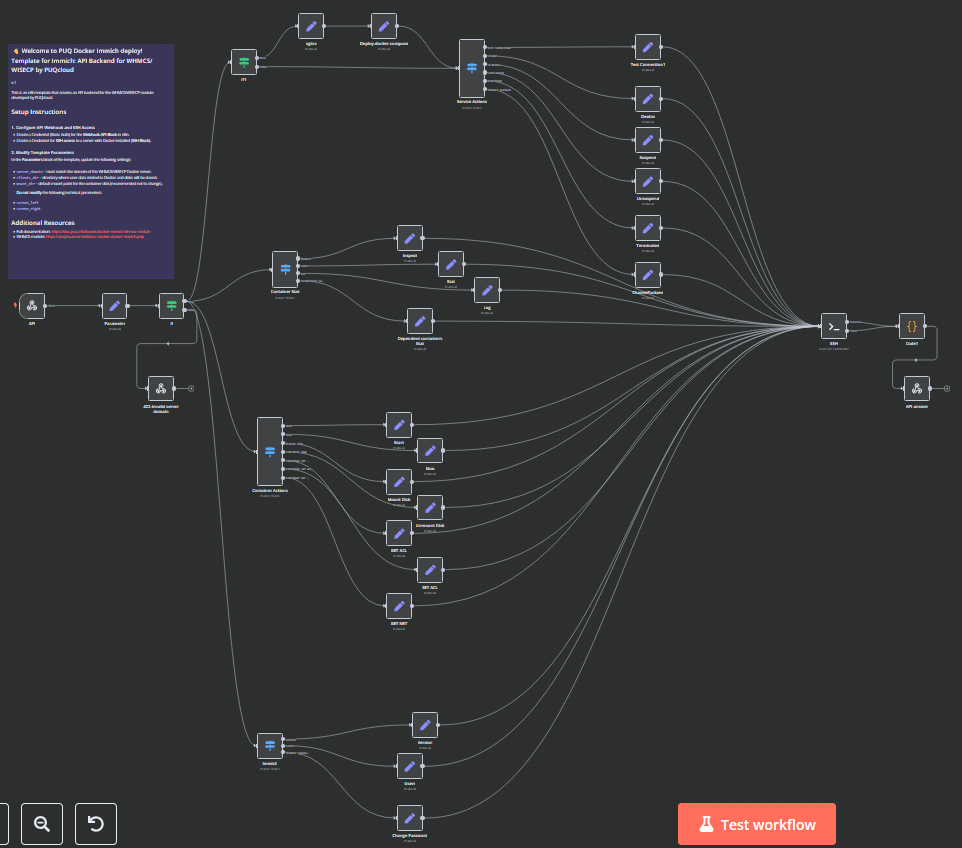
The **Docker Immich WHMCS module** uses a specially designed workflow for **n8n** to automate deployment processes. The workflow provides an API interface for the module, receives specific commands, and connects via SSH to a server with Docker installed to perform predefined actions.
## Prerequisites
- You must have your own **n8n** server.
- Alternatively, you can use the official **n8n** cloud installations available at: [n8n Official Site](https://n8n.partnerlinks.io/o692v7cg297k)
## Installation Steps
### Install the Required Workflow on n8n
You have two options:
#### **Option 1: Use the Latest Version from the n8n Marketplace**
- The latest workflow templates for our modules are available on the official n8n marketplace.
- Visit our profile to access all available templates: [PUQcloud on n8n](https://n8n.io/creators/puqcloud/)
#### **Option 2: Manual Installation**
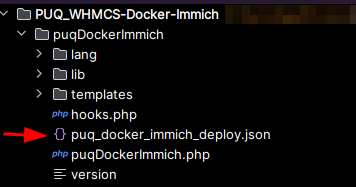
- Each module version comes with a workflow template file.
[](https://doc.puq.info/uploads/images/gallery/2025-03/image-1742323788556.png)
- You need to manually import this template into your n8n server.
[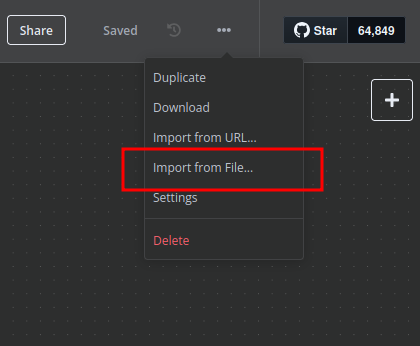](https://doc.puq.info/uploads/images/gallery/2025-03/image-1741284912356.png)
## n8n Workflow API Backend Setup for WHMCS/WISECP
### Configure API Webhook and SSH Access
- Create a **Basic Auth Credential** for the Webhook API Block in n8n.
[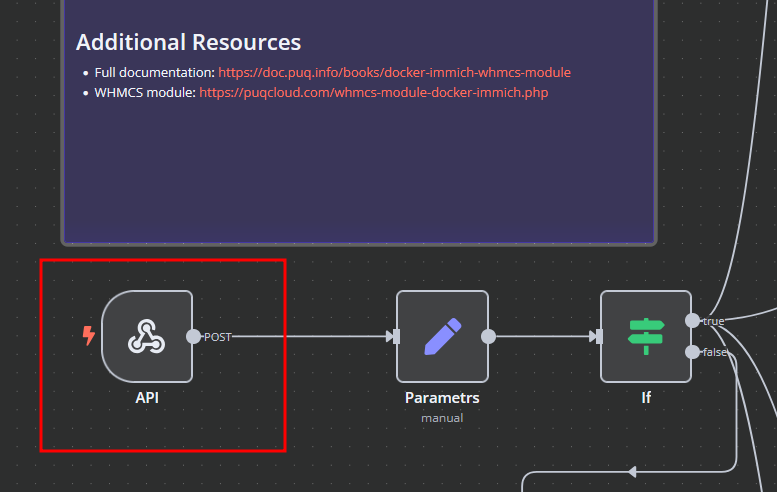](https://doc.puq.info/uploads/images/gallery/2025-03/image-1742323836025.png)
[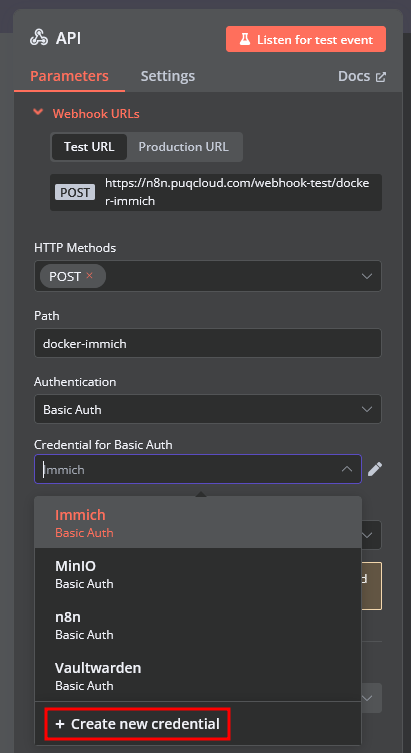](https://doc.puq.info/uploads/images/gallery/2025-03/image-1742323899841.png)
[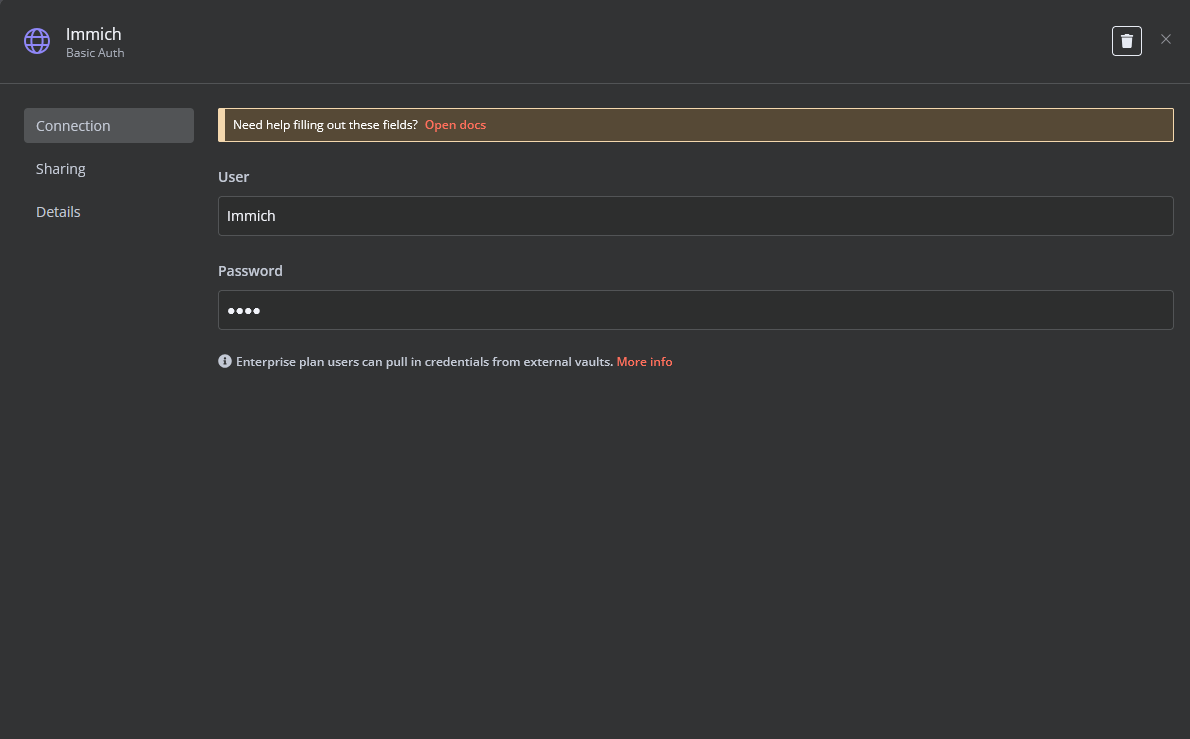](https://doc.puq.info/uploads/images/gallery/2025-03/image-1742323927094.png)
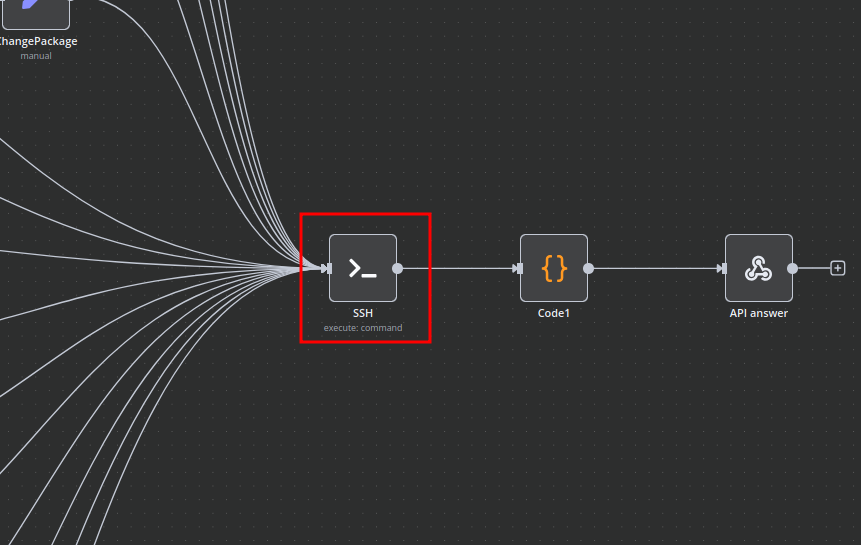
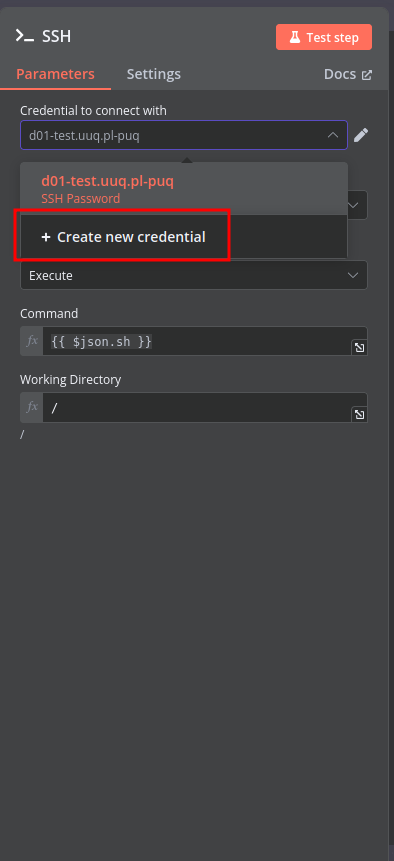
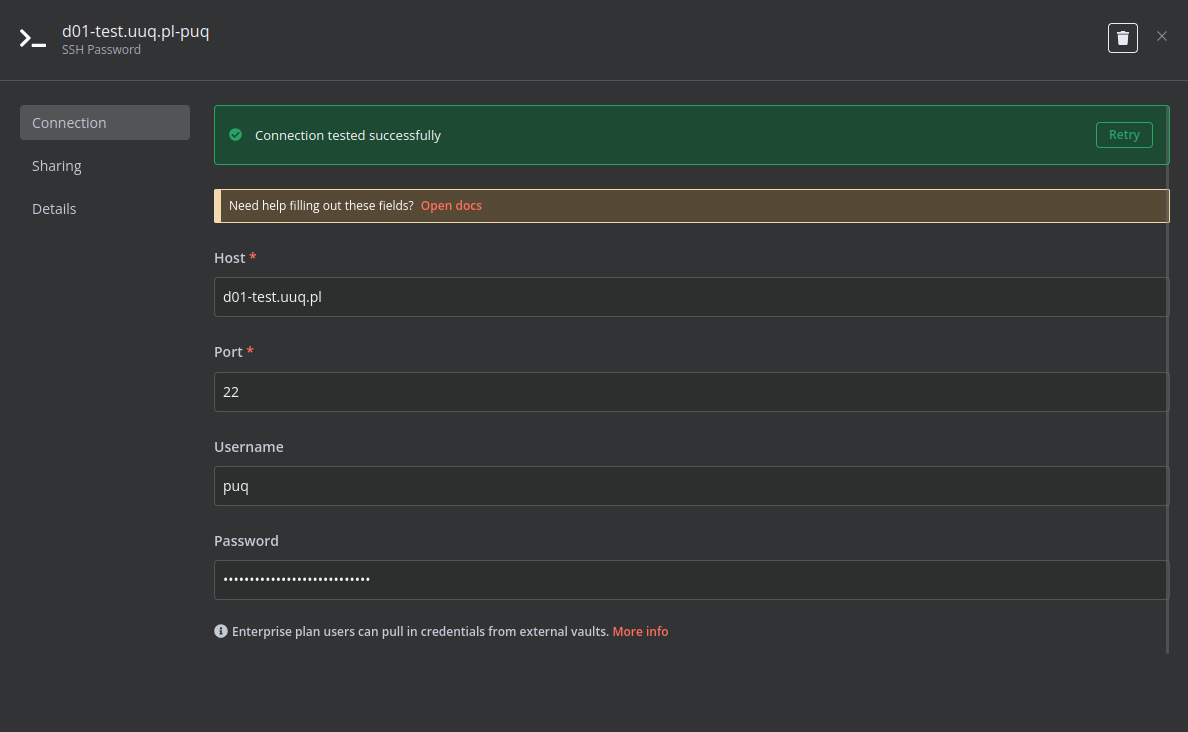
- Create an **SSH Credential** for accessing a server with Docker installed.
[](https://doc.puq.info/uploads/images/gallery/2025-03/image-1741285118412.png)
[](https://doc.puq.info/uploads/images/gallery/2025-03/image-1741285147192.png)
[](https://doc.puq.info/uploads/images/gallery/2025-03/image-1741285198822.png)
### Modify Template Parameters
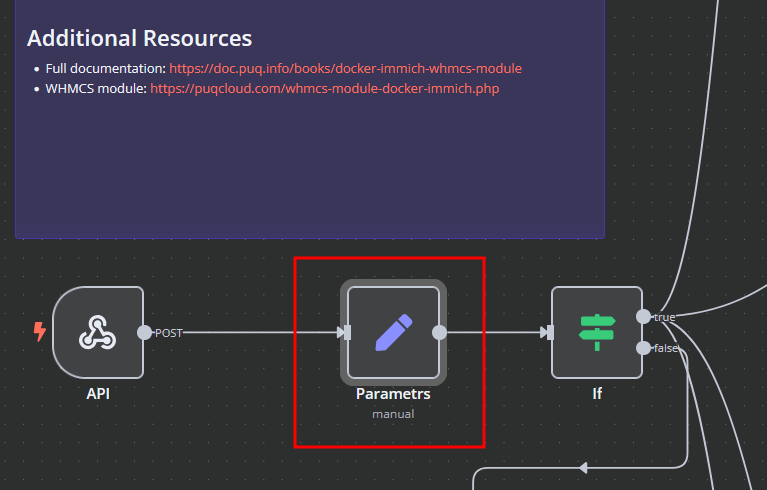
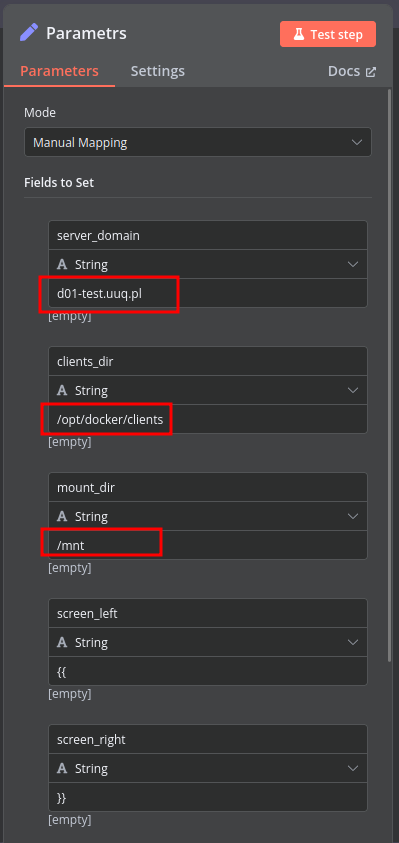
In the **Parameters** block of the template, update the following settings:
[](https://doc.puq.info/uploads/images/gallery/2025-03/image-1742323964634.png)
[](https://doc.puq.info/uploads/images/gallery/2025-03/image-1741285412110.png)
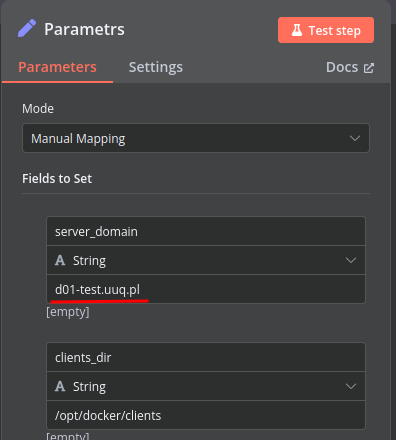
- `server_domain` – Must match the domain of the WHMCS/WISECP Docker server.
- `clients_dir` – Directory where user data related to Docker and disks will be stored.
- `mount_dir` – Default mount point for the container disk (recommended not to change).
**Do not modify** the following technical parameters:
- `screen_left`
- `screen_right`
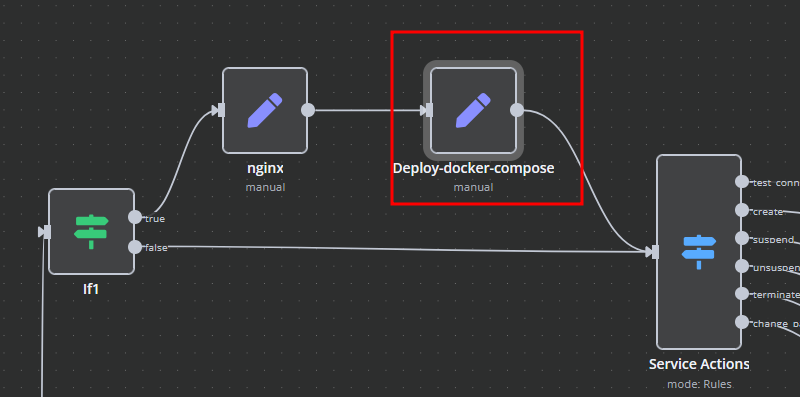
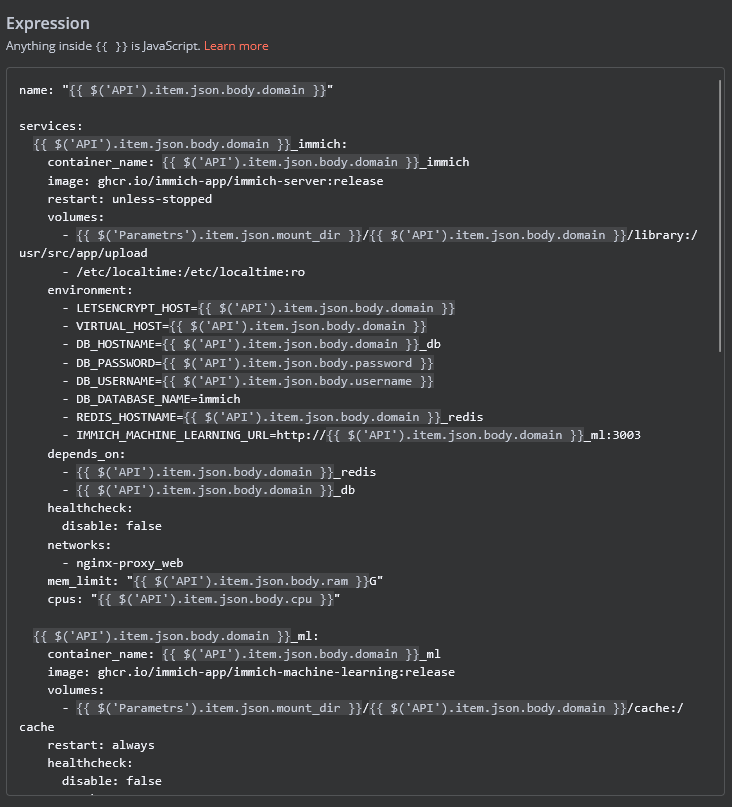
### **Deploy-docker-compose**
In the **Deploy-docker-compose** element, you have the ability to modify the Docker Compose configuration, which will be generated in the following scenarios:
- When the service is created
- When the service is unlocked
- When the service is updated
[](https://doc.puq.info/uploads/images/gallery/2025-03/image-1741875704524.png)
[](https://doc.puq.info/uploads/images/gallery/2025-03/image-1742324015958.png)
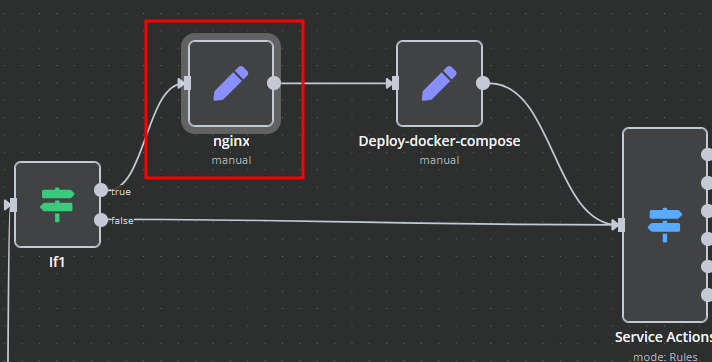
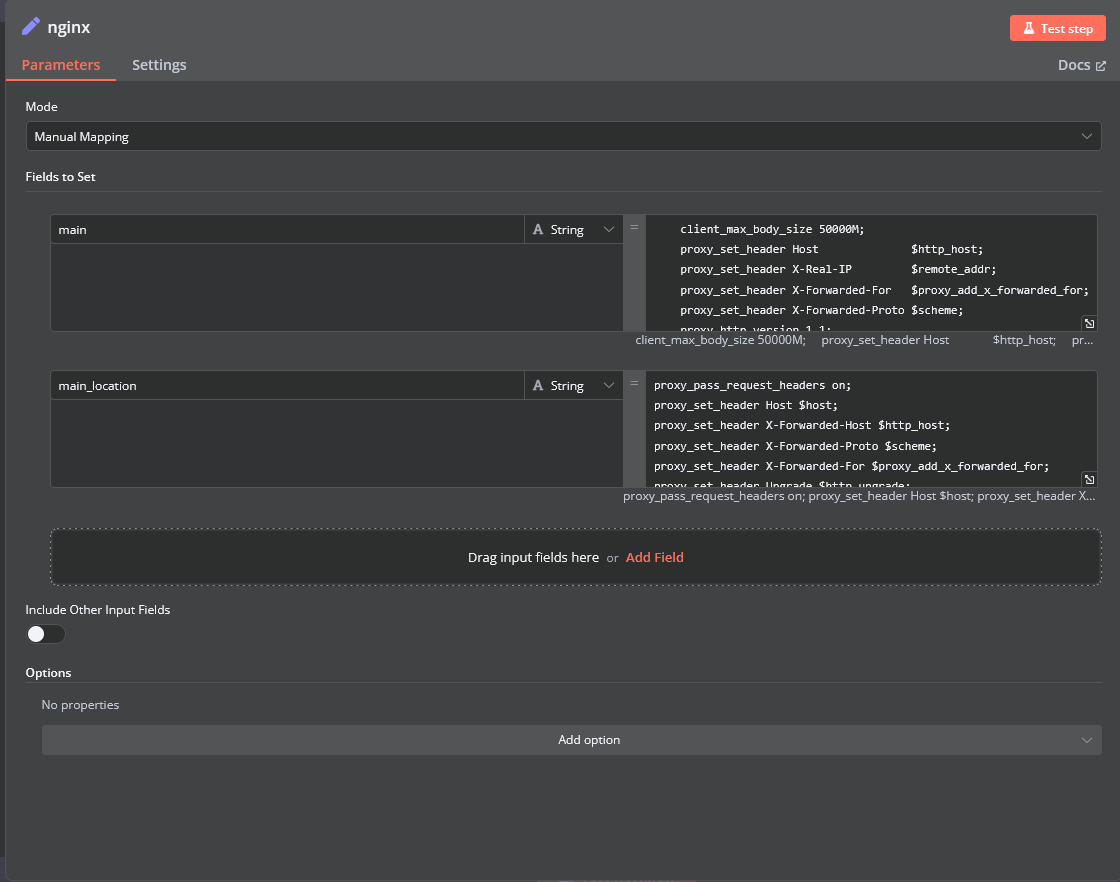
### **nginx**
In the **nginx** element, you can modify the configuration parameters of the web interface proxy server.
- The **main** section allows you to add custom parameters to the **server** block in the proxy server configuration file.
- The **main\_location** section contains settings that will be added to the **location /** block of the proxy server configuration. Here, you can define custom headers and other parameters specific to the root location.
[](https://doc.puq.info/uploads/images/gallery/2025-03/image-1741875960357.png)
[](https://doc.puq.info/uploads/images/gallery/2025-03/image-1742324044762.png)
### **Bash Scripts**
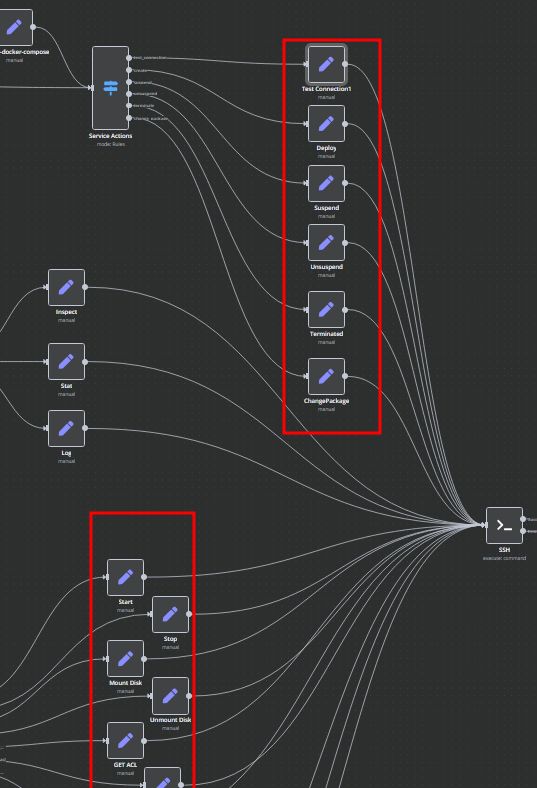
Management of Docker containers and all related procedures on the server is carried out by executing Bash scripts generated in **n8n**. These scripts return either a JSON response or a string.
- All scripts are located in elements directly connected to the **SSH** element.
- You have full control over any script and can modify or execute it as needed.
[](https://doc.puq.info/uploads/images/gallery/2025-03/image-1741876353319.png)
# Add server
### Docker Immich module **[WHMCS](https://puqcloud.com/link.php?id=77)**
##### [Order now](https://puqcloud.com/whmcs-module-docker-immich.php) | [Download](https://download.puqcloud.com/WHMCS/servers/PUQ_WHMCS-Docker-Immich/) | [FAQ](https://faq.puqcloud.com/) | [n8n](https://puqcloud.com/link.php?id=117)
##### Add a new server to the system WHMCS.
```
System Settings->Servers->Add New Server
```
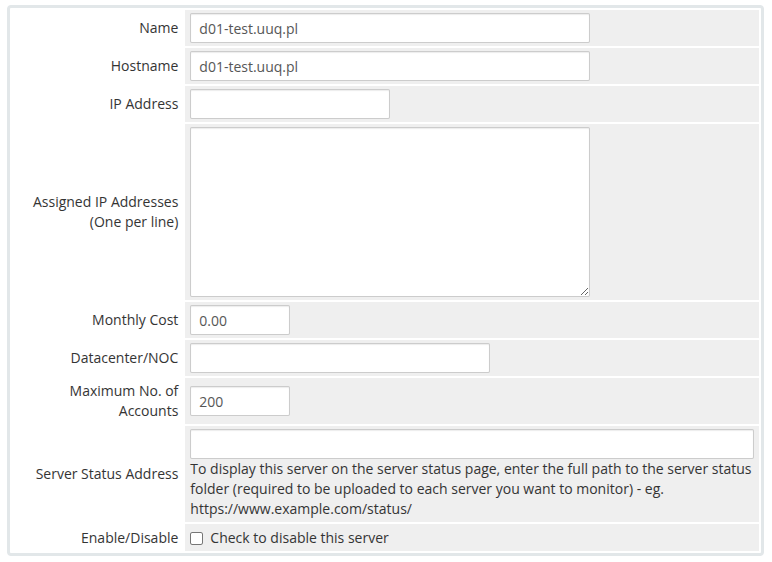
- Enter the correct **Name** and **Hostname**
[](https://doc.puq.info/uploads/images/gallery/2025-03/image-1741287291552.png)
**Attention: Important Information** The **hostname** field represents the actual domain of the server running Docker and must match the **server\_domain** parameter in the **n8n workflow**. If they do not match, communication will not function correctly.
Additionally, this domain must be configured so that all its subdomains resolve to the IP address of the server running Docker.
[](https://doc.puq.info/uploads/images/gallery/2025-03/image-1741287929855.png)
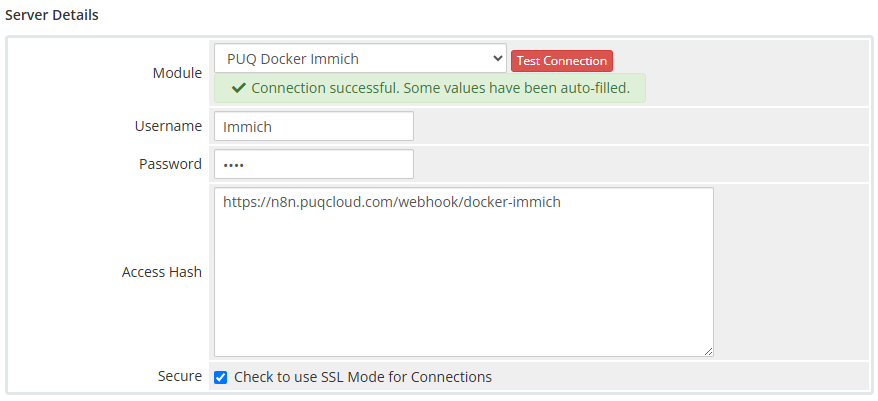
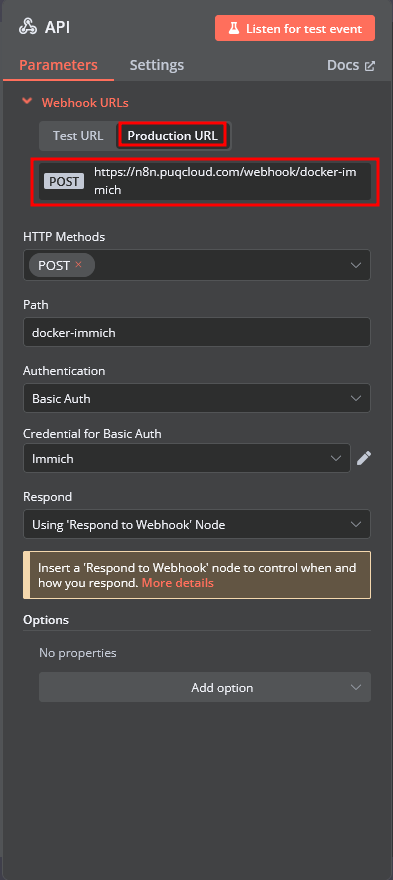
In the **Server Details** section, select the **"PUQ Docker Immich"** module and enter the correct **username** and **password** for the **API endpoint** in the n8n workflow.
Additionally, in the **Access Hash** field, insert the **URL of the API entry point** for the n8n workflow.
[](https://doc.puq.info/uploads/images/gallery/2025-03/image-1742324235831.png)
[](https://doc.puq.info/uploads/images/gallery/2025-03/image-1742324306086.png)
# Product Configuration
### Docker Immich module **[WHMCS](https://puqcloud.com/link.php?id=77)**
##### [Order now](https://puqcloud.com/whmcs-module-docker-immich.php) | [Download](https://download.puqcloud.com/WHMCS/servers/PUQ_WHMCS-Docker-Immich/) | [FAQ](https://faq.puqcloud.com/) | [n8n](https://puqcloud.com/link.php?id=117)
##### Add new product to WHMCS
```
System Settings->Products/Services->Create a New Product
```
In the **Module settings** section, select the **"PUQ Docker Immich"** module
- **License key –** A pre-purchased license key for the **"PUQ Docker Immich"** module. For the module to work correctly, the key must be active
- **Disk space** – defines the allocated disk size for the Docker container.
- **CPU** – sets the CPU usage limit for the Docker container.
- **RAM** – specifies the amount of RAM allocated to the Docker container.
- **Link to instruction** – URL to a guide that will be displayed in the client panel if provided.
- **Main domain** – defines the primary domain for the web interface of the application. If not set, the main domain will be taken from the **hostname** parameter in the server settings.
- **Subdomain** – a personal subdomain assigned to each service. If left empty or if the subdomain is already taken, it will be automatically generated in the format **{user\_id}-{service\_id}**.
- ### Supported Macros for **App Subdomain**:
- **{user\_id}** – Client ID
- **{service\_id}** – Service ID
- **{random\_digit\_x}** – Random number (x defines the length)
- **{random\_letter\_x}** – Random letter (x defines the length)
- **{unixtime}** – Unix timestamp
- **{year}, {month}, {day}, {hour}, {minute}, {second}** – Date and time values
- **Notification, used disk space X %** – The percentage value that sets the threshold for the container's disk space usage will trigger a notification message to the client once the threshold is reached.
- **Notification disk limit email template** – The email template for the notification that will be sent when the threshold is reached. [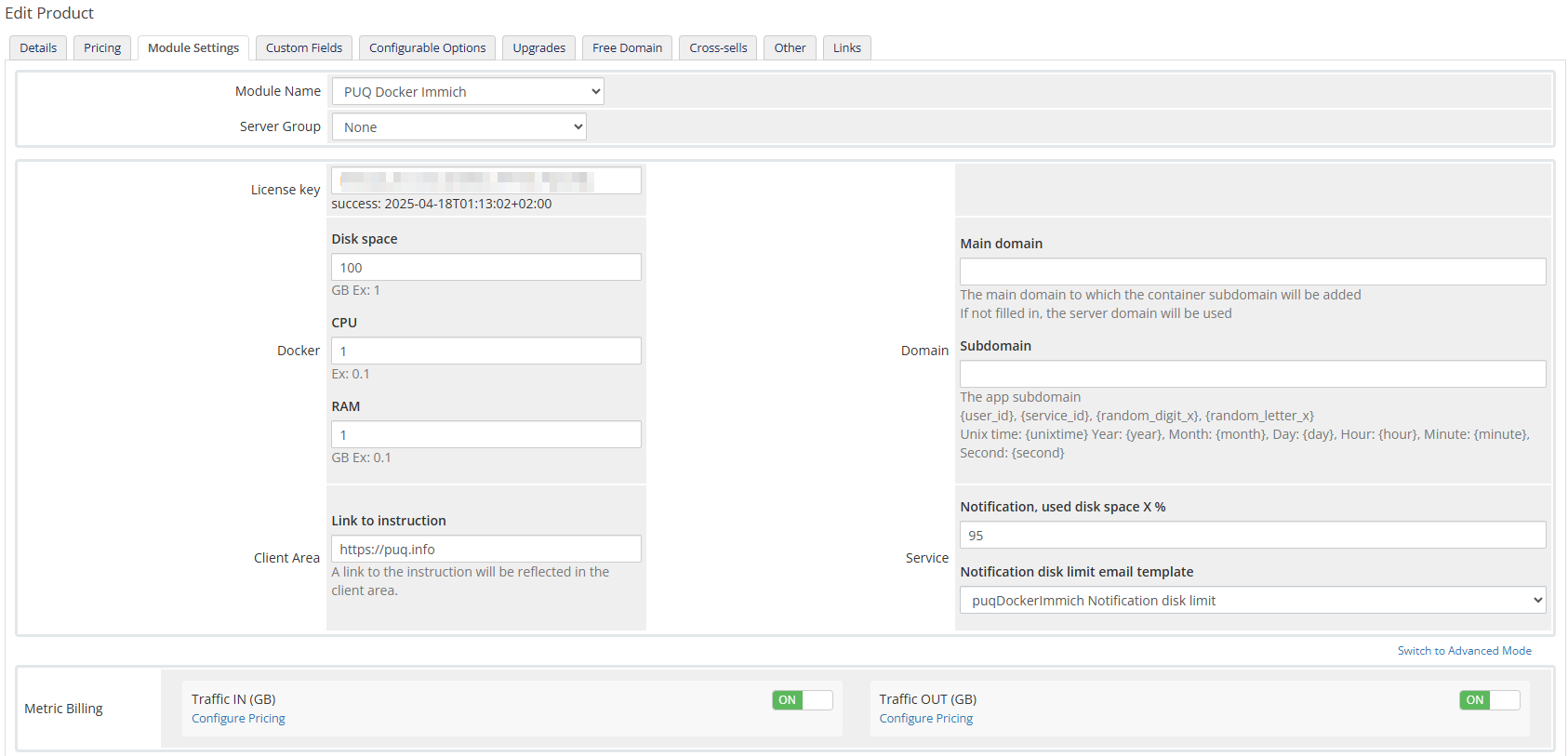](https://doc.puq.info/uploads/images/gallery/2025-03/image-1742329220406.png)
# Metric Billing
### Docker Immich module **[WHMCS](https://puqcloud.com/link.php?id=77)**
##### [Order now](https://puqcloud.com/whmcs-module-docker-immich.php) | [Download](https://download.puqcloud.com/WHMCS/servers/PUQ_WHMCS-Docker-Immich/) | [FAQ](https://faq.puqcloud.com/) | [n8n](https://puqcloud.com/link.php?id=117)
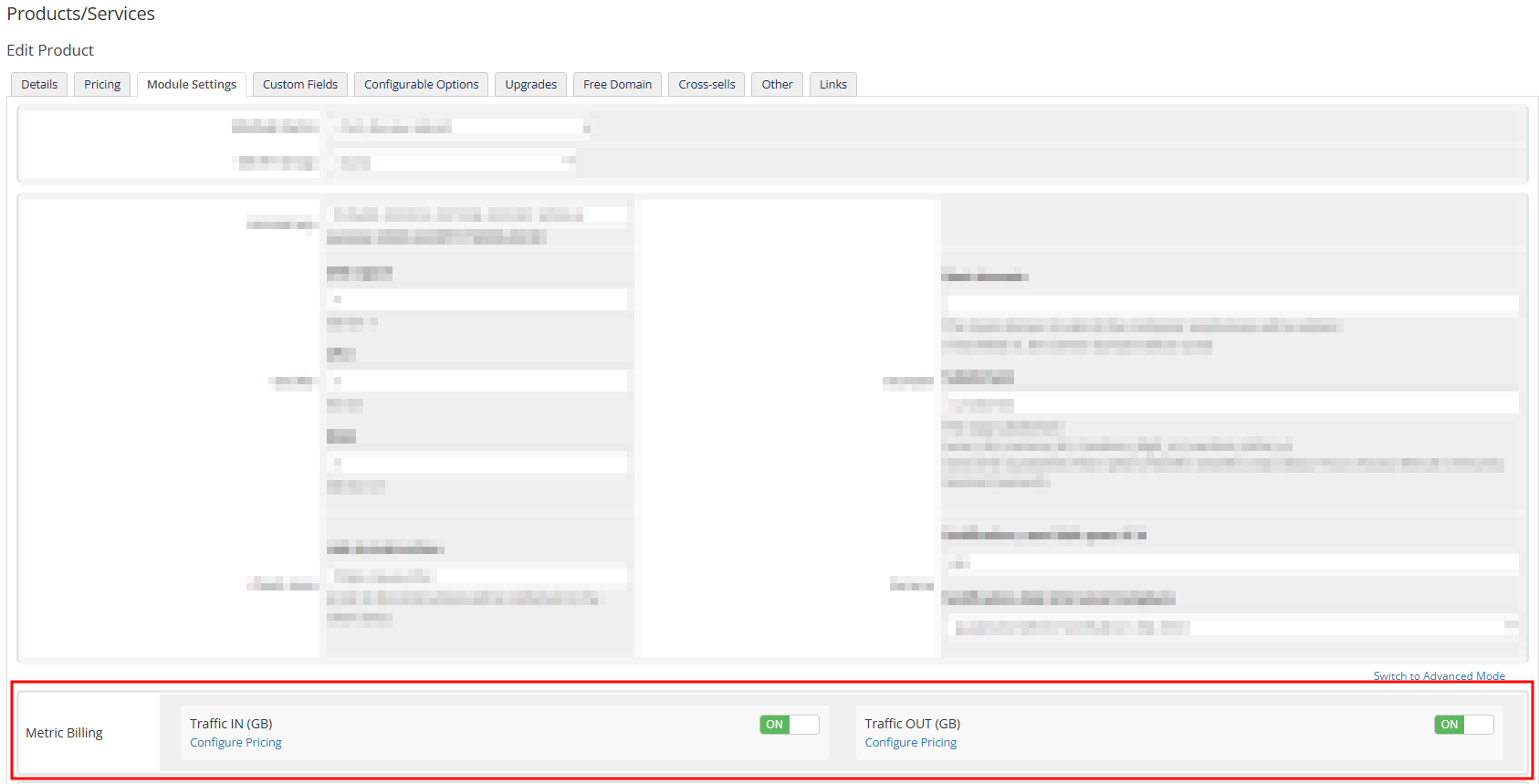
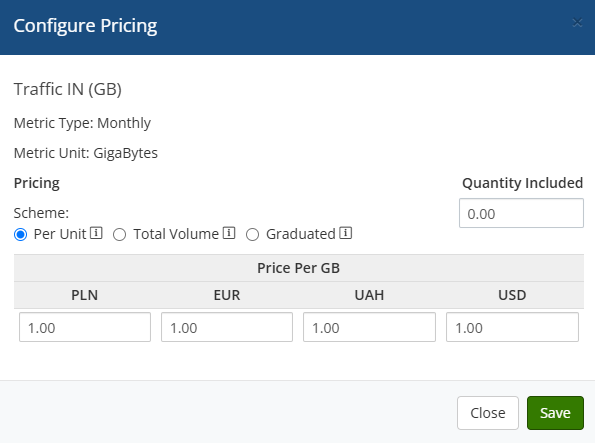
To bill certain metrics separately, you can use the standard WHMCS Metric Billing mechanism.
To configure it, you need to enable the required metrics and set the desired prices. Metrics work based on the standard WHMCS mechanism, the description of which can be found here:
[https://docs.whmcs.com/products/configuration-options/usage-billing/](https://docs.whmcs.com/products/configuration-options/usage-billing/)
[](https://doc.puq.info/uploads/images/gallery/2025-03/image-1741888208248.png)
[](https://doc.puq.info/uploads/images/gallery/2025-03/image-1741888239156.png)
# Email Template (puqDockerImmich Welcome Email)
### Docker Immich module **[WHMCS](https://puqcloud.com/link.php?id=77)**
##### [Order now](https://puqcloud.com/whmcs-module-docker-immich.php) | [Download](https://download.puqcloud.com/WHMCS/servers/PUQ_WHMCS-Docker-Immich/) | [FAQ](https://faq.puqcloud.com/) | [n8n](https://puqcloud.com/link.php?id=117)
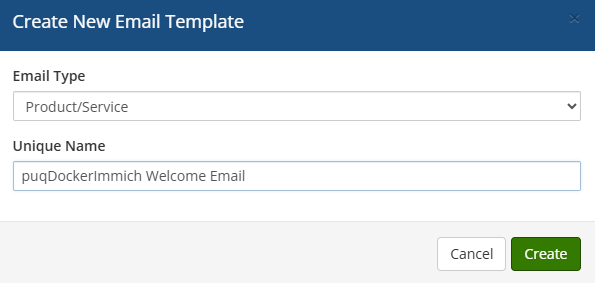
##### Create an email template for customer notifications.
```
System Settings->Email Templates->Create New Email Template
```
- **Email Type:** Product/service
- **Unique Name:** puqDockerImmich Welcome Email
[](https://doc.puq.info/uploads/images/gallery/2025-03/image-1742325411268.png)
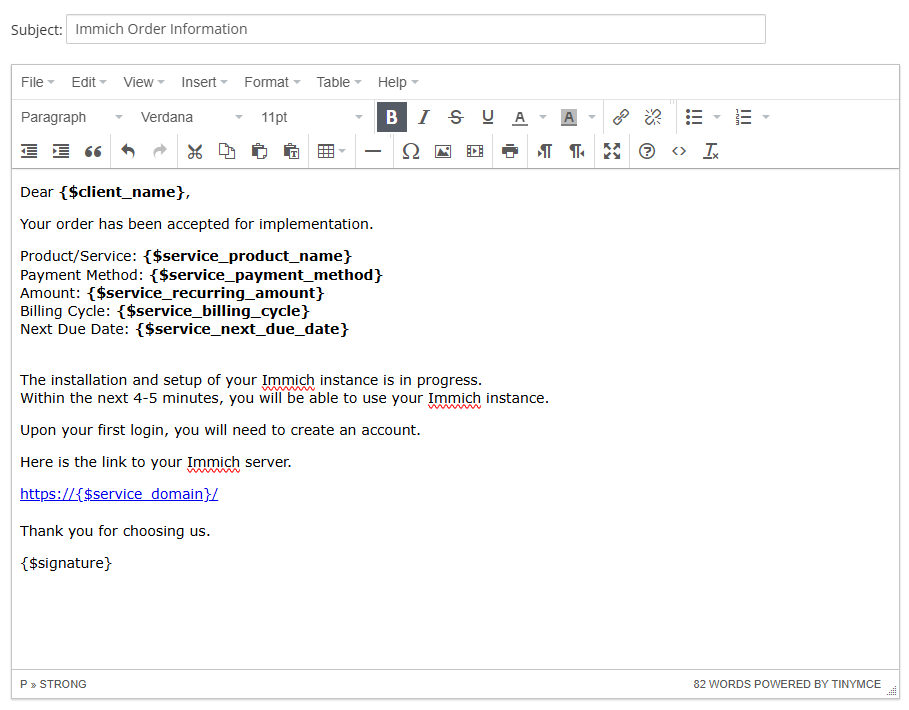
**Subject:**
```
Immich Order Information
```
**Body:**
```
Dear {$client_name},
Your order has been accepted for implementation.
Product/Service: {$service_product_name}
Payment Method: {$service_payment_method}
Amount: {$service_recurring_amount}
Billing Cycle: {$service_billing_cycle}
Next Due Date: {$service_next_due_date}
The installation and setup of your Immich instance is in progress.
Within the next 4-5 minutes, you will be able to use your Immich instance.
Upon your first login, you will need to create an account.
Here is the link to your Immich server.
https://{$service_domain}/
Thank you for choosing us.
{$signature}
```
[](https://doc.puq.info/uploads/images/gallery/2025-03/image-1742325563570.png)
# Email Template (puqDockerImmich Update Email)
### Docker Immich module **[WHMCS](https://puqcloud.com/link.php?id=77)**
##### [Order now](https://puqcloud.com/whmcs-module-docker-immich.php) | [Download](https://download.puqcloud.com/WHMCS/servers/PUQ_WHMCS-Docker-Immich/) | [FAQ](https://faq.puqcloud.com/) | [n8n](https://puqcloud.com/link.php?id=117)
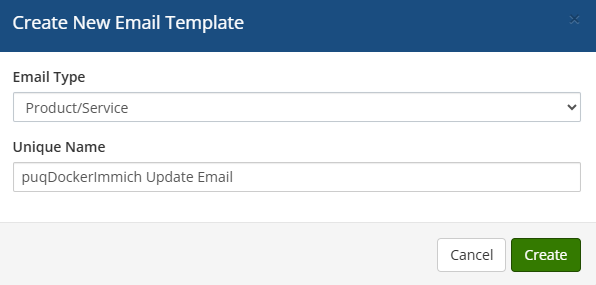
##### Create an email template for customer notifications.
```
System Settings->Email Templates->Create New Email Template
```
- **Email Type:** Product/service
- **Unique Name:** puqDockerImmich Update Email
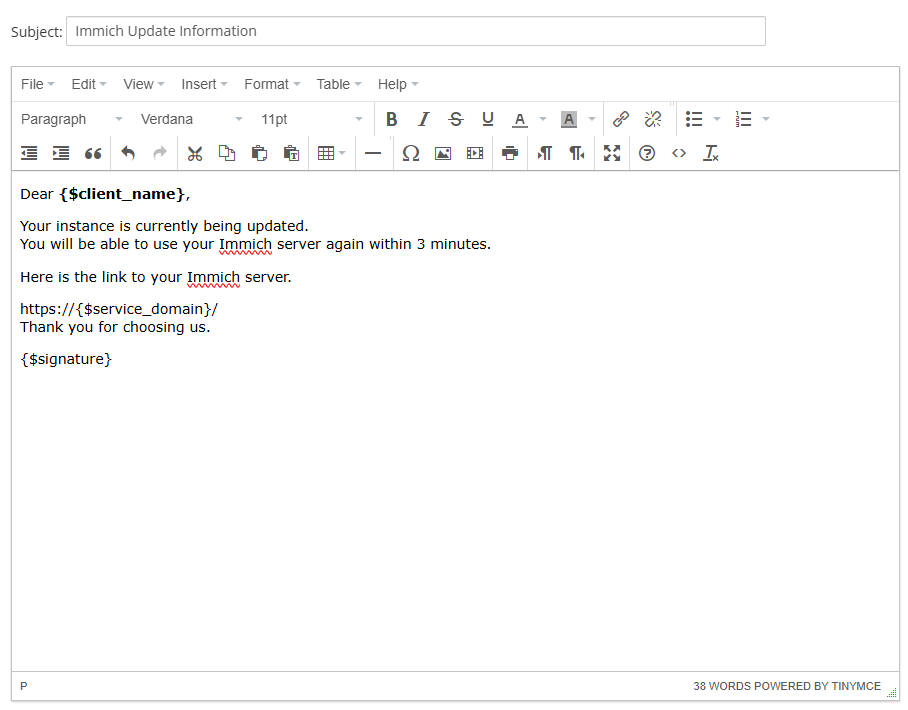
[](https://doc.puq.info/uploads/images/gallery/2025-03/image-1742326011602.png)
**Subject:**
```
Immich Update Information
```
**Body:**
```
Dear {$client_name},
Your instance is currently being updated.
You will be able to use your Immich server again within 3 minutes.
Here is the link to your Immich server.
https://{$service_domain}/
Thank you for choosing us.
{$signature}
```
[](https://doc.puq.info/uploads/images/gallery/2025-03/image-1742326094269.png)
# Email Template (puqDockerImmich Notification disk limit)
### Docker Immich module **[WHMCS](https://puqcloud.com/link.php?id=77)**
##### [Order now](https://puqcloud.com/whmcs-module-docker-immich.php) | [Download](https://download.puqcloud.com/WHMCS/servers/PUQ_WHMCS-Docker-Immich/) | [FAQ](https://faq.puqcloud.com/) | [n8n](https://puqcloud.com/link.php?id=117)
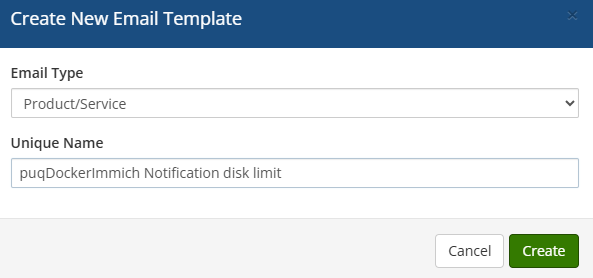
##### Create an email template for customer notifications.
```
System Settings->Email Templates->Create New Email Template
```
- **Email Type:** Product/service
- **Unique Name:** puqDockerImmich Notification disk limit
[](https://doc.puq.info/uploads/images/gallery/2025-03/image-1742326213042.png)
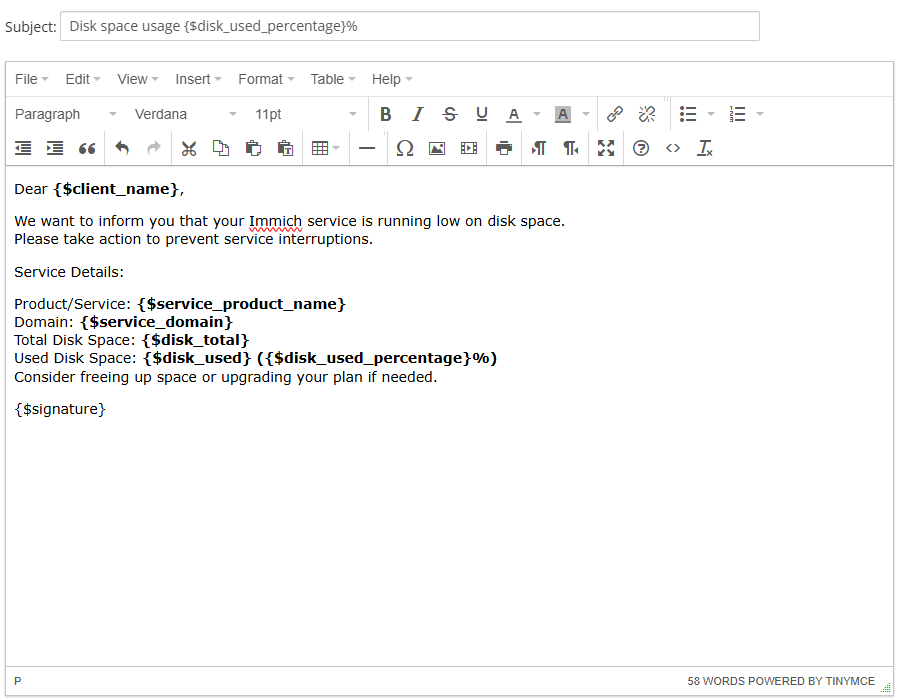
**Subject:**
```
Disk space usage {$disk_used_percentage}%
```
**Body:**
```
Dear {$client_name},
We want to inform you that your Immich service is running low on disk space.
Please take action to prevent service interruptions.
Service Details:
Product/Service: {$service_product_name}
Domain: {$service_domain}
Total Disk Space: {$disk_total}
Used Disk Space: {$disk_used} ({$disk_used_percentage}%)
Consider freeing up space or upgrading your plan if needed.
{$signature}
```
[](https://doc.puq.info/uploads/images/gallery/2025-03/image-1742326312540.png)
# Configurable Option (CPU/RAM/DISK)
### Docker Immich module **[WHMCS](https://puqcloud.com/link.php?id=77)**
##### [Order now](https://puqcloud.com/whmcs-module-docker-immich.php) | [Download](https://download.puqcloud.com/WHMCS/servers/PUQ_WHMCS-Docker-Immich/) | [FAQ](https://faq.puqcloud.com/) | [n8n](https://puqcloud.com/link.php?id=117)
In order for the client to have a choice of operating system in the configuration of the virtual machine. You need to configure the Configurable Option and connect them to the package.
#### Create Group
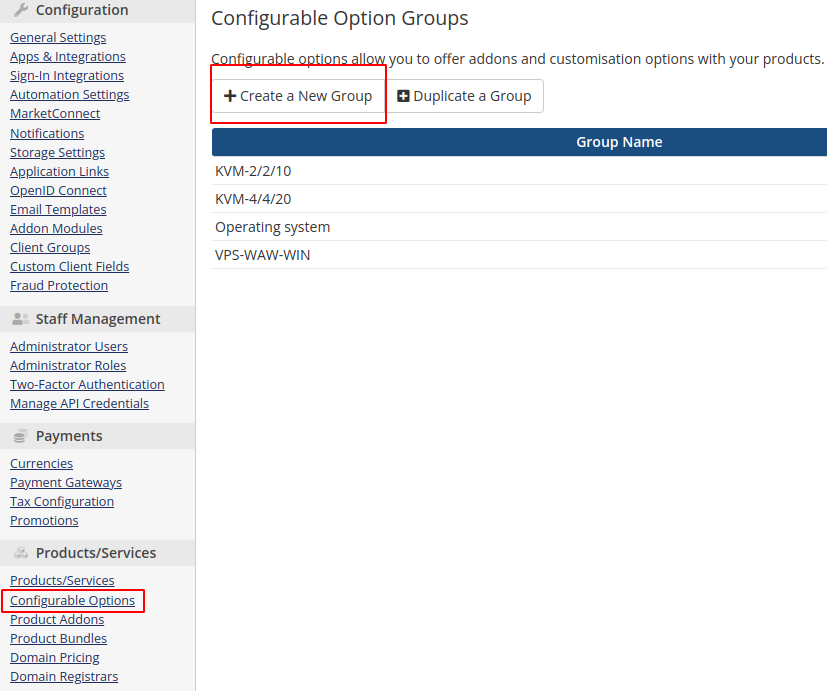
Add new Configurable Option to WHMCS
```
System Settings->Configurable Option->Create a New Group
```
[](https://doc.puq.info/uploads/images/gallery/2022-09/image-1663138303613.png)
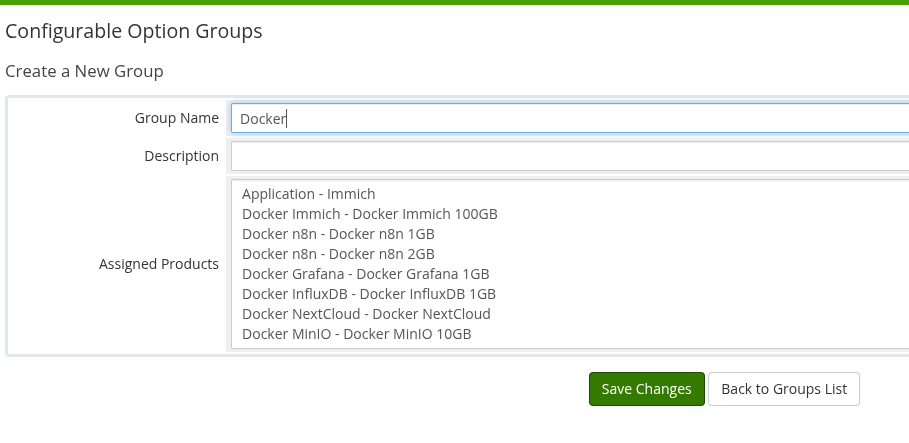
**Enter the group name, description, and select the products you need.**
**Group Name:** Docker
[](https://doc.puq.info/uploads/images/gallery/2025-04/image-1745864110464.png)
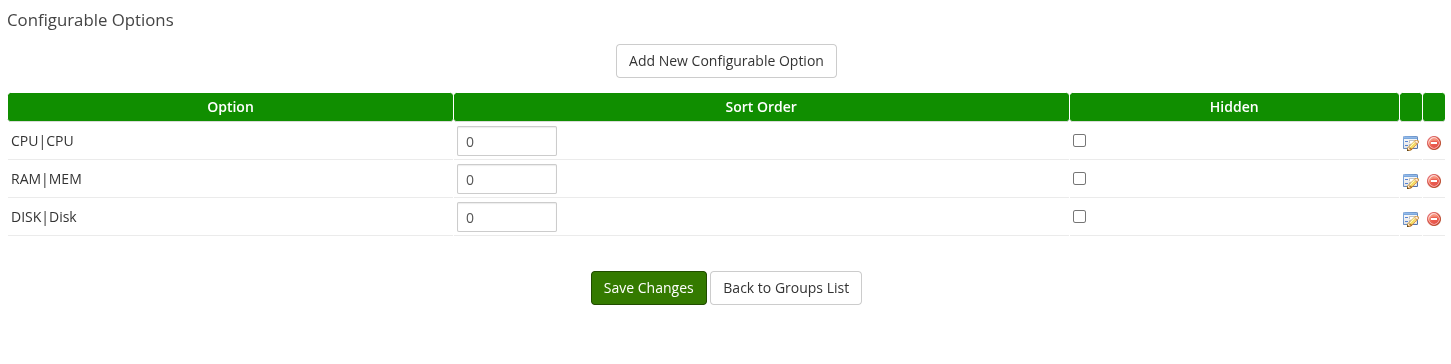
#### Add Configurable Option
[](https://doc.puq.info/uploads/images/gallery/2025-04/image-1745864205353.png)
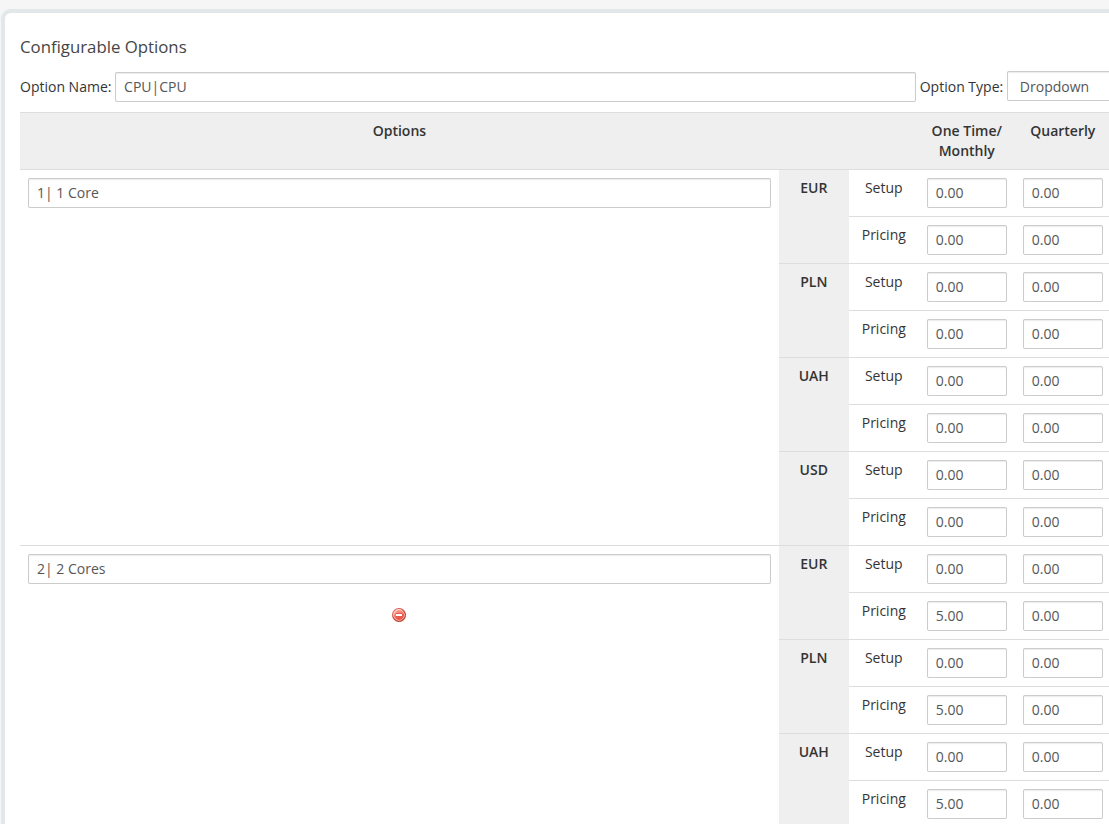
##### CPU|CPU - The first element before | must be left as is, but the second can be changed to suit your needs
[](https://doc.puq.info/uploads/images/gallery/2025-04/image-1745866390473.png)
In the option, the first element is responsible for the quantity and the second element is responsible for the description.
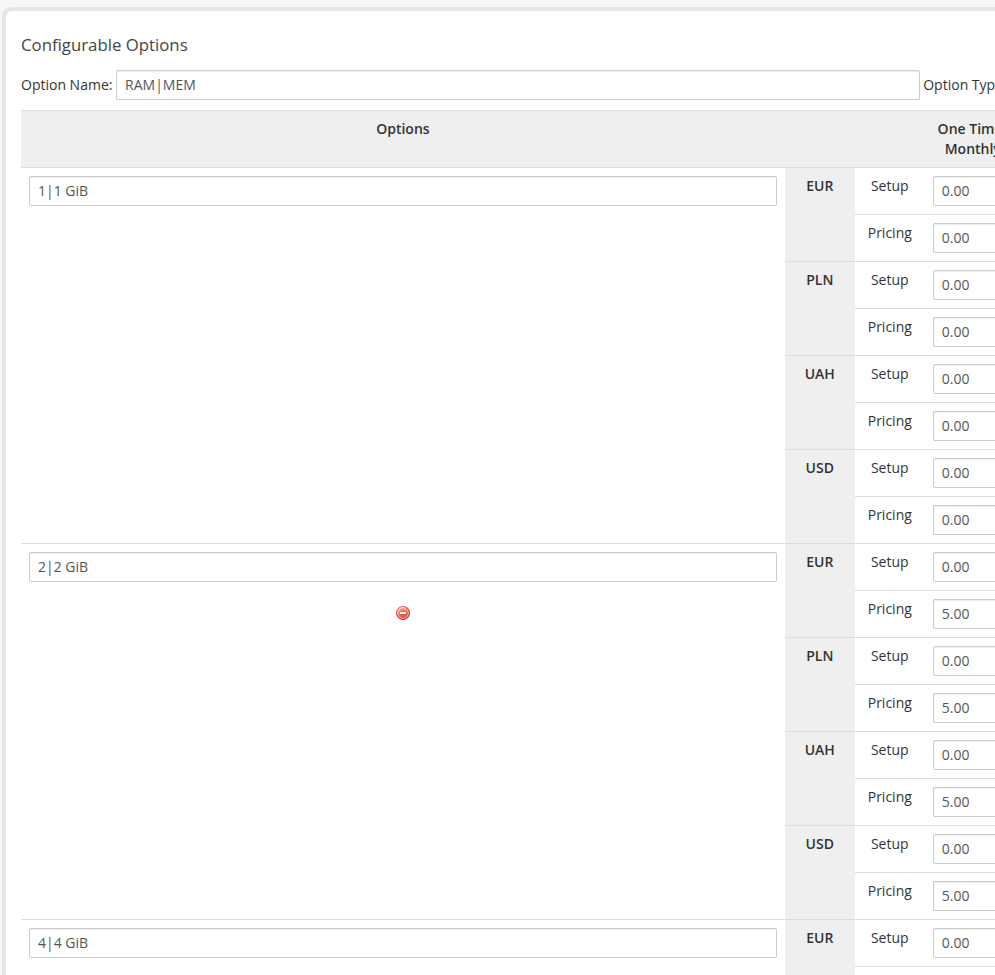
##### RAM|MEM - The first element before | must be left as is, but the second can be changed to suit your needs
[](https://doc.puq.info/uploads/images/gallery/2025-04/image-1745866413434.png)
In the option, the first element is responsible for the quantity and the second element is responsible for the description.
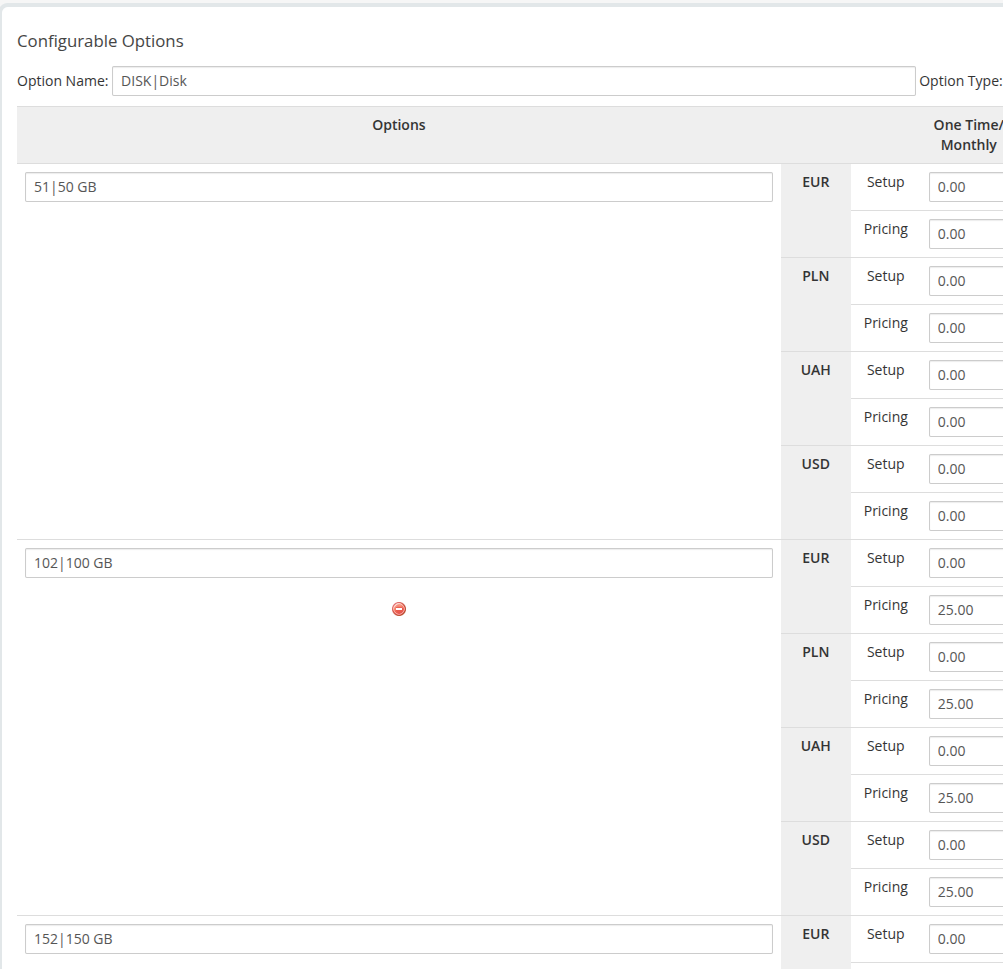
##### DISK|Disk - The first element before | must be left as is, but the second can be changed to suit your needs
[](https://doc.puq.info/uploads/images/gallery/2025-04/image-1745866456963.png)
In the option, the first element is responsible for the quantity and the second element is responsible for the description.
# Admin Area
# Product Information
### Docker Immich module **[WHMCS](https://puqcloud.com/link.php?id=77)**
##### [Order now](https://puqcloud.com/whmcs-module-docker-immich.php) | [Download](https://download.puqcloud.com/WHMCS/servers/PUQ_WHMCS-Docker-Immich/) | [FAQ](https://faq.puqcloud.com/) | [n8n](https://puqcloud.com/link.php?id=117)
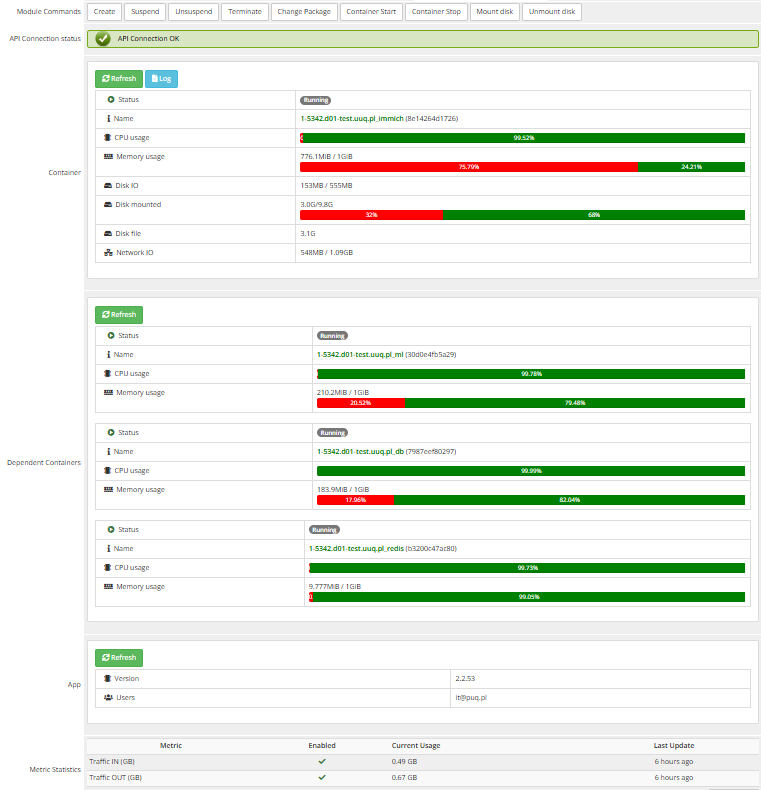
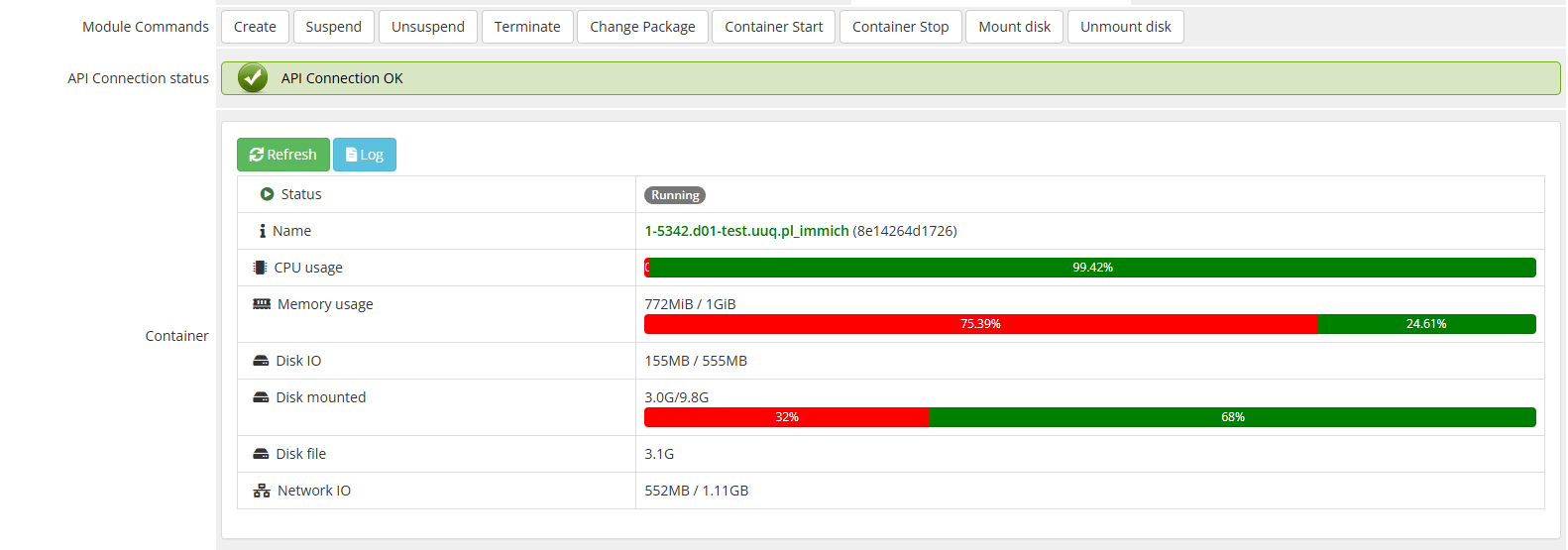
### **Admin Panel – Container Management Overview**
The **admin panel** is structured into two main sections with additional control buttons for container management.
#### **Control Buttons**
- **Container Start / Stop** – Start or stop the running container.
- **Mount Disk / Unmount Disk** – Attach or detach the container's disk to the host system. This modifies the **fstab** file to ensure proper mounting.
#### **Container Status & Resource Monitoring**
- **Status** – Displays the current state (Running / Stopped).
- **Name** – Unique identifier and domain of the container.
- **CPU Usage** – Shows current CPU load.
- **Memory Usage** – Displays RAM consumption in real-time.
- **Disk IO & Disk Mounted** – Tracks disk input/output operations.
- **Disk File** – Indicates the actual disk image size.
- **Network IO** – Shows network traffic statistics.
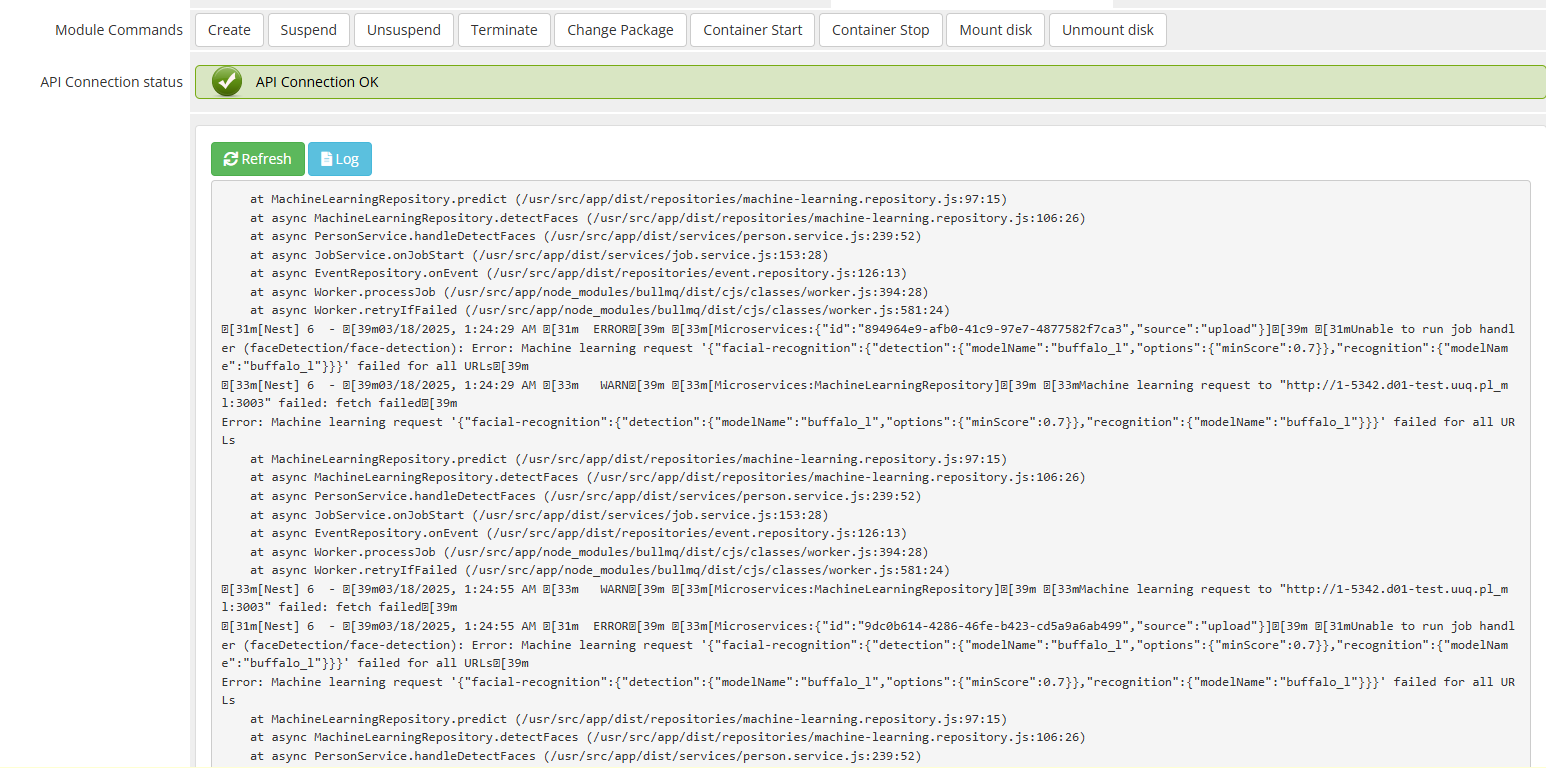
- **Log Button** – Loads and displays the container logs for debugging and monitoring.
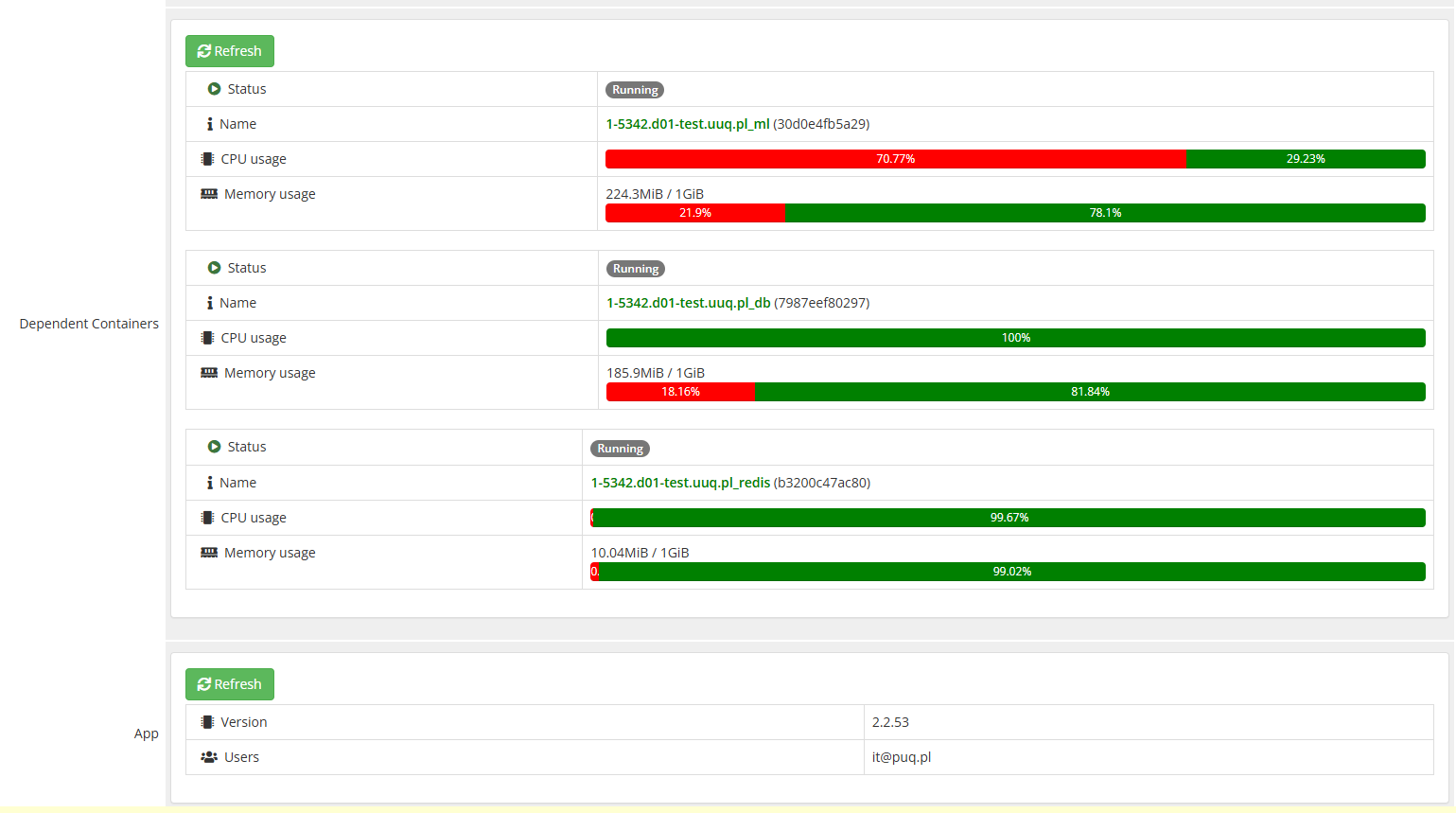
#### **Application Information**
- **Version** – Displays the installed application version.
- **Owner** – Administrator managing the application.
- **Users** – List of assigned users with access to the application.
[](https://doc.puq.info/uploads/images/gallery/2025-03/image-1742326728533.png)
[](https://doc.puq.info/uploads/images/gallery/2025-03/image-1742326772368.png)
[](https://doc.puq.info/uploads/images/gallery/2025-03/image-1742326813526.png)
Metric Statistics
[](https://doc.puq.info/uploads/images/gallery/2025-03/image-1741881751238.png)
# Client Area
# Home screen
### Docker Immich module **[WHMCS](https://puqcloud.com/link.php?id=77)**
##### [Order now](https://puqcloud.com/whmcs-module-docker-immich.php) | [Download](https://download.puqcloud.com/WHMCS/servers/PUQ_WHMCS-Docker-Immich/) | [FAQ](https://faq.puqcloud.com/) | [n8n](https://puqcloud.com/link.php?id=117)
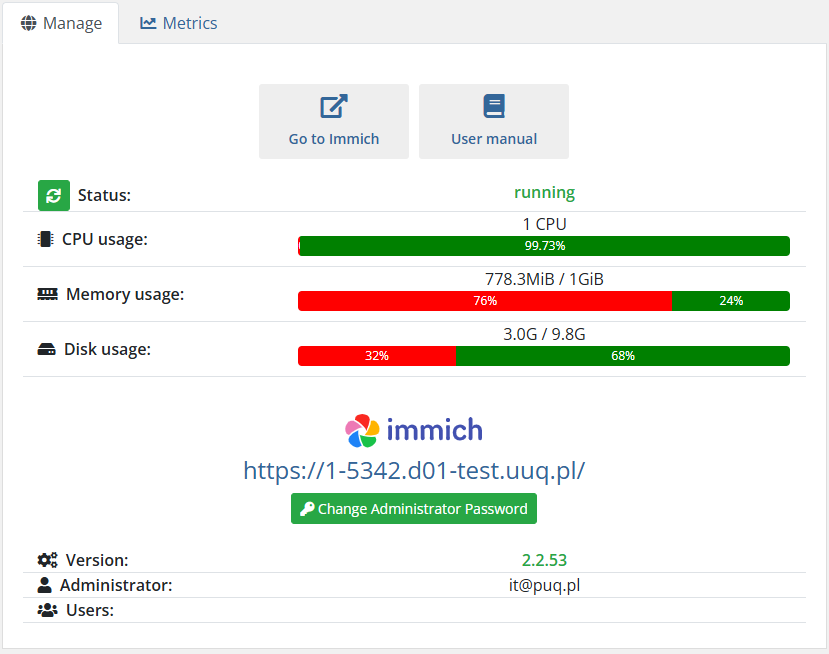
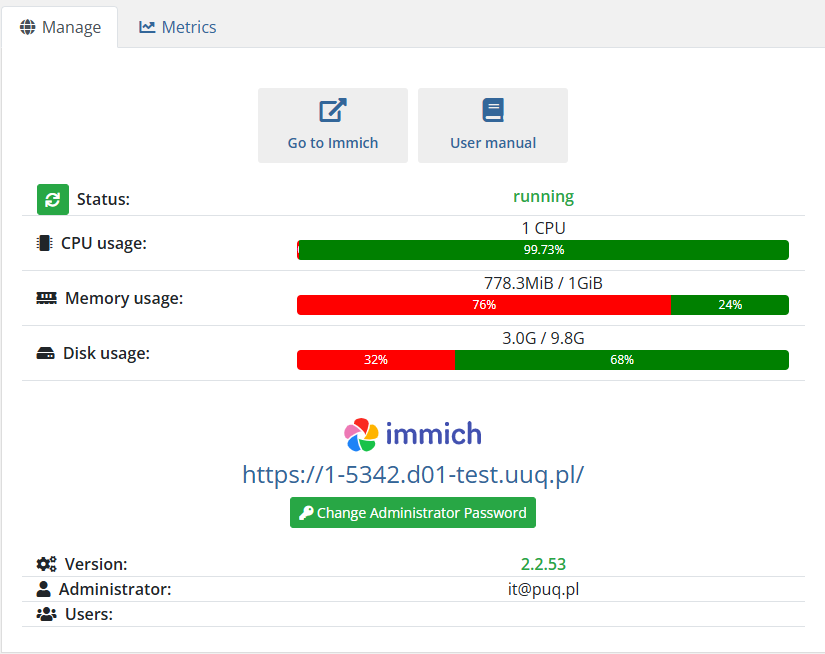
### **Client Area Overview – Logical Structure**
The **main screen** of the client area is divided into **three logical sections**:
1. **Navigation Block**
- **"Go to Immich"**: Direct link to access the application.
- **"User Manual"**: Opens the official documentation or user guide.
2. **Resource Usage Block**
- Displays real-time statistics on container resource usage:
- **CPU Usage**: Number of allocated CPUs and current load.
- **Memory Usage**: RAM consumption, helping clients understand available capacity.
- **Disk Usage**: Storage consumption within the container.
- This section is crucial for users to **monitor performance** and determine whether they need to **upgrade their package**.
3. **Application Information & Controls**
- **Application Version**: Displays the installed software version.
- **Owner Information**: Indicates the primary administrator of the application.
- **User List**: Shows active users associated with the instance.
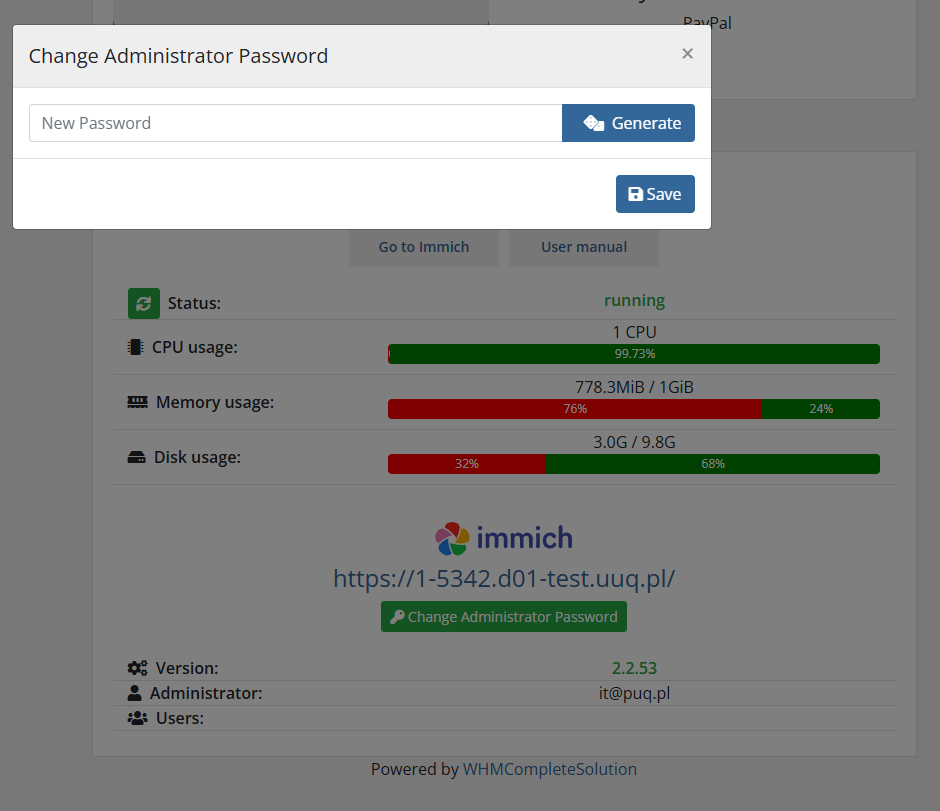
- **Reset Password Button**: Allows the client to reset the administrator password for the application.
This **clear structure** ensures that users have **quick access** to their application, **real-time monitoring** of resource usage, and **essential management functions** in one place.
[](https://doc.puq.info/uploads/images/gallery/2025-03/image-1742327063897.png)
[](https://doc.puq.info/uploads/images/gallery/2025-03/image-1742327086473.png)
# IP Access Control
### Docker Immich module **[WHMCS](https://puqcloud.com/link.php?id=77)**
##### [Order now](https://puqcloud.com/whmcs-module-docker-immich.php) | [Download](https://download.puqcloud.com/WHMCS/servers/PUQ_WHMCS-Docker-Immich/) | [FAQ](https://faq.puqcloud.com/) | [n8n](https://puqcloud.com/link.php?id=117)
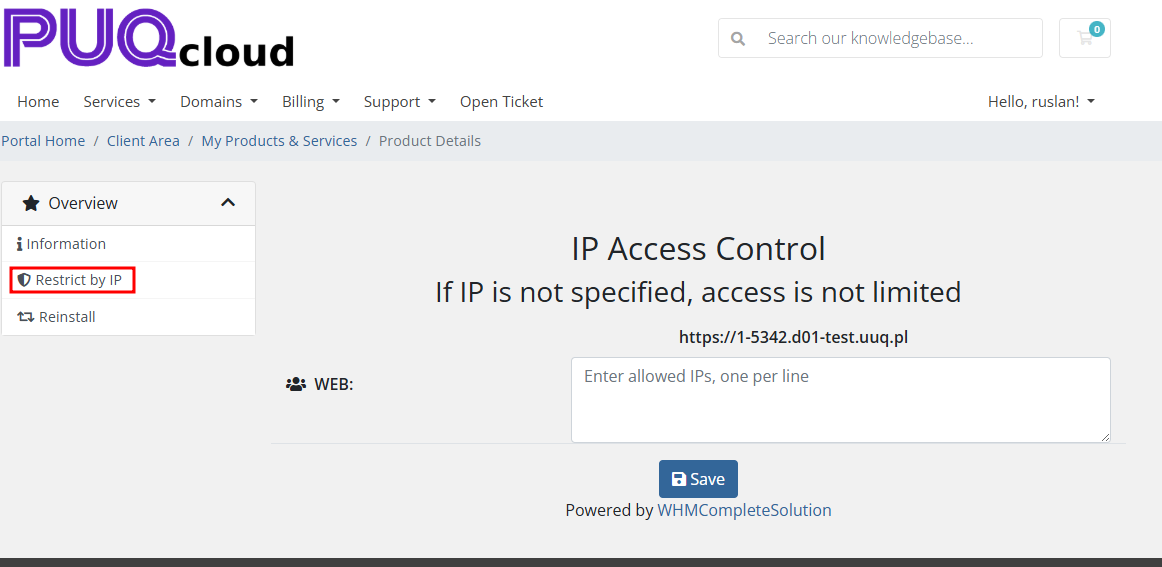
In the client area, the client can configure access to their resource by entering allowed IP addresses in the appropriate section on the **Restrict by IP** page.
If no IP addresses are specified, access is open to all IP addresses.
[](https://doc.puq.info/uploads/images/gallery/2025-03/image-1742327165778.png)
# Reinstall
### Docker Immich module **[WHMCS](https://puqcloud.com/link.php?id=77)**
##### [Order now](https://puqcloud.com/whmcs-module-docker-immich.php) | [Download](https://download.puqcloud.com/WHMCS/servers/PUQ_WHMCS-Docker-Immich/) | [FAQ](https://faq.puqcloud.com/) | [n8n](https://puqcloud.com/link.php?id=117)
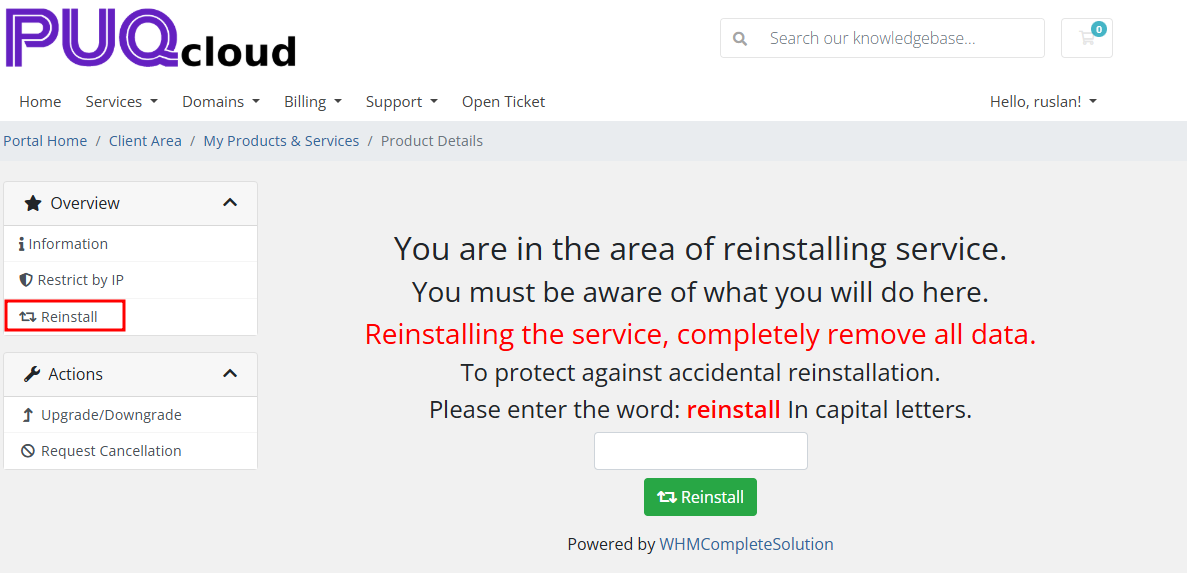
The client has the option to **fully reinstall the application**, which will result in **complete data loss**.
This action can be performed on the **Reinstall** page, which also includes **protection against accidental reinstallation**.
[](https://doc.puq.info/uploads/images/gallery/2025-03/image-1741882286068.png)
# Metrics
### Docker Immich module **[WHMCS](https://puqcloud.com/link.php?id=77)**
##### [Order now](https://puqcloud.com/whmcs-module-docker-immich.php) | [Download](https://download.puqcloud.com/WHMCS/servers/PUQ_WHMCS-Docker-Immich/) | [FAQ](https://faq.puqcloud.com/) | [n8n](https://puqcloud.com/link.php?id=117)
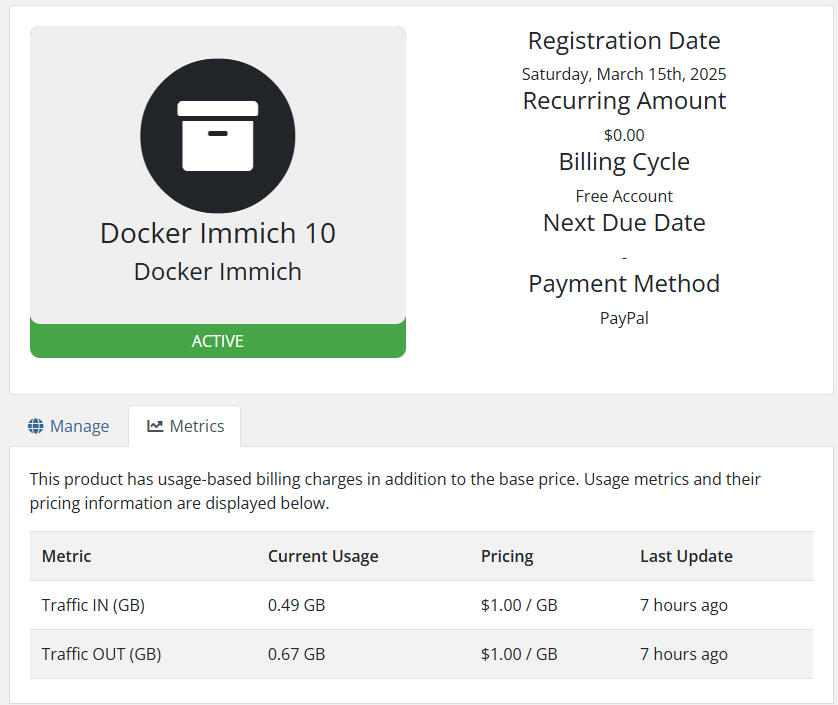
If you use metrics for application traffic billing, the Metrics tab will display the usage statistics for the metrics.
[](https://doc.puq.info/uploads/images/gallery/2025-03/image-1742327255763.png)