# Add server

### Docker InfluxDB module **[WHMCS](https://puqcloud.com/link.php?id=77)** 

#####  [Order now](https://puqcloud.com/whmcs-module-docker-influxdb.php) | [Download](https://download.puqcloud.com/WHMCS/servers/PUQ_WHMCS-Docker-InfluxDB/) | [FAQ](https://faq.puqcloud.com/) | [n8n](https://puqcloud.com/link.php?id=117)

##### Add a new server to the system WHMCS.

```
System Settings->Servers->Add New Server
```

- Enter the correct **Name** and **Hostname**

[![image-1741287291552.png](https://doc.puq.info/uploads/images/gallery/2025-03/scaled-1680-/image-1741287291552.png)](https://doc.puq.info/uploads/images/gallery/2025-03/image-1741287291552.png)

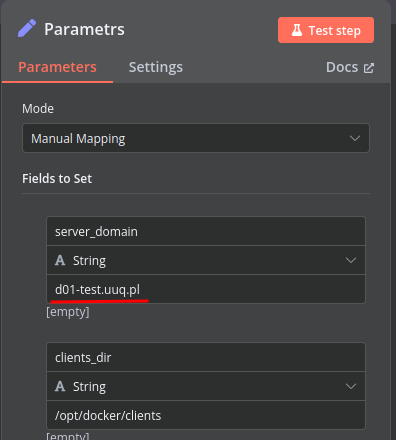
<p class="callout warning">**Attention: Important Information** The **hostname** field represents the actual domain of the server running Docker and must match the **server\_domain** parameter in the **n8n workflow**. If they do not match, communication will not function correctly.  
Additionally, this domain must be configured so that all its subdomains resolve to the IP address of the server running Docker.</p>

[![image-1741287929855.png](https://doc.puq.info/uploads/images/gallery/2025-03/scaled-1680-/image-1741287929855.png)](https://doc.puq.info/uploads/images/gallery/2025-03/image-1741287929855.png)  
  
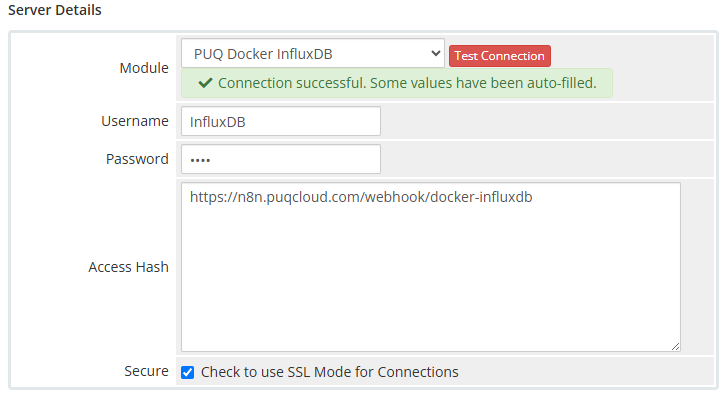
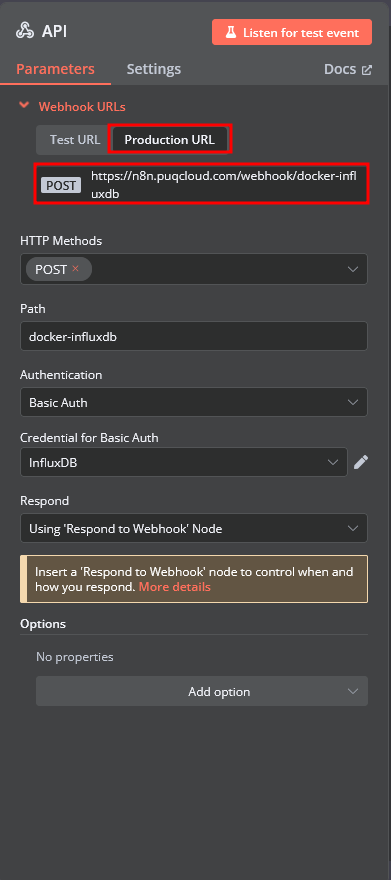
In the **Server Details** section, select the **"PUQ Docker InfluxDB"** module and enter the correct **username** and **password** for the **API endpoint** in the n8n workflow.

<p class="callout warning">Additionally, in the **Access Hash** field, insert the **URL of the API entry point** for the n8n workflow.</p>

[![image-1742770877457.png](https://doc.puq.info/uploads/images/gallery/2025-03/scaled-1680-/image-1742770877457.png)](https://doc.puq.info/uploads/images/gallery/2025-03/image-1742770877457.png)

[![image-1742770908428.png](https://doc.puq.info/uploads/images/gallery/2025-03/scaled-1680-/image-1742770908428.png)](https://doc.puq.info/uploads/images/gallery/2025-03/image-1742770908428.png)