For the correct operation of the module, a pre-prepared Emby installation is required (the module does not assist in the installation of the Emby server and assumes that such installation is ready for operation through API.) Module use Emby API to manage clients account.
We have prepared a detailed installation manual for the module, including all the steps needed to implement the module, including the preparation of the Emby server, including all installation steps such as PHP, Emby , SSL certificates etc.
### Functions: - Auto create and deploy client account - The module uses only the API to manage the accounts - Emby Connect Integration: Seamlessly access media accounts across different devices and platforms using Emby Connect functionality. - Module supports multilingualism **(Arabic, Azerbaijani, Catalan, Chinese, Croatian, Czech, Danish, Dutch, English, Estonian, Farsi, French, German, Hebrew, Hungarian, Italian, Macedonian, Norwegian, Polish, Romanian, Spanish, Swedish, Turkish, Ukrainian)** - The module shows all user info: enabled user libraries, active devices etc. - Link to instructions for setting up the service in the client area. ### Available options in the admin panel: - Create users - Suspend users - Terminate users - Unsuspend users - Change users password - Change Package - Drop all devices - API connection status - List of active devices - List of enabled user libraries ### Available options in the client panel: - List of active devices - List of enabled user libraries - Drop all devices - Change the Emby user password - Add/Manage Emby Connect account - - - - - -WHMCS minimal version: 8 +
Emby minimal version: 4.7+
[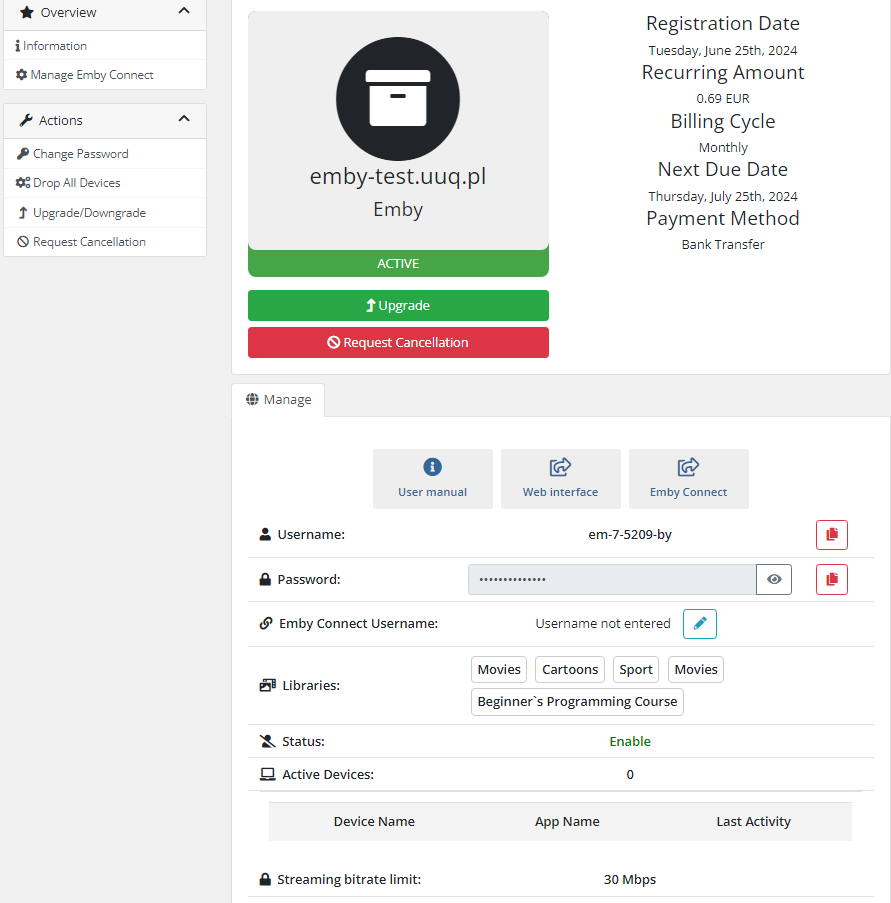](https://doc.puq.info/uploads/images/gallery/2024-07/image-1720696798608.png) [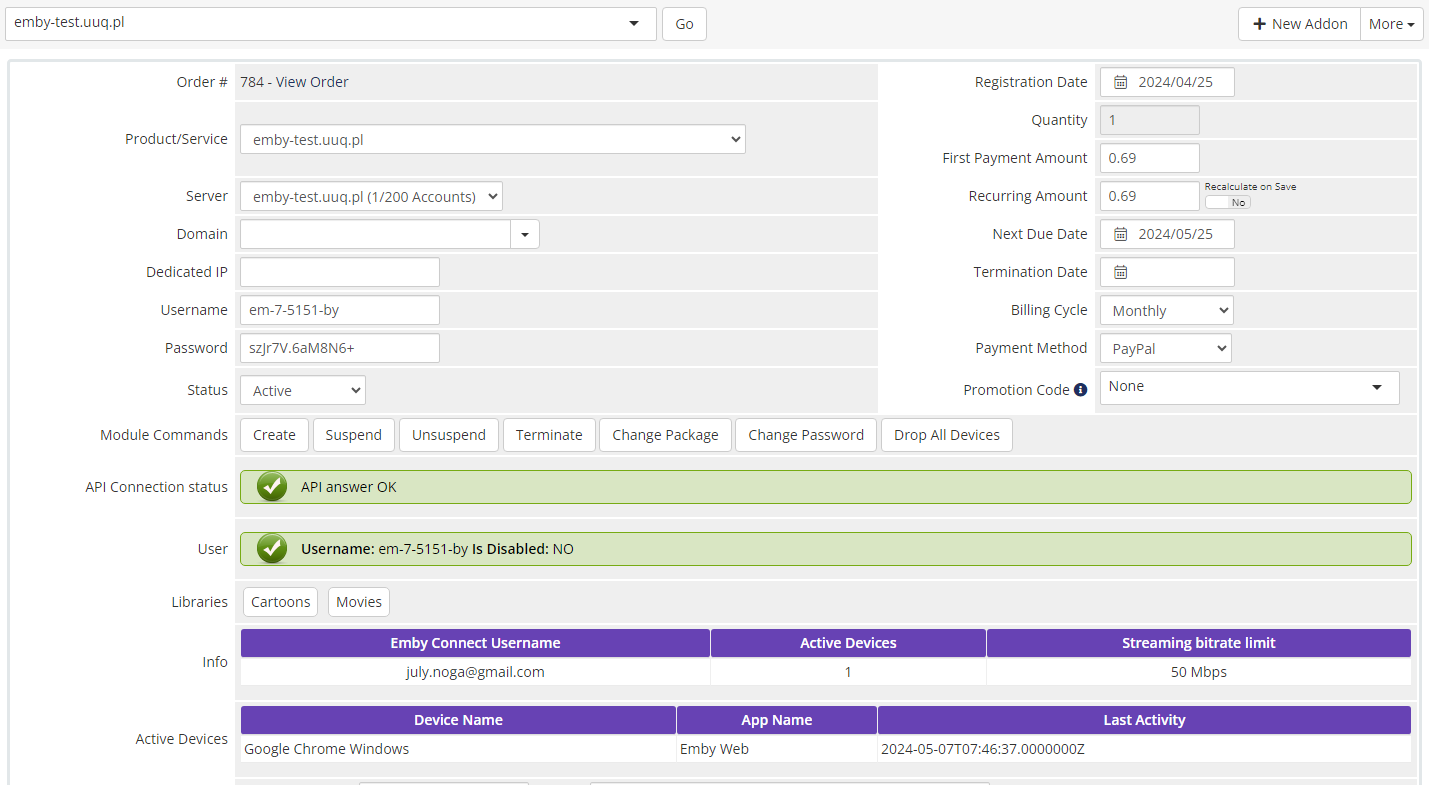](https://doc.puq.info/uploads/images/gallery/2024-05/image-1715068372834.png)# Changelog ### Emby module **[WHMCS](https://puqcloud.com/link.php?id=77)** ##### [Order now](https://puqcloud.com/whmcs-module-emby.php) | [Download](https://download.puqcloud.com/WHMCS/servers/PUQ_WHMCS-Emby/) | [FAQ](https://faq.puqcloud.com/) #### v2.1.1 and v2.1.2 Released 14-10-2025 1. Support for custom admin pathYou should save the 'Module Setting' in your products for the module to function correctly.
- - - - - - #### v2.1 Released 03-10-2025 1. Adding availability to create a rule about custom username 2. Adding availability to create a rule about custom password 3. Supported php8.2+ versionYou should save the 'Module Setting' in your products for the module to function correctly.
- - - - - - ##### v2.0 Released 24-09-2024**Module is coded ionCube v13**
Supported php version: - php 7.4 WHMCS 8.11.0 - - php 8.1 WHMCS 8.11.0 + - php 8.2 WHMCS 8.11.0 + - - - - - - #### v1.4.1 Released 13-08-2024 1. Fixed bug with password, when "Show password" is "no" - - - - - - ##### v1.4 Released 12-07-2024 1. Buttons for copying login and password have been added to the client area 2. Client area more adapted for mobile version 3. New module settings: - Subtitle Downloading - Camera upload - Media conversion - Social media sharing - User Preference Access - - - - - - v1.3 Released 07-05-2024 1. Added the capability to link an Emby Connect Username to the account. 2. Introduced a new tab for managing Emby Connect Username in the Client Area. 3. Optimized. - - - - - - ##### v1.2 Released 21-12-2023 Client Area Enhancements: 1. Added the ability to disable the display of service passwords by default. 2. Introduced a "Show" button for displaying service passwords in the Client Area. 3. Provided options to display service passwords in plain text.You should save the 'Module Setting' in your products for the module to function correctly.
- - - - - - ##### v1.1 Released 20-11-2023 1. Fixed bug with incorrect libraries selection functionality, CRITICAL 2. Fix some bugs in the change password feature. 3. New "**Use All Libraries**" checkbox in Module Setting page. 4. Some change in Client Area. 5. OptimizedYou should reconfigure the 'Module Setting' in your product for the module to function correctly. Additionally, it's recommended to select 'Change Package' in the customer product settings."
- - - - - - ##### v1.0 Released 10-11-2023 First version# Installation and configuration guide # WHMCS setup(install/update) ### Emby module **[WHMCS](https://puqcloud.com/link.php?id=77)** ##### [Order now](https://puqcloud.com/whmcs-module-emby.php) | [Download](https://download.puqcloud.com/WHMCS/servers/PUQ_WHMCS-Emby/) | [FAQ](https://faq.puqcloud.com/)**Module is coded ionCube v13**
Supported php version: - php 7.4 WHMCS 8.11.0 - - php 8.1 WHMCS 8.11.0 + - php 8.2 WHMCS 8.11.0 +To install and update a module, you must perform one and the same action.
##### 1. Download the latest version of the module. PHP 8.2 ```Powershell wget http://download.puqcloud.com/WHMCS/servers/PUQ_WHMCS-Emby/php82/PUQ_WHMCS-Emby-latest.zip ``` PHP 8.1 ```Powershell wget http://download.puqcloud.com/WHMCS/servers/PUQ_WHMCS-Emby/php81/PUQ_WHMCS-Emby-latest.zip ``` PHP 7.4 ```Powershell wget http://download.puqcloud.com/WHMCS/servers/PUQ_WHMCS-Emby/php74/PUQ_WHMCS-Emby-latest.zip ```All versions are available via link: [http://download.puqcloud.com/WHMCS/servers/PUQ\_WHMCS-Emby/](http://download.puqcloud.com/WHMCS/servers/PUQ_WHMCS-Emby/)
##### 2. Unzip the archive with the module. ```Powershell unzip PUQ_WHMCS-Emby-latest.zip ``` ##### 3. Copy and Replace "puqEmby" to "WHMCS\_WEB\_DIR/modules/servers/" # Setup guide: Emby setup ### Emby module **[WHMCS](https://puqcloud.com/link.php?id=77)** ##### [Order now](https://puqcloud.com/whmcs-module-emby.php) | [Download](https://download.puqcloud.com/WHMCS/servers/PUQ_WHMCS-Emby/) | [FAQ](https://faq.puqcloud.com/) #### 1. Install Emby on your server To simplify deployment and help automate this for as many users as possible, we provide a BASH script to handle repo installation as well as installing Emby. All you need to do is run this command on your system ``` wget https://github.com/MediaBrowser/Emby.Releases/releases/download/4.7.14.0/emby-server-deb_4.7.14.0_amd64.deb ``` ``` dpkg -i emby-server-deb_4.7.14.0_amd64.deb ``` #### 2. SSL certificate generation: ``` sudo apt install nginx certbot python3-certbot-nginx ``` ``` sudo certbot --nginx --agree-tos --redirect --hsts --staple-ocsp --email YOUR_EMAIL -d DOMAIN_NAME ``` ``` echo "0 0 * * * root certbot renew --quiet --no-self-upgrade --post-hook 'systemctl reload nginx'" | sudo tee -a /etc/cron.d/renew_certbot ``` #### 3. Configure nginx from a subdomain Create a file named nginx.conf. ``` cd /etc/nginx/conf.d/ nano nginx.conf ``` Then, insert the following text, replacing DOMAIN\_NAME with your domain. ```Nginx # Uncomment the commented sections after you have acquired a SSL Certificate server { listen 80; #listen [::]:80; server_name DOMAIN_NAME; # Uncomment to redirect HTTP to HTTPS return 302 https://$host$request_uri; } server { listen 443 ssl http2; #listen [::]:443 ssl http2; server_name DOMAIN_NAME; ## The default `client_max_body_size` is 1M, this might not be enough for some posters, etc. client_max_body_size 20M; # use a variable to store the upstream proxy # in this example we are using a hostname which is resolved via DNS # (if you aren't using DNS remove the resolver line and change the variable to point to an IP address e.g `set $emby 127.0.0.1`) set $emby 127.0.0.1; resolver 127.0.0.1 valid=30; ssl_certificate /etc/letsencrypt/live/DOMAIN_NAME/fullchain.pem; ssl_certificate_key /etc/letsencrypt/live/DOMAIN_NAME/privkey.pem; include /etc/letsencrypt/options-ssl-nginx.conf; ssl_dhparam /etc/letsencrypt/ssl-dhparams.pem; add_header Strict-Transport-Security "max-age=31536000" always; ssl_trusted_certificate /etc/letsencrypt/live/DOMAIN_NAME/chain.pem; ssl_stapling on; ssl_stapling_verify on; # Security / XSS Mitigation Headers # NOTE: X-Frame-Options may cause issues with the webOS app add_header X-Frame-Options "SAMEORIGIN"; add_header X-XSS-Protection "0"; # Do NOT enable. This is obsolete/dangerous add_header X-Content-Type-Options "nosniff"; # COOP/COEP. Disable if you use external plugins/images/assets add_header Cross-Origin-Opener-Policy "same-origin" always; add_header Cross-Origin-Embedder-Policy "require-corp" always; add_header Cross-Origin-Resource-Policy "same-origin" always; # Permissions policy. May cause issues on some clients add_header Permissions-Policy "accelerometer=(), ambient-light-sensor=(), battery=(), bluetooth=(), camera=(), clipboard-read=(), display-capture=(), document-domain=(), encrypted-media=(), gamepad=(), geolocation=(), gyroscope=(), hid=(), idle-detection=(), interest-cohort=(), keyboard-map=(), local-fonts=(), magnetometer=(), microphone=(), payment=(), publickey-credentials-get=(), serial=(), sync-xhr=(), usb=(), xr-spatial-tracking=()" always; # Tell browsers to use per-origin process isolation add_header Origin-Agent-Cluster "?1" always; # Content Security Policy # See: https://developer.mozilla.org/en-US/docs/Web/HTTP/CSP # Enforces https content and restricts JS/CSS to origin # External Javascript (such as cast_sender.js for Chromecast) must be whitelisted. # NOTE: The default CSP headers may cause issues with the webOS app #add_header Content-Security-Policy "default-src https: data: blob: http://image.tmdb.org; style-src 'self' 'unsafe-inline'; script-src 'self' 'unsafe-inline' https://www.gstatic.com https://www.youtube.com blob:; worker-src 'self' blob:; connect-src 'self'; object-src 'none'; frame-ancestors 'self'"; location = / { return 302 http://$host/web/; #return 302 https://$host/web/; } location / { # Proxy main Emby traffic proxy_pass http://$emby:8096; proxy_set_header Host $host; proxy_set_header X-Real-IP $remote_addr; proxy_set_header X-Forwarded-For $proxy_add_x_forwarded_for; proxy_set_header X-Forwarded-Proto $scheme; proxy_set_header X-Forwarded-Protocol $scheme; proxy_set_header X-Forwarded-Host $http_host; # Disable buffering when the nginx proxy gets very resource heavy upon streaming proxy_buffering off; } # location block for /web - This is purely for aesthetics so /web/#!/ works instead of having to go to /web/index.html/#!/ location = /web/ { # Proxy main Emby traffic proxy_pass http://$emby:8096/web/index.html; proxy_set_header Host $host; proxy_set_header X-Real-IP $remote_addr; proxy_set_header X-Forwarded-For $proxy_add_x_forwarded_for; proxy_set_header X-Forwarded-Proto $scheme; proxy_set_header X-Forwarded-Protocol $scheme; proxy_set_header X-Forwarded-Host $http_host; } location /socket { # Proxy Emby Websockets traffic proxy_pass http://$emby:8096; proxy_http_version 1.1; proxy_set_header Upgrade $http_upgrade; proxy_set_header Connection "upgrade"; proxy_set_header Host $host; proxy_set_header X-Real-IP $remote_addr; proxy_set_header X-Forwarded-For $proxy_add_x_forwarded_for; proxy_set_header X-Forwarded-Proto $scheme; proxy_set_header X-Forwarded-Protocol $scheme; proxy_set_header X-Forwarded-Host $http_host; } } ``` #### Restarting nginx ``` sudo service nginx restart ``` # Setup guide: WHMCS setup ### Emby module **[WHMCS](https://puqcloud.com/link.php?id=77)** ##### [Order now](https://puqcloud.com/whmcs-module-emby.php) | [Download](https://download.puqcloud.com/WHMCS/servers/PUQ_WHMCS-Emby/) | [FAQ](https://faq.puqcloud.com/) ##### 1. Download the latest version of the module. PHP 8.1 ```Powershell wget http://download.puqcloud.com/WHMCS/servers/PUQ_WHMCS-Emby/PUQ_WHMCS-Emby-latest.zip ``` PHP 7.4 ```Powershell wget http://download.puqcloud.com/WHMCS/servers/PUQ_WHMCS-Emby/php74/PUQ_WHMCS-Emby-latest.zip ```All versions are available via link: [http://download.puqcloud.com/WHMCS/servers/PUQ\_WHMCS-Emby/](http://download.puqcloud.com/WHMCS/servers/PUQ_WHMCS-Emby/)
##### 2. Unzip the archive with the module. ```Powershell unzip PUQ_WHMCS-Emby-latest.zip ``` ##### 3. Copy "puqEmby" to "WHMCS\_WEB\_DIR/modules/servers/" ##### 4. Create new server Emby in WHMCS (System Settings->Products/Services->Servers) ``` System Settings->Servers->Add New Server ``` - Enter the correct **Name** and **Hostname** [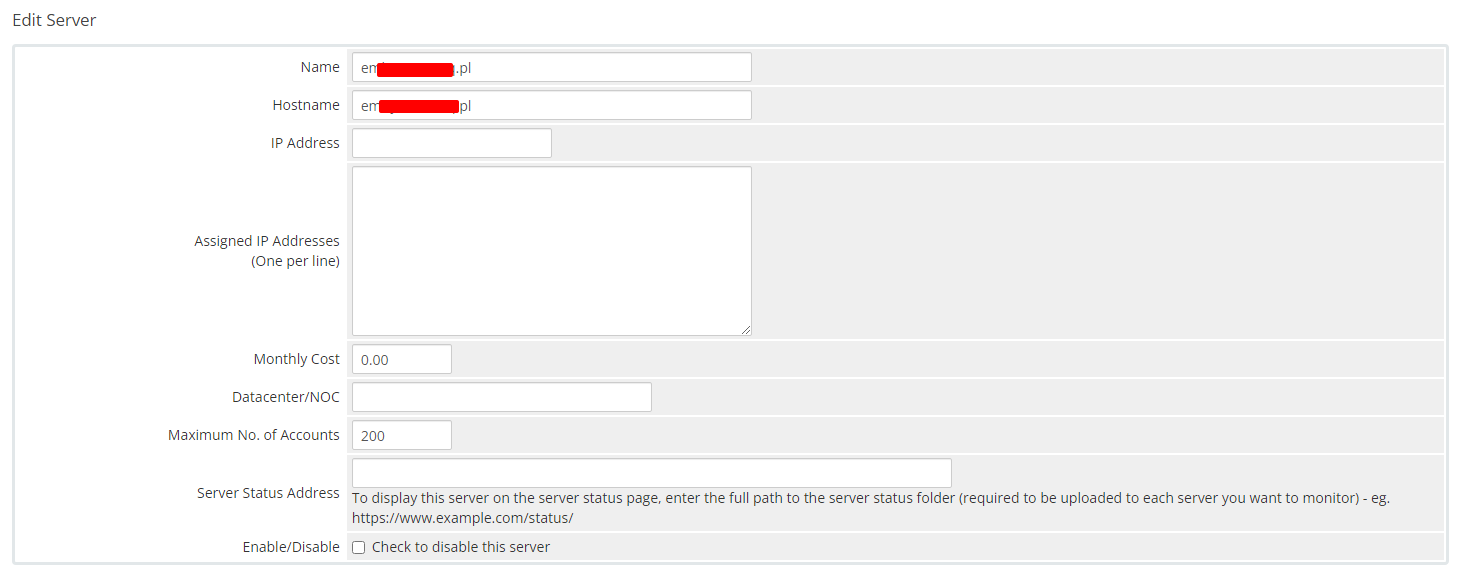](https://doc.puq.info/uploads/images/gallery/2023-11/21.png) - In the **Server Details** section, select the "**PUQ Emby**" module and enter the correct **username**, **password** and **access hash (API key)** for the **Emby web interface**. - To check, click the **"Test connection"** button [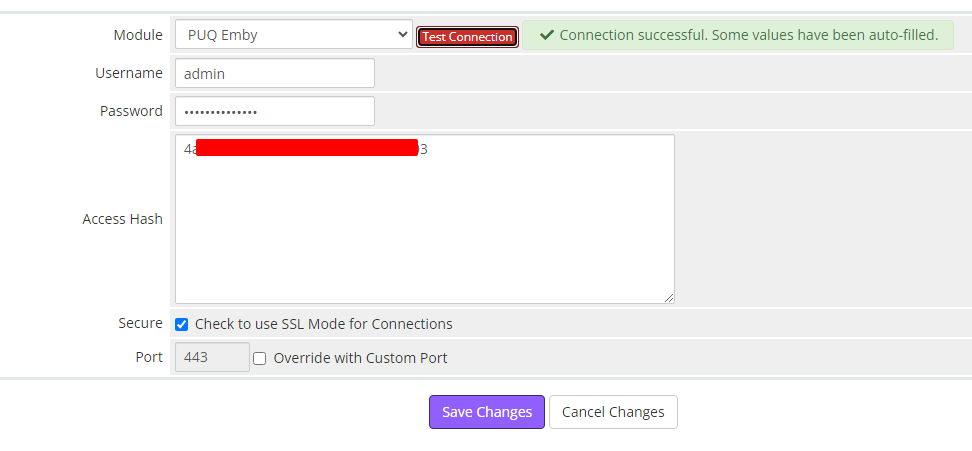](https://doc.puq.info/uploads/images/gallery/2023-11/22.png) ##### 5. Create a new Products/Services ``` System Settings->Products/Services->Create a New Product ``` In the **Module settings** section, select the **"PUQ Emby"** module [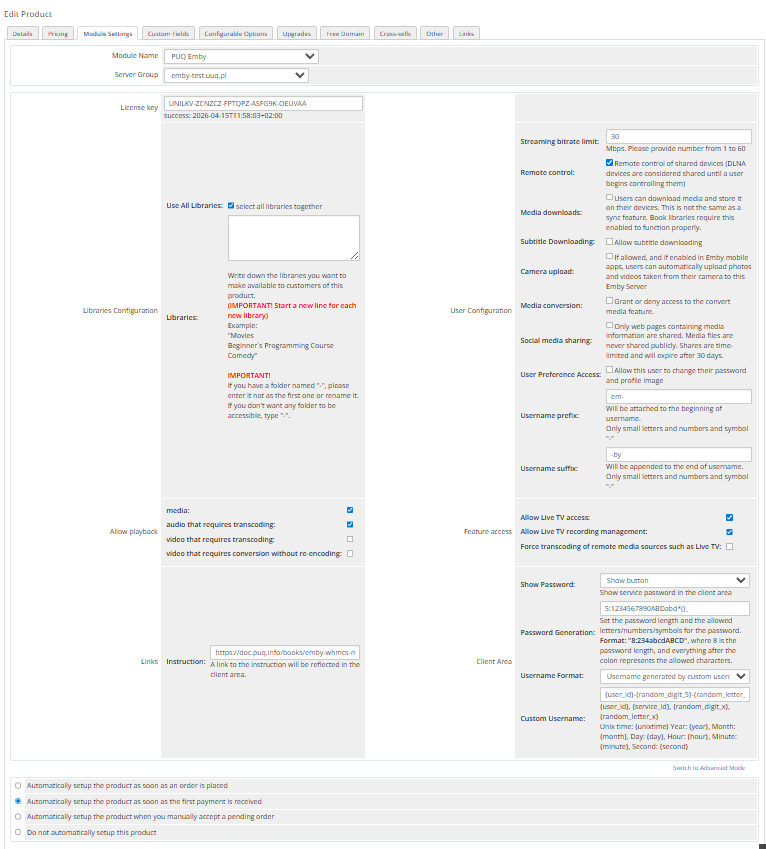](https://doc.puq.info/uploads/images/gallery/2025-10/2.png) - **License key:** A pre-purchased license key for the **"PUQ Emby"** module. For the module to work correctly, the key must be active ##### Libraries: - **Use All Libraries**: Choosing all of libraries from your Jellyfin server - **Libraries**: The libraries you want to make available to customers of this product. **(IMPORTANT! Start a new line for each new library)** Example: "Movies Beginner`s Programming Course Comedy" **IMPORTANT!** If you have a folder named "-", please enter it not as the first one or rename it. If you don't want any folder to be accessible, type "-". ##### User Configuration: - **Streaming bitrate limit:** An optional per-stream bitrate limit for all out of network devices. This is useful to prevent devices from requesting a higher bitrate than your internet connection can handle. This may result in increased CPU load on your server in order to transcode videos on the fly to a lower bitrate. - **Remote control:** Remote control of shared devices (DLNA devices are considered shared until a user begins controlling them) - **Media downloads:** Users can download media and store it on their devices. This is not the same as a sync feature. Book libraries require this enabled to function properly. - **Subtitle Downloading:** Allow subtitle downloading - **Camera upload:** If allowed, and if enabled in Emby mobile apps, users can automatically upload photos and videos taken from their camera to this Emby Server - **Media conversion:** Grant or deny access to the convert media feature. - **Social media sharing:** Only web pages containing media information are shared. Media files are never shared publicly. Shares are time-limited and will expire after 30 days. - **User Preference Access:** Allow this user to change their password and profile image - **Username prefix/Username suffix:** Necessary in order to generate a username for the service, in the format: **prefix<client\_id>-<service\_id>suffix** ##### Allow playback (Restricting access to transcoding may cause playback failures in clients due to unsupported media formats) - **media** - **audio that requires transcoding** - **video that requires transcoding** - **video that requires conversion without re-encoding** ##### Feature access: - **Allow Live TV access** - **Allow Live TV recording management** - **Force transcoding of remote media sources such as Live TV** ##### Links - **Link to instruction:** Link to the instruction, if filled out, it will be reflected in the client area ##### Client Area - **Show Password** – Show the service password in the client area. - **Password Generation** – Set the password length and the allowed letters/numbers/symbols for the password. Format: `"8:234abcdABCD"`, where `8` is the password length, and everything after the colon represents the allowed characters. - **Username Format** – Define the format for username generation: - - **Standard** – prefix-client\_id-service\_id-suffix - **Custom** – username generated by a custom rule - **Custom Username** – Set a rule for generating a custom username. # Add server (Emby server) ### Emby module **[WHMCS](https://puqcloud.com/link.php?id=77)** ##### [Order now](https://puqcloud.com/whmcs-module-emby.php) | [Download](https://download.puqcloud.com/WHMCS/servers/PUQ_WHMCS-Emby/) | [FAQ](https://faq.puqcloud.com/) ##### Add a new server to the system WHMCS. ``` System Settings->Servers->Add New Server ``` - Enter the correct **Name** and **Hostname** [](https://doc.puq.info/uploads/images/gallery/2023-11/21.png) - In the **Server Details** section, select the "**PUQ Emby**" module and enter the correct **username**, **password** and **access hash (API key)** for the **Emby web interface** - To check, click the **"Test connection"** button [](https://doc.puq.info/uploads/images/gallery/2023-11/22.png) # Product Configuration ### Emby module **[WHMCS](https://puqcloud.com/link.php?id=77)** ##### [Order now](https://puqcloud.com/whmcs-module-emby.php) | [Download](https://download.puqcloud.com/WHMCS/servers/PUQ_WHMCS-Emby/) | [FAQ](https://faq.puqcloud.com/) ##### Create a new Products/Services ``` System Settings->Products/Services->Create a New Product ``` In the **Module settings** section, select the **"PUQ Emby"** module [](https://doc.puq.info/uploads/images/gallery/2025-10/2.png) - **License key:** A pre-purchased license key for the **"PUQ Emby"** module. For the module to work correctly, the key must be active ##### Libraries: - **Use All Libraries**: Choosing all of libraries from your Jellyfin server - **Libraries**: The libraries you want to make available to customers of this product. **(IMPORTANT! Start a new line for each new library)** Example: "Movies Beginner`s Programming Course Comedy" **IMPORTANT!** If you have a folder named "-", please enter it not as the first one or rename it. If you want to select all folders together, simply leave the field EMPTY. If you don't want any folder to be accessible, type "-". ##### User Configuration: - **Streaming bitrate limit:** An optional per-stream bitrate limit for all out of network devices. This is useful to prevent devices from requesting a higher bitrate than your internet connection can handle. This may result in increased CPU load on your server in order to transcode videos on the fly to a lower bitrate. - **Remote control:** Remote control of shared devices (DLNA devices are considered shared until a user begins controlling them) - **Media downloads:** Users can download media and store it on their devices. This is not the same as a sync feature. Book libraries require this enabled to function properly. - **Subtitle Downloading:** Allow subtitle downloading - **Camera upload:** If allowed, and if enabled in Emby mobile apps, users can automatically upload photos and videos taken from their camera to this Emby Server - **Media conversion:** Grant or deny access to the convert media feature. - **Social media sharing:** Only web pages containing media information are shared. Media files are never shared publicly. Shares are time-limited and will expire after 30 days. - **User Preference Access:** Allow this user to change their password and profile image - **Username prefix/Username suffix:** Necessary in order to generate a username for the service, in the format: **prefix<client\_id>-<service\_id>suffix** ##### Allow playback (Restricting access to transcoding may cause playback failures in clients due to unsupported media formats) - **media** - **audio that requires transcoding** - **video that requires transcoding** - **video that requires conversion without re-encoding** ##### Feature access: - **Allow Live TV access** - **Allow Live TV recording management** - **Force transcoding of remote media sources such as Live TV** ##### Links - **Link to instruction:** Link to the instruction, if filled out, it will be reflected in the client area ##### Client Area - **Show Password** – Show the service password in the client area. - **Password Generation** – Set the password length and the allowed letters/numbers/symbols for the password. Format: `"8:234abcdABCD"`, where `8` is the password length, and everything after the colon represents the allowed characters. - **Username Format** – Define the format for username generation: - - **Standard** – prefix-client\_id-service\_id-suffix - **Custom** – username generated by a custom rule - **Custom Username** – Set a rule for generating a custom username. # Add new library/item in Emby ### Emby module **[WHMCS](https://puqcloud.com/link.php?id=77)** ##### [Order now](https://puqcloud.com/whmcs-module-emby.php) | [Download](https://download.puqcloud.com/WHMCS/servers/PUQ_WHMCS-Emby/) | [FAQ](https://faq.puqcloud.com/) ### New library: To create a new library, you should to **create a folder** in your Emby server. First, navigate to the root of your project "/" and enter the following commands: ``` cd mnt ``` ``` mkdir LIBRARY_NAME ``` **LIBRARY\_NAME** - The name of the new library. ##### After creating a folder, let's create a library in Emby: Add a new library: [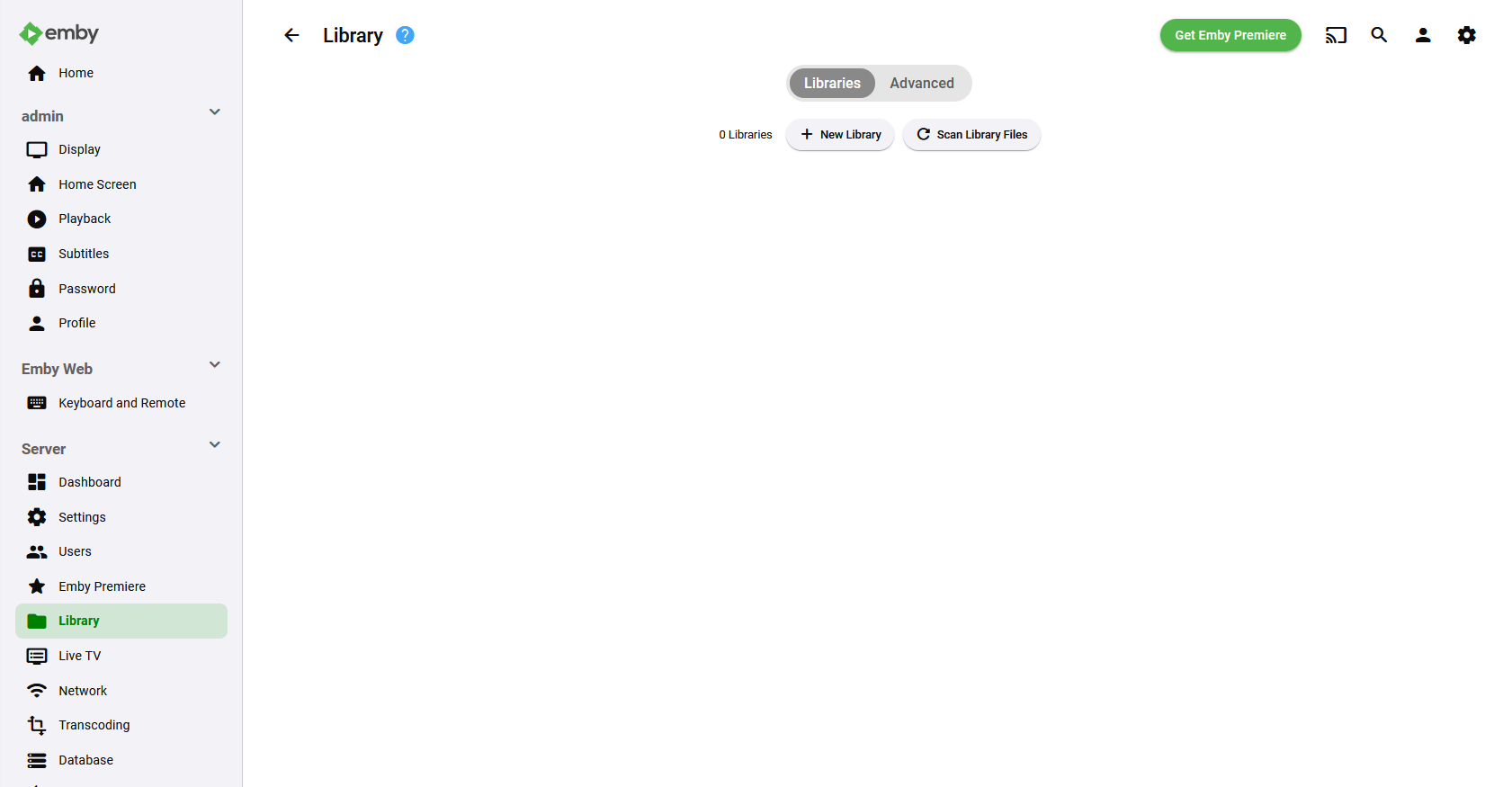](https://doc.puq.info/uploads/images/gallery/2023-11/9.png) Assign the appropriate folder to this library: [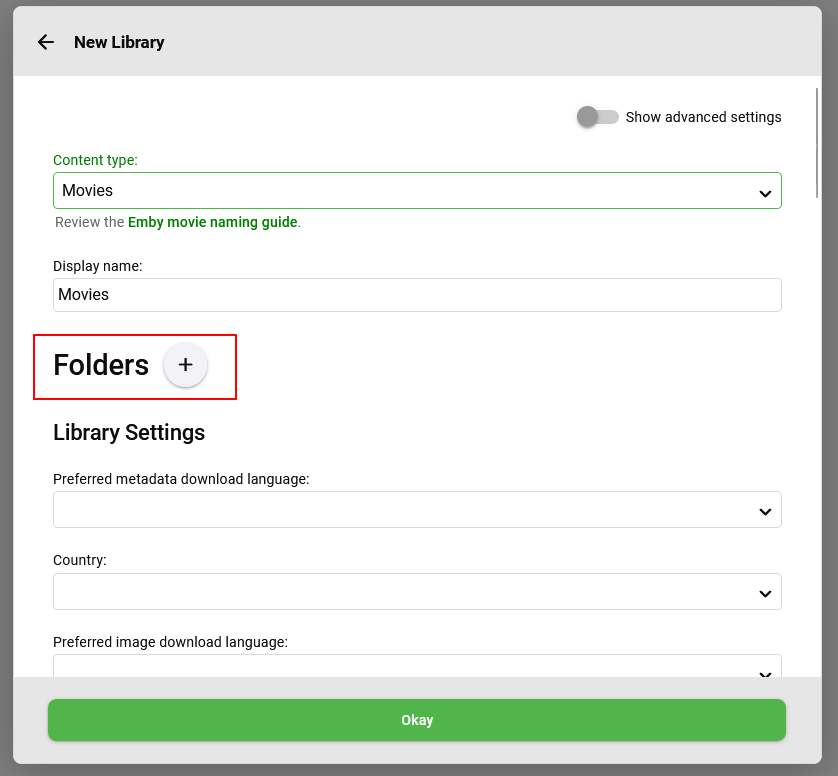](https://doc.puq.info/uploads/images/gallery/2023-11/11.png) [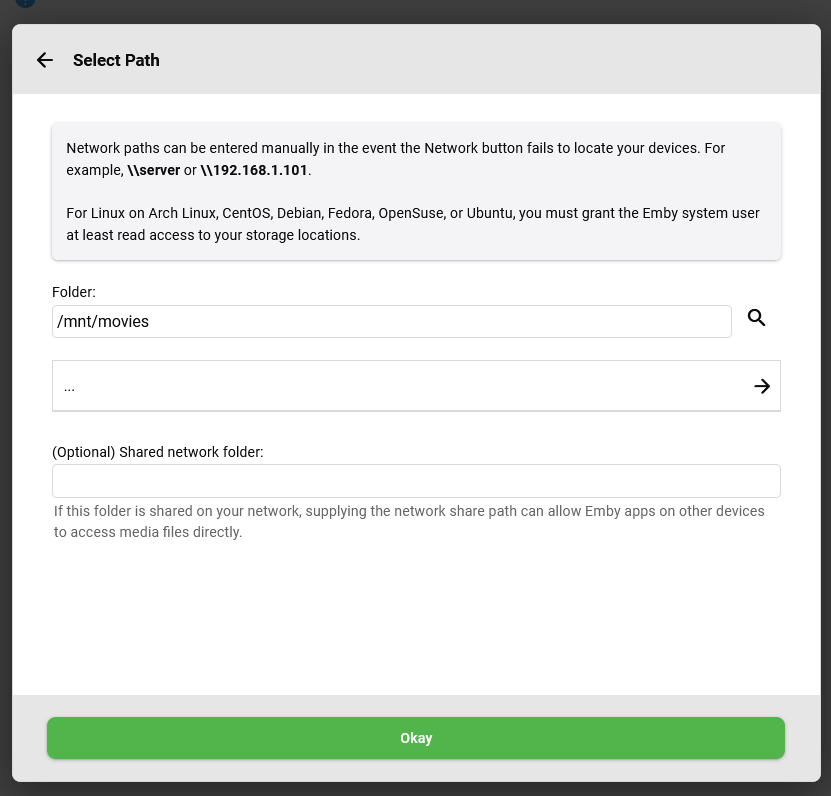](https://doc.puq.info/uploads/images/gallery/2023-11/12.png) ### ### New item: To download a new item, navigate to the root of your project "/" and enter the following commands: ``` cd mnt/LIBRARY_NAME ``` ``` wget DOWNLOAD_ITEM_URL ``` **LIBRARY\_NAME** - The name of the library. **DOWNLOAD\_ITEM\_URL** - The download URL of the item you want to upload to the server. ### ### After all Scan all libraries by clicking on the "Scan All Libraries" button, or scan the specific library by clicking on the three dots and selecting "Scan Library." [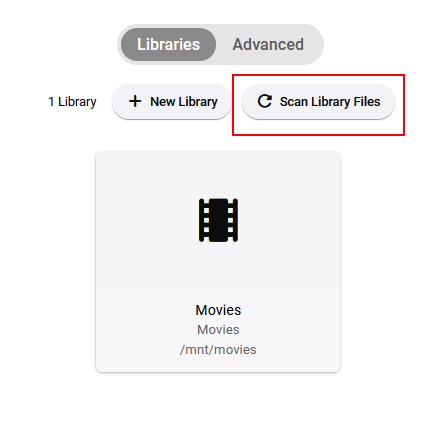](https://doc.puq.info/uploads/images/gallery/2023-11/13.png)[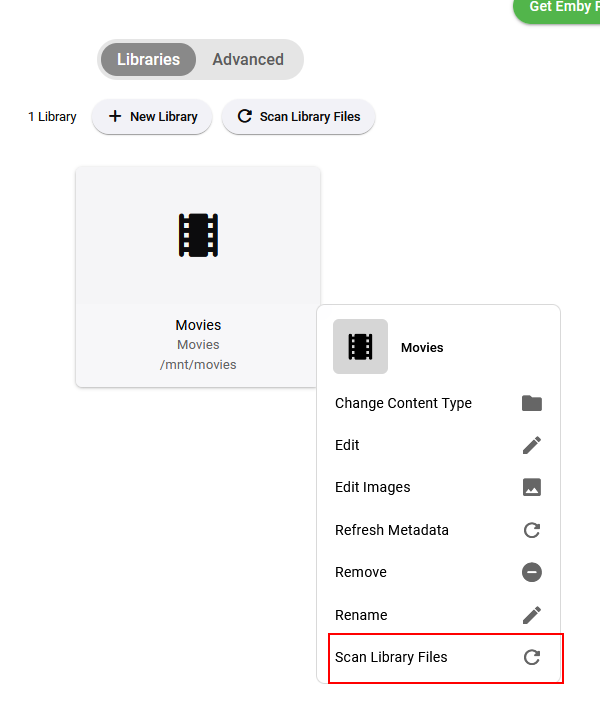](https://doc.puq.info/uploads/images/gallery/2023-11/14.png) # Getting Access Hash (API key) ### Emby module **[WHMCS](https://puqcloud.com/link.php?id=77)** ##### [Order now](https://puqcloud.com/whmcs-module-emby.php) | [Download](https://download.puqcloud.com/WHMCS/servers/PUQ_WHMCS-Emby/) | [FAQ](https://faq.puqcloud.com/) ``` Dashboard -> API Keys ``` ##### Create a new API Key [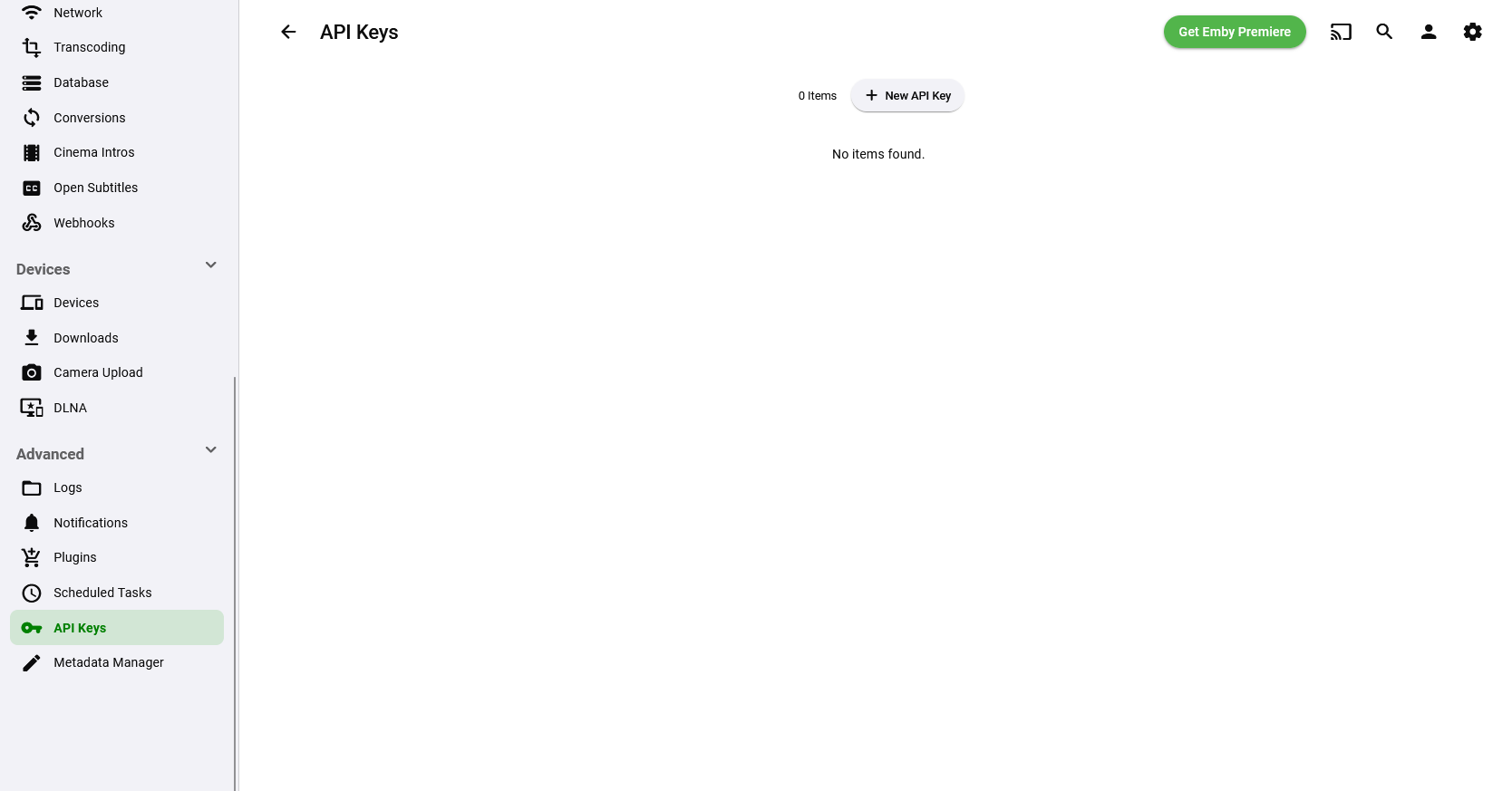](https://doc.puq.info/uploads/images/gallery/2023-11/15.png) ##### Whrite an App Name [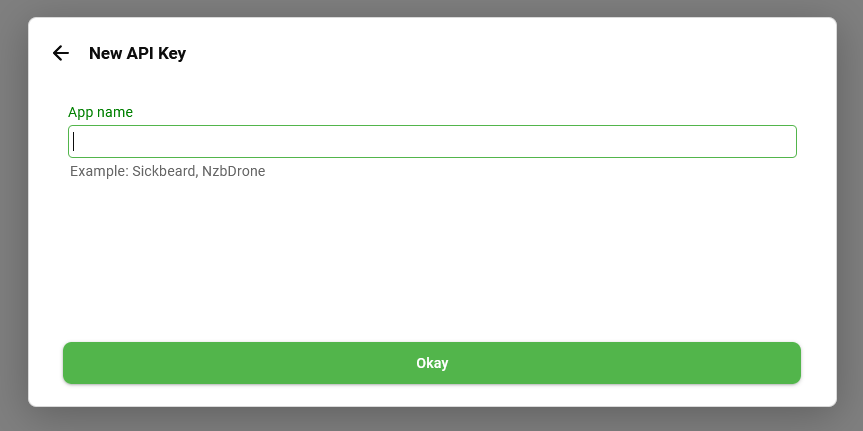](https://doc.puq.info/uploads/images/gallery/2023-11/16.png) ##### Now you can getting an API key [](https://doc.puq.info/uploads/images/gallery/2023-11/17.png) # Client Area # Home screen ### Emby module **[WHMCS](https://puqcloud.com/link.php?id=77)** ##### [Order now](https://puqcloud.com/whmcs-module-emby.php) | [Download](https://download.puqcloud.com/WHMCS/servers/PUQ_WHMCS-Emby/) | [FAQ](https://faq.puqcloud.com/) The end customer, after logging in to his own customer panel, has access to the following information and options - Link to the user manual (which was defined by the administrator when setting up the service.). - Emby server address - Authorization data - User informations - List of active devices - List of enabled user libraries - Drop all devices - Change the Emby user password - Add/Manage Emby Connect account [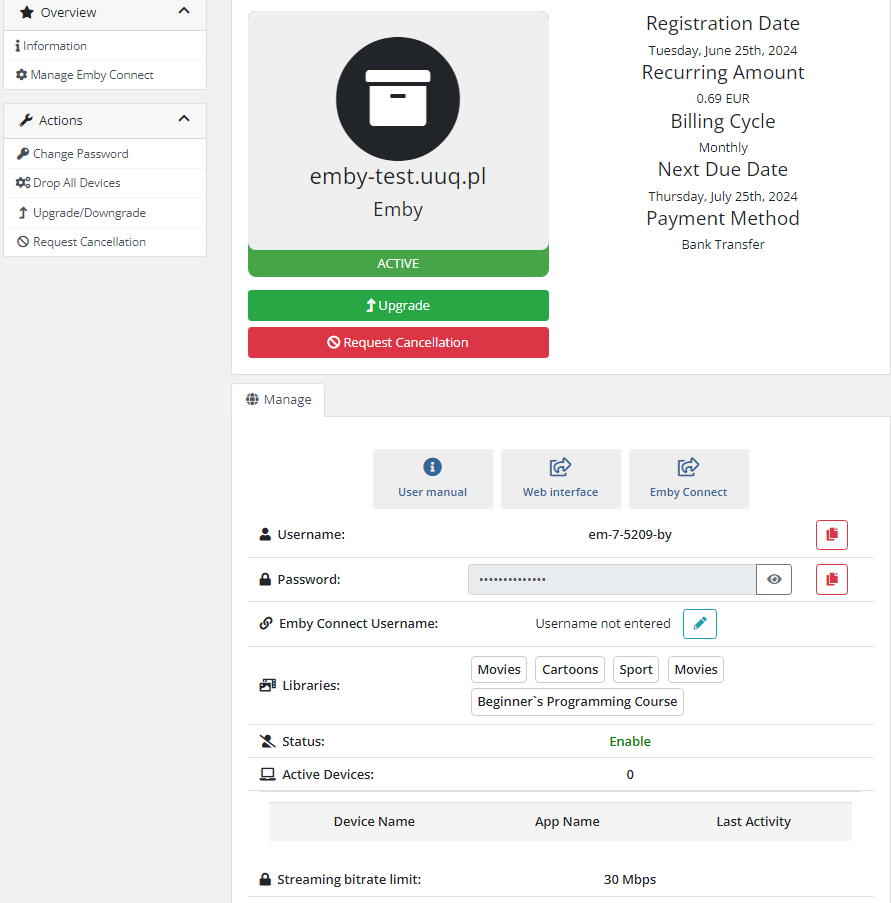](https://doc.puq.info/uploads/images/gallery/2024-07/image-1720697559223.png) # Manage Emby Connect ### Emby module **[WHMCS](https://puqcloud.com/link.php?id=77)** ##### [Order now](https://puqcloud.com/whmcs-module-emby.php) | [Download](https://download.puqcloud.com/WHMCS/servers/PUQ_WHMCS-Emby/) | [FAQ](https://faq.puqcloud.com/) Here you can add an Emby Connect Username for main userIf you leave the field empty, Emby Connect will be disabled.
Register the email in **[Emby Connect](https://emby.media/connect.html).**
One Emby Connect username can only be linked to one Emby account.
[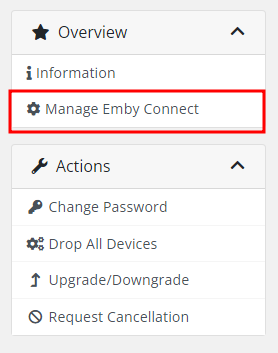](https://doc.puq.info/uploads/images/gallery/2024-05/image-1715068747830.png) [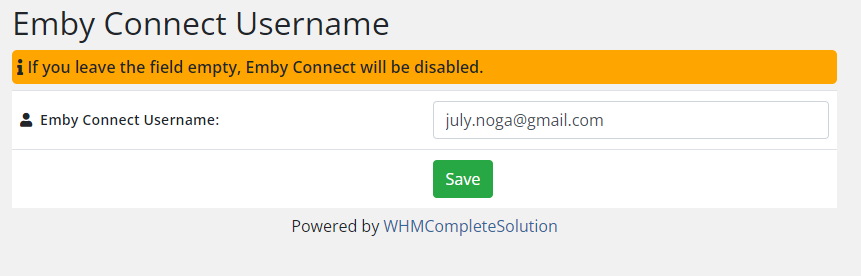](https://doc.puq.info/uploads/images/gallery/2024-05/image-1714752317890.png) # Admin Area # Product Information ### Emby module **[WHMCS](https://puqcloud.com/link.php?id=77)** ##### [Order now](https://puqcloud.com/whmcs-module-emby.php) | [Download](https://download.puqcloud.com/WHMCS/servers/PUQ_WHMCS-Emby/) | [FAQ](https://faq.puqcloud.com/) ##### Here is the data presented for the service admin in WHMCS [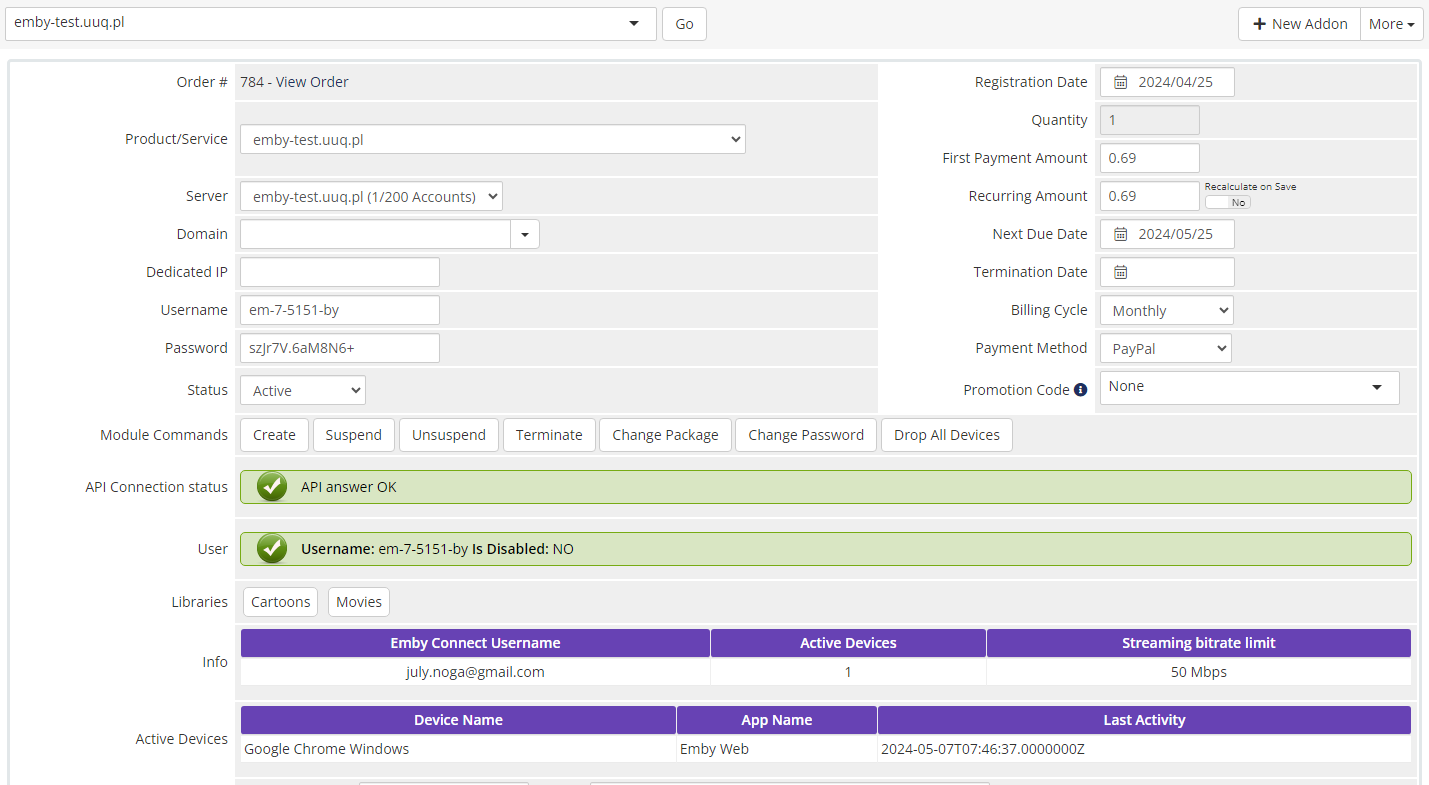](https://doc.puq.info/uploads/images/gallery/2024-05/image-1715068669459.png)