# Service configuration

### Emby module **[WISECP](https://puqcloud.com/link.php?id=78)** 

##### [Order now](https://puqcloud.com/index.php?rp=/store/wisecp-module-emby) | [Download](https://download.puqcloud.com/WISECP/Product/PUQ_WISECP-Emby/) | [FAQ](https://faq.puqcloud.com/)

<p class="callout info">If you do not have a **Service Group** where you want to place the new service, you need to create a new **Service Group**</p>

##### 1. Log in to the administrative area of your **[WISECP](https://puqcloud.com/link.php?id=78)**.

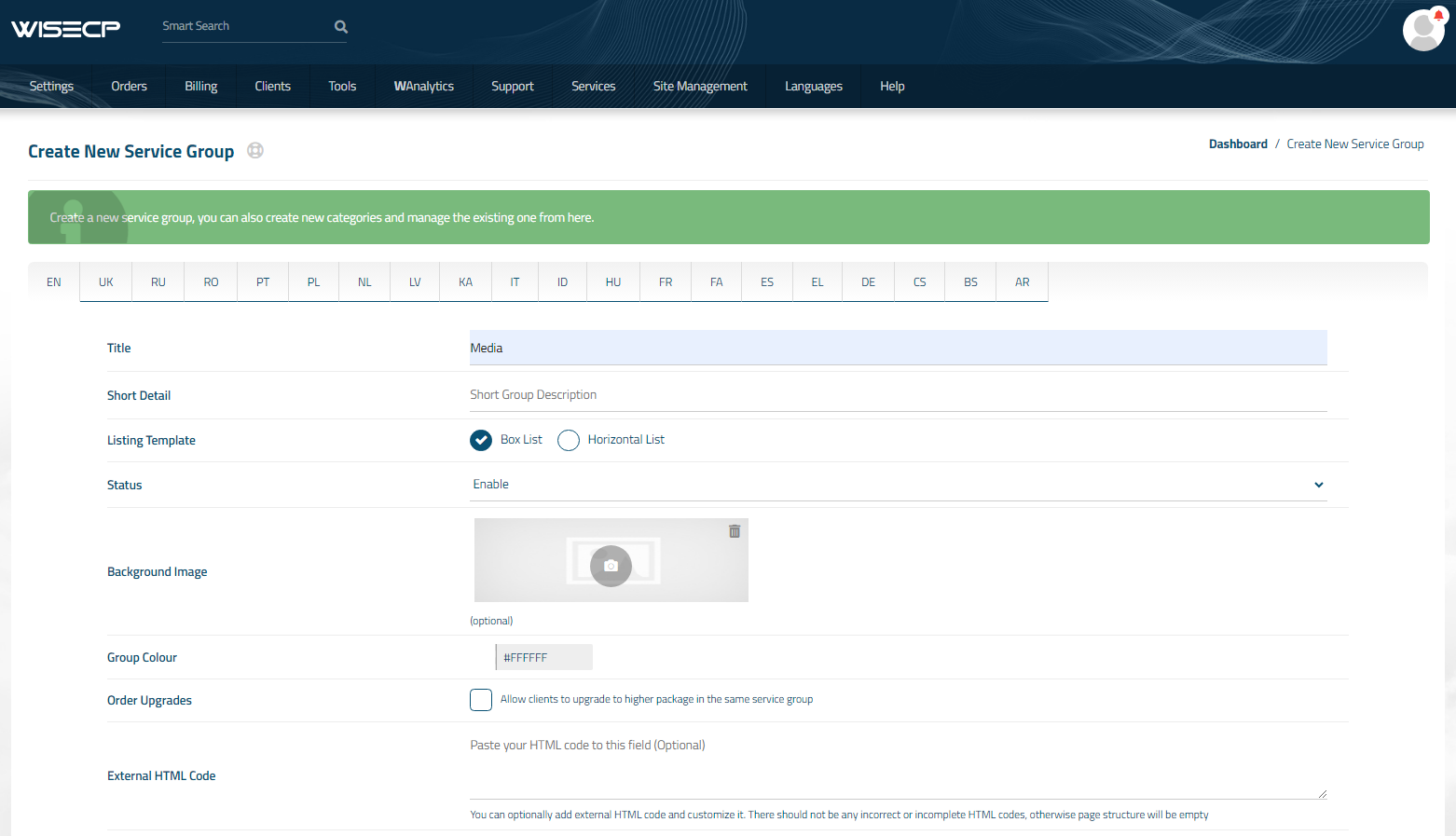
##### 2. Create New Service Group

  
Go to

```
Services -> Service Management -> Add Group
```

[![5.png](https://doc.puq.info/uploads/images/gallery/2023-11/scaled-1680-/32b5.png)](https://doc.puq.info/uploads/images/gallery/2023-11/32b5.png)

Enter all the necessary data and click the '**Create Group**' button.  
[![6.png](https://doc.puq.info/uploads/images/gallery/2023-11/scaled-1680-/yDd6.png)](https://doc.puq.info/uploads/images/gallery/2023-11/yDd6.png)
##### 3. Adding a New Service  


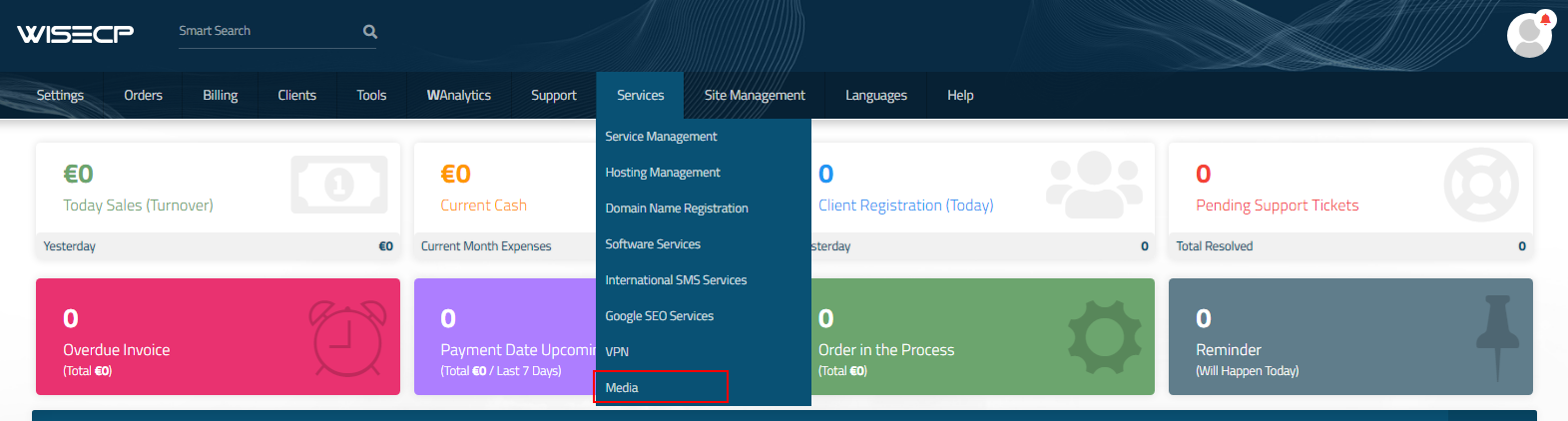
Go to

```
Services -> our service group where you need to add the new service.
```

[![7.png](https://doc.puq.info/uploads/images/gallery/2023-11/scaled-1680-/Shg7.png)](https://doc.puq.info/uploads/images/gallery/2023-11/Shg7.png)
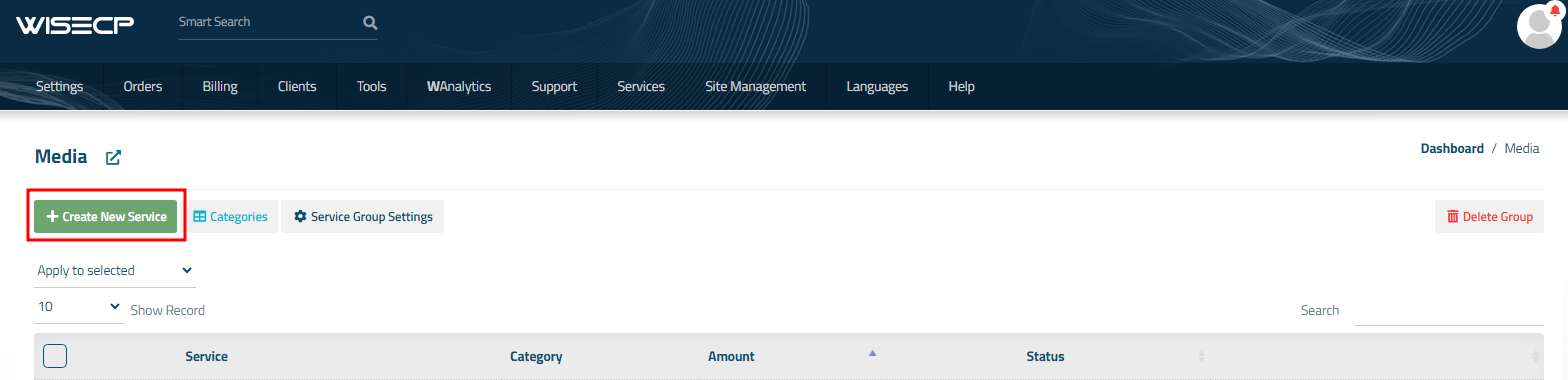
In the opened window, click the '**Create New Service**' button.

[![8.png](https://doc.puq.info/uploads/images/gallery/2023-11/scaled-1680-/auQ8.png)](https://doc.puq.info/uploads/images/gallery/2023-11/auQ8.png)
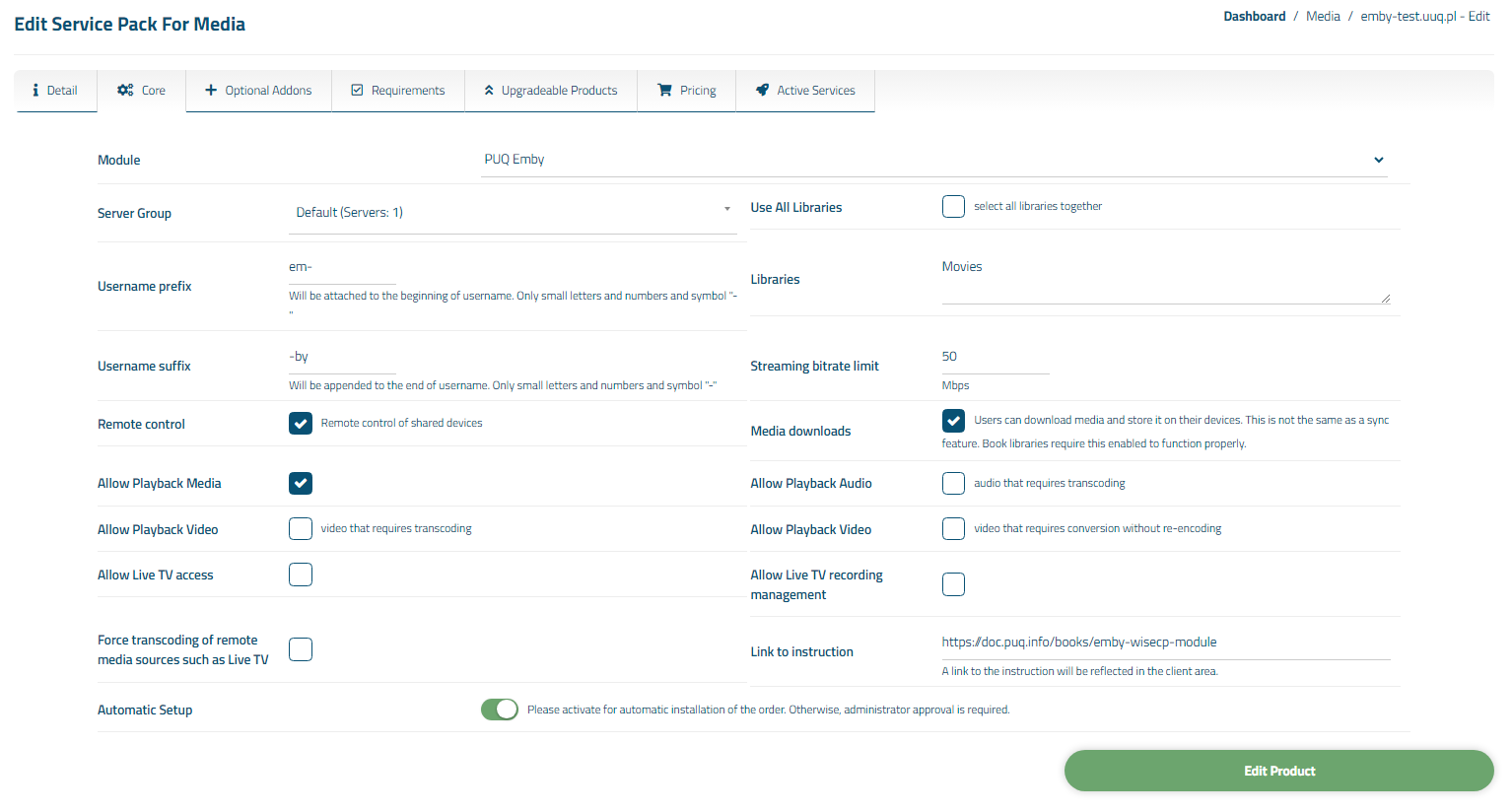
On the opened page, enter all the necessary details for your new service and navigate to the '**Core**' tab.  
  
Select the '**PUQ Emby**' module from the drop-down list of modules.

[![9.png](https://doc.puq.info/uploads/images/gallery/2023-11/scaled-1680-/jwl9.png)](https://doc.puq.info/uploads/images/gallery/2023-11/jwl9.png)
##### 4. Fill in the configuration options according to your preferences.

##### Libraries:

<div id="bkmrk-use-all-libraries%3A-c"><div><div>- **Use All Libraries**: Choosing all of libraries from your Jellyfin server
- **Libraries**: The libraries you want to make available to customers of this product.  
     **(IMPORTANT! Start a new line for each new library)**  
    Example:  
    "Movies  
    Beginner`s Programming Course  
    Comedy"  
     **IMPORTANT!** If you have a folder named "-", please enter it not as the first one or rename it.  
    If you don't want any folder to be accessible, type "-".

</div></div></div>##### User Configuration:

<div id="bkmrk-streaming-bitrate-li"><div><div>- **Streaming bitrate limit:** An optional per-stream bitrate limit for all out of network devices. This is useful to prevent devices from requesting a higher bitrate than your internet connection can handle. This may result in increased CPU load on your server in order to transcode videos on the fly to a lower bitrate.
- **Remote control:** Remote control of shared devices (DLNA devices are considered shared until a user begins controlling them)
- **Media downloads:** Users can download media and store it on their devices. This is not the same as a sync feature. Book libraries require this enabled to function properly.
- **Username prefix/Username suffix:** Necessary in order to generate a username for the service, in the format: **prefix&lt;client\_id&gt;-&lt;service\_id&gt;suffix**

</div></div></div>##### Allow playback (Restricting access to transcoding may cause playback failures in clients due to unsupported media formats)

<div id="bkmrk-media-audio-that-req"><div><div>- **media**
- **audio that requires transcoding**
- **video that requires transcoding**
- **video that requires conversion without re-encoding**

</div></div></div>##### Feature access:

<div id="bkmrk-allow-live-tv-access"><div><div>- **Allow Live TV access**
- **Allow Live TV recording management**
- **Force transcoding of remote media sources such as Live TV**

</div></div></div>##### Links

<div id="bkmrk-link-to-instruction%3A"><div>- **Link to instruction:** Link to the instruction, if filled out, it will be reflected in the client area

</div></div><div id="bkmrk--3"><div></div></div>