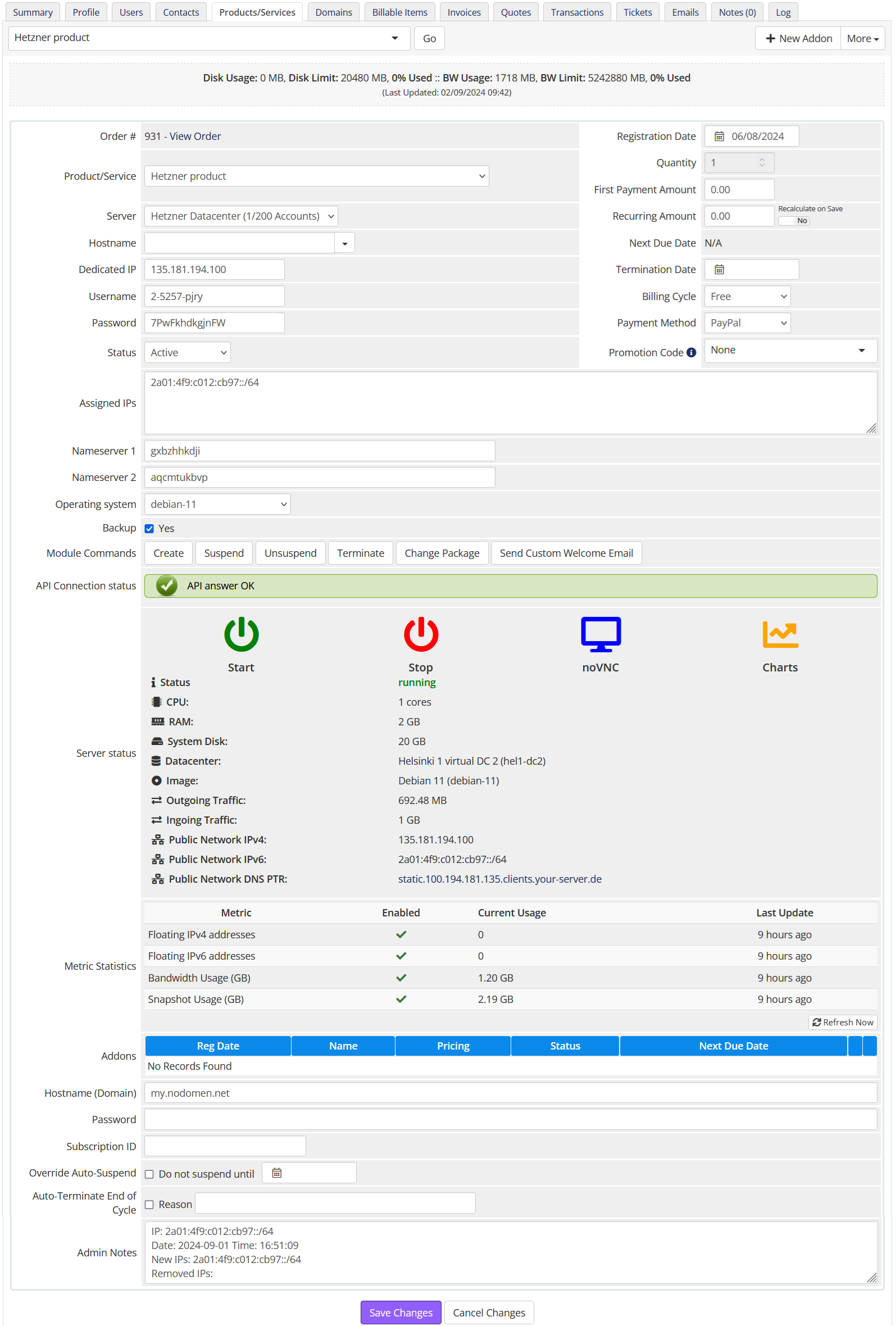
**IP Address Logging.** The system now includes a mechanism that automatically tracks and logs all IP address changes. Every time a new IP address is added or an existing one is removed, a note is automatically added to the **Admin Notes** section. This note includes the date, time, and details of the IP changes. This feature ensures that all changes are documented for easy reference and auditing.
[](https://doc.puq.info/uploads/images/gallery/2024-09/image-1725264544352.png) # Product configuration in WHMCS ### Hetzner Datacenter module **[WHMCS](https://puqcloud.com/link.php?id=77)** ##### [Order now](https://puqcloud.com/whmcs-module-hetzner-datacenter.php) | [Download](https://download.puqcloud.com/WHMCS/servers/PUQ_WHMCS-HetznerDatacenter/) | [FAQ](https://faq.puqcloud.com/) **License key:** A pre-purchased license key for the "PUQ Hetzner Datacenter" module. For the module to work correctly, the key must be active. **Server name:** This option allows you to add a prefix string to the server name. A new name will be generated each time the create account function is called. The NameServer will be present only if the field is set: `NameServer-[*user_id*]-[*service_id*]`. **Server type:** The type of server to be deployed. Selected from the available server types provided by Hetzner. This field is automatically populated based on your selection in *Select Server and Location*. **Server location:** The physical location of the server. Selected from the available locations provided by Hetzner. This field is automatically populated based on your selection in *Select Server and Location*. **Server placement groups:** Controls how the server should be grouped within the data center. This field is automatically populated based on your selection in *Select Placement Group*. **Server image:** The operating system image to be used for the server. Automatically populated based on the selection in *Select Image*. **SSH keys:** Keys used for accessing the server. Multiple keys can be added. Auto-populated based on the selection in *Select SSH Keys*. **Server networks:** Networks to which the server will be connected. Auto-populated based on your selection in *Private Networks*. **Server firewalls:** Firewall rules to be applied to the server. Select from predefined rules or create custom ones. Auto-populated based on the selection in *Select Firewalls*. **User data:** Custom user data used during server creation (e.g., cloud-init). Field limit: 32KB. **Package setting:** Additional settings for the package: - **Hide PTR open record:** Hides the PTR control button in the client area. - **Not allow access to server on VNC/NC:** Prohibits access to the server console. - **Not allow access to Charts:** Hides server resource charts. - **Not allow reset password:** Disables the password reset action for the service. - **Backup:** Allows access to server backups. Select the name of the custom field (default: *Backup*). - **Snapshot:** Allows access to server snapshots. - **Server labels:** Adds labels to the server; `user_id` and `service_id` are added automatically. - **Hide inputs on client area:** Hides inputs (domain, password, username, nameserver1/2) and sets server label(s) in the client area. - **Firewall for suspend service:** Select a firewall profile used when suspending the service (or disable the VM). - **Link to instruction:** A documentation link displayed in the client area. - **Username as root:** Use `root` as the administrative username (otherwise the image default is used). #### **Automatic Pricing & Rounding (UI)**The right-hand panel contains a live pricing tool for bulk price management. It keeps UI and backend pricing fully consistent.
- **Base price (Net/Gross):** Displays the Hetzner base price. Choose Net or Gross as a starting point. - **Percentage margin:** Enter the markup applied to the Hetzner base price. - **Select currencies:** Bulk-select one or more currencies for which prices will be generated. - **Select periods:** Bulk-select billing cycles (Monthly, Quarterly, Semi-Annually, Annually, Biennially). - **Preview table:** Prices recalculate instantly when Base price or Percentage changes. - **Apply Bulk Pricing:** Updates or creates missing `tblpricing` rows for the selected currencies and periods. - **Automatically apply price daily:** Enables daily synchronization via cron using the saved configuration. - **Rounding policy:** Always round *up* according to ISO-4217 minor units (0/2/3 decimals). Monthly price is rounded first, then multiplied by the period factor and rounded again. The JS preview and server-side logic are identical. - **Currency source:** Uses Hetzner Cloud API `/pricing.currency` (no hard-coded EUR). Server JSON responses follow currency precision. - **Expanded dropdown descriptions:** Server selectors show *name – architecture – cores – memory – disk* for clarity.Bulk pricing settings are persisted per product in `available_servers_input` (Base64 JSON) and merged safely without overwriting unrelated saved fields.
#### **Daily Cron automation** - DailyCronJob respects the saved bulk pricing configuration. - Fetches the latest Hetzner base price once per run and applies it to all selected currencies and periods. - Creates missing `tblpricing` rows and logs detailed status for each action (with trace identifiers in Module Log). #### **Admin Tools for Stock Management** - **Clear and Reset:** Restores `stockcontrol` and `qty` values in product configuration from the saved record. - **restore\_saved\_stockcontrol (AJAX):** Restores data from storage and removes the old entry. Logged states: *input*, *not\_found*, *updated\_product*, *deleted\_saved*, *done*, *error*. #### **API Settings****Please pay attention to the order of filling in the API Settings section.** Different locations expose different networks; some networks are not available in specific locations.
**Select Server and Location:** Choose the server type and location from the available options provided by Hetzner. **Select Image:** Choose the operating system image for the server from the available options provided by Hetzner.You can deploy services from your backups or snapshots to pre-configure solutions for clients.
**Custom option name for image:** Specify a custom option name for the server image if needed.**Custom option name for image** is evaluated only during initial deployment. Pass the image name you want to use for server creation.
**Allow user to select ISO image:** Enable this option to allow users to select an ISO image. **Allow user to reinstall service:** Enable this option to allow users to reinstall the service from the client area. **Allow user to choose backup and snapshot when reinstalling service:** Enable this to let users select a backup/snapshot for reinstall.**When enabled,** users can browse their snapshots and backups and reinstall the system directly from a chosen snapshot or backup.
**Select Placement Group:** Choose the placement group for the server from the available options provided by Hetzner. **Select SSH Keys:** Choose the SSH keys used to access the server. **Public Networks:** Configure public networking (enable/disable public IPv4 and IPv6).If you turn off public networks, you must attach at least one private network.
**Private Networks:** Configure the private networks attached to the server. **Select Firewalls:** Choose firewall rules to be applied to the server. #### **Email configuration:** Use pre-built templates to notify users about common actions: - **Custom Welcome Email** - **Custom start stop service Email** - **Custom reset server password Email** - **Custom snapshot action Email** - **Custom backup action Email** - **Custom ISO action Email** - **Custom reinstall action service Email** #### **Metric Billing:** - **Floating IPv4 addresses:** Configure pricing for floating IPv4 addresses. - **Floating IPv6 addresses:** Configure pricing for floating IPv6 addresses. - **Bandwidth Usage (GB):** Configure pricing for bandwidth usage. - **Snapshot Usage (GB):** Configure pricing for snapshot storage/usage. [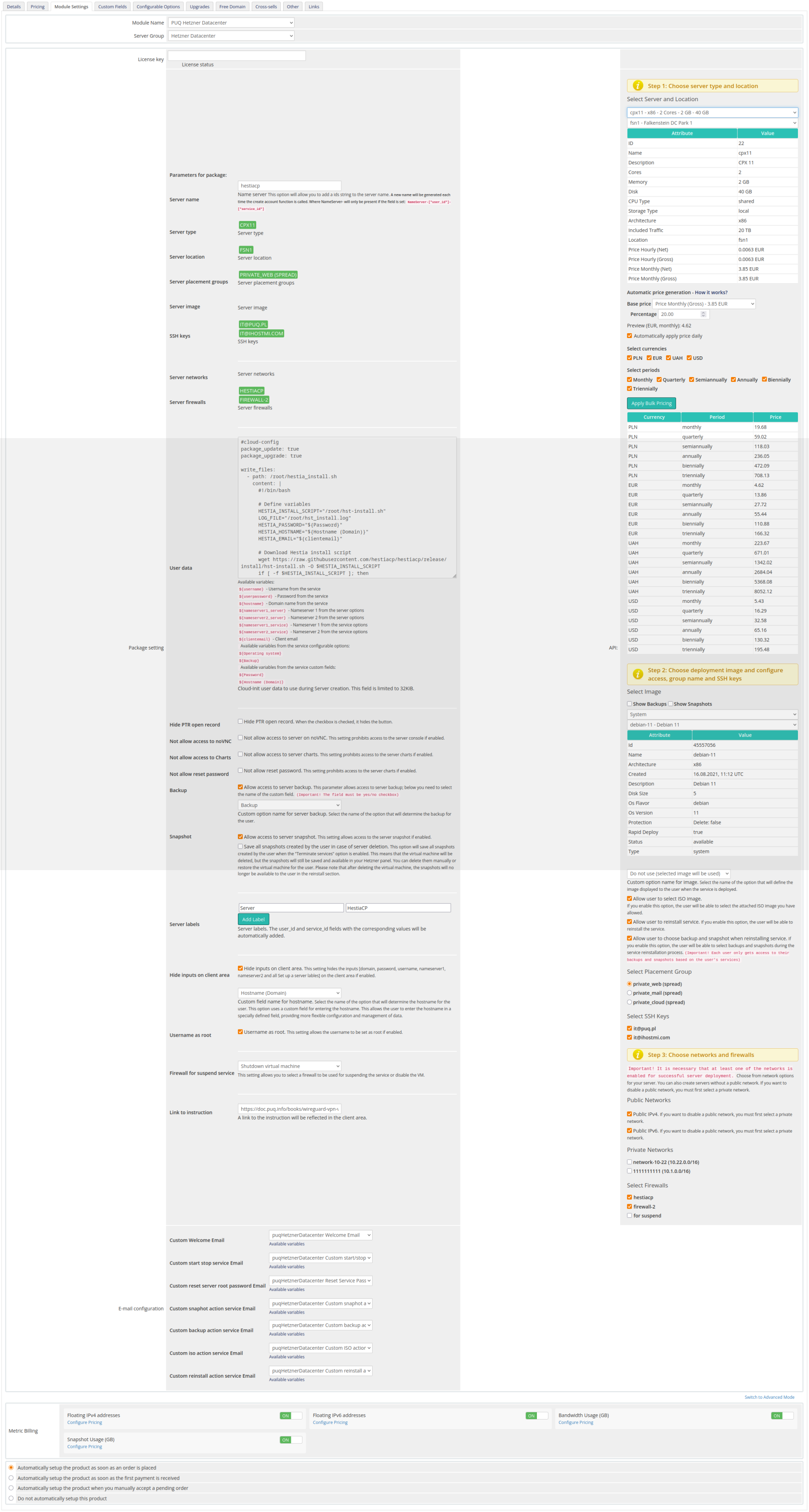](https://doc.puq.info/uploads/images/gallery/2025-10/7sBproduct-hetzner.png)