
Configurable Option
Hetzner Datacenter module WHMCS
Order now | Download | FAQ
Overview
Configurable Options in WHMCS allow clients to choose specific configurations while ordering a product. In the PUQ Hetzner Datacenter module, these options are used to select an Operating System image and enable Backup access.
What this does
WHMCS Configurable Options let clients choose parameters during order. In this module they are used to: (1) pick an Operating system image; (2) enable/disable Backup access.
Step 1 — Create a Configurable Option Group and link it to your product
- Go to
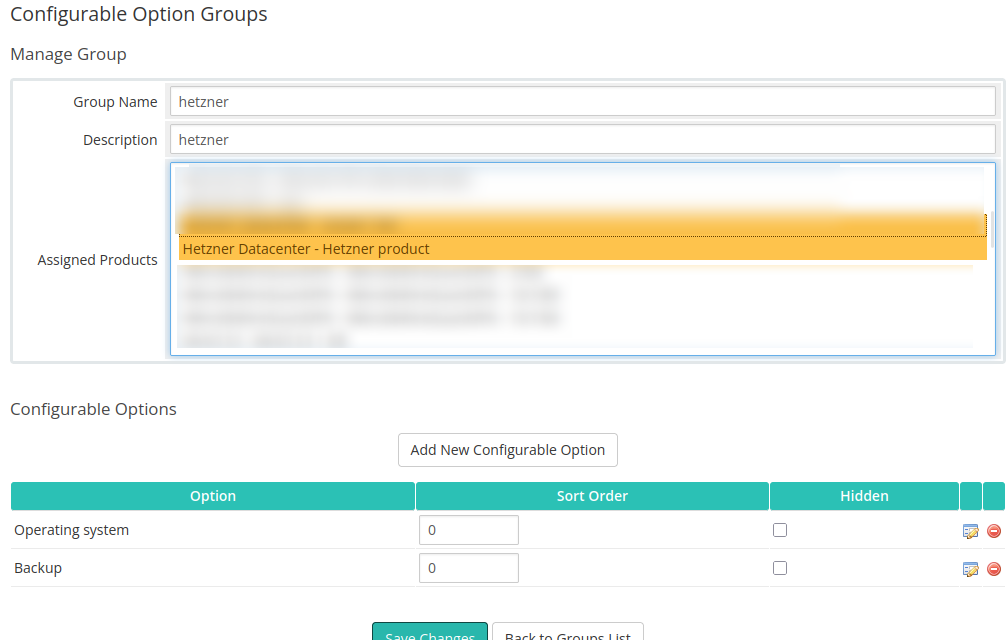
System Settings → Products/Services → Configurable Optionsand click Create a New Group. - Set Group Name (e.g., “hetzner”) and Description (optional).
- In Assigned Products select your Hetzner product (e.g., “Hetzner Datacenter – Hetzner product”).
- Click Save Changes.
Step 2 — Add options inside the group
2.1 Operating system (Dropdown)
- Click Add New Configurable Option.
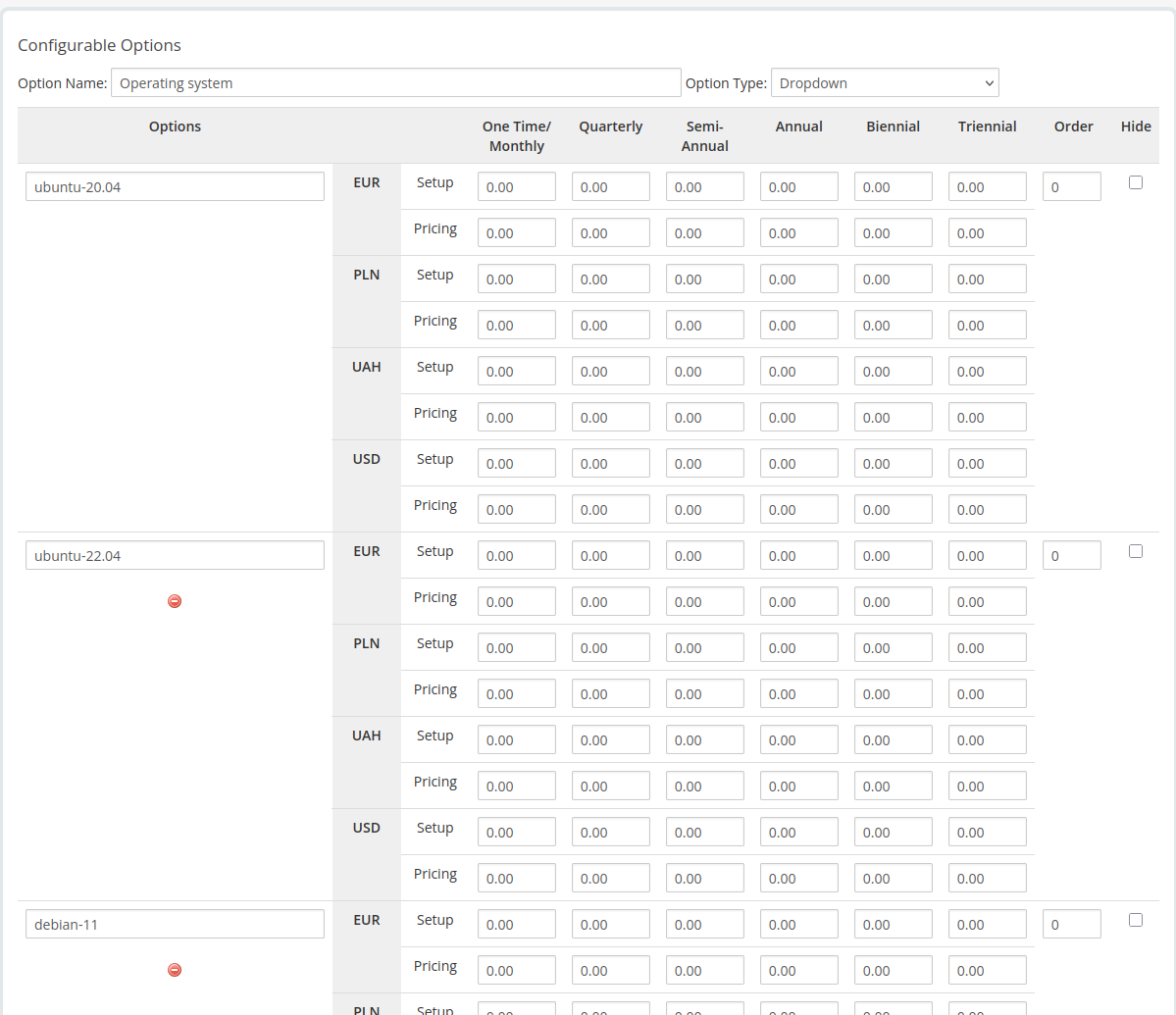
- Set Option Name: Operating system; Option Type: Dropdown.
- Add values (examples): ubuntu-20.04, ubuntu-22.04, debian-11 etc.
- Optionally define pricing per currency and billing cycle.
- Save.
2.2 Backup (Yes/No)
- Click Add New Configurable Option again.
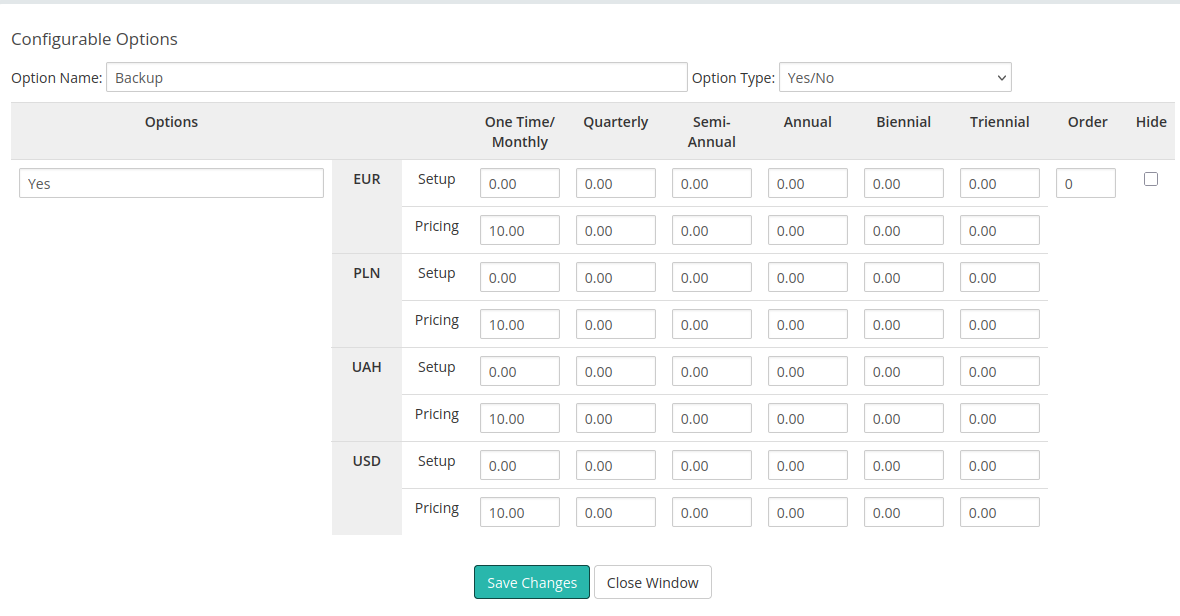
- Set Option Name: Backup; Option Type: Yes/No.
- Optionally add a price for enabling backup (per currency/cycle).
- Save.
Step 3 — Map these options in the module settings
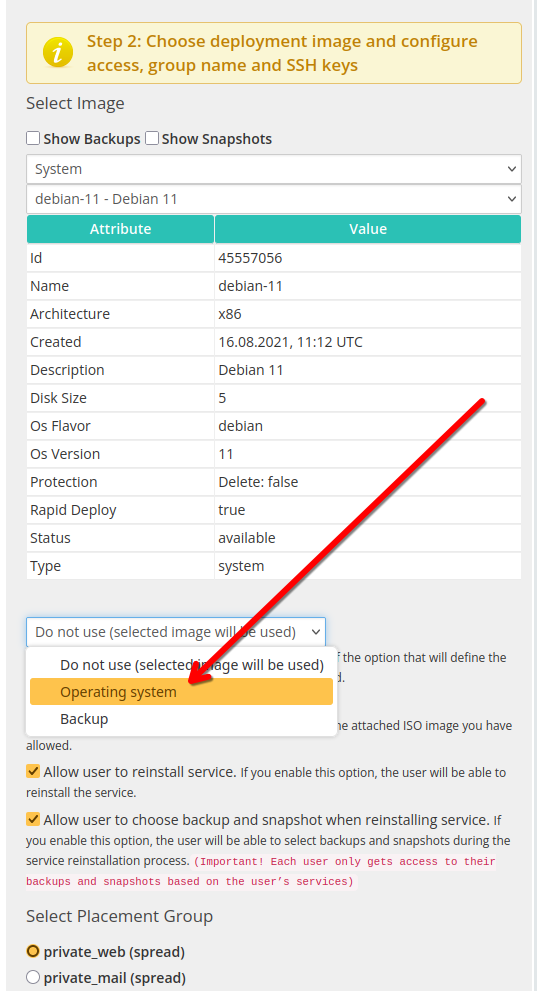
Open your product → Module Settings (PUQ Hetzner Datacenter) and map the WHMCS options to the module controls:
- Custom option name for image — choose Operating system. This lets clients select the OS during order.

- Backup — tick Allow access to server backup and select the Backup option from the dropdown.


Available Operating Systems and Application Images
All available operating system and application images can be viewed in the dropdown list when selecting an ISO image in the product configuration.
This list is always dynamically updated from the Hetzner API, so it reflects the most recent system templates.
The module uses the Name field value (for example: debian-11).
Examples of available system images that can be added to the Operating system configurable option:
-
debian-11
-
debian-12
-
debian-13
-
ubuntu-20.04
-
ubuntu-22.04
-
ubuntu-24.04
-
centos-stream-9
-
centos-stream-10
-
rocky-8
-
rocky-9
-
rocky-10
-
alma-8
-
alma-9
-
alma-10
-
fedora-41
-
fedora-42
-
opensuse-15
In addition to standard operating systems, the Hetzner catalog also includes preconfigured application images.
These can also be added to the same configurable option group if you want to allow clients to deploy ready-to-use environments:
-
lamp
-
wordpress
-
jitsi
-
nextcloud
-
docker-ce
-
gitlab
-
prometheus-grafana
-
wireguard
-
owncast
-
photoprism
-
rustdesk
-
coolify
All these image names can be used directly in the Operating system dropdown when creating configurable options in WHMCS.
How it behaves for the client
- At order time, the client chooses an OS from Operating system and toggles Backup (Yes/No).
- The module deploys the server with the selected image. If Backup is enabled, backup management becomes available in the client area.
Naming rules (important)
- Option names in WHMCS must match those selected in the module: exactly Operating system and Backup.
- If you rename an option later, revisit the Module Settings and re-select it in the dropdowns.