
Product Configuration
Hetzner Datacenter module WHMCS
Order now | Download | FAQ
Add new product to WHMCS
System Settings → Products/Services → Create a New ProductIn the Module settings section, select the "PUQ Hetzner Datacenter" module.
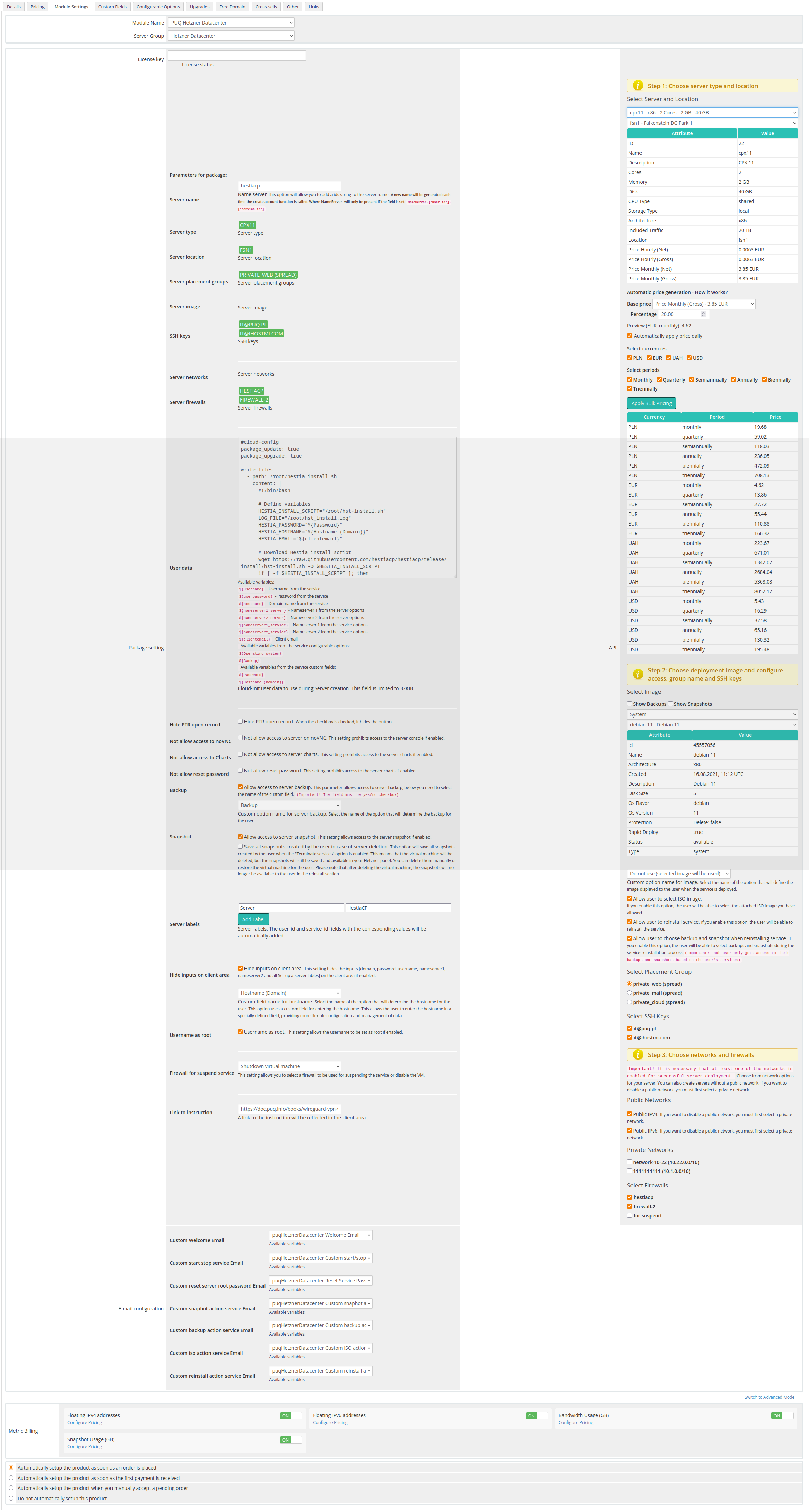
Package Settings
License key: A pre-purchased license key for the "PUQ Hetzner Datacenter" module. The key must be active.
Server name: Adds a prefix to the generated server name. A new name is generated on create. Format: NameServer-[*user_id*]-[*service_id*].
Server type: Type of server to deploy. Auto-filled from the Select Server and Location panel.
Server location: Physical location. Auto-filled from Select Server and Location.
Server placement groups: Placement group for the server. Auto-filled from Select Placement Group.
Server image: OS image to use. Auto-filled from Select Image.
SSH keys: Keys for server access. Auto-filled from Select SSH Keys.
Server networks: Networks to attach. Auto-filled from Private Networks.
Server firewalls: Firewall profiles to apply. Auto-filled from Select Firewalls.
User data: Custom cloud-init or init script used during server creation (limit 32KB).
Package setting: Additional options:
- Hide PTR open record: Hides PTR control button.
- Not allow access to server on VNC/NC: Blocks access to the server console.
- Not allow access to Charts: Hides resource charts.
- Not allow reset password: Disables password reset.
- Backup: Allows access to server backups (select the custom field name; default: Backup).
- Snapshot: Allows access to server snapshots.
- Server labels: Adds labels;
user_idandservice_idare added automatically. - Hide inputs on client area: Hides inputs (domain, password, username, nameserver1/2) and sets server label(s).
- Username as root: Use
rootas the administrative username (or keep image defaults). - Firewall for suspend service: Select a firewall profile used when suspending the service (or disabling the VM).
- Link to instruction: A documentation link shown in the client area.
Automatic Pricing & Rounding (UI)
The right-hand panel includes a new Automatic Pricing UI for consistent price management.
- Base price (Net/Gross): Displays Hetzner base price; choose Net or Gross.
- Percentage margin: Set a markup applied to Hetzner base price.
- Automatic price generation – How it works? Collapsible help explaining rules and examples.
- Select currencies: Bulk select one or multiple currencies.
- Select periods: Bulk select billing cycles (Hourly, Monthly, Quarterly, Semi-Annually, Annually, Biennially).
- Preview table: Live recalculation per currency and period before applying.
- Apply Bulk Pricing: Writes or creates
tblpricingrows according to selection. - Automatically apply price daily: Enables cron-based daily sync using saved configuration.
- Rounding policy: Always round up to ISO-4217 minor units (0/2/3 decimals). Monthly price is rounded first; then multiplied by the period factor and rounded again. JS preview and server-side logic are identical.
- Currency source: Uses Hetzner Cloud API
/pricing.currency(not hard-coded EUR). - Expanded server dropdowns: Server selectors show name – architecture – cores – memory – disk.
API Settings
Select Server and Location: Choose server type and region from Hetzner’s catalog (Step 1).
Select Image: Choose OS image or snapshot (Step 2).
Custom option name for image: (Optional) Provide a custom option label for the image selector.
Allow user to select ISO image: Let users choose an ISO for boot/install.
Allow user to reinstall service: Enables one-click reinstall from the client area.
Allow user to choose backup and snapshot when reinstalling service: Allow selecting a backup/snapshot during reinstall.
Select Placement Group: Pick a placement group for spreading/affinity (Step 2/3).
Select SSH Keys: Choose keys for access.
Public Networks: Enable/disable public IPv4/IPv6.
Private Networks: Attach private networks.
Select Firewalls: Choose firewall rules to apply.
Admin Tools for Stock Management
- Clear and Reset: Button in the product configuration that restores
stockcontrolandqtyto saved values. - Restore saved stockcontrol: Internal action that recovers data from the stored record and removes the obsolete entry. Actions are logged (input, not_found, updated_product, deleted_saved, done, error).
Email configuration:
Choose pre-built templates to notify users about actions:
- Custom Welcome Email
- Custom start stop service Email
- Custom reset server password Email
- Custom snapshot action Email
- Custom backup action Email
- Custom ISO action Email
- Custom reinstall action service Email
Metric Billing:
- Floating IPv4 addresses: Configure pricing.
- Floating IPv6 addresses: Configure pricing.
- Bandwidth Usage (GB): Configure pricing.
- Snapshot Usage (GB): Configure pricing.