# Jellyfin Family WHMCS module
# Description
### Jellyfin Family module **[WHMCS](https://puqcloud.com/link.php?id=77)**
##### [Order now](https://puqcloud.com/whmcs-module-jellyfin-family.php) | [Download](https://download.puqcloud.com/WHMCS/servers/PUQ_WHMCS-Jellyfin-Family/) | [Community](https://community.puqcloud.com/)
## Jellyfin Family WHMCS module
The **Jellyfin Family WHMCS module** turns your WHMCS into an automated platform for selling **Jellyfin media-server accounts with a family / sub-account system**. Each WHMCS service is mapped to a main Jellyfin user whose access is fully driven by the product configuration: which libraries the user can see, what playback and transcoding is allowed, Live TV access, SyncPlay, streaming bitrate limit, maximum active sessions and failed-login lockout.
On top of the main account, the **Family** edition lets the client create a configurable number of **media accounts** — additional named Jellyfin sub-users (`username-name`), each with its own password, enabled state and restricted set of libraries. Clients add, edit and delete their media accounts, and drop their devices, directly from the client area — all over AJAX.
Account provisioning is automatic — on **Create** the module generates the username and password, creates the Jellyfin user and applies the configured policy. **Suspend / Unsuspend / Change package / Terminate** keep the main user *and every media account* in sync with the WHMCS service lifecycle. Clients manage everything from the WHMCS client area.
- - - - - -
## What's new in v3.0
Version 3.0 is a **complete rewrite** that brings the module up to the modern PUQ standard:
- 👨👩👧👦 **Media accounts, reimagined** — the family sub-account system is now fully **AJAX**: add, edit and delete media accounts in a modal, pick their libraries with checkboxes, toggle each one on/off and drop its devices — all without leaving the page.
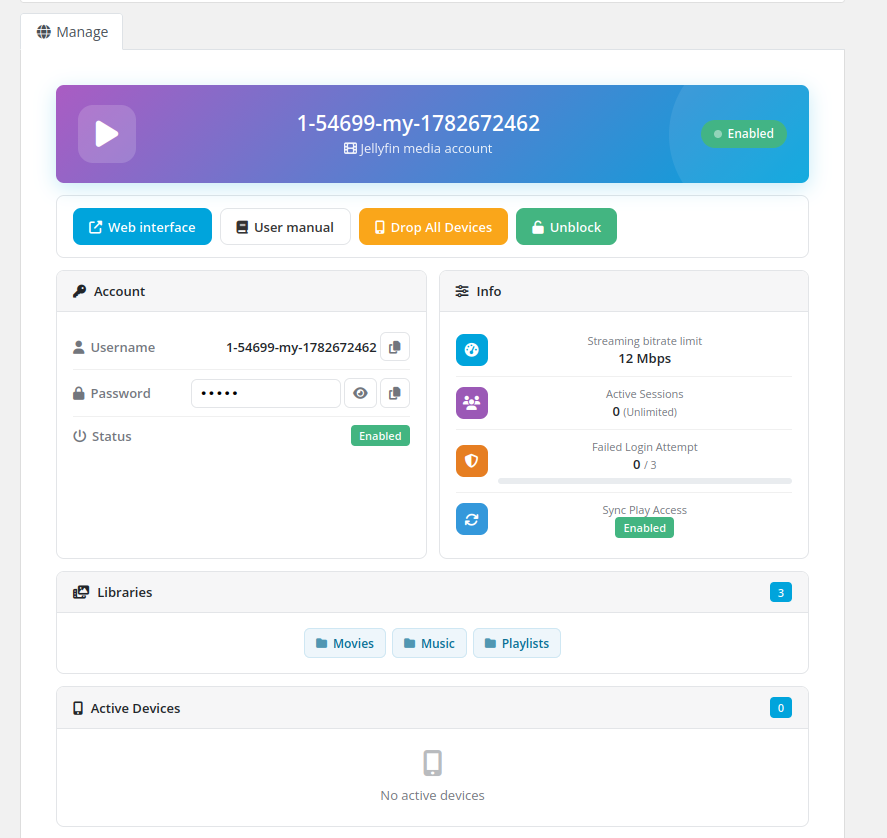
- 🎨 **Redesigned client area** — a beautiful, fully **AJAX** card-based interface: a gradient status hero, account credentials with copy/show, live usage bars (sessions, failed logins), library chips, an active-devices table and a media-accounts card. No page reloads — every action reports back with a toast.
- 🗂️ **Dynamic library picker** — libraries are now loaded **live from your Jellyfin server** as checkboxes with *Select all* and *Reload*, instead of typing names by hand.
- 🔌 **Jellyfin 10.11.10+ ready** — switched to the modern `Authorization: MediaBrowser` scheme and the current API routes, so the module keeps working on Jellyfin **10.12 / 10.13** where the legacy authorization is removed.
- 🧰 **One-click self-service** — clients can **drop all devices** and **unblock** their account straight from the client area.
- ⚙️ **Streamlined configuration** — all product settings live in a single, injected settings panel; upgrading from v2.x needs **no reconfiguration**.
- 🛡️ **Hardened & diagnosable** — PHP 7.4 / 8.1 / 8.2+ clean, null-safe, with full error logging to the WHMCS Module Log for easy troubleshooting.
- 🌍 **25 languages** — the full interface is translated.
- - - - - -
## Main features
- **Automatic provisioning** — Jellyfin user created on service activation with generated credentials
- **Media accounts (Family)** — let clients create a configurable number of sub-users, each with its own password, enabled state and library subset; managed from the client area over AJAX
- **Full lifecycle sync** — suspend, unsuspend, change package, terminate and change password (cascaded to every media account)
- **Library access control** — grant all libraries or a selected set per product
- **Playback & transcoding policy** — media playback, audio/video transcoding, remux without re-encoding, force remote-source transcoding
- **Feature access** — Live TV access and recording management
- **Session & security limits** — streaming bitrate limit, maximum active sessions, failed-login lockout
- **SyncPlay & downloads** — SyncPlay access level and media-download control
- **Flexible credentials** — configurable password generation and standard or macro-based custom username templates
- **AJAX client area** — modern card-based UI showing status, credentials, allowed libraries, active devices and sessions
- **Self-service actions** — clients can drop all devices and unblock their account
- **Admin service tab** — user status, libraries, package info and active devices on the WHMCS service page
- **Multi-language** — 25 languages
- **License verification** — built-in online/offline license system with admin homepage alerts
- - - - - -
## System requirements & compatibility
The module supports **PHP 7.4, 8.1 and 8.2+**, shipped as a separate ionCube build per PHP version. Download the build that matches the PHP version your WHMCS runs on.
| WHMCS version | PHP version | Module build |
|---|
| WHMCS 8.x | 7.4 | `php74` |
| WHMCS 8.x | 8.1 | `php81` |
| WHMCS 8.x | 8.2 | `php82` |
| WHMCS 9.x | 8.2 | `php82` |
> Match the build to the **server's PHP version**, not to the WHMCS version. PHP 8.2 and any newer PHP → always use `php82`. Requires ionCube Loader v13+.
A reachable **Jellyfin server, version 10.11.10 or newer**, with an administrator account and API key is required. The module uses the modern `Authorization: MediaBrowser` scheme and the current user/password API routes, so it stays compatible with Jellyfin 10.12/10.13 where the legacy authorization headers are removed.# Changelog
### Jellyfin Family module **[WHMCS](https://puqcloud.com/link.php?id=77)**
##### [Order now](https://puqcloud.com/whmcs-module-jellyfin-family.php) | [Download](https://download.puqcloud.com/WHMCS/servers/PUQ_WHMCS-Jellyfin-Family/) | [Community](https://community.puqcloud.com/)
- - - - - -
## v3.0 (01-07-2026)
Full rewrite onto the PUQ module skeleton (shared with the other PUQ WHMCS modules).
**Added**
- AJAX, card-based client area with a gradient status hero, a two-column account/usage layout, usage progress bars (sessions, failed logins), library chips, an active-devices table and a **media-accounts** card — plus toast notifications and confirm dialogs.
- **AJAX media accounts (Family).** Clients add, edit and delete media accounts in a modal, pick their libraries with checkboxes, toggle each on/off and drop its devices — all without a page reload. The old `?action_m=` sub-pages are replaced. The number of media accounts is set per product (*Media Accounts Configuration → Count of media accounts*).
- Suspend / Unsuspend / Change package / Terminate now **cascade to every media account** (disable, re-enable to the stored state, re-apply policy, or delete).
- Admin service tab shows a **Media Accounts** table (enabled state, username, enabled libraries).
- Self-service **Drop all devices** and **Unblock** actions in the client area (no page reload).
- **Dynamic library picker** in the product configuration form: the library list is loaded live from the assigned Jellyfin server as checkboxes, with a *Select all* toggle and a *Reload* button (with a manual text-box fallback when the server is unreachable). The separate *Use all libraries* switch is kept.
- Product configuration form injected on the WHMCS product page via `AdminAreaFooterOutput`.
- Admin homepage license alert listing products with invalid or missing licenses.
- Automatic schema setup — the module self-creates its `puq_license` and `puqJellyfinFamily_media_account` tables on load (no SQL to run).
- **Diagnostic logging throughout.** Every lifecycle action, hook and AJAX call records its result and any exception to the WHMCS Module Log; all Jellyfin API calls log their request/response on error (and every write call on success), with the HTTP status code and the real Jellyfin message. Passwords are redacted in the log.
**Changed**
- **Jellyfin 10.11.10+ compatibility.** Switched to the modern `Authorization: MediaBrowser` header (with `Version`) as the primary scheme and dropped the deprecated `X-Emby-Token` / `X-MediaBrowser-Token` headers that Jellyfin removes in 10.12/10.13. The password endpoint now uses the current route `Users/Password?userId=` instead of the deprecated `Users/{id}/Password`.
- `CreateAccount` now reads the new user's `Id` directly from the `Users/New` response instead of re-listing all users and matching by name (faster and robust against special characters).
- API error handling now inspects the HTTP status code and extracts the real Jellyfin error message (ProblemDetails / validation errors) instead of occasionally treating a 4xx as success.
- All product settings are now stored as a single JSON document in `configoption24`. Existing v2 installs are read transparently from the legacy `configoption2`–`configoption8` slots (including *Media Accounts Configuration* in `configoption2`), so **no reconfiguration is required** after upgrading.
- License verification moved to a block-based hash with online/offline caching.
- Jellyfin admin API token is cached per instance instead of re-authenticating on every call.
- PHP **7.4 / 8.1 / 8.2+** compatible source; hardened with null-safe reads, `try/catch` around all external calls, and `htmlspecialchars` on every API-sourced string.
**Fixed**
- Web-interface URL no longer mishandled the plain-HTTP/port-80 case (operator-precedence bug in the default-port check).
- Empty text fields (e.g. an intentionally blank username suffix) are now preserved instead of reverting to their default on save.
**Removed**
- Legacy `lib/functions.php`, `lib/puqJellyfinFamilyLicense.php`, `lib/puqJellyfinFamilyPackageOption.php` and the old `templates/include/header.tpl` (folded into the new skeleton).
## v2.1
- Previous public release.# Installation and Configuration Guide
Step-by-step instructions for installing and configuring the Jellyfin Family WHMCS module: WHMCS deployment, connecting your Jellyfin server, creating the product and configuring the access policy.
# WHMCS setup (install/update)
### Jellyfin Family module **[WHMCS](https://puqcloud.com/link.php?id=77)**
##### [Order now](https://puqcloud.com/whmcs-module-jellyfin-family.php) | [Download](https://download.puqcloud.com/WHMCS/servers/PUQ_WHMCS-Jellyfin-Family/) | [Community](https://community.puqcloud.com/)
## Technical requirements
The **PUQ Jellyfin Family** module is encoded with **ionCube Loader v13** (or newer) and is published as a separate build for each supported PHP major version. Installation and updates follow the same procedure.
| PHP version | WHMCS version | Module build |
|-------------|-----------------|--------------|
| PHP 7.4 | 8.11.0 - | `php74` |
| PHP 8.1 | 8.11.0 + | `php81` |
| PHP 8.2 (or newer) | 8.11.0 + and 9+ | `php82` |
> Pick the build that matches the **PHP runtime of your WHMCS server**, not the WHMCS version — PHP 8.2 and any newer PHP always use `php82`. Not sure which PHP version your WHMCS runs on? Check **Utilities → System → PHP Info** in the WHMCS admin area.
A reachable **Jellyfin server, version 10.11.10 or newer**, with an administrator account and an API key, is also required.
---
## Download
A separate build is published for each PHP major version. All versions and historical builds are available in the index:
- [https://download.puqcloud.com/WHMCS/servers/PUQ_WHMCS-Jellyfin-Family/](https://download.puqcloud.com/WHMCS/servers/PUQ_WHMCS-Jellyfin-Family/)
### Direct "latest" downloads
#### PHP 8.2
```bash
wget https://download.puqcloud.com/WHMCS/servers/PUQ_WHMCS-Jellyfin-Family/php82/PUQ_WHMCS-Jellyfin-Family-latest.zip
```
#### PHP 8.1
```bash
wget https://download.puqcloud.com/WHMCS/servers/PUQ_WHMCS-Jellyfin-Family/php81/PUQ_WHMCS-Jellyfin-Family-latest.zip
```
#### PHP 7.4
```bash
wget https://download.puqcloud.com/WHMCS/servers/PUQ_WHMCS-Jellyfin-Family/php74/PUQ_WHMCS-Jellyfin-Family-latest.zip
```
---
## Installation
### Step 1: Extract the archive
On your WHMCS server (or locally, before uploading):
```bash
unzip PUQ_WHMCS-Jellyfin-Family-latest.zip
```
### Step 2: Deploy the module
Copy and replace the `puqJellyfinFamily` folder into the WHMCS servers module directory, so the module lives at `WHMCS_WEB_DIR/modules/servers/puqJellyfinFamily/`:
```
puqJellyfinFamily → WHMCS_WEB_DIR/modules/servers/puqJellyfinFamily/
```
Example:
```bash
cp -r puqJellyfinFamily /var/www/html/whmcs/modules/servers/
```
Make sure **ionCube Loader v13+** is enabled for the PHP version WHMCS runs on. On first load the module self-creates its database tables (`puq_license` and `puqJellyfinFamily_media_account`) — there is no SQL to run manually.
### Step 3: Next steps
1. [Add a Jellyfin server in WHMCS](02-create-new-server.md) — connect WHMCS to your Jellyfin server.
2. [Product configuration](03-product-configuration.md) — create the **PUQ Jellyfin Family** product, enter the license key and configure the access policy.
---
## Update
Installation and updates follow the same procedure. To update an existing installation:
1. Back up the WHMCS database and the `modules/servers/puqJellyfinFamily/` directory.
2. Download the new build that matches the current PHP version and overwrite all files in `modules/servers/puqJellyfinFamily/`.
3. Open any WHMCS admin page once — the module verifies and creates any missing database tables automatically.
> Upgrading from **v2.x**: no reconfiguration is required. The module reads existing product settings from the legacy `configoption2`–`configoption8` slots (including *Media Accounts Configuration* in `configoption2`) until you save the product once through the new form, at which point they are consolidated into `configoption24`.
> **Tip:** always back up your WHMCS installation before performing an update.
# Add a Jellyfin server in WHMCS
### Jellyfin Family module **[WHMCS](https://puqcloud.com/link.php?id=77)**
##### [Order now](https://puqcloud.com/whmcs-module-jellyfin-family.php) | [Download](https://download.puqcloud.com/WHMCS/servers/PUQ_WHMCS-Jellyfin-Family/) | [Community](https://community.puqcloud.com/)
Configure the connection to your Jellyfin server under **System Settings → Servers → Add New Server**.
| Field | Value |
|-------|-------|
| **Name** | A label for the server. |
| **Hostname / IP Address** | The Jellyfin server hostname or IP. |
| **Module** | `PUQ Jellyfin Family`. |
| **Username** | A Jellyfin **administrator** username. |
| **Password** | That administrator's password. |
| **Access Hash** | A Jellyfin **API key** (Jellyfin Dashboard → API Keys). |
| **Secure (SSL)** | Enable if Jellyfin is served over HTTPS. |
| **Port** | Jellyfin port (default `8096`, or `443` when SSL is enabled). |
In the **Server Details** section select **Module → PUQ Jellyfin Family**, fill in the **Username**, **Password** and **Access Hash** (API key), tick **Secure** for SSL and set the **Port**.
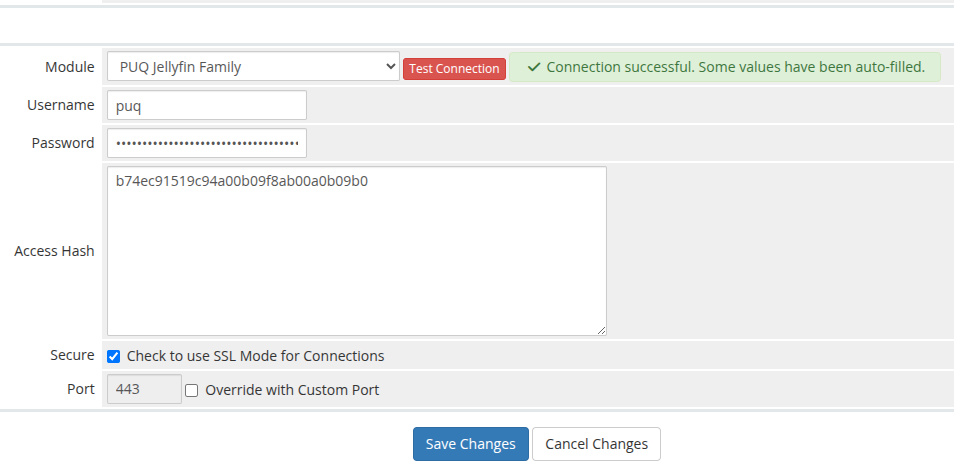
Use **Test Connection** to confirm WHMCS can reach Jellyfin and authenticate. The module authenticates with the username / password + API key to obtain an access token, then calls `System/Info` to verify connectivity. On success some fields are auto-filled and the status shows **Connection successful**.
Finally, assign the server (or a server group that contains it) to your Jellyfin Family product under the product's **Module Settings**.
# Product configuration
### Jellyfin Family module **[WHMCS](https://puqcloud.com/link.php?id=77)**
##### [Order now](https://puqcloud.com/whmcs-module-jellyfin-family.php) | [Download](https://download.puqcloud.com/WHMCS/servers/PUQ_WHMCS-Jellyfin-Family/) | [Community](https://community.puqcloud.com/)
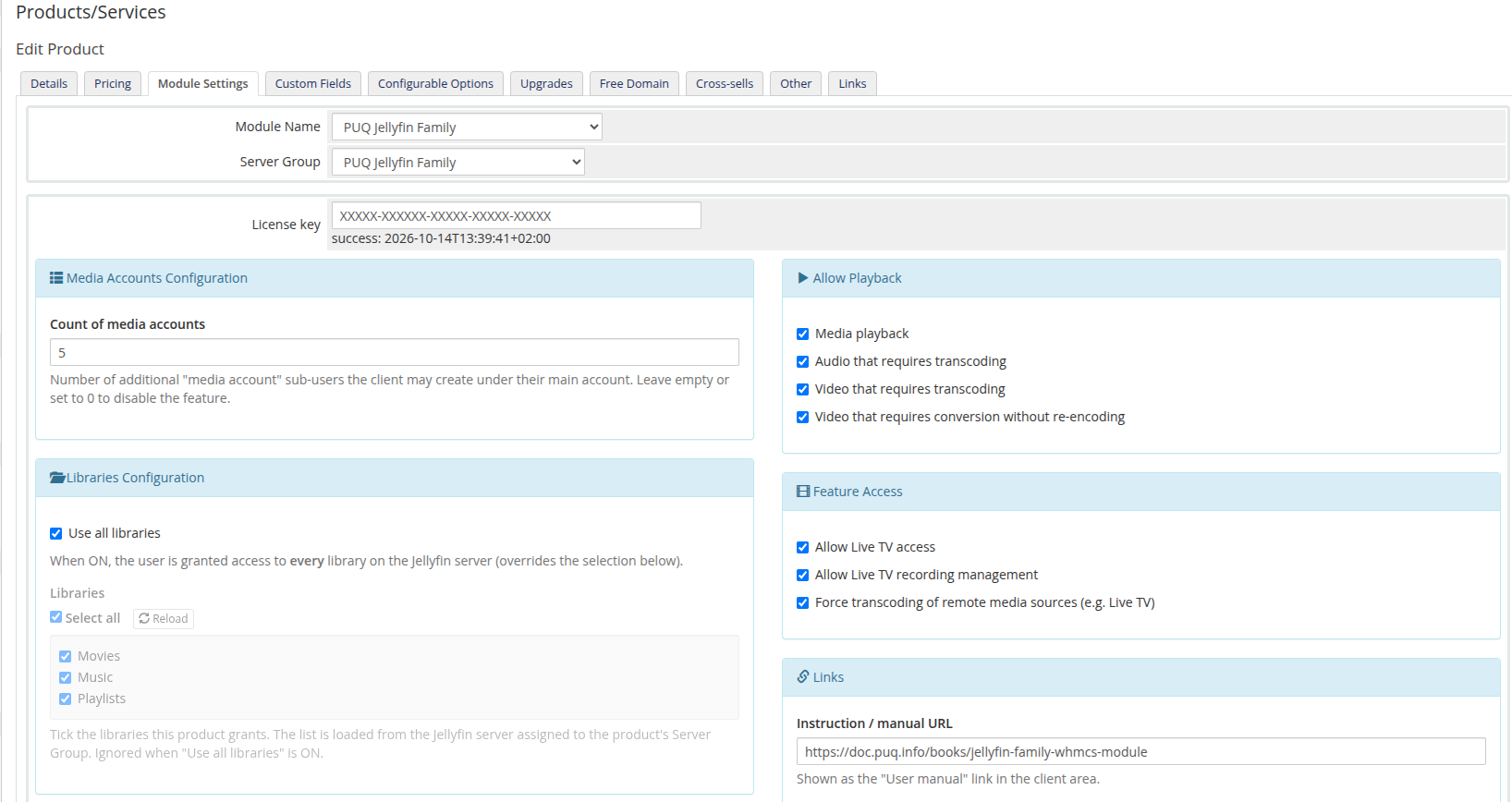
Create a product of type **PUQ Jellyfin Family** (Setup → Products/Services), assign the Jellyfin server on the **Module Settings** tab, then configure the access policy in the injected configuration panel.
## Media Accounts Configuration
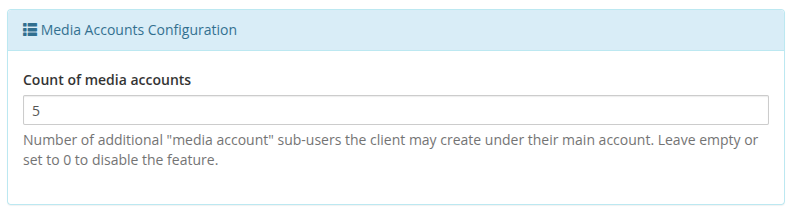
- **Count of media accounts** — how many additional **media accounts** (sub-users) the client may create under their main account. Leave empty or set to `0` to disable the feature for this product. When set to a positive number, a *Media Accounts* card appears in the client area where the client can add up to that many sub-users.
> Each media account is a separate Jellyfin user named `mainusername-name`. It inherits the product's playback / transcoding / Live TV / SyncPlay / session settings, but its library access is limited to a subset of the main account's libraries (chosen per media account). Setting the count to `0` removes all existing media accounts on the next *Change package*.
## Libraries Configuration
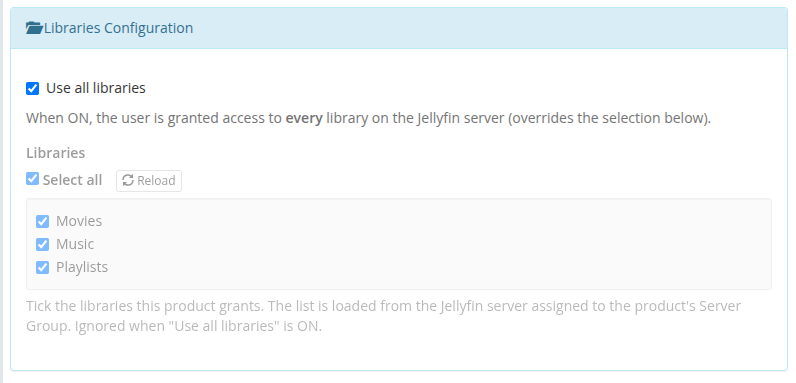
- **Use all libraries** — grant access to every library on the server (overrides the selection below).
- **Libraries** — the list of libraries is loaded live from the Jellyfin server assigned to the product's Server Group. Tick the libraries this product grants; use **Select all** to toggle everything, or **Reload** to refresh the list. Leaving everything unticked grants no library. If the server cannot be reached, a manual text box appears as a fallback (one library name per line). Ignored when "Use all libraries" is ON.
> The dynamic list requires the product to be saved with a Server Group that contains a reachable Jellyfin server. Until then the panel shows a hint to select and save a Server Group.
## User Configuration
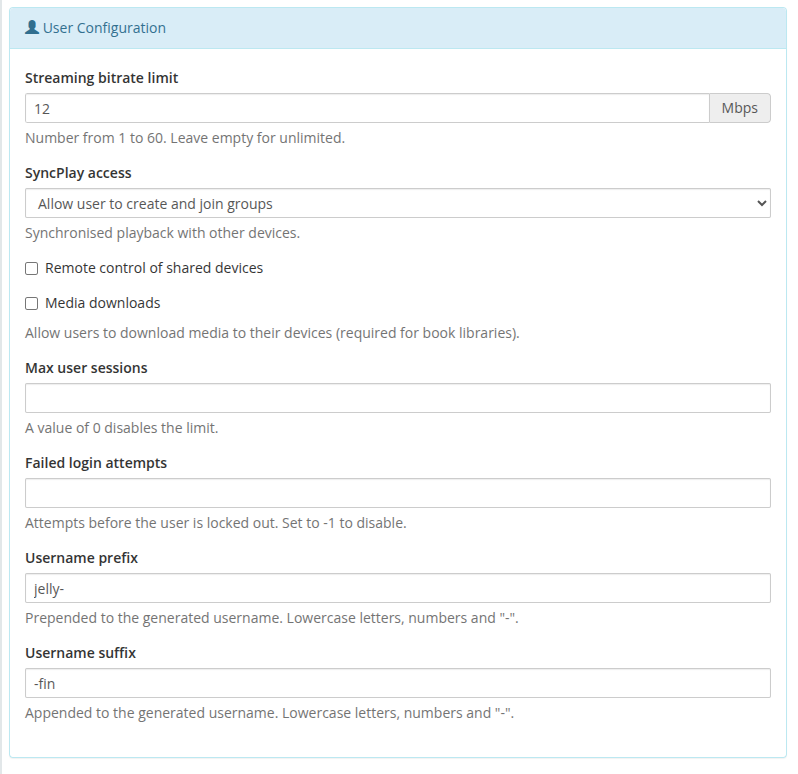
- **Streaming bitrate limit** — 1–60 Mbps (empty = unlimited).
- **SyncPlay access** — create & join groups / join groups / disabled.
- **Remote control of shared devices**, **Media downloads** — on/off.
- **Max user sessions** — `0` disables the limit.
- **Failed login attempts** — lockout threshold; `-1` disables it.
- **Username prefix / suffix** — wrap the generated username.
## Allow Playback
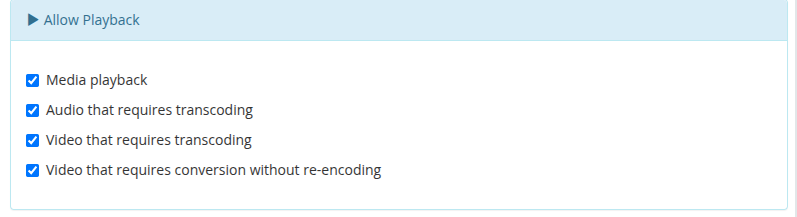
Toggle media playback, audio transcoding, video transcoding and video conversion without re-encoding.
## Feature Access
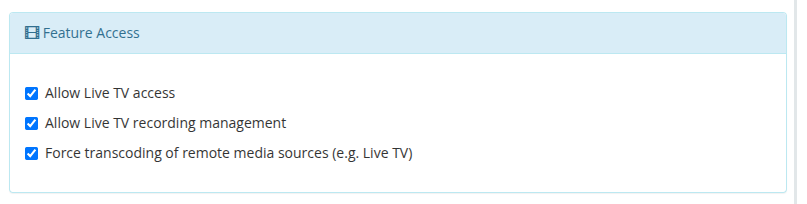
Live TV access, Live TV recording management, and force transcoding of remote media sources.
## Links
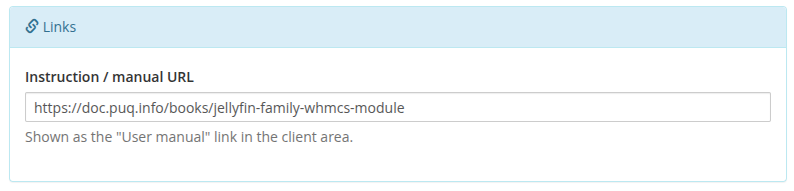
- **Instruction / manual URL** — shown as the *User manual* link in the client area.
## Client Area
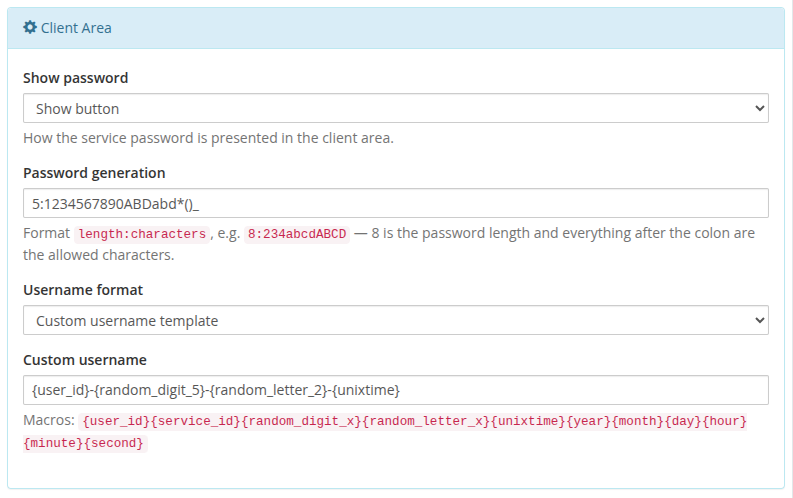
- **Show password** — show button / plain text / hidden.
- **Password generation** — `length:characters`, e.g. `8:23456789abcdABCD`.
- **Username format** — `standard` (`prefix-suffix`) or `custom`.
- **Custom username** — macro template: `{user_id}`, `{service_id}`, `{random_digit_x}`, `{random_letter_x}`, `{unixtime}`, `{year}`, `{month}`, `{day}`, `{hour}`, `{minute}`, `{second}`.
Settings are stored as a single JSON document in `configoption24`. After saving, **Create/Change** actions push the resulting policy to Jellyfin.
# Client Area
What the customer sees and can do on the Jellyfin Family service page in the WHMCS client area.
# Client area overview
### Jellyfin Family module **[WHMCS](https://puqcloud.com/link.php?id=77)**
##### [Order now](https://puqcloud.com/whmcs-module-jellyfin-family.php) | [Download](https://download.puqcloud.com/WHMCS/servers/PUQ_WHMCS-Jellyfin-Family/) | [Community](https://community.puqcloud.com/)
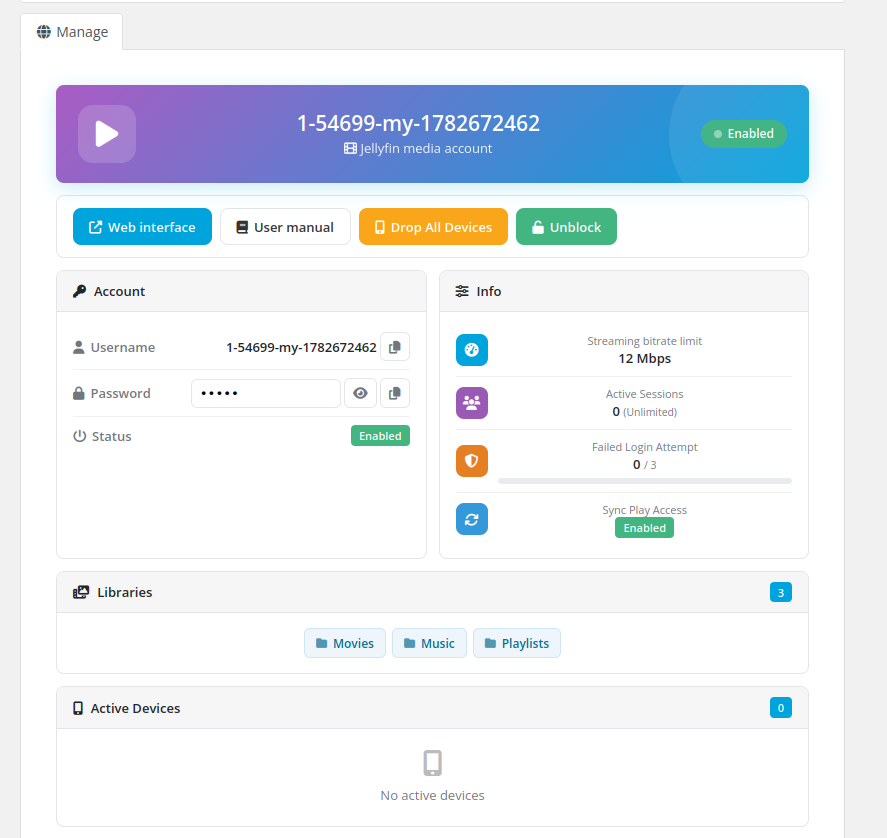
The client opens their Jellyfin Family service from **clientarea.php → My Services → (service) → Information**. The page loads its data over AJAX and renders a set of cards.
## Actions
- **Web interface** — opens the Jellyfin web UI in a new tab.
- **User manual** — opens the instruction URL configured on the product (if set).
- **Drop All Devices** — signs the account out of every device (confirmation required).
- **Unblock** — re-enables the account when it has been locked/disabled (shown only when disabled).
## Account
- **Username** with a copy button.
- **Password** — shown as a reveal button, plain text, or hidden, depending on the product's *Show password* setting; with a copy button.
- **Status** — Enabled / Disabled badge.
## Info
- Streaming bitrate limit, active sessions (with the max), failed-login attempts (with the lockout threshold), and SyncPlay access.
## Libraries & Devices
- **Libraries** — chips for each library the user can access (with a count badge).
- **Active Devices** — table of device name, app and last activity (with a count badge).
## Media Accounts
When the product allows media accounts, a **Media Accounts** card lists the client's sub-users with a `used / limit` count badge.
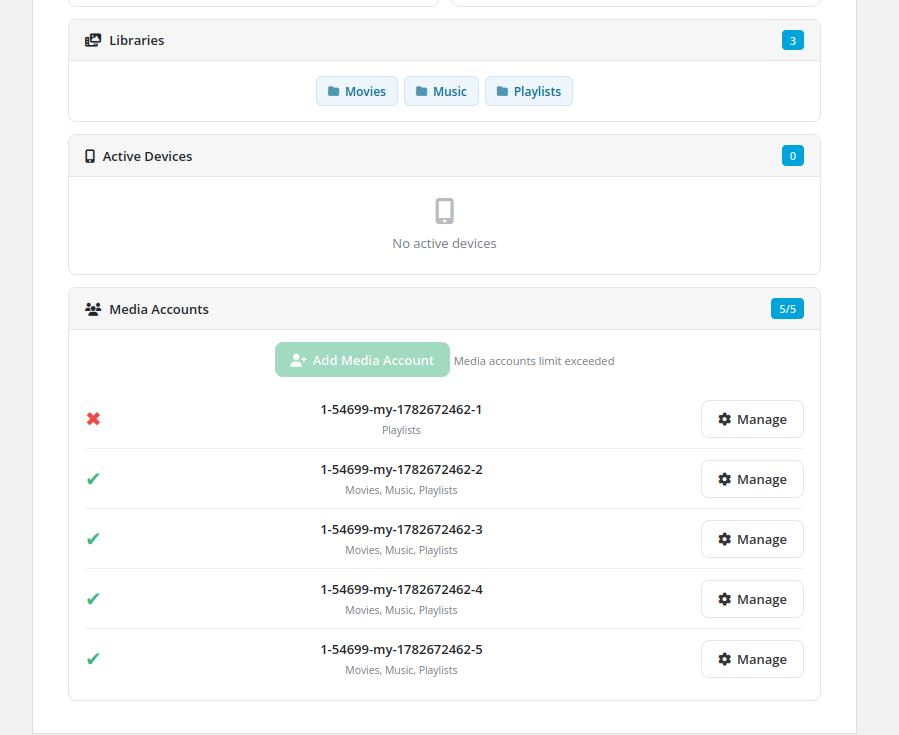
- **Add Media Account** — opens a modal to enter a username (the main username is prefixed automatically), generate a password and tick which libraries the sub-user may access. Disabled once the limit is reached.
- **Manage** (per media account) — opens a modal to enable/disable the sub-user, change its password (leave empty to keep the current one), adjust its libraries, view and **drop its active devices**, or **delete** the media account (confirmation required).
A media account's available libraries are always a subset of the main account's libraries, and it inherits the product's playback/transcoding/feature settings.
All actions use AJAX and report the result with a toast notification — the page never reloads.
# Admin Area
Managing a Jellyfin Family service from the WHMCS admin area.
# Service page
### Jellyfin Family module **[WHMCS](https://puqcloud.com/link.php?id=77)**
##### [Order now](https://puqcloud.com/whmcs-module-jellyfin-family.php) | [Download](https://download.puqcloud.com/WHMCS/servers/PUQ_WHMCS-Jellyfin-Family/) | [Community](https://community.puqcloud.com/)
On the WHMCS admin service page (**Clients → (client) → Products/Services**) the module adds an information tab and the standard module command buttons.
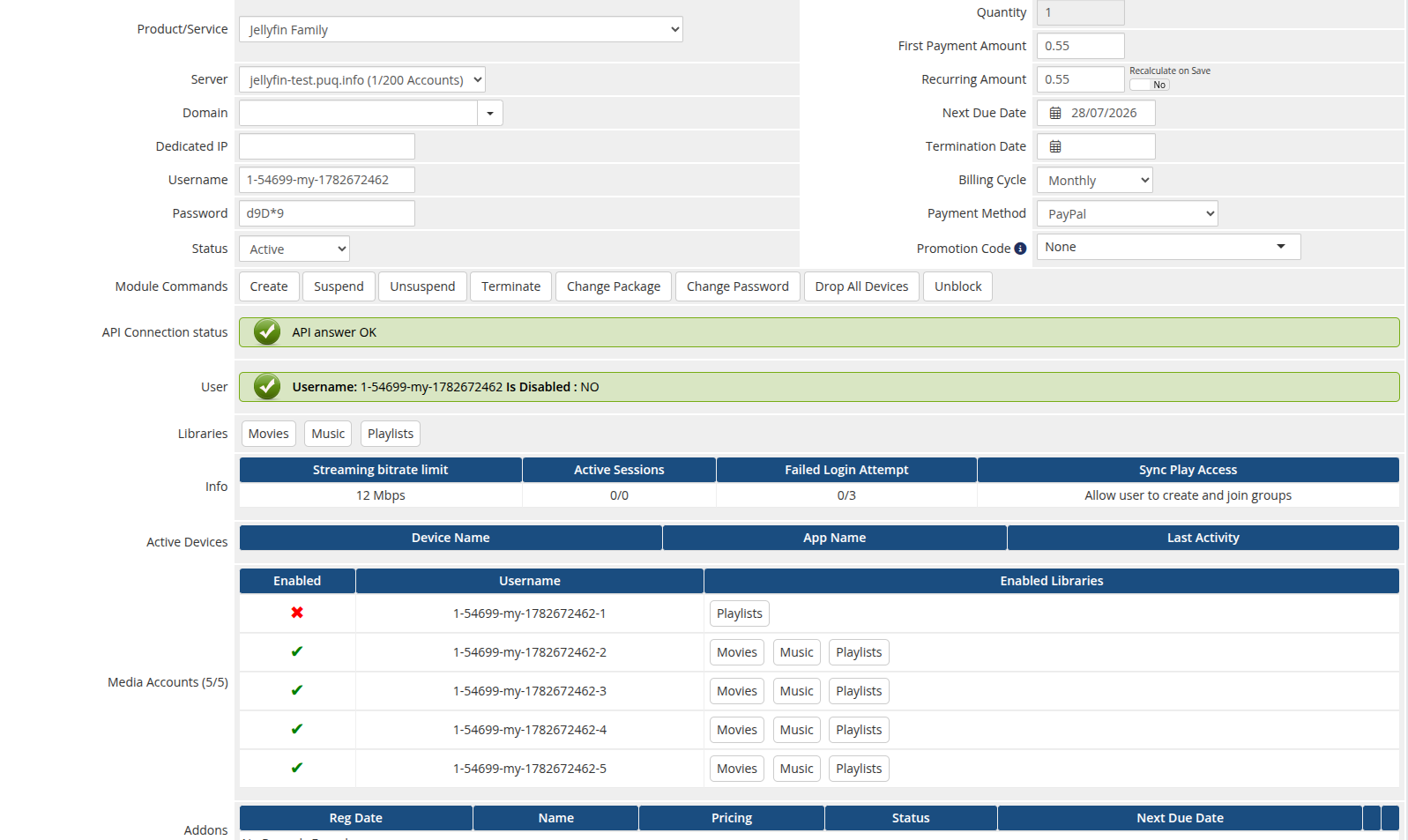
## Module commands
- **Create** — generates credentials, creates the Jellyfin user and applies the policy.
- **Suspend / Unsuspend** — toggles the user's *IsDisabled* flag.
- **Change Package** — re-applies the product policy to the existing user and to every media account.
- **Change Password** — resets and sets a new password.
- **Terminate** — deletes the Jellyfin user and all of its media accounts.
## Custom buttons
- **Drop All Devices** — removes all of the user's registered devices.
- **Unblock** — re-enables a disabled account (requires the service to be *Active*).
## Information tab
- **API Connection status** — confirms the module can reach Jellyfin.
- **User** — username and disabled state (with a too-many-failed-logins warning).
- **Libraries** — the libraries the user can access.
- **Info** — streaming bitrate limit, active sessions, failed-login counter and SyncPlay access.
- **Active Devices** — device name, app and last activity.
- **Media Accounts** *(when enabled on the product)* — a table of the client's sub-users: enabled state, username and the libraries each one can access. The tab header shows the `used / limit` count.
> All lifecycle actions are license-gated: if the license cache is stale and the license server is unreachable, the action is refused with the license error.