
Installation and configuration guide
WHMCS setup(install/update)
NOWPayments Payment Gateway WHMCS
Order now | Download | FAQ
Module is coded in PHP with ionCube protection
Supported php version:
- php 7.4 WHMCS 8.0 +
- php 8.1 WHMCS 8.0 +
- php 8.2+ WHMCS 8.0 +
To install and update a module, you must perform one and the same action.
1. Download the latest version of the module.
PHP 8.2+
wget https://download.puqcloud.com/WHMCS/gateways/PUQ_WHMCS_PG-nowpayments/php82/PUQ_WHMCS_PG-nowpayments-latest.zipPHP 8.1
wget https://download.puqcloud.com/WHMCS/gateways/PUQ_WHMCS_PG-nowpayments/php81/PUQ_WHMCS_PG-nowpayments-latest.zipPHP 7.4
wget https://download.puqcloud.com/WHMCS/gateways/PUQ_WHMCS_PG-nowpayments/php74/PUQ_WHMCS_PG-nowpayments-latest.zip
All versions are available via link: https://download.puqcloud.com/WHMCS/gateways/PUQ_WHMCS_PG-nowpayments/
2. Unzip the archive with the module.
unzip PUQ_WHMCS_PG-nowpayments-latest.zip3. Copy and Replace "puq_nowpayments" to "WHMCS_WEB_DIR/modules/gateways/"
cp -r puq_nowpayments/ /path/to/your/whmcs/modules/gateways/4. Copy callback file to "WHMCS_WEB_DIR/modules/gateways/callback/"
cp callback/puq_nowpayments.php /path/to/your/whmcs/modules/gateways/callback/5. Configure the module in WHMCS Admin Area
Click "Activate" and configure the following settings:
- License Key: Enter your module license key
- Mode of Operation: Choose between Production or Sandbox
- API Key (Production): Your production API key from NOWPayments
- IPN Secret Key (Production): Your production IPN secret from NOWPayments
- API Key (Sandbox): Your sandbox API key from NOWPayments Sandbox
- IPN Secret Key (Sandbox): Your sandbox IPN secret from NOWPayments Sandbox
6. Configure Webhook in NOWPayments Account
Copy the IPN Callback URL from the module configuration and paste it into your NOWPayments account webhook settings:
- Production: https://account.nowpayments.io/store-settings#notifications
- Sandbox: https://account-sandbox.nowpayments.io/store-settings#notifications
7. Test the payment gateway
Test the payment gateway in sandbox mode first to ensure everything is working correctly before switching to production mode.
Don't have a NOWPayments account yet? Create your free account here
NOWPayments Payment Gateway Configuration in WHMCS
NOWPayments Payment Gateway WHMCS
Order now | Download | FAQ
Configure Payment Gateway in WHMCS
Setup → Payment Gateways → NOWPaymentsIn the Gateway settings section, configure the following parameters for the "PUQ NOWPayments" module
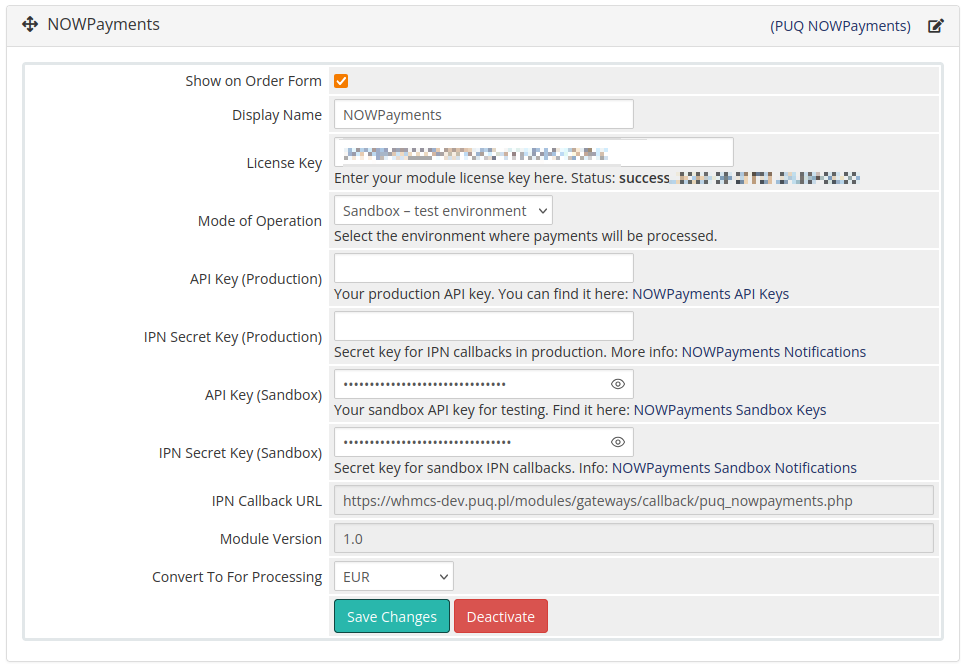
- Show on Order Form: Check this box to display NOWPayments as a payment option during checkout. When enabled, customers will see NOWPayments in the list of available payment methods.
- Display Name: The name that will be shown to customers on the order form. Default is "NOWPayments" but can be customized to match your branding.
- License Key: A pre-purchased license key for the "PUQ NOWPayments" module. The module will verify this key and display the status (success/expiration date). The key must be active for the module to function correctly.
- Mode of Operation: Choose between "Production - live payments" or "Sandbox - test environment". In sandbox mode, all transactions are test transactions and no real money is processed. Always test in sandbox first before switching to production.
- API Key (Production): Your production API key from NOWPayments account. This key is used to authenticate API requests in the live environment. You can find it in your NOWPayments production account settings.
- IPN Secret Key (Production): Secret key for securing Instant Payment Notifications (IPN) callbacks in production. This key is used to verify that webhook notifications are coming from NOWPayments. Configure this in your NOWPayments production notifications settings.
- API Key (Sandbox): Your sandbox API key for testing purposes. This key is used for test transactions in the sandbox environment. Obtain it from your NOWPayments sandbox account settings.
- IPN Secret Key (Sandbox): Secret key for sandbox IPN callbacks. This ensures secure webhook notifications during testing. Configure this in your NOWPayments sandbox notifications settings.
- IPN Callback URL: This URL is automatically generated and shows where NOWPayments will send payment status notifications. Copy this URL and paste it into your NOWPayments account webhook settings. The format is:
https://yourdomain.com/modules/gateways/callback/puq_nowpayments.php - Module Version: Displays the current version of the installed NOWPayments module (e.g., "1.0"). This field is read-only and helps with troubleshooting and support.
- Convert To For Processing: Select the currency that incoming payments will be converted to for processing. This is typically your primary business currency (e.g., USD, EUR). The module will automatically convert cryptocurrency payments to this currency using current exchange rates.
Payment Flow Configuration
The module automatically handles the following payment flow:
- Customer Selection: Customer selects NOWPayments as payment method during checkout
- Currency Selection: Customer chooses from 200+ supported cryptocurrencies
- Rate Calculation: Module fetches real-time exchange rates from NOWPayments API
- Payment Creation: Creates payment invoice in NOWPayments system
- Payment Processing: Customer completes payment using their chosen cryptocurrency
- Webhook Notification: NOWPayments sends payment status via secure webhook
- Invoice Update: WHMCS automatically marks invoice as paid upon successful payment
Important Notes:
- Always test the payment gateway in sandbox mode before going live
- Ensure the IPN Callback URL is correctly configured in your NOWPayments account
- The webhook URL must be accessible from the internet for NOWPayments to send notifications
- Keep your API keys and IPN secret keys secure and never share them publicly
- Monitor the WHMCS gateway logs for any payment processing issues