
NOWPayments payment gateway WHMCS module
Boost your business with NOWPayments – the best crypto payment gateway for effortless payments!
Description
NOWPayments Payment Gateway WHMCS
Order now | Download | FAQ
The module, fully installed and correctly implemented in the system, offers the following functionalities.
Module Functions:
- Accept over 200 cryptocurrencies for payments
- Automatic coin-to-coin conversion support
- Real-time payment status updates via IPN
- Secure HMAC signature verification
- Support for both production and sandbox environments
- Dynamic currency selection interface
- Real-time exchange rate estimation
- Automatic invoice payment processing
- Comprehensive transaction logging
- Multi-currency support with automatic conversion
Available options in the admin panel:
- Configure API keys for production and sandbox
- Set IPN secret keys for secure callbacks
- Switch between production and sandbox modes
- Monitor payment transactions and status
- View detailed payment logs and debugging information
- Configure webhook callback URLs
- License key management and verification
Available options in the client panel:
- Select from 200+ supported cryptocurrencies
- View real-time exchange rate estimates
- Secure payment processing with NOWPayments
- Automatic payment confirmation
- Payment status tracking
WHMCS minimal version: 8 +
NOWPayments account required: Create Account
The module supports both production and sandbox environments. Make sure to use the correct API keys and IPN secret keys for your selected environment. Sandbox keys are available at NOWPayments Sandbox and production keys at NOWPayments Production.
Please be aware that the webhook callback URL must be configured in your NOWPayments account settings. The module automatically provides the correct callback URL in the configuration. Ensure that your server can receive incoming webhook notifications from NOWPayments servers.
Changelog
NOWPayments Payment Gateway WHMCS
Order now | Download | FAQ
v1.1 Released 22-10-2025
-
Option in module settings to show or hide currency codes in the dropdown list.
-
Ability to enable a feature where the buyer pays the commission.
-
Currency icons added in the client area during currency selection.
- Option to sort currencies in the dropdown list.
v1.0 Released 22-09-2025
First version
Installation and configuration guide
WHMCS setup(install/update)
NOWPayments Payment Gateway WHMCS
Order now | Download | FAQ
Module is coded in PHP with ionCube protection
Supported php version:
- php 7.4 WHMCS 8.0 +
- php 8.1 WHMCS 8.0 +
- php 8.2+ WHMCS 8.0 +
To install and update a module, you must perform one and the same action.
1. Download the latest version of the module.
PHP 8.2+
wget https://download.puqcloud.com/WHMCS/gateways/PUQ_WHMCS_PG-nowpayments/php82/PUQ_WHMCS_PG-nowpayments-latest.zipPHP 8.1
wget https://download.puqcloud.com/WHMCS/gateways/PUQ_WHMCS_PG-nowpayments/php81/PUQ_WHMCS_PG-nowpayments-latest.zipPHP 7.4
wget https://download.puqcloud.com/WHMCS/gateways/PUQ_WHMCS_PG-nowpayments/php74/PUQ_WHMCS_PG-nowpayments-latest.zip
All versions are available via link: https://download.puqcloud.com/WHMCS/gateways/PUQ_WHMCS_PG-nowpayments/
2. Unzip the archive with the module.
unzip PUQ_WHMCS_PG-nowpayments-latest.zip3. Copy and Replace "puq_nowpayments" to "WHMCS_WEB_DIR/modules/gateways/"
cp -r puq_nowpayments/ /path/to/your/whmcs/modules/gateways/4. Copy callback file to "WHMCS_WEB_DIR/modules/gateways/callback/"
cp callback/puq_nowpayments.php /path/to/your/whmcs/modules/gateways/callback/5. Configure the module in WHMCS Admin Area
Click "Activate" and configure the following settings:
- License Key: Enter your module license key
- Mode of Operation: Choose between Production or Sandbox
- API Key (Production): Your production API key from NOWPayments
- IPN Secret Key (Production): Your production IPN secret from NOWPayments
- API Key (Sandbox): Your sandbox API key from NOWPayments Sandbox
- IPN Secret Key (Sandbox): Your sandbox IPN secret from NOWPayments Sandbox
6. Configure Webhook in NOWPayments Account
Copy the IPN Callback URL from the module configuration and paste it into your NOWPayments account webhook settings:
- Production: https://account.nowpayments.io/store-settings#notifications
- Sandbox: https://account-sandbox.nowpayments.io/store-settings#notifications
7. Test the payment gateway
Test the payment gateway in sandbox mode first to ensure everything is working correctly before switching to production mode.
Don't have a NOWPayments account yet? Create your free account here
NOWPayments Payment Gateway Configuration in WHMCS
NOWPayments Payment Gateway WHMCS
Order now | Download | FAQ
Configure Payment Gateway in WHMCS
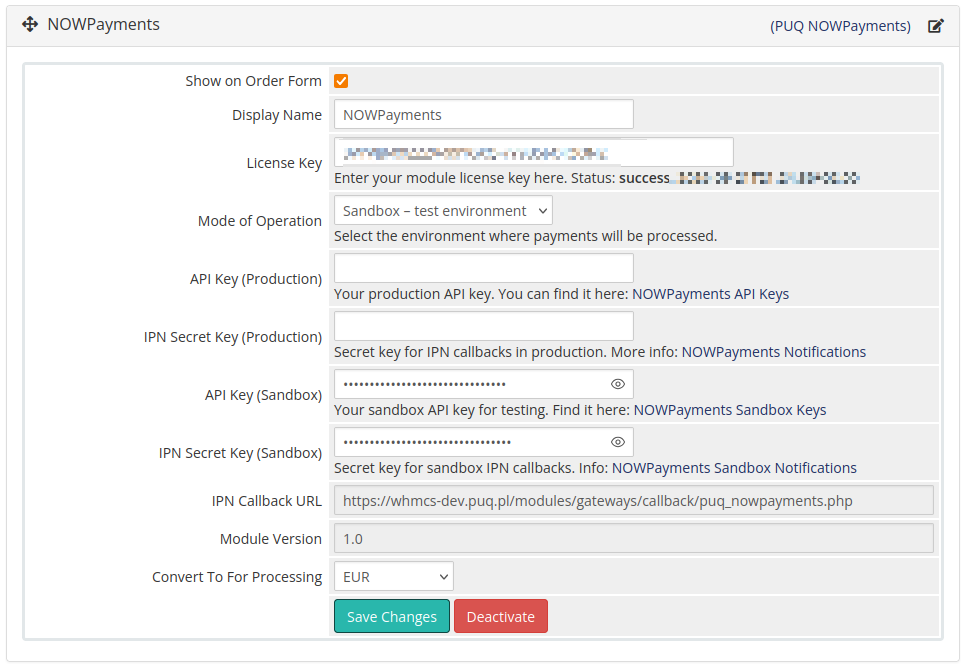
Setup → Payment Gateways → NOWPaymentsIn the Gateway settings section, configure the following parameters for the "PUQ NOWPayments" module
- Show on Order Form: Check this box to display NOWPayments as a payment option during checkout. When enabled, customers will see NOWPayments in the list of available payment methods.
- Display Name: The name that will be shown to customers on the order form. Default is "NOWPayments" but can be customized to match your branding.
- License Key: A pre-purchased license key for the "PUQ NOWPayments" module. The module will verify this key and display the status (success/expiration date). The key must be active for the module to function correctly.
- Mode of Operation: Choose between "Production - live payments" or "Sandbox - test environment". In sandbox mode, all transactions are test transactions and no real money is processed. Always test in sandbox first before switching to production.
- API Key (Production): Your production API key from NOWPayments account. This key is used to authenticate API requests in the live environment. You can find it in your NOWPayments production account settings.
- IPN Secret Key (Production): Secret key for securing Instant Payment Notifications (IPN) callbacks in production. This key is used to verify that webhook notifications are coming from NOWPayments. Configure this in your NOWPayments production notifications settings.
- API Key (Sandbox): Your sandbox API key for testing purposes. This key is used for test transactions in the sandbox environment. Obtain it from your NOWPayments sandbox account settings.
- IPN Secret Key (Sandbox): Secret key for sandbox IPN callbacks. This ensures secure webhook notifications during testing. Configure this in your NOWPayments sandbox notifications settings.
- IPN Callback URL: This URL is automatically generated and shows where NOWPayments will send payment status notifications. Copy this URL and paste it into your NOWPayments account webhook settings. The format is:
https://yourdomain.com/modules/gateways/callback/puq_nowpayments.php - Module Version: Displays the current version of the installed NOWPayments module (e.g., "1.0"). This field is read-only and helps with troubleshooting and support.
- Convert To For Processing: Select the currency that incoming payments will be converted to for processing. This is typically your primary business currency (e.g., USD, EUR). The module will automatically convert cryptocurrency payments to this currency using current exchange rates.
Payment Flow Configuration
The module automatically handles the following payment flow:
- Customer Selection: Customer selects NOWPayments as payment method during checkout
- Currency Selection: Customer chooses from 200+ supported cryptocurrencies
- Rate Calculation: Module fetches real-time exchange rates from NOWPayments API
- Payment Creation: Creates payment invoice in NOWPayments system
- Payment Processing: Customer completes payment using their chosen cryptocurrency
- Webhook Notification: NOWPayments sends payment status via secure webhook
- Invoice Update: WHMCS automatically marks invoice as paid upon successful payment
Important Notes:
- Always test the payment gateway in sandbox mode before going live
- Ensure the IPN Callback URL is correctly configured in your NOWPayments account
- The webhook URL must be accessible from the internet for NOWPayments to send notifications
- Keep your API keys and IPN secret keys secure and never share them publicly
- Monitor the WHMCS gateway logs for any payment processing issues
Client Area
WHMCS Invoice Payment with NOWPayments
NOWPayments Payment Gateway WHMCS
Order now | Download | FAQ
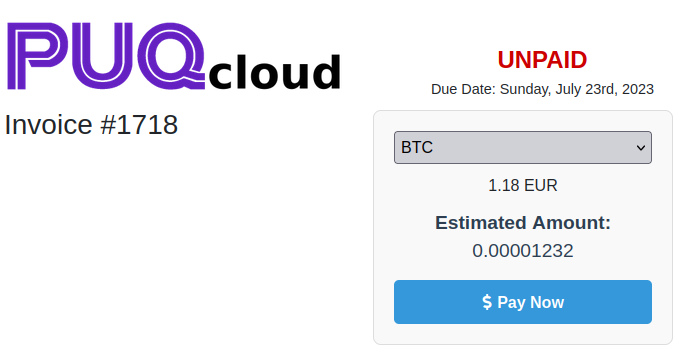
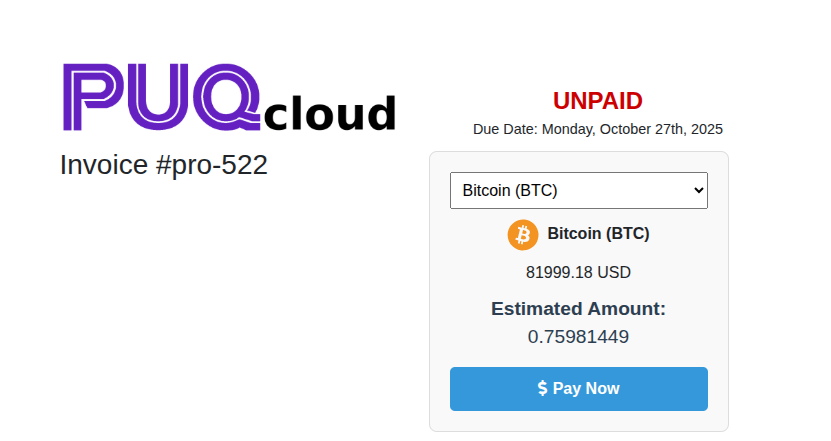
When a customer selects NOWPayments as their payment method on the invoice page, they will see a user-friendly cryptocurrency payment interface with the following features:
- Cryptocurrency Selection: A dropdown menu displaying 200+ supported cryptocurrencies (BTC, ETH, USDT, DOGE, etc.) for the customer to choose from.
- Real-time Exchange Rates: The system automatically fetches current exchange rates from NOWPayments API to provide accurate conversion amounts.
- Estimated Amount Display: Shows the exact amount of cryptocurrency the customer needs to pay based on their selection and current market rates.
- Loading Indicators: Professional spinner animations while the system loads available currencies and calculates exchange rates.
- Secure Payment Processing: One-click payment button that redirects to NOWPayments secure payment page.
Payment Process Flow
- Page Load: When the invoice page loads, the system displays a loading spinner while fetching available cryptocurrencies from NOWPayments API.
- Currency Loading: The dropdown menu is populated with all supported cryptocurrencies (BTC, USDC, FUN, THETA, XRP, DOGE, ETH, and 200+ others).
- Default Selection: The first available currency (typically BTC) is automatically selected and the system calculates the estimated amount.
- Rate Calculation: When a customer selects a different cryptocurrency, the system automatically fetches the current exchange rate and updates the estimated amount in real-time.
- Amount Display: The interface shows both the original invoice amount (e.g., "1.18 EUR") and the estimated cryptocurrency amount (e.g., "0.00001232 BTC").
- Payment Initiation: When the customer clicks "Pay Now", they are redirected to the NOWPayments secure payment page to complete the transaction.
User Interface Elements
- Payment Box: A clean, bordered container with light gray background that contains all payment options and information.
- Currency Dropdown: A responsive dropdown menu that lists all available cryptocurrencies in uppercase format for easy selection.
- Amount Information: Clear display of the original invoice amount and the calculated cryptocurrency equivalent.
- Pay Now Button: A prominent blue button with dollar sign icon that initiates the payment process.
- Loading States: Professional spinner animations (large and small variants) that provide visual feedback during API calls.
- Error Messages: Red-colored error messages that appear if there are issues with currency loading or rate calculation.
Technical Features
- AJAX Integration: The interface uses asynchronous JavaScript to fetch currencies and exchange rates without page reloads.
- API Communication: Secure communication with NOWPayments API endpoints for currency lists and rate calculations.
- Dynamic Updates: Real-time updates of estimated amounts when customers change their cryptocurrency selection.
- Error Handling: Comprehensive error handling for network issues, API failures, and invalid responses.
- Security: All API calls are made server-side to protect API keys and ensure secure communication.
Important Notes for Customers:
- Exchange rates are calculated in real-time and may fluctuate during the payment process
- Payment amounts are locked once you proceed to the NOWPayments payment page
- Ensure you have sufficient cryptocurrency balance in your wallet before initiating payment
- Payment confirmations may take a few minutes depending on the selected cryptocurrency network
- Contact support if you experience any issues during the payment process
Admin Area
Gateway Configuration Screen
NOWPayments Payment Gateway WHMCS
Order now | Download | FAQ
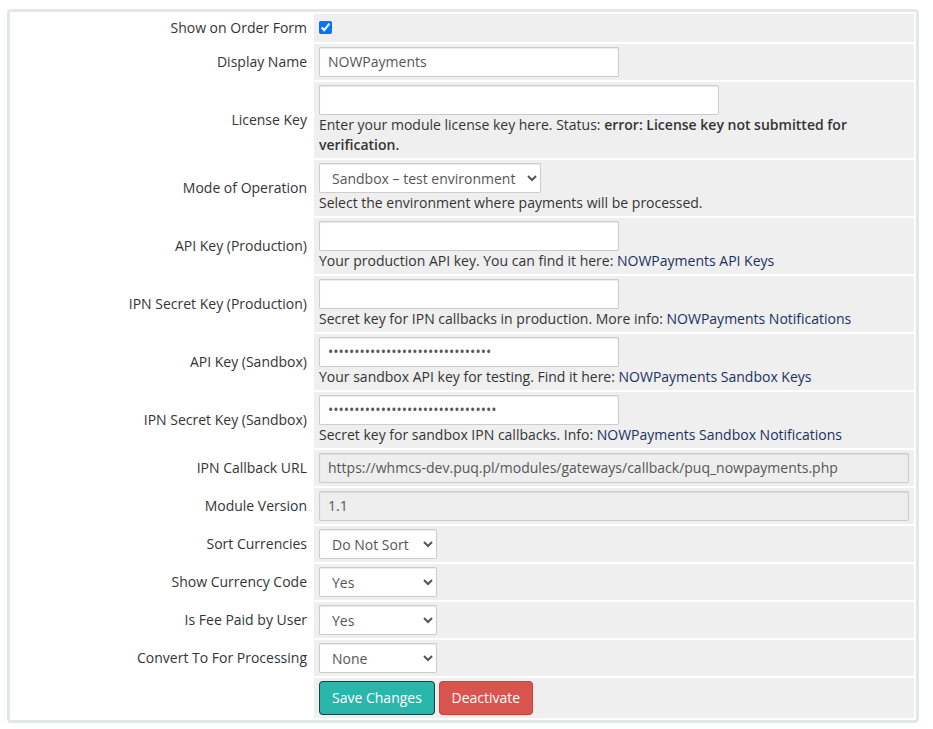
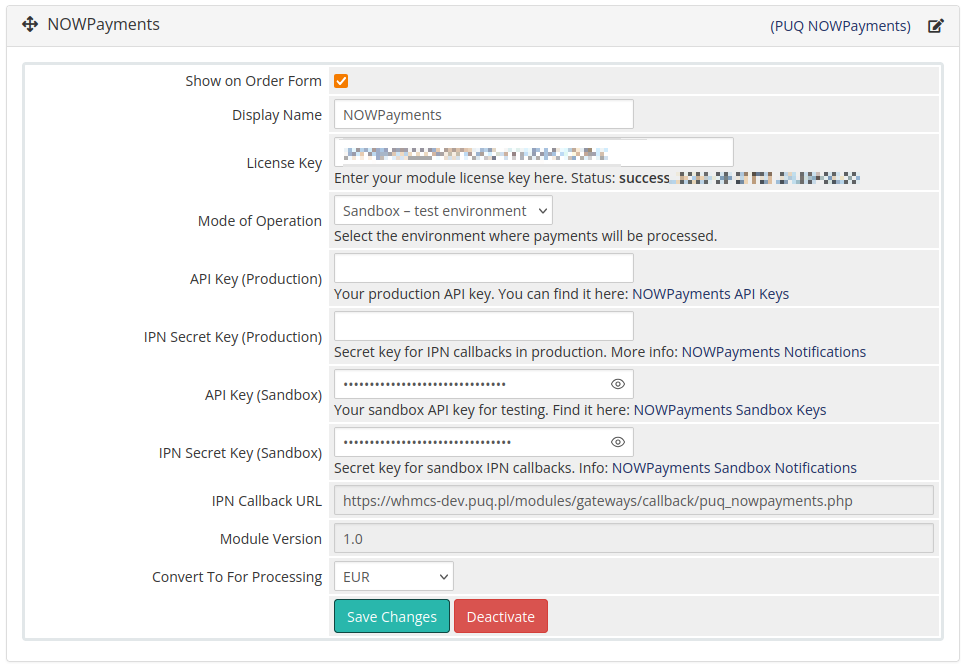
The gateway configuration screen provides administrators with comprehensive control over the NOWPayments payment gateway settings. This interface allows you to manage all aspects of cryptocurrency payment processing, from basic display options to advanced security configurations.
Display Settings
- Show on Order Form: Controls whether NOWPayments appears as a payment option during customer checkout. When enabled, customers will see NOWPayments in the payment method selection list.
- Display Name: Customizable name that appears to customers on the order form. Default is "NOWPayments" but can be modified to match your brand identity or preferred terminology.
License Management
- License Key: Displays your module license key with real-time validation status. The system shows "success" with expiration date when the license is active and valid. License verification ensures you have access to all module features and support.
Environment Configuration
- Mode of Operation: Critical setting that determines whether payments are processed in sandbox (testing) or production (live) environment. Always test thoroughly in sandbox mode before switching to production to avoid processing real transactions during setup.
API Credentials
- API Key (Production): Your live environment API key from NOWPayments. This key authenticates your WHMCS installation with NOWPayments production servers for processing real cryptocurrency payments. Keep this key secure and never share it publicly.
- IPN Secret Key (Production): Security key for validating Instant Payment Notifications in the live environment. This ensures that payment status updates are genuinely from NOWPayments and prevents unauthorized payment confirmations.
- API Key (Sandbox): Testing environment API key for development and testing purposes. Use this key to test payment flows without processing real transactions or spending actual cryptocurrency.
- IPN Secret Key (Sandbox): Security key for sandbox IPN callbacks, allowing you to test webhook functionality in a safe environment before going live.
Webhook Configuration
- IPN Callback URL: Automatically generated URL where NOWPayments sends payment status notifications. This URL must be configured in your NOWPayments account settings to enable automatic payment processing. The format follows:
https://yourdomain.com/modules/gateways/callback/puq_nowpayments.php
System Information
- Module Version: Displays the currently installed version of the NOWPayments module (e.g., "1.0"). This information is useful for troubleshooting and ensuring you have the latest features and security updates.
- Convert To For Processing: Specifies the target currency for payment processing. All incoming cryptocurrency payments are automatically converted to this currency using real-time exchange rates from NOWPayments API.
Security Features
- HMAC Signature Verification: All webhook notifications are verified using HMAC-SHA512 signatures to ensure authenticity and prevent payment fraud.
- Secure API Communication: All API calls use HTTPS encryption and proper authentication headers for secure data transmission.
- Environment Isolation: Clear separation between sandbox and production environments prevents accidental live transactions during testing.
Monitoring and Logging
- Transaction Logging: All payment attempts, successes, and failures are logged in WHMCS for audit purposes and troubleshooting.
- API Call Logging: Detailed logs of all NOWPayments API interactions help diagnose connectivity or configuration issues.
- Error Tracking: Comprehensive error handling and logging for failed payments, API errors, and webhook validation failures.
Important Configuration Notes:
- Always test your configuration in sandbox mode before enabling production payments
- Ensure your server can receive incoming webhook notifications from NOWPayments
- Keep your API keys and IPN secret keys secure and regularly rotate them
- Monitor the WHMCS gateway logs regularly for any payment processing issues
- Verify that the IPN Callback URL is correctly configured in your NOWPayments account