
WHMCS Invoice Payment with NOWPayments
NOWPayments Payment Gateway WHMCS
Order now | Download | FAQ
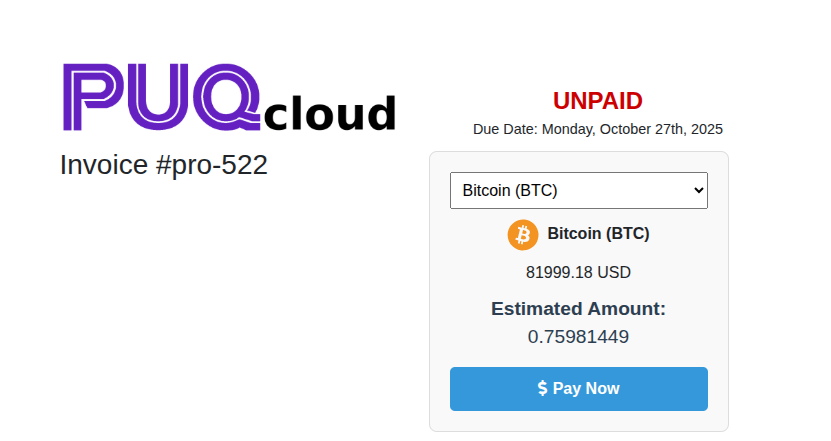
When a customer selects NOWPayments as their payment method on the invoice page, they will see a user-friendly cryptocurrency payment interface with the following features:
- Cryptocurrency Selection: A dropdown menu displaying 200+ supported cryptocurrencies (BTC, ETH, USDT, DOGE, etc.) for the customer to choose from.
- Real-time Exchange Rates: The system automatically fetches current exchange rates from NOWPayments API to provide accurate conversion amounts.
- Estimated Amount Display: Shows the exact amount of cryptocurrency the customer needs to pay based on their selection and current market rates.
- Loading Indicators: Professional spinner animations while the system loads available currencies and calculates exchange rates.
- Secure Payment Processing: One-click payment button that redirects to NOWPayments secure payment page.
Payment Process Flow
- Page Load: When the invoice page loads, the system displays a loading spinner while fetching available cryptocurrencies from NOWPayments API.
- Currency Loading: The dropdown menu is populated with all supported cryptocurrencies (BTC, USDC, FUN, THETA, XRP, DOGE, ETH, and 200+ others).
- Default Selection: The first available currency (typically BTC) is automatically selected and the system calculates the estimated amount.
- Rate Calculation: When a customer selects a different cryptocurrency, the system automatically fetches the current exchange rate and updates the estimated amount in real-time.
- Amount Display: The interface shows both the original invoice amount (e.g., "1.18 EUR") and the estimated cryptocurrency amount (e.g., "0.00001232 BTC").
- Payment Initiation: When the customer clicks "Pay Now", they are redirected to the NOWPayments secure payment page to complete the transaction.
User Interface Elements
- Payment Box: A clean, bordered container with light gray background that contains all payment options and information.
- Currency Dropdown: A responsive dropdown menu that lists all available cryptocurrencies in uppercase format for easy selection.
- Amount Information: Clear display of the original invoice amount and the calculated cryptocurrency equivalent.
- Pay Now Button: A prominent blue button with dollar sign icon that initiates the payment process.
- Loading States: Professional spinner animations (large and small variants) that provide visual feedback during API calls.
- Error Messages: Red-colored error messages that appear if there are issues with currency loading or rate calculation.
Technical Features
- AJAX Integration: The interface uses asynchronous JavaScript to fetch currencies and exchange rates without page reloads.
- API Communication: Secure communication with NOWPayments API endpoints for currency lists and rate calculations.
- Dynamic Updates: Real-time updates of estimated amounts when customers change their cryptocurrency selection.
- Error Handling: Comprehensive error handling for network issues, API failures, and invalid responses.
- Security: All API calls are made server-side to protect API keys and ensure secure communication.
Important Notes for Customers:
- Exchange rates are calculated in real-time and may fluctuate during the payment process
- Payment amounts are locked once you proceed to the NOWPayments payment page
- Ensure you have sufficient cryptocurrency balance in your wallet before initiating payment
- Payment confirmations may take a few minutes depending on the selected cryptocurrency network
- Contact support if you experience any issues during the payment process