Compliance Disclaimer: While **"Export VAT\_R"** diligently compiles data for your reports, it is essential to note that we do not assume responsibility for the accuracy or completeness of the information provided. If you identify any discrepancies or require assistance in ensuring compliance with legal regulations, please do not hesitate to reach out to us.
Key Features: 1. Effortless VAT\_R Reporting: Streamline your tax reporting obligations by effortlessly generating VAT\_R reports from invoice data stored within your WHMCS system. 2. Integration with WHMCS: **"Export VAT\_R"** seamlessly integrates with your existing WHMCS infrastructure, pulling invoice details, payment methods, and other relevant data to compile comprehensive VAT\_R documents for your accounting needs. 3. Real-Time Data Updates: Stay up-to-date with the latest currency exchange rates and pricing information by leveraging the API of Narodowy Bank Polski (National Bank of Poland), ensuring that your VAT\_R reports reflect the most accurate and current data available. 4. Flexible Reporting Options: Generate reports for any desired period by simply inputting and saving the desired timeframe within the "download" window, providing you with the flexibility to meet your reporting needs efficiently. 5. Compatibility with "Overwrite Tax Rules" Extension: Seamlessly integrate **"Export VAT\_R"** with the **"Overwrite Tax Rules"** extension to ensure accurate tax calculations and compliance with Polish tax regulations. Empower your accounting team with **"Export VAT\_R"**, the essential extension for simplifying VAT\_R reporting and ensuring compliance with Polish tax laws. Streamline your tax settlement processes and focus on growing your business with confidence. # Configuration ### PUQ Customization module **[WHMCS](https://puqcloud.com/link.php?id=77)** ##### [Order now](https://puqcloud.com/whmcs-addon-puq-customization.php) | [Download](https://download.puqcloud.com/WHMCS/addons/PUQ-Customization/) | [FAQ](https://faq.puqcloud.com/) [](https://doc.puq.info/uploads/images/gallery/2024-02/image-1709116781611.png) **Enabled** - Enabling or disabling all custom functions of this extension affects the automation and visibility of its features in the client area. When extension disabled, the automation capabilities and related features provided by the extension will not be active or visible to clients. However, as an administrator, you will still have access to configure and utilize the extension's functionalities through the administration interface. This gives you the flexibility to control the visibility and automation aspects of the extension based on your specific needs and preferences. **Client VAT ID field**: This setting allows you to choose between using the standard VAT ID field or a custom VAT ID field for clients. # Static Data ### PUQ Customization module **[WHMCS](https://puqcloud.com/link.php?id=77)** ##### [Order now](https://puqcloud.com/whmcs-addon-puq-customization.php) | [Download](https://download.puqcloud.com/WHMCS/addons/PUQ-Customization/) | [FAQ](https://faq.puqcloud.com/) [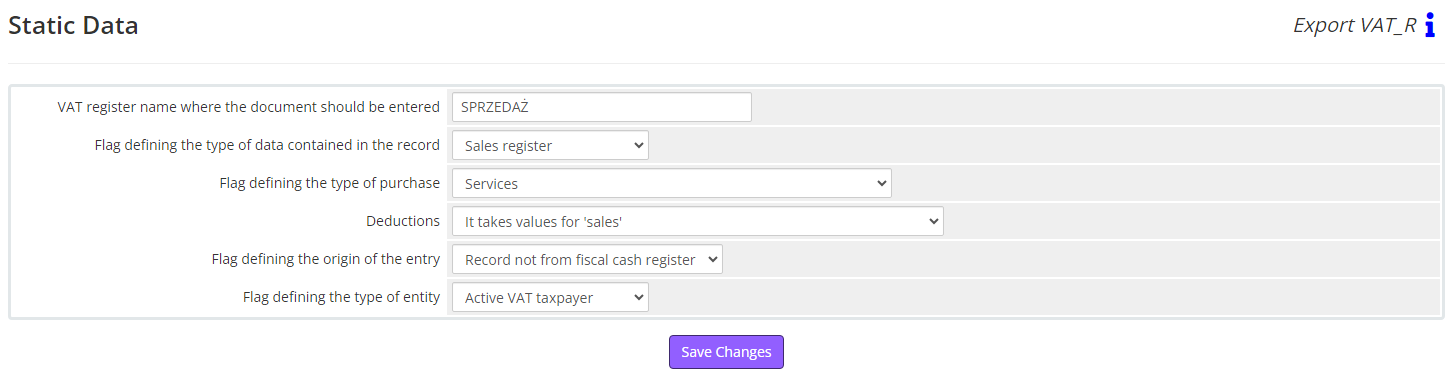](https://doc.puq.info/uploads/images/gallery/2024-02/image-1709117020641.png)Please ensure to fill in these details with your accounting department to ensure all data complies with regulations, and perform checks before sending to Uzhondu.
**Static data** - these are the details we assign to all invoices and remain unchanged regardless of the invoices, namely: 1. VAT register name where the document should be entered 2. Flag defining the type of data contained in the record 1. Purchase register 2. Sales register 3. Cost ledger item 4. Revenue ledger item 3. Flag defining the type of purchase 1. Value provided for transactions of type (field TYPE) 2, 3, and 4 2. Purchase of goods for resale 3. Other purchases 4. Purchase of fixed assets 5. Services 6. Purchase of means of transport 7. Purchase of real estate 8. Purchase of fuel 4. Deductions 1. It takes values for 'sales' 2. Does not take values for 'sales' 3. Takes values for 'sales' only in nominative case 4. Three-party transaction (only if 'EXPORT' - intra-Community delivery) 5. The buyer is a taxpayer 6. Purchase from a taxpayer not domiciled in Poland (only if 'EXPORT' - intra-Community delivery or export) 7. To be settled in the VAT-UE declaration 8. The buyer is a taxpayer (only if 'EXPORT' - intra-Community delivery or export) or three-party transaction (only if 'EXPORT' – domestic transaction) 5. Flag defining the origin of the entry 1. Record not from fiscal cash register 2. Record from fiscal cash register 6. Flag defining the type of entity 1. Inactive VAT taxpayer 2. Individual 3. Active VAT taxpayer # Payment Methods ### PUQ Customization module **[WHMCS](https://puqcloud.com/link.php?id=77)** ##### [Order now](https://puqcloud.com/whmcs-addon-puq-customization.php) | [Download](https://download.puqcloud.com/WHMCS/addons/PUQ-Customization/) | [FAQ](https://faq.puqcloud.com/) [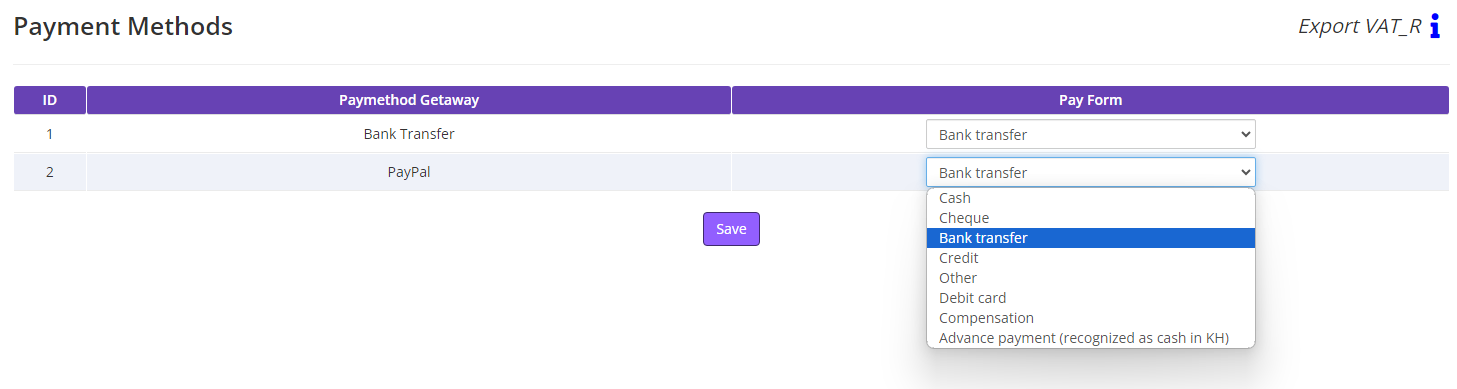](https://doc.puq.info/uploads/images/gallery/2024-02/image-1709125008989.png) In the "Paymethod Getaway" column, all Paymethod Gateways from your WHMCS system will be listed. For each of them, you will need to select the corresponding Pay Form so that invoices with different Paymethod Gateways are correctly documented in the report. # Currencies ### PUQ Customization module **[WHMCS](https://puqcloud.com/link.php?id=77)** ##### [Order now](https://puqcloud.com/whmcs-addon-puq-customization.php) | [Download](https://download.puqcloud.com/WHMCS/addons/PUQ-Customization/) | [FAQ](https://faq.puqcloud.com/) [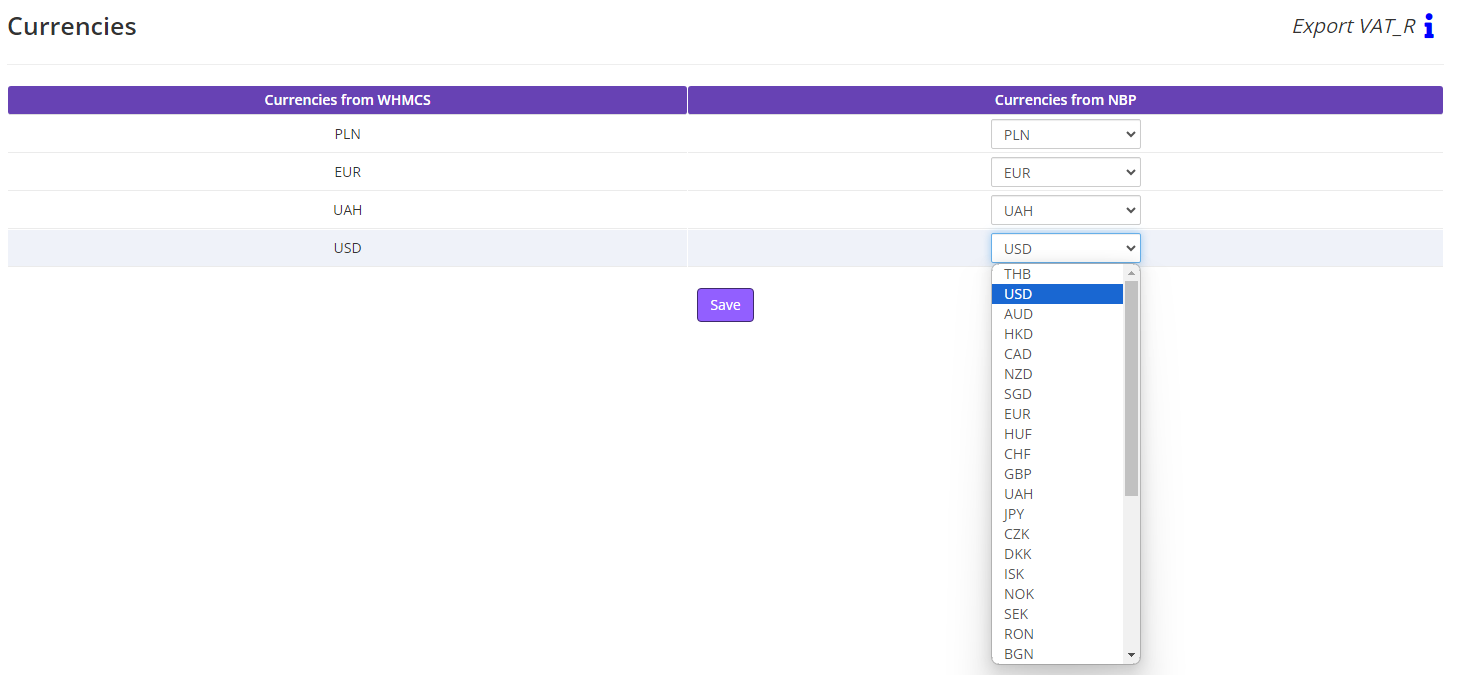](https://doc.puq.info/uploads/images/gallery/2024-02/image-1709125397369.png) In the "Currencies from WHMCS" column, all currencies from your WHMCS system will be listed. For each of them, you will need to select the corresponding "Currencies from NBP" (taken from the official NBP website) so that invoices with different currencies have accurate prices based on the exchange rates on the day of payment, in the report.