
Product Group Order
Product Group Order extension provides users with the ability to automatically create orders based on product-group rules.
Description
PUQ Customization module WHMCS
Order now | Download | FAQ
The "Product Group Order" extension is a powerful tool that enables users to automatically generate orders based on product-group rules. With this extension, you can standardize bundles, enforce required add-ons, and complete client setups exactly when needed. Here are the key features of the "Product Group Order" extension:
- Rule-Based Ordering from Product Groups: Define what a client must already have (applies_to), what is required (requires), and which billing cycles are allowed. The extension turns these rules into consistent, compliant orders.
- Per-Client Service Analysis: The extension scans each client’s existing products and addons, maps billing cycles, and pinpoints exactly what’s missing to complete the set.
- Cycle-Aware Matching: Ensure accuracy by requiring at least one allowed billing cycle for every required product before an order is created.
- On-Demand Order Creation & Auto-Provisioning: Create the order via WHMCS Local API with your chosen payment method; the module triggers provisioning (AcceptOrder, autosetup) so services are delivered promptly and efficiently.
- Products and Addons Support: Apply rules across both products and addons to build complete, sellable bundles.
By giving you the power to convert grouping rules into precise, on-demand orders, the "Product Group Order" extension provides unparalleled control over how bundles are completed. You no longer have to rely on manual checks—initiate compliant, cycle-correct orders whenever you choose.
It does not disrupt your existing services or schedules; instead, it enhances your sales flow by adding only the necessary items to fulfill your defined rules.
Automated ordering and provisioning let you closely monitor outcomes and ensure orders complete successfully. If any issues arise, you can address them immediately—keeping operations smooth and clients satisfied.
By enabling rule-driven ordering, per-client analysis, cycle-aware matching, and one-click order + auto-provisioning, this "Product Group Order" extension becomes an indispensable tool for optimizing your WHMCS sales efficiency and revenue growth.
Configuration
PUQ Customization module WHMCS
Order now | Download | FAQ

Enabled - Enabling or disabling all custom functions of this extension affects the automation and visibility of its features in the client area. When extension disabled, the automation capabilities and related features provided by the extension will not be active or visible to clients. However, as an administrator, you will still have access to configure and utilize the extension's functionalities through the administration interface. This gives you the flexibility to control the visibility and automation aspects of the extension based on your specific needs and preferences.
Default Payment Method — The payment method used by default when orders are created automatically. You can choose any of the payment gateways configured in WHMCS. This ensures newly created orders are immediately linked to the correct payment method, with no additional manual changes required.
Product Grouping
PUQ Customization module WHMCS
Order now | Download | FAQ
Rules list

-
ID — rule identifier
-
Group Name — rule name
-
Applies To — trigger items
-
Requires — mandatory items
-
Auto Suspend — whether autosuspend is enabled
-
Notes — admin notes
-
🗑 — delete rule
Click Group Name to edit a rule.
Create / Edit a rule
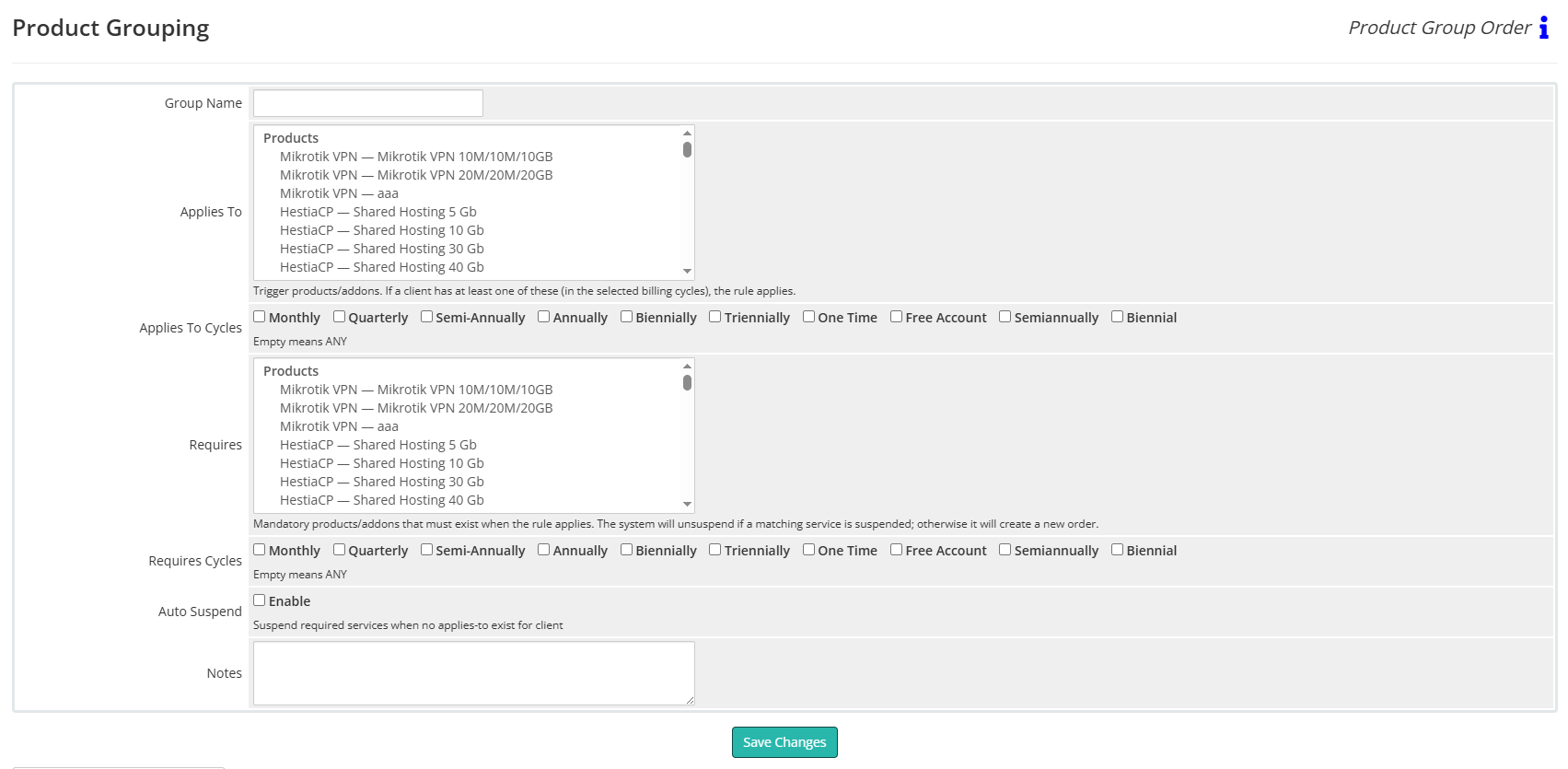
Group Name
A friendly name for the rule.
Applies To (Products/Addons)
Select trigger products/addons.
Meaning: if a client has at least one of these items in the selected billing cycles, the rule applies.
Below the list, use Applies To Cycles checkboxes.
Leaving all cycles unchecked means ANY cycle.
Requires (Products/Addons)
Select the mandatory products/addons that must exist when the rule applies.
Below the list, use Requires Cycles (existing/new service cycle; empty = ANY).
Runtime behavior when the rule applies:
-
If a matching required service already exists but is Suspended, the system will unsuspend it.
-
If a required service does not exist, the system will create a new order via WHMCS Local API using one of the allowed cycles and your Default Payment Method.
Auto Suspend → Enable
If enabled and the client no longer has any of the Applies To triggers, the module will suspend the services listed in Requires.
If disabled, no suspension is performed.
Notes
Internal notes for administrators.
Save Changes
Saves the rule.
Example (from screenshots)
Group Name: rDNS
Applies To: Proxmox KVM — VPS Start; Proxmox KVM — VPS Pro
Requires: Reverse DNS — Reverse DNS Management
Auto Suspend: Enabled
Result:
-
When the client has any listed VPS plan, the module ensures Reverse DNS Management exists (creates an order if missing, or unsuspends if suspended).
-
If the client no longer has any of those VPS plans, the module suspends Reverse DNS Management (because Auto Suspend is enabled).
Tips
- Make sure Default Payment Method is set on the Configuration page so auto-created orders use the correct gateway.
-
Test new rules on a small client set before broad use.