# Ticket Auto-Reply
The extension allows configuring messages to be sent to clients automatically in response to their inquiries.
# Description
### PUQ Customization module **[WHMCS](https://puqcloud.com/link.php?id=77)**
##### [Order now](https://puqcloud.com/whmcs-addon-puq-customization.php) | [Download](https://download.puqcloud.com/WHMCS/addons/PUQ-Customization/) | [FAQ](https://faq.puqcloud.com/)
The "**Ticket Auto-Reply**" extension streamlines communication with clients by automating responses to their inquiries. Users can configure default replies for all support departments or customize responses for each department individually. Additionally, administrators can set the username for replies and specify the time frame for auto-responses after ticket creation.
This extension offers flexibility by allowing different replies for registered clients based on whether they have selected a specific product or not, as well as for unregistered clients. Users can include merge field variables in auto-replies, which are dynamically replaced with user data upon sending.
Key Features:
- Automated Responses: Automatically send predefined messages to clients in response to their inquiries, reducing response times and improving customer satisfaction.
- Department-specific Replies: Customize auto-replies for each support department to ensure tailored responses that meet the needs of different client inquiries.
- Flexible Configuration: Set the admin username for replies and adjust the timing of auto-responses to align with your support workflow.
- Client Segmentation: Tailor responses based on client registration status and product selection, enhancing personalization and relevance.
- Merge Field Support: Include merge field variables in auto-replies to dynamically insert client-specific information for a personalized touch.
Overall, the "**Ticket Auto-Reply**" extension enhances efficiency and customer service by automating response processes and providing flexibility in configuring replies based on client characteristics and support department requirements.
# Configuration
### PUQ Customization module **[WHMCS](https://puqcloud.com/link.php?id=77)**
##### [Order now](https://puqcloud.com/whmcs-addon-puq-customization.php) | [Download](https://download.puqcloud.com/WHMCS/addons/PUQ-Customization/) | [FAQ](https://faq.puqcloud.com/)
[](https://doc.puq.info/uploads/images/gallery/2024-05/image-1714644003066.png)
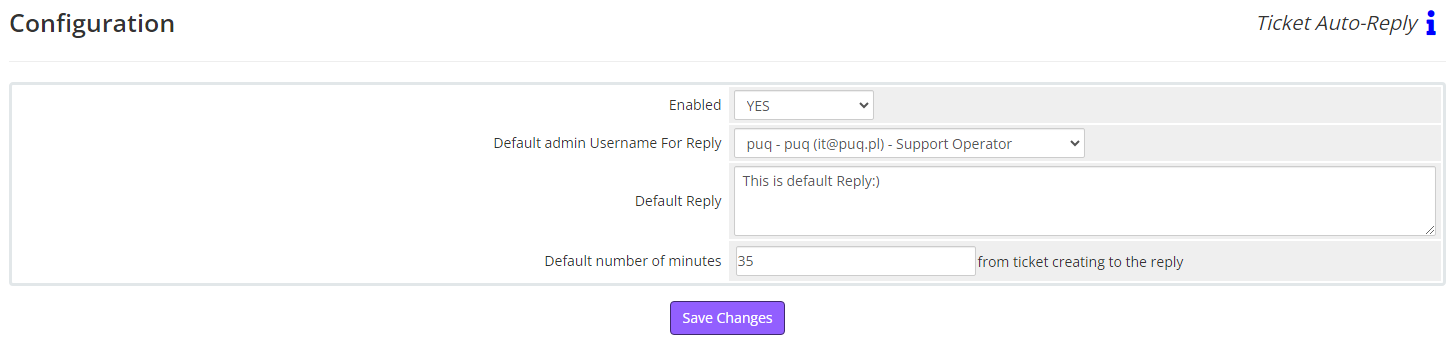
**Enabled** - Enabling or disabling all custom functions of this extension affects the automation and visibility of its features in the client area. When the extension is disabled, the automation capabilities and related features provided by the extension will not be active or visible to clients. However, as an administrator, you will still have access to configure and utilize the extension's functionalities through the administration interface. This gives you the flexibility to control the visibility and automation aspects of the extension based on your specific needs and preferences.
**Default admin Username For Reply** - Set the admin username for default replies
**Default Reply** - Please enter your message here. If you check "Auto-Reply" chackbox in the "Replies" tab but do not check "Overwrite Reply" chackbox, the response to the client will contain the text from this field.
**Default number of minutes** - The time after the client's request is created when an auto-reply will be sent. Please note that this time depends entirely on your WHMCS cron job. For example: If a client submits a request at 11:41 and you set this field to "6", and the cron job runs every 5 minutes, then the auto-reply will be sent at 11:50, i.e., in the next cron run.
# Replies
### PUQ Customization module **[WHMCS](https://puqcloud.com/link.php?id=77)**
##### [Order now](https://puqcloud.com/whmcs-addon-puq-customization.php) | [Download](https://download.puqcloud.com/WHMCS/addons/PUQ-Customization/) | [FAQ](https://faq.puqcloud.com/)
[](https://doc.puq.info/uploads/images/gallery/2024-05/image-1714646412469.png)
[](https://doc.puq.info/uploads/images/gallery/2024-05/image-1714646424929.png)
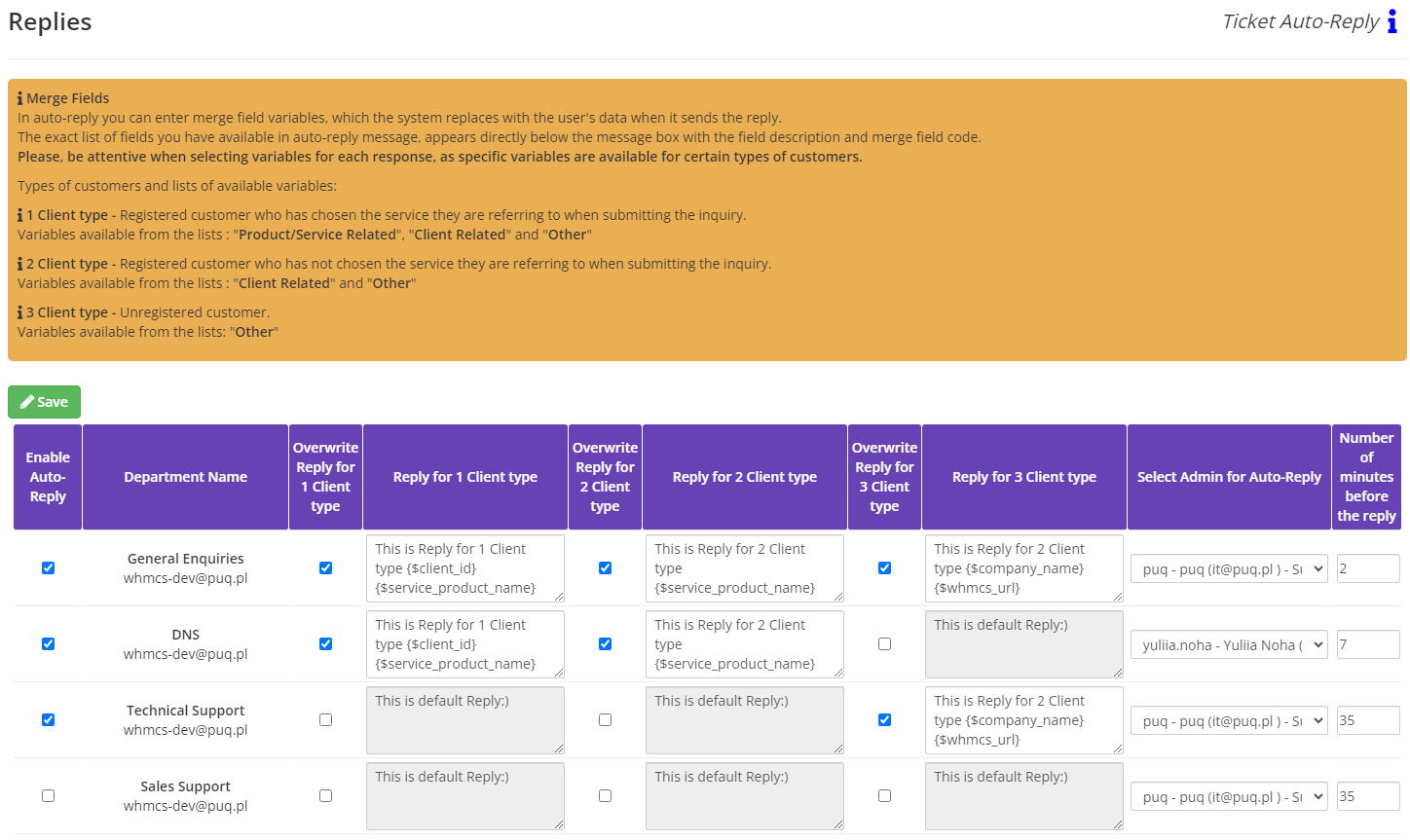
**Enable Auto-Reply** - Enable this option if you want an automatic reply to be sent upon receiving requests to this department.
**Merge Fields**
In auto-reply you can enter merge field variables, which the system replaces with the user's data when it sends the reply.
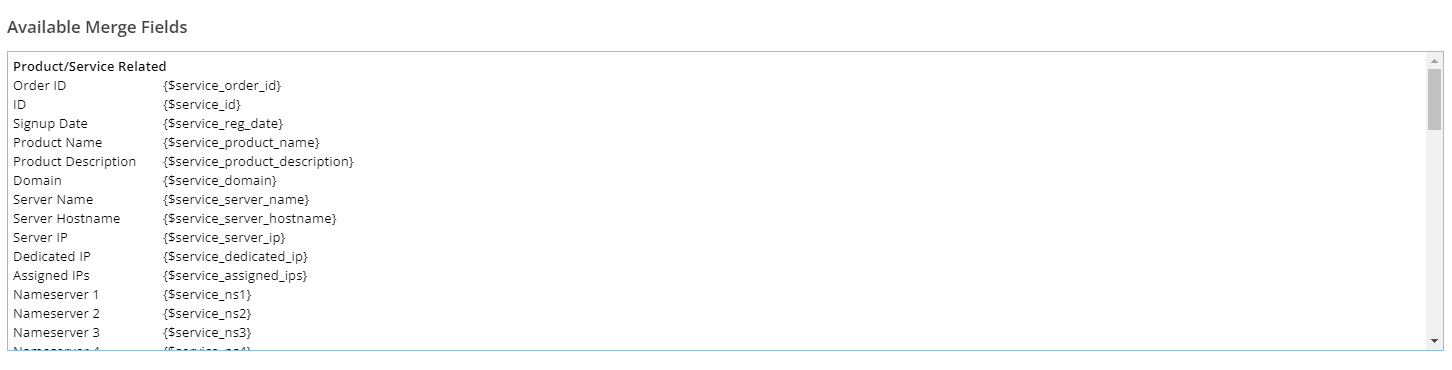
The exact list of fields you have available in auto-reply message, appears directly below the message box with the field description and merge field code. **Please, be attentive when selecting variables for each response, as specific variables are available for certain types of customers.** Types of customers and lists of available variables:
**1 Client type -** Registered customer who has chosen the service they are referring to when submitting the inquiry.
Variables available from the lists : "**Product/Service Related**", "**Client Related**" and "**Other**"
**2 Client type -** Registered customer who has not chosen the service they are referring to when submitting the inquiry.
Variables available from the lists : "**Client Related**" and "**Other**"
**3 Client type -** Unregistered customer.
Variables available from the lists: "**Other**"
**Overwrite Reply for 1/2/3 Client type** - Enable this option if you want to customize the text of the auto-reply. Otherwise, the Default Reply specified in the Configuration will be sent.
**Reply for 1/2/3 Client type** - Enter the text of the auto-reply for this department. If Overwrite Reply for 1/2/3 Client type is disabled, this message will not be saved, and the Default Reply specified in the Configuration will be sent. Here, you can enter merge field variables, which the system replaces with the user's data when it sends the reply. The exact list of fields available in the auto-reply message appears directly below the message box with the field description and merge field code.
**Select Admin for Auto-Reply** - Specify the admin username for auto-replies. Otherwise, the Default Admin Username For Reply specified in the Configuration will be selected.
**Number of minutes before the reply** - The time after the client's request is created when an auto-reply will be sent. Please note that this time depends entirely on your WHMCS cron job. For example: If a client submits a request at 11:41 and you set this field to "6", and the cron job runs every 5 minutes, then the auto-reply will be sent at 11:50, i.e., in the next cron run. Otherwise, the Default number of minutes specified in the Configuration will be used.