
Automation: Scheduler Overview
PUQcloud Panel
Order Now | Download | FAQ
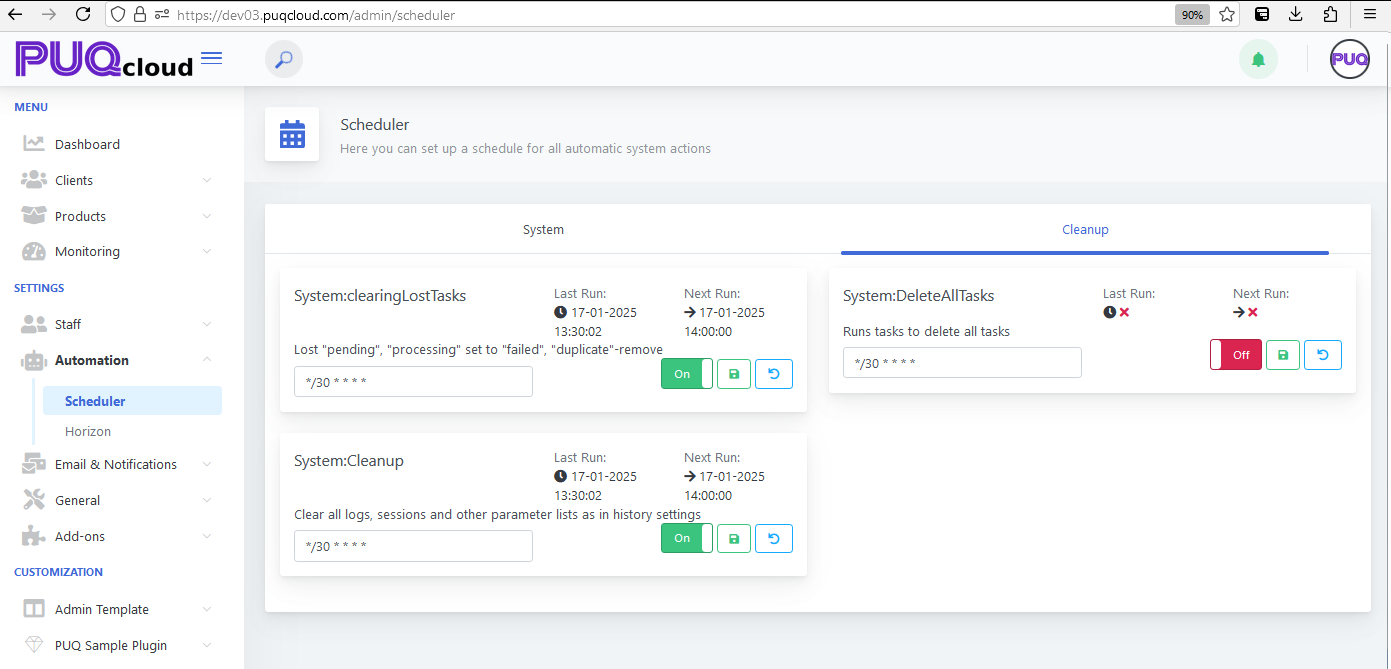
The "Scheduler" section in the PUQ Cloud Panel under Automation is a robust tool designed for managing automated tasks across the system. This feature ensures that routine operations are executed efficiently, consistently, and without manual intervention, enhancing overall system reliability and productivity.
Overview of Scheduler
Schedulers are configured instructions that automate specific system actions at defined intervals. These actions range from cleaning up logs and sessions to managing tasks and maintaining system performance. The Scheduler interface provides administrators with an intuitive and powerful way to oversee and adjust these automated operations.
Key Components
The Scheduler section is divided into multiple panels, each representing a category of tasks or system actions. The interface includes the following key elements:
- Task Name: Displays the name of the scheduled task, providing a clear understanding of its purpose (e.g., System:clearingLostTasks, System:Cleanup).
- Last Run: Indicates the most recent execution time of the task, allowing administrators to monitor activity and verify successful operation.
- Next Run: Shows the scheduled time for the task’s next execution, ensuring transparency in scheduling.
- Interval: Configurable time expressions (e.g., CRON syntax) that define the task’s execution frequency, such as every 30 minutes.
- Toggle Switch: Enables or disables specific tasks, giving administrators control over active automation processes.
- Reset Button: Allows administrators to reset task configurations to default settings if needed.
Functionality
The Scheduler enables administrators to configure and monitor automated tasks. Key functionalities include:
- Task Management: Administrators can view and modify task configurations, ensuring they align with operational requirements. Tasks such as clearing logs, processing pending tasks, or removing duplicates are standard examples.
- Custom Intervals: Using CRON expressions, administrators can define task frequencies with high precision, tailoring automation to the system’s specific needs.
- Error Handling: The interface highlights tasks that fail to execute, enabling prompt troubleshooting and minimizing disruptions to automation workflows.
- Comprehensive Status Indicators: Visual cues, such as icons and color coding, provide immediate insight into the task’s current state (e.g., pending, running, failed).
Use Cases
The Scheduler is versatile and supports various applications, including but not limited to:
- System Maintenance: Automating routine tasks like cleaning old logs and sessions ensures that the system remains efficient and clutter-free.
- Task Management: Handling recurring actions such as processing queued jobs or removing obsolete data to optimize system performance.
- Data Integrity: Regularly scheduled checks for duplicate entries or failed tasks help maintain data consistency and reliability.
Best Practices
To maximize the Scheduler’s efficiency, consider the following best practices:
- Define Clear Intervals: Use CRON expressions to set intervals that balance system performance with operational requirements.
- Monitor Task Execution: Regularly review the Last Run and Next Run fields to ensure tasks are executing as expected.
- Enable Relevant Tasks Only: Disable tasks that are not immediately needed to reduce system overhead and potential conflicts.
- Respond to Failures: Promptly address failed tasks by reviewing logs and troubleshooting issues to maintain system reliability.
Technical Details
Schedulers in the PUQ Cloud Panel utilize CRON syntax for time-based job execution. This provides flexibility in defining schedules, such as:
*/30 * * * *- Every 30 minutes0 2 * * *- Daily at 2 AM0 0 1 * *- Monthly on the first day
Each task is executed by the system’s job queue, ensuring tasks run sequentially and do not conflict with each other. Administrators can view detailed execution logs for each task in the Activity Log, aiding in diagnosing and optimizing automation processes.
Conclusion
The Scheduler is an indispensable tool in the PUQ Cloud Panel’s Automation suite, providing robust capabilities for managing system tasks with precision and efficiency. By leveraging its flexible configurations and monitoring features, organizations can automate repetitive tasks, enhance system performance, and focus on strategic initiatives. Its intuitive interface and powerful functionality make it a cornerstone of efficient system management.