Clients: Manage Clients Overview
PUQcloud Panel
Order Now | Download | FAQ
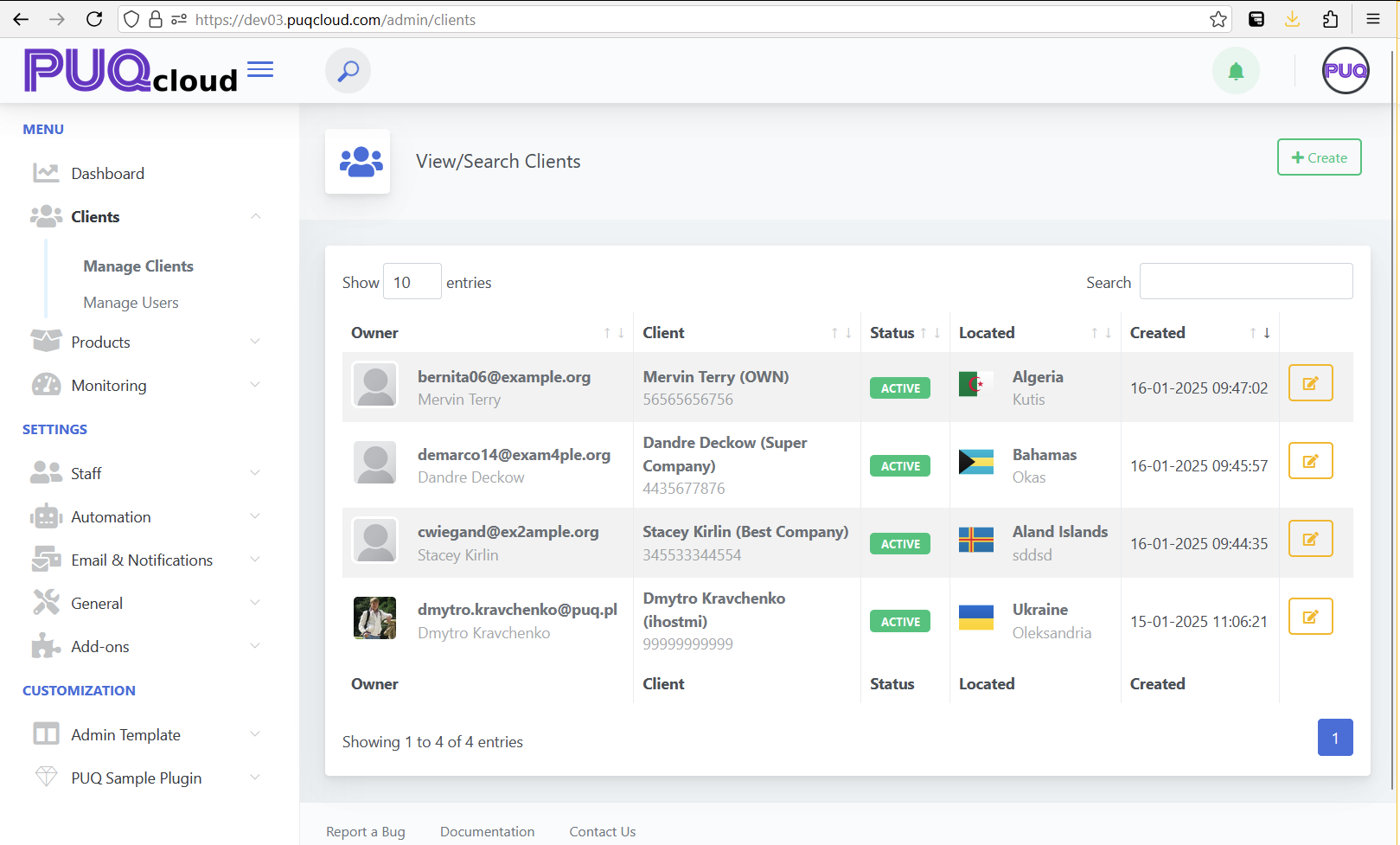
The Manage Clients section provides administrators with tools to view, search, and manage the client database within the PUQ Cloud Panel. This section is designed to simplify client management with an intuitive interface and detailed client information.
Key Features:
- Search Bar: Located at the top right corner, it allows quick searching of clients by email, name, or company.
- Client List: Displays a table with comprehensive information about each client, including:
- Owner: The email address and name of the client owner.
- Client: The client's full name and associated company (if applicable).
- Status: Indicates whether the client account is active or inactive. Active accounts are marked with a green label.
- Located: Displays the client's country and city along with a flag icon for easy identification.
- Created: Shows the timestamp when the client account was created.
- Edit Client Button: Located in the last column of the table, represented by a yellow edit icon. Clicking this button redirects to the client editing interface.
Pagination and Display Options:
- Entries Display: A dropdown menu to select how many clients are displayed per page (e.g., 10, 25, 50).
- Pagination: Allows navigation between multiple pages of clients.
Client Dashboard
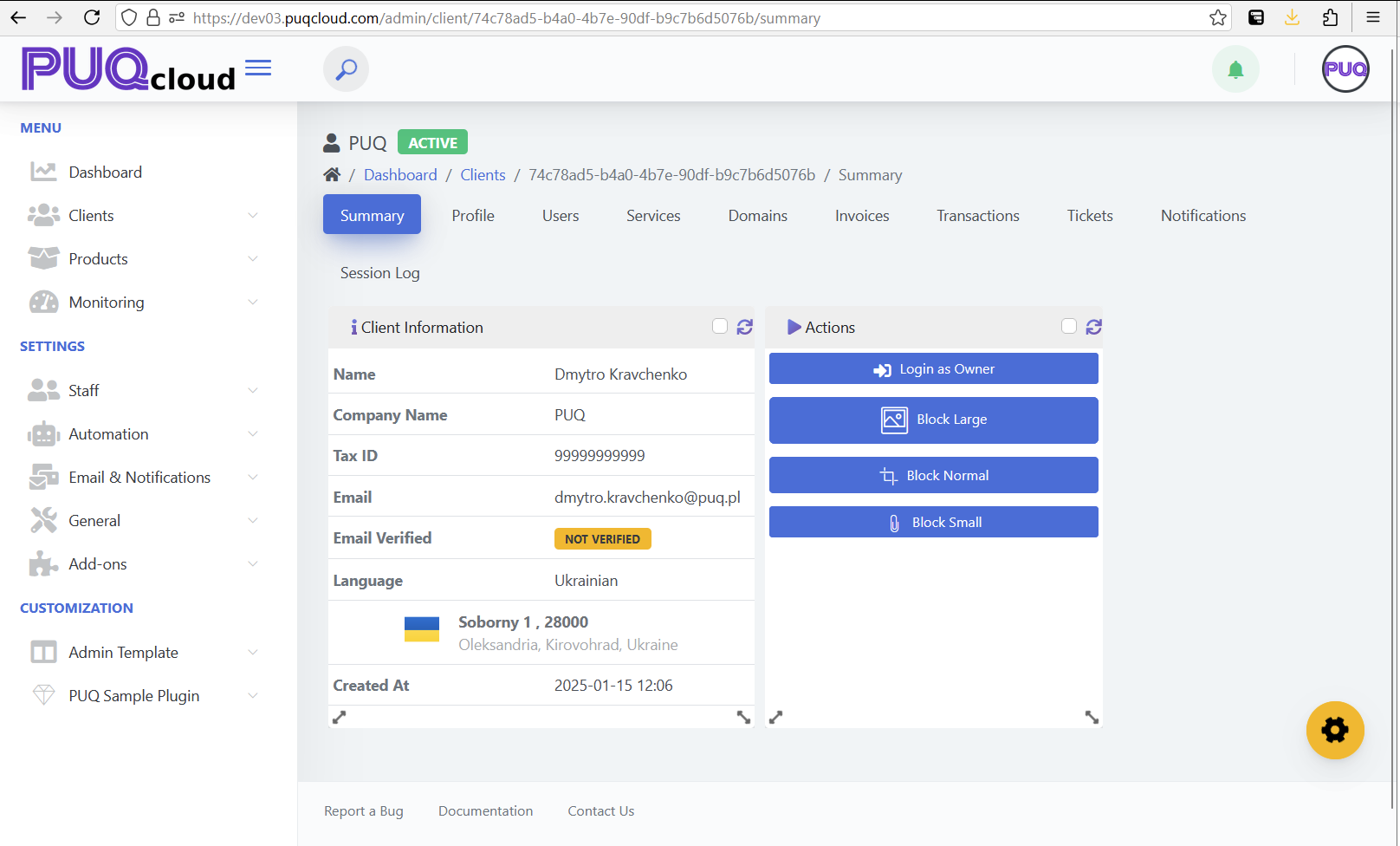
Once a client is selected, the system opens a dedicated dashboard that provides detailed information and management options for the client. The dashboard is built with widgets, which administrators can customize.
Customization Features:
- Widget Management: Widgets can be toggled on or off by clicking the gear icon in the bottom-right corner of the page. This allows administrators to personalize their view.
- Drag and Drop: Widgets can be rearranged by dragging them to a desired position on the page.
- Resizable Widgets: Each widget can be resized to better fit the administrator's workflow.
- Personalized Layouts: Widget settings and layouts are saved individually for each administrator, enabling personalized dashboards.
Widgets:
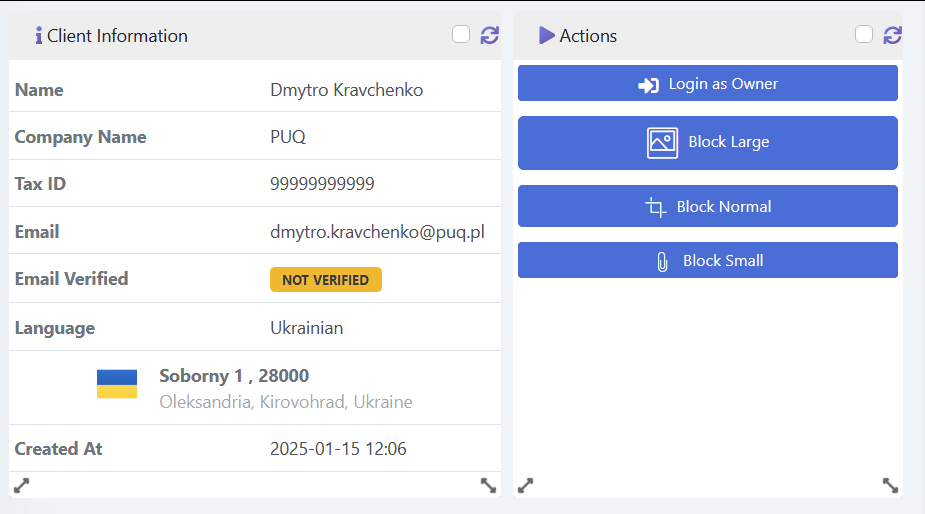
- Client Information Widget: Displays detailed information about the client, including:
- Name: The full name of the client.
- Company Name: The name of the client’s company, if applicable.
- Tax ID: The client’s tax identification number.
- Email: The client’s email address.
- Email Verified: Indicates whether the email is verified (e.g., "Not Verified").
- Language: The preferred language of the client, with a flag representing their country.
- Address: The full address of the client, including street, city, region, and country.
- Created At: The exact date and time when the client account was created.
- Actions Widget: Provides quick management actions, including:
- Login as Owner: Allows the administrator to log in as the client for troubleshooting or management purposes.
- Block Large: Blocks the client with a specific reason or category labeled as "Large."
- Block Normal: Blocks the client with a standard category labeled as "Normal."
- Block Small: Blocks the client with a minor category labeled as "Small."
Tabs:
The client dashboard includes the following tabs for comprehensive management:
- Summary: Displays an overview of the client’s information and recent activity.
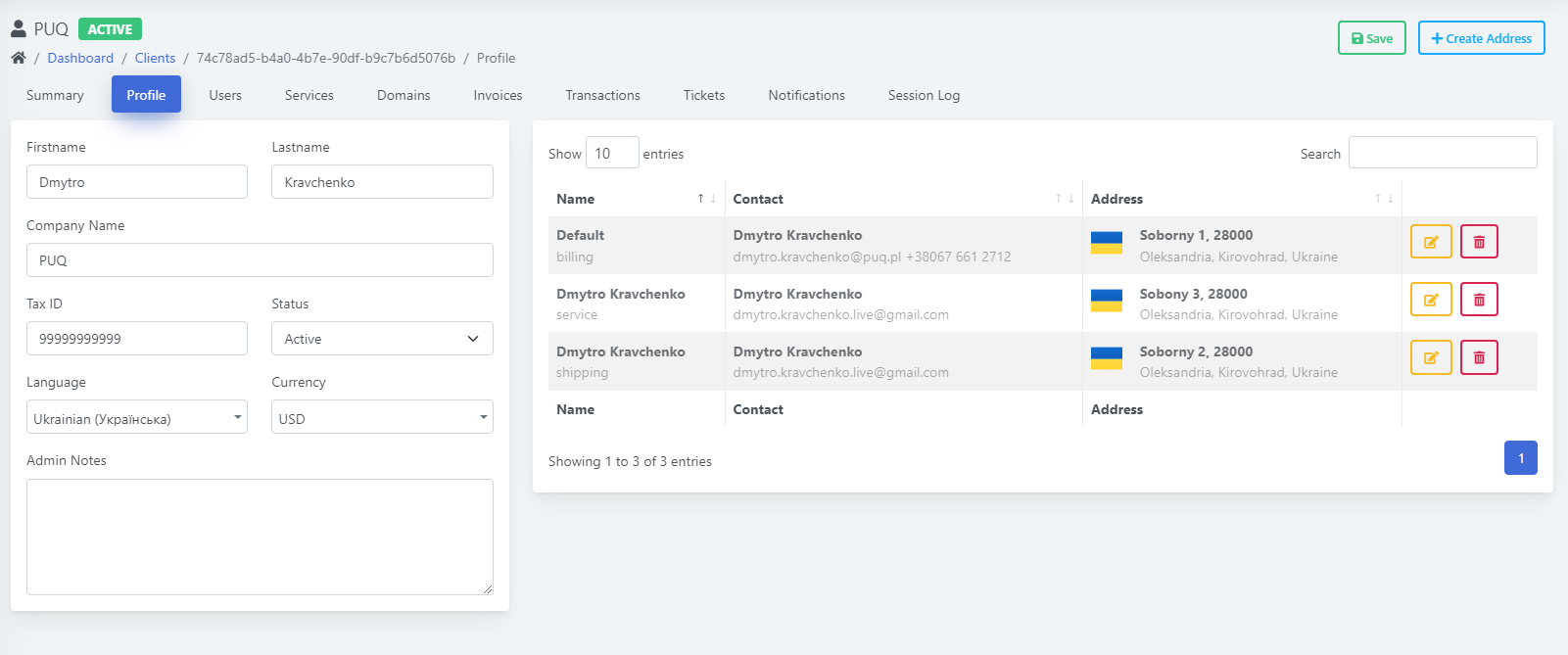
- Profile: Allows viewing and editing of the client’s personal details and preferences. Administrators can edit the client’s first name, last name, company name, tax ID, account status, preferred language, and currency. Additional notes for internal use can also be added in the "Admin Notes" field.
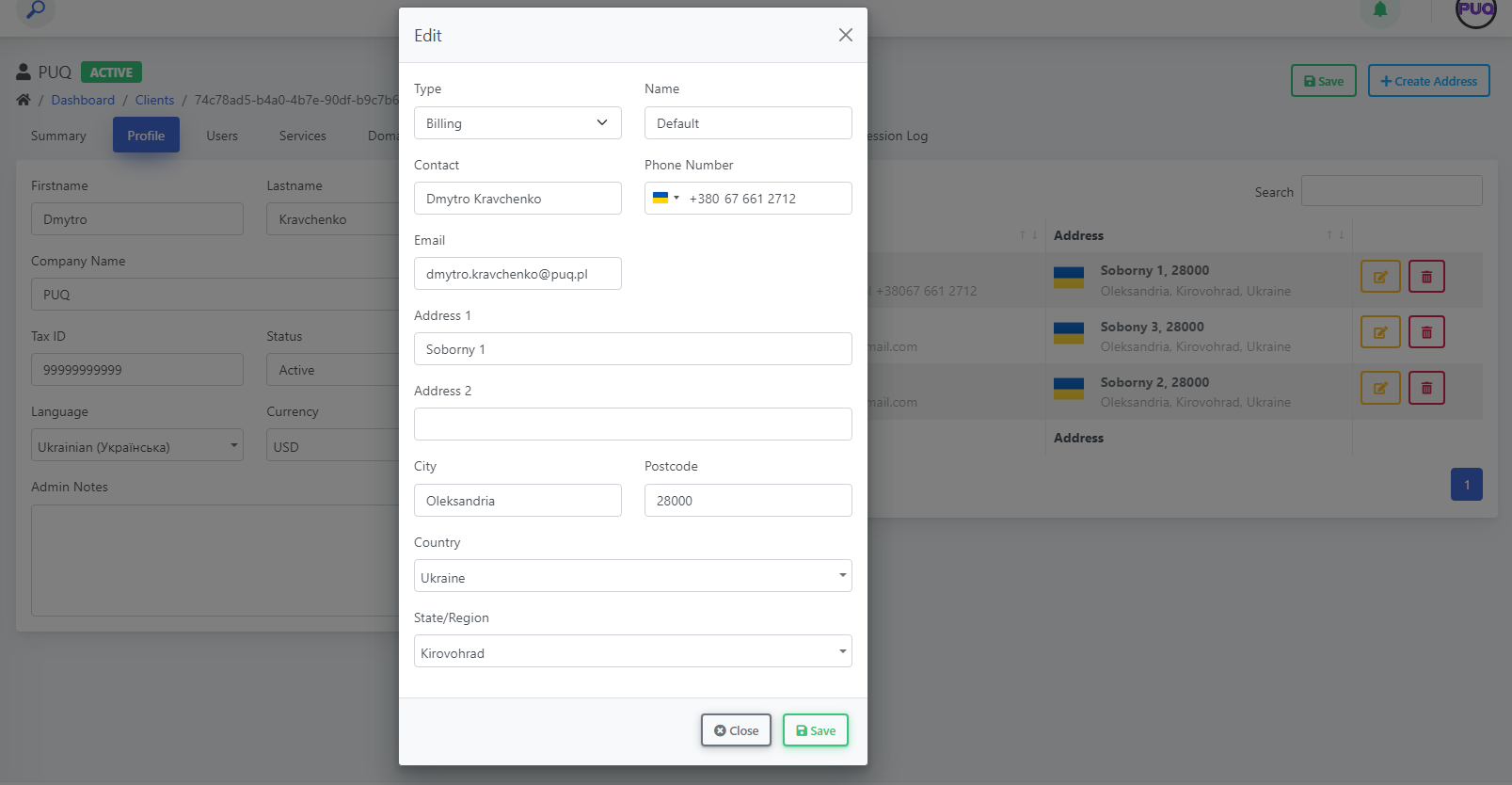
- Address Management: Administrators can manage multiple addresses associated with the client, including billing, shipping, and service addresses. Each address displays details like name, contact information, and full address. Administrators can add, edit, or delete addresses with the options available next to each entry.
- Users: Lists all users associated with the client account.
- Services: Shows all active, suspended, or pending services related to the client.
- Domains: Displays a list of domains owned by the client.
- Invoices: Provides access to all invoices, including paid, unpaid, and overdue statuses.
- Transactions: Details all financial transactions related to the client.
- Tickets: Lists support tickets submitted by the client, along with their statuses.
- Notifications: Displays all system notifications sent to the client.
- Session Log: Records recent logins and actions performed by the client for auditing and monitoring purposes.
Usage:
This section is essential for efficiently managing individual client accounts, monitoring their status, and performing quick actions. The flexible dashboard ensures a tailored experience for administrators, improving overall management efficiency.
Users Tab
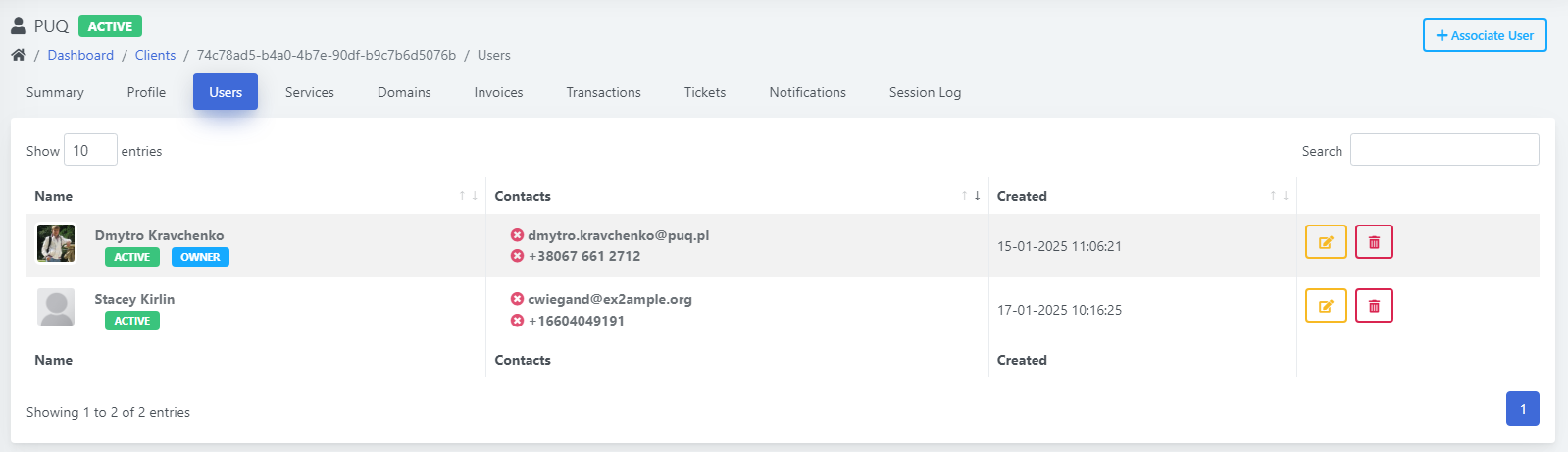
The Users tab allows administrators to manage all users associated with the client account. Features include:
- User List: Displays a list of users linked to the account, including their roles and permissions.
- Add User: Provides an option to add new users to the account with specific roles (e.g., admin, editor).
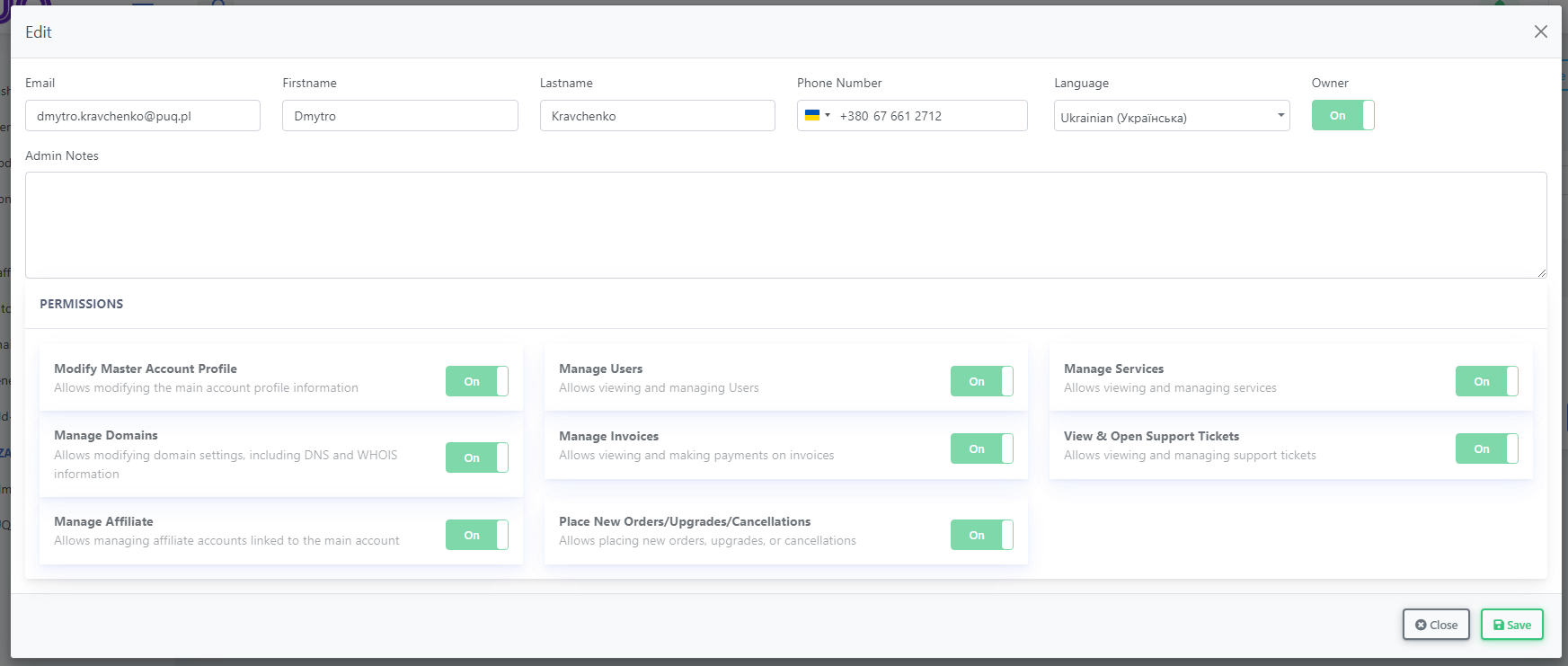
- Edit User: Allows administrators to modify existing user details such as name, email, and access permissions.
- Remove User: Enables the deletion of users no longer associated with the account.
- Search and Filter: Includes a search bar and filtering options to easily locate specific users based on criteria like name, email, or role.
This tab streamlines user management by offering comprehensive tools to customize access levels and ensure account security.
Profile Tab
The Profile tab allows administrators to view and edit the client’s profile details. Key features include:
- Edit Personal Details: Administrators can update the client’s first and last name, company name, tax ID, and account status.
- Language and Currency Settings: Adjust the client’s preferred language and default currency.
- Admin Notes: Internal notes for tracking specific details about the client.
- Multiple Addresses: Administrators can manage multiple addresses categorized as billing, shipping, and service. Each address includes fields for name, street, city, state, country, and contact information. Options to add, edit, or delete addresses are available for enhanced flexibility.
This tab ensures comprehensive management of client details, providing the flexibility to handle diverse scenarios and requirements.