# Manage Your Profile in the Client Area
### PUQcloud Panel
##### [Order Now](https://puqcloud.com/puqcloud-panel.php) | [Download](https://github.com/puqcloud/PUQcloud) | [FAQ](https://faq.puqcloud.com/)
#### Overview
Keep your **Profile** correct to ensure proper taxes, legal invoice details, and contact emails. This guide shows how to open the Profile screen, what every field means, and the safest way to update it — with exact places to insert your screenshots.
- - - - - -
#### Open the Profile screen
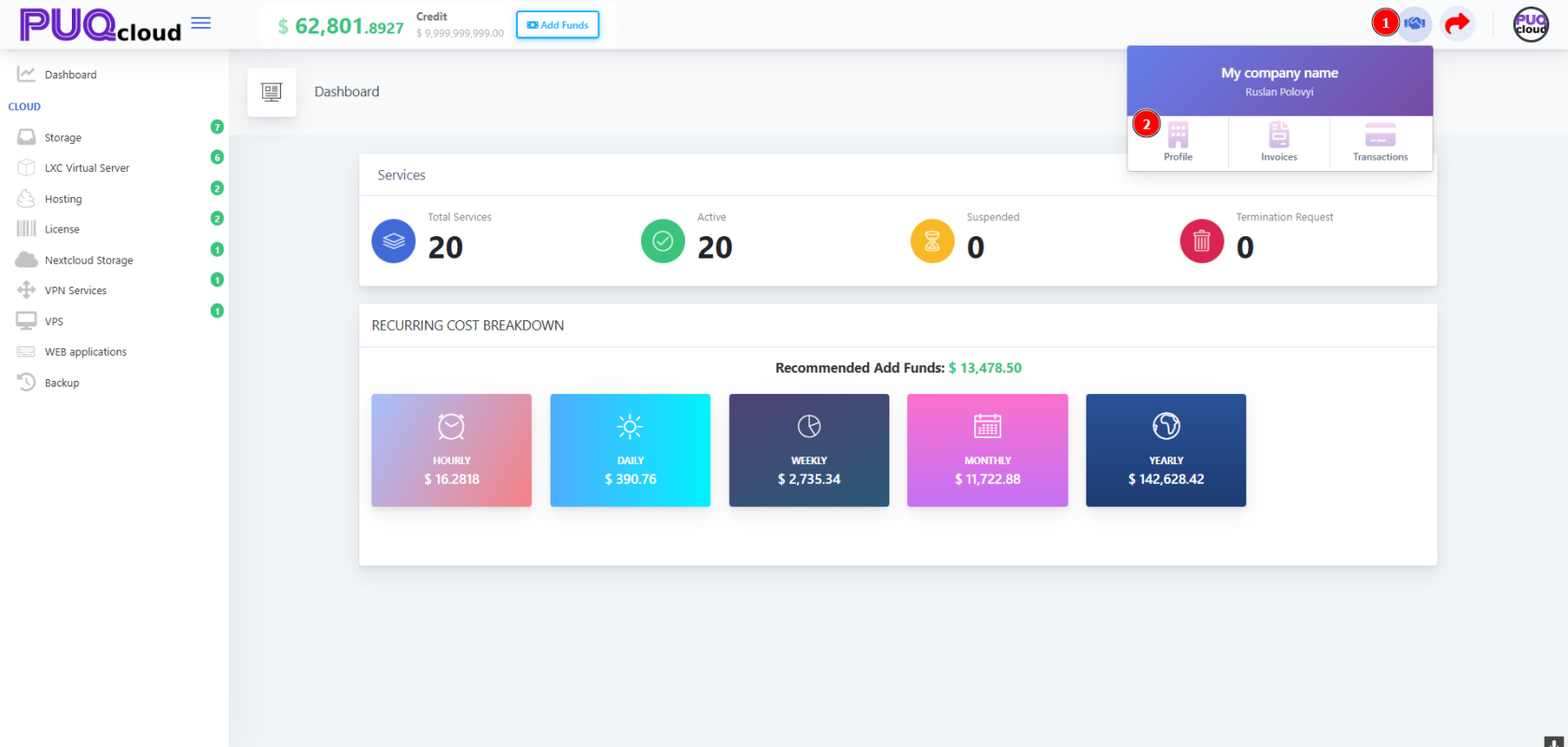
1. On the Dashboard, click your **Company widget** in the top-right.
2. Choose **Profile**.
Company dropdown (marker 1 → open menu, marker 2 → Profile).
[](https://doc.puq.info/uploads/images/gallery/2025-09/image-1758027110963.png)
- - - - - -
#### Edit your details
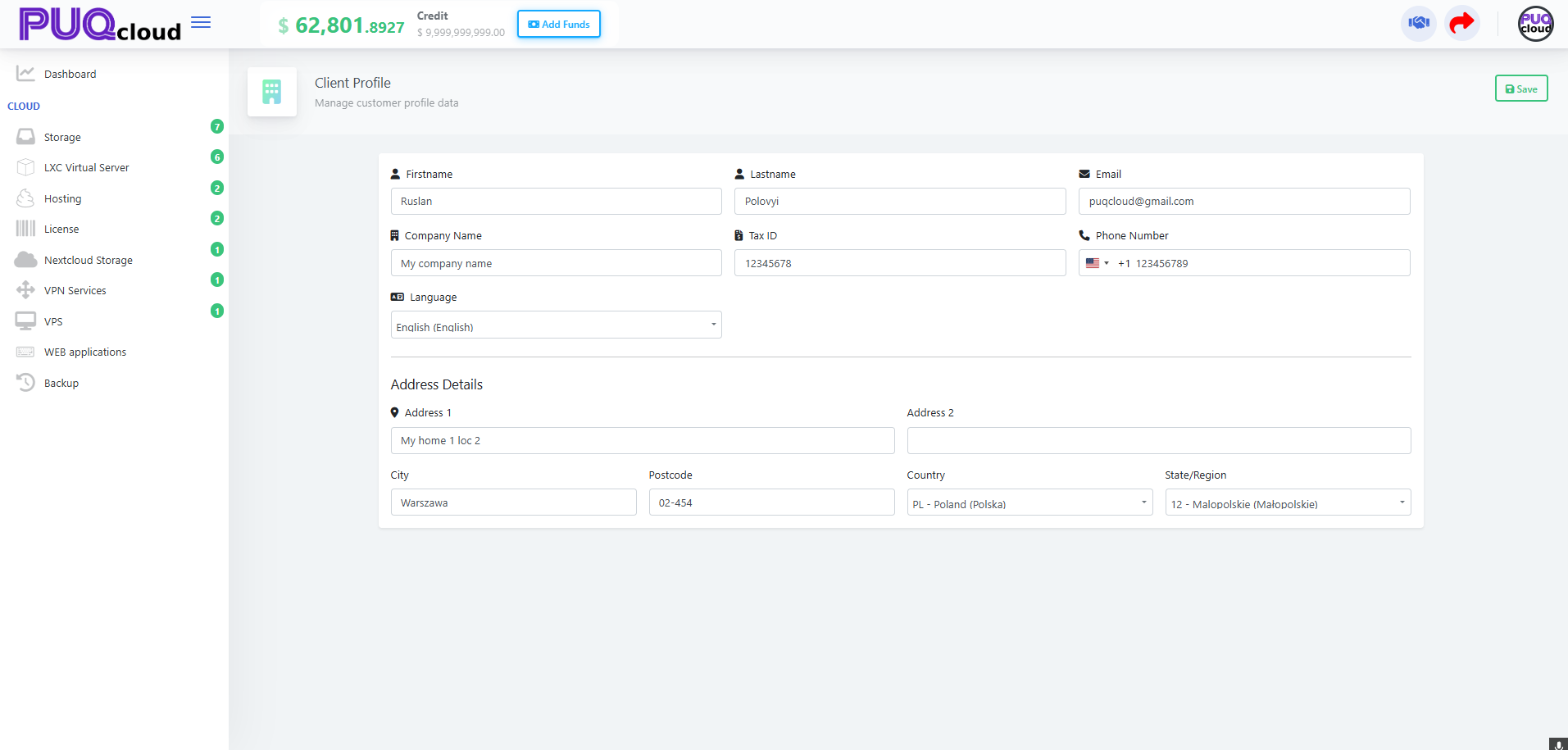
You’ll land on **Client Profile**. Update the fields below and press **Save** (top-right).
Client Profile form (full page).
[](https://doc.puq.info/uploads/images/gallery/2025-09/image-1758027117322.png)
#### What each field is for
- **Firstname / Lastname** — Account owner name shown on invoices/receipts.
- **Email** — Where invoices, payment receipts and alerts are sent.
- **Company Name** — Legal entity name printed on invoices.
- **Tax ID** — VAT/GST/Tax number. Required for correct tax calculation.
- **Phone Number** — Include **country code** (e.g., +1, +48).
- **Language** — UI language and (if enabled) document language.
- **Address 1/2, City, Postcode, Country, State/Region** — Legal billing address used for taxes.
Tip: If you’re not a company, leave **Company Name** empty and **Tax ID** blank — you’ll be treated as a private individual where applicable.
- - - - - -
#### Best practices (1-minute checklist)
- **Company vs Individual:** Fill **Company Name** and **Tax ID** only if you’re a business.
- **Tax ID format:** Use your country’s official format (e.g., **PL** VAT: `PL1234567890`).
- **Country & State:** Must match your real billing address — taxes depend on it.
- **Phone:** Add the **country code**; avoid spaces/symbols if validation fails.
- **Save:** Click **Save** before leaving, then reload the **Invoices** page to confirm the header shows your new details.
- - - - - -
#### When to update your profile
- You see **wrong VAT/GST** on an invoice
- Your company renamed, moved address, or changed tax number
- You want the portal in another **Language**
- Your **Email** for billing changed
- - - - - -
#### Troubleshooting
- **“My invoice has the wrong tax.”** → Recheck **Country/State** and **Tax ID** in Profile, then regenerate or request a corrected document.
- **Phone won’t save.** → Include international format `+`.
- **Language saved but UI didn’t change.** → Refresh the page or log out/in; some sections cache language.
- **Tax ID rejected.** → Remove extra spaces, add country prefix if required (e.g., `PL`, `DE`, `CA` numbers vary).