
Transactions Page
PUQcloud Panel
Order Now | Download | FAQ
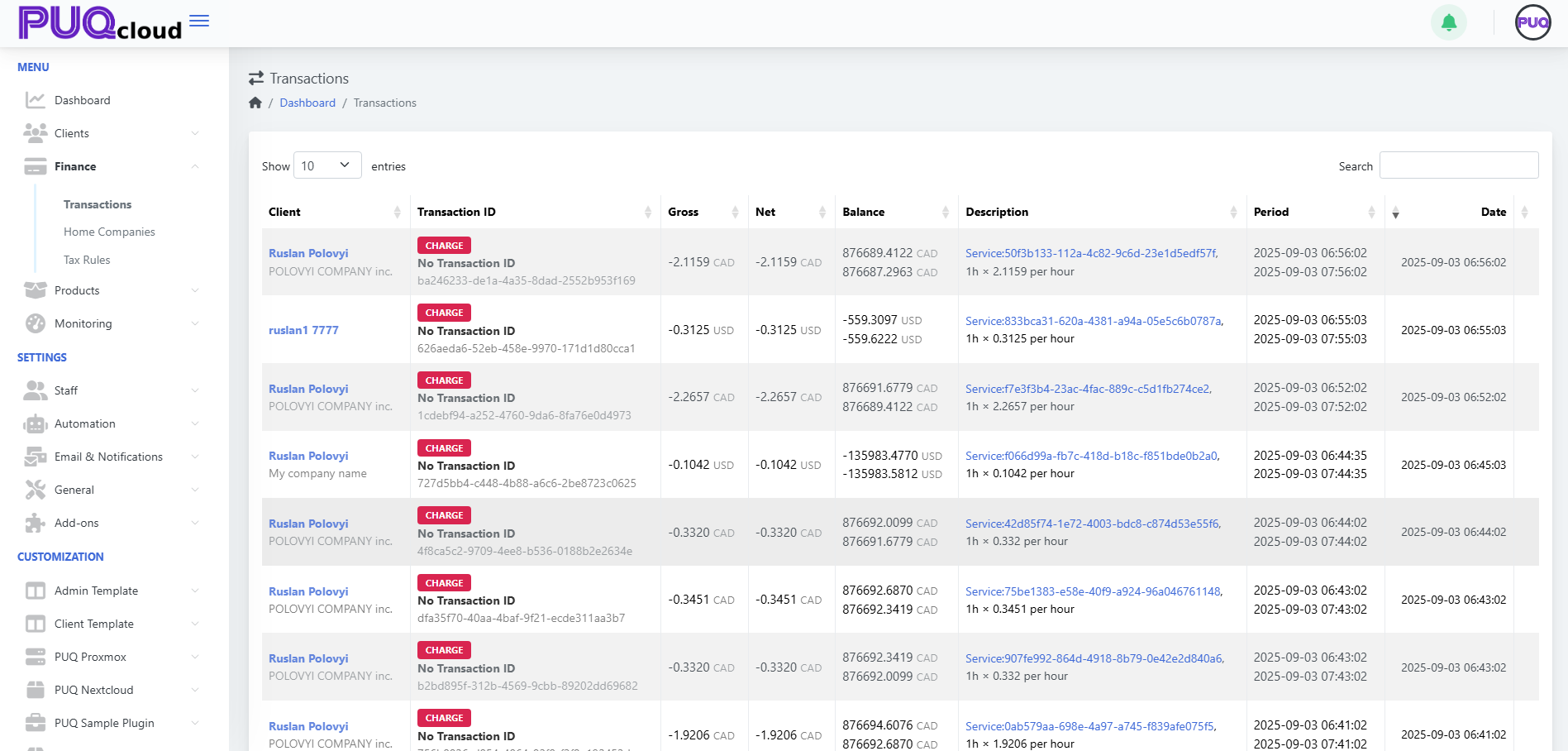
1. Open Transactions View
-
From the left-side menu, go to:
Finance → Transactions
2. Understand the Columns
Each transaction row includes the following:
| Column | Description |
|---|---|
| Client | The name of the client associated with the transaction. |
| Transaction ID | Displays the transaction type (e.g. CHARGE) and a unique ID or "No Transaction ID". |
| Gross / Net | Amount before and after fees or discounts. |
| Balance | The client’s account balance after the transaction. |
| Description | Contains a reference to the service and billing logic. |
| Period | Time range for which the charge applies. |
| Date | The exact timestamp of when the transaction occurred. |
3. Clickable Navigation
-
🔗 Click on the Client name
→ You will be redirected to the Client Summary page of that user. -
🔗 Click on the link in the Description column
→ You will be redirected to the specific Service page within the client's profile that generated the transaction.
Notes:
-
Transactions are displayed in real-time.
-
You can search, filter, and track charges per hour, per service.
-
Currency is shown per client’s preference (e.g., CAD, USD).