**WireGuard** is the main **VPN** protocol of the **PUQVPNCP** system. This means that the WireGuard protocol must be installed and configured correctly. If you have carefully carried out the panel installation process according to our instructions, then all packages are ready to work and you do not need to do anything else.
The primary place where configuration changes are made is the WireGuard interface, the internal network address space is configured on the interface, the public IP address for NAT implementation, as well as DNS server settings, and VPN clients are connected to the interface and much more. WireGard interface cannot be disabled (only removed)
## **WireGuard** protocol available to clients - **Android** (Official application from **WireGuard**) - **iOS** (Official application from **WireGuard**) - **macOS** (Official application from **WireGuard**) - **Linux** (Official application from **WireGuard** wireguard-dkms wireguard-tools) - **Windows** (Official application from **WireGuard**) ## Usage features WireGuard - User must install **WireGuard** software ([https://www.wireguard.com/install/](https://www.wireguard.com/install/ "https://www.wireguard.com/install/")) - Import VPN configuration to VPN client, from file or QR code. # Technical requirements and installation ##### [Order now](https://puqcloud.com/puqvpncp.php) | [Download](https://download.puqcloud.com/cp/puqvpncp/) | [FAQ](https://faq.puqcloud.com) ## Technical requirements - Operating systems: Debian 11+ (amd64), Ubuntu 20+ (amd64) - Real, public IP address on server interface - Domain name for the server - **PUQVPNCP** - Installed packages **wireguard wireguard-dkms wireguard-tools** *(Included in the installation process)* ## **Installation**We issue all comments after logging into the SSH terminal window as the root user.
##### Linux kernels less than 5.6 (<=5.5) did not include Wireguard as a feature in the upstream kernel code. Adding Wireguard support to these (older) kernels is possible via additional modules **Check kernel version** ```shell uname -sr Linux 5.10.0-10-amd64 ``` ```shell apt-get update apt-get upgrade reboot ``` For Debian 10: **WireGuard** is in Debian backported repo. Hence, enable backports as follows, run: ```shell sudo sh -c "echo 'deb http://deb.debian.org/debian buster-backports main contrib non-free' > /etc/apt/sources.list.d/buster-backports.list" sudo apt update ``` ```shell apt-get install wireguard wireguard-dkms wireguard-tools -y ``` ## Checking installed packages ##### Checking the **wireguard** status ```shell dpkg -s wireguard ``` Output should looks similar to this: ```shell Package: wireguard Status: install ok installed Priority: optional Section: net Installed-Size: 17 Maintainer: Daniel Kahn GillmorIn order for the WireGuard solution to work properly, it is necessary to create, among others: interface for Wireguard and configure other settings
##### **WireGuard's** configuration is available in the menu item **VPN servers->WireGuard** [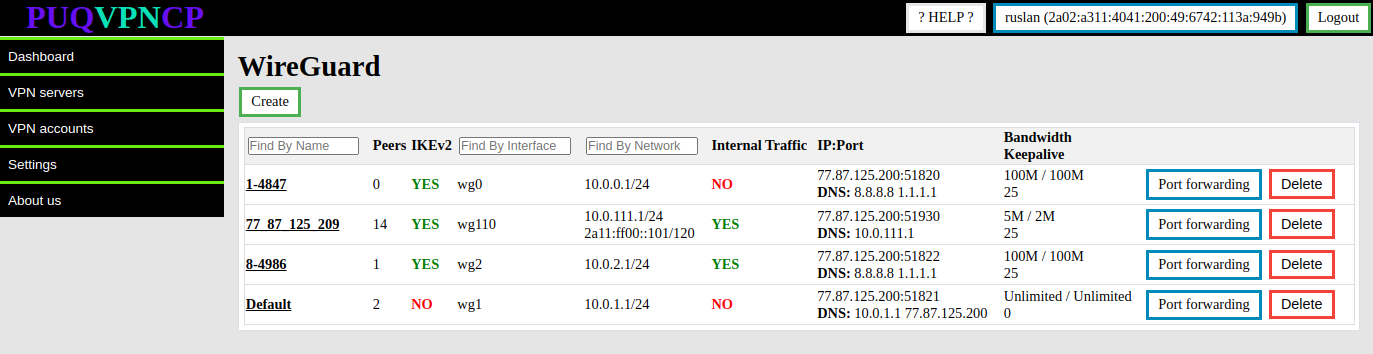](https://doc.puq.info/uploads/images/gallery/2023-07/image-1690791351780.png) To create a new **WireGuard** server, click the Create button. [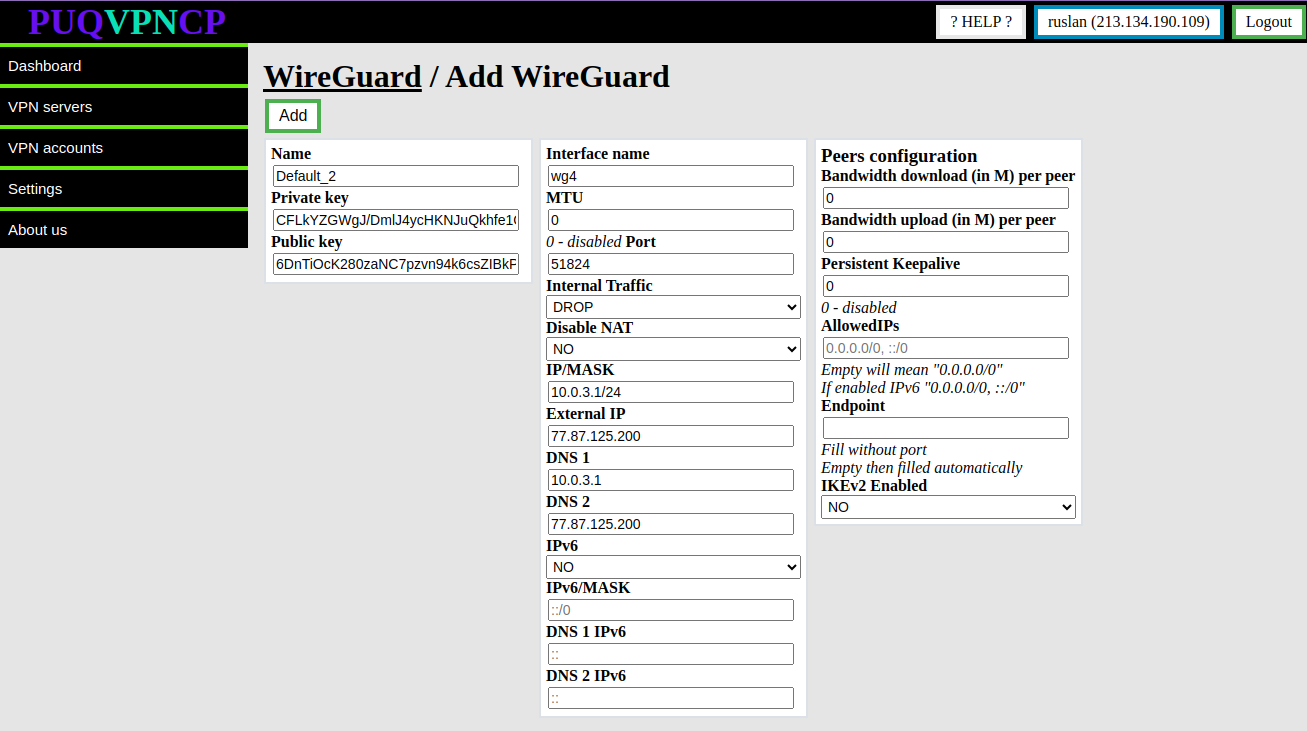](https://doc.puq.info/uploads/images/gallery/2023-10/image-1697374139408.png) The system will automatically fill in the form for creating a new server with unique data. You can change the data if necessary. - **Name** - This is a unique configuration name, this name appears in the system as the main configuration model of the **WireGuard** interface, this parameter cannot be changed later - **Private key/Public key -** Keys for encrypting the traffic of the WireGuard interface, the system generated new keys, but you can set them yourself when creating the **WireGuard** interface - **Interface name -** Name of the **WireGuard** network interface in the system, this parameter cannot be changed - **IP/MASK -**The parameters of the internal network of clients of this **WireGuard** interface, the address that is specified will be assigned to the interface and for all clients of this interface it will be the default gateway. - **Internal Traffic -** Allow or deny traffic exchange between the client of this interface - **Disable NAT-** If set to YES, then NAT rules will not be added to the firewall, which is necessary for public IP for the client or restricting access to the Internet. - **Port -** Port on which the interface will listen for incoming connections - **External IP -** The public IP address that will be used in the interface configuration, NAT will be organized through this address for all clients of this interface. **The address must be public and configured on the server**. - **DNS 1/DNS 2 -** DNS servers that will be issued to the client of this interface - **Bandwidth download/Bandwidth upload -** conditional value for the throughput of each peer connected to this **WireGuard** interface. This data will be automatically applied when creating a VPN client for this WireGuard interface. - **Persistent Keepalive -** A sensible interval that works with a wide variety of firewalls is 25 seconds. Setting it to 0 turns the feature off, which is the default, since most users will not need this, and it makes **WireGuard** slightly more chatty - **MTU** - Ability to set **MTU** on the **WireGuard** interface. This parameter is involved in generating the client settings configuration. - **AllowedIPs -** This parameter is involved in generating the client settings configuration. - **IKEv2 Enabled -** Enables **IKEv2** protocol support for this interface. If set to **YES** then users of this interface will connect to the server using the **IKEv2** protocol - **IPv6 -** Enable or disable IPV6 - **IPv6/MASK -** IPv6 subnet to be distributed among peers - **DNS 1 IPv6/DNS 2 IPv6 -** IPv6 DNS serversYou must understand that changing any interface parameters will completely remove all old configuration and create an interface with new parameters. In case of changing critical parameters, each client must reconfigure the connection taking into account the new configuration.
[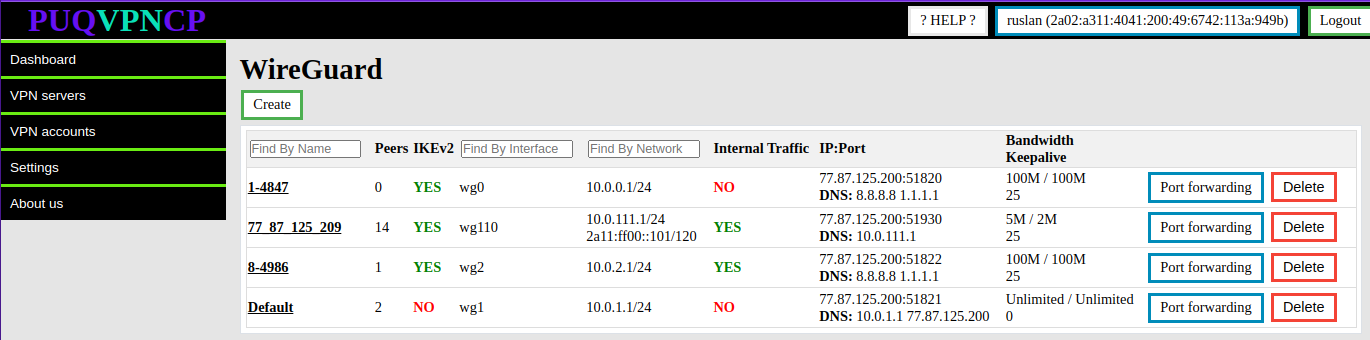](https://doc.puq.info/uploads/images/gallery/2023-07/image-1690793942519.png) [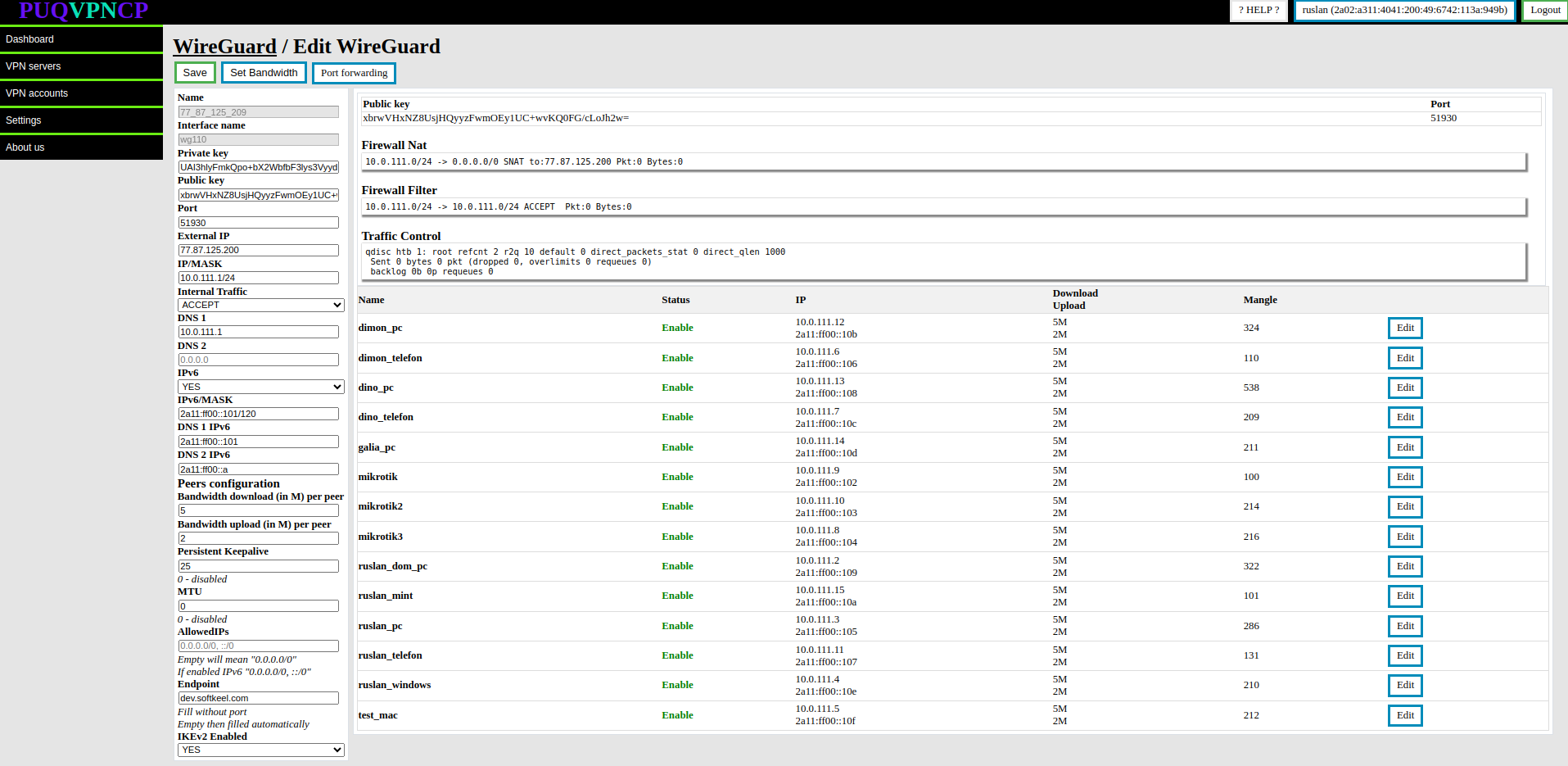](https://doc.puq.info/uploads/images/gallery/2023-07/image-1690793950704.png) **You can change the following parameters of the WireGuard interface** - **Private key/Public key -** Keys for encrypting the traffic of the WireGuard interface, the system generated new keys, but you can set them yourself when creating the **WireGuard** interface - **IP/MASK -**The parameters of the internal network of clients of this **WireGuard** interface, the address that is specified will be assigned to the interface and for all clients of this interface it will be the default gateway. - **Internal Traffic -** Allow or deny traffic exchange between the client of this interface - **Port -** Port on which the interface will listen for incoming connections - **External IP -** The public IP address that will be used in the interface configuration, NAT will be organized through this address for all clients of this interface. **The address must be public and configured on the server**. - **DNS 1/DNS 2 -** DNS servers that will be issued to the client of this interface - **Bandwidth download/Bandwidth upload -** conditional value for the throughput of each peer connected to this **WireGuard** interface. This data will be automatically applied when creating a VPN client for this WireGuard interface. - **Persistent Keepalive -** A sensible interval that works with a wide variety of firewalls is 25 seconds. Setting it to 0 turns the feature off, which is the default, since most users will not need this, and it makes **WireGuard** slightly more chatty - **MTU** - Ability to set **MTU** on the **WireGuard** interface. This parameter is involved in generating the client settings configuration. - **AllowedIPs -** This parameter is involved in generating the client settings configuration. - **IKEv2 Enabled -** Enables **IKEv2** protocol support for this interface. If set to **YES** then users of this interface will connect to the server using the **IKEv2** protocol - **IPv6 -** Enable or disable IPV6 - **IPv6/MASK -** IPv6 subnet to be distributed among peers - **DNS 1 IPv6/DNS 2 IPv6 -** IPv6 DNS servers "**Set Bandwidth**" button, which automatically sets the bandwidth of all clients of the external interface/server Set Bandwidth for the parameters that are entered in the section Peer configuration # Diagnostic Information ##### [Order now](https://puqcloud.com/puqvpncp.php) | [Download](https://download.puqcloud.com/cp/puqvpncp/) | [FAQ](https://faq.puqcloud.com) ##### **WireGuard** diagnostic Information is available in the menu item **VPN servers->WireGuard** Select the **WireGuard** interface for which you want to display diagnostic information and click the button "Edit" in the corresponding row. [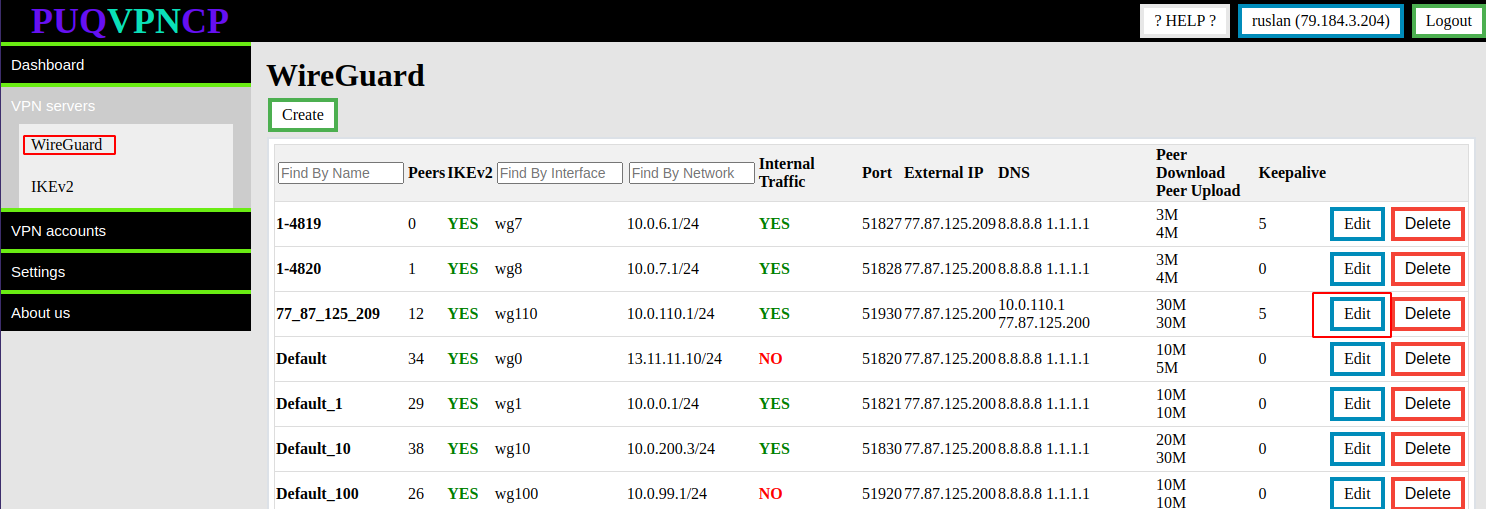](https://doc.puq.info/uploads/images/gallery/2022-12/image-1671007016158.png) [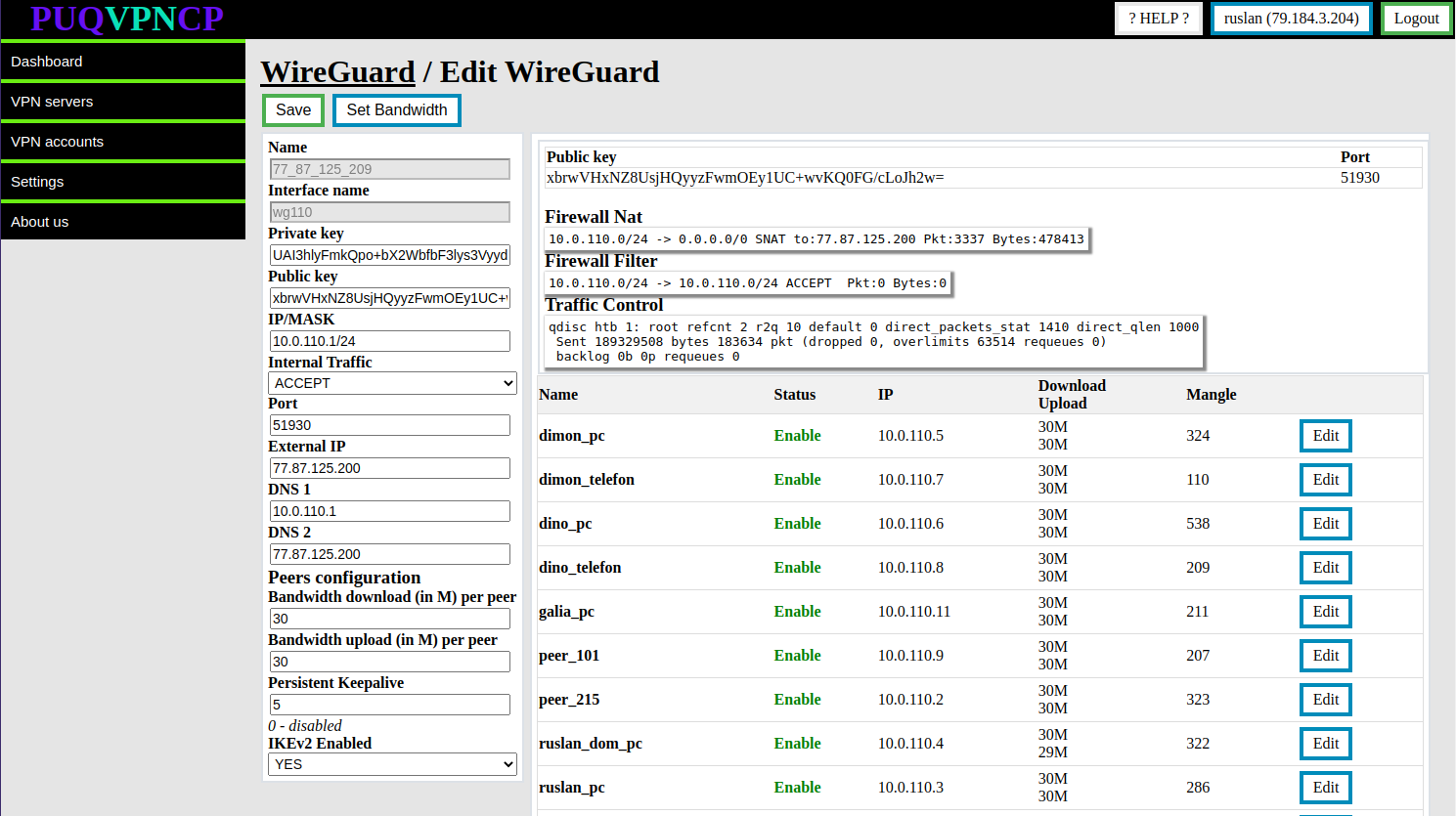](https://doc.puq.info/uploads/images/gallery/2022-12/image-1671007061670.png) - **Public key/Port -** The actual data that is installed in the system on this interface - **Firewall Nat -** The actual data is taken from the system firewall, this is a rule that implements nat, with statistics on packet counters and traffic passing through this rule. - **Firewall Filter -** The actual data is taken from the system firewall, these are rules allowing internal traffic of interface clients, with statistics on packet counters and traffic passing through this rules. - **Traffic Control -** The actual data is taken from the system with the **Traffic control** configuration, it shows that the interface is involved in filtering traffic in order to limit the speed to the clients of this interface. Further, there is a table in which the list of all clients which are assigned to this interface. # Port Forwarding ##### [Order now](https://puqcloud.com/puqvpncp.php) | [Download](https://download.puqcloud.com/cp/puqvpncp/) | [FAQ](https://faq.puqcloud.com) **Port forwarding** is a networking technique used to allow external devices to access services running on a local network. Essentially, it involves redirecting incoming network traffic from a specific port on a router or firewall to a specific device or port on the internal network. This allows devices outside the local network to access resources such as web servers, FTP servers, or game servers hosted on a local network. Port forwarding is often used for remote access to devices, for example, accessing a security camera or a home automation system from a remote location. To access port forwarding settings, select the Wireguard server for which you wish to configure port forwarding and click on the **port forwarding** button. [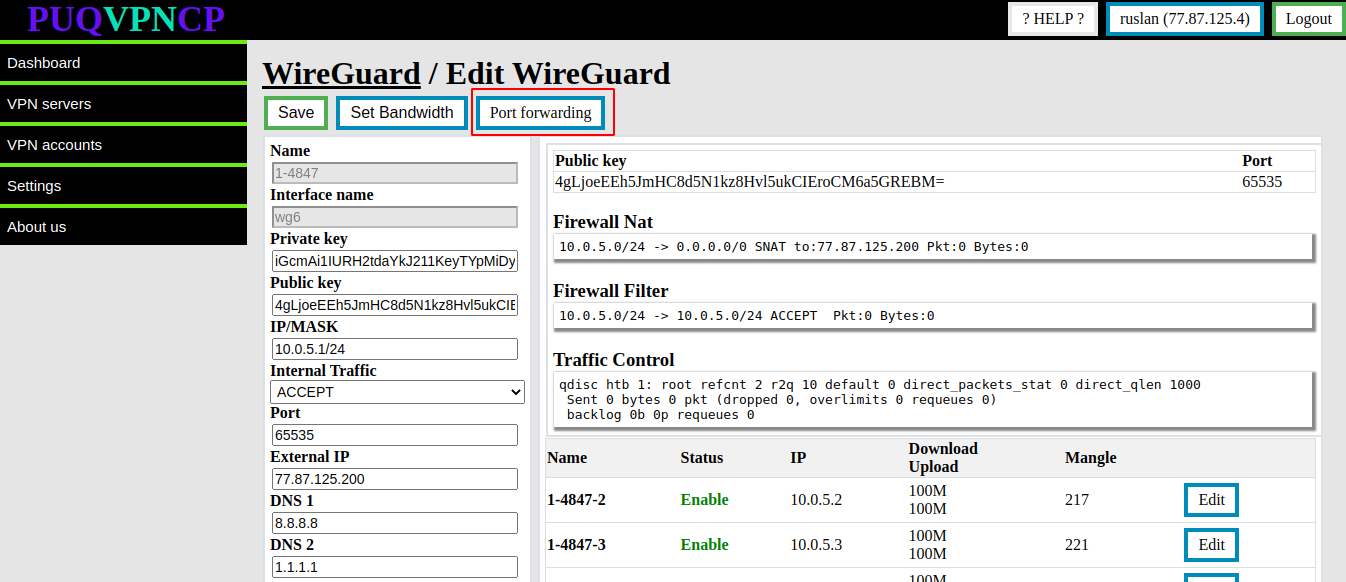](https://doc.puq.info/uploads/images/gallery/2023-02/image-1677505786729.png) When you access the port forwarding settings, a list of all currently forwarded ports from the external IP address to the internal account will be displayed. If you wish to add a new port forwarding rule, simply fill out the necessary information and click on the "**ADD**" button. Conversely, if you need to remove an existing port forwarding rule, click on the "**DELETE**" button associated with the relevant entry. These options provide a great deal of flexibility in managing your port forwarding settings to ensure that external devices can access the resources on your VPN network that you want to make available. [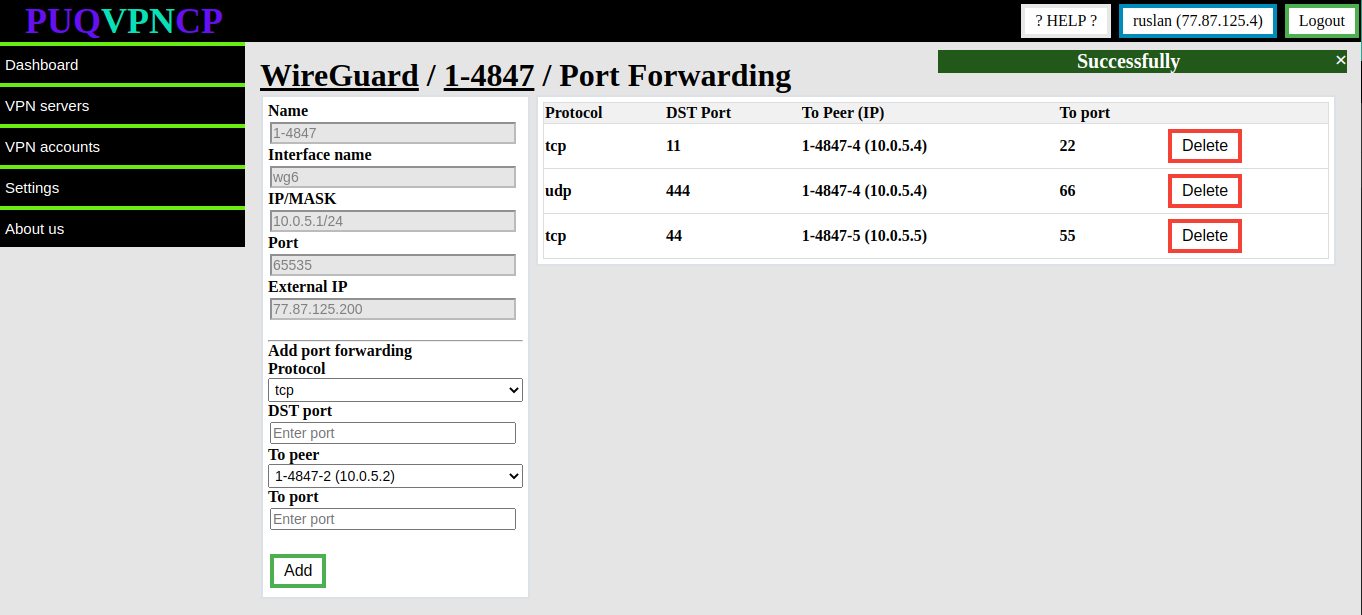](https://doc.puq.info/uploads/images/gallery/2023-02/image-1677505845931.png)