⚠️ *Important:* In the first version of the module, rDNS management for **IPv6** addresses is **not supported**. Only IPv4 reverse DNS records can be managed at this time.
- - - - - -WHMCS minimal version: 8 +
PowerDNS minimal version: 4.9
[](https://doc.puq.info/uploads/images/gallery/2025-07/image-1752356018259.png) [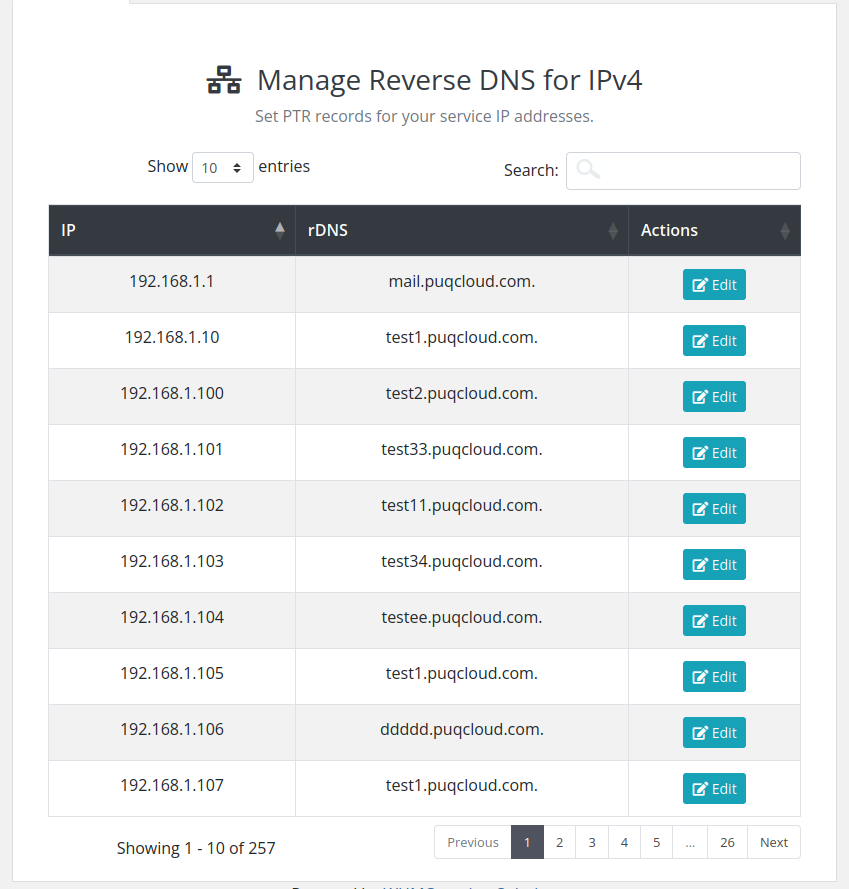](https://doc.puq.info/uploads/images/gallery/2025-07/image-1752356027109.png) [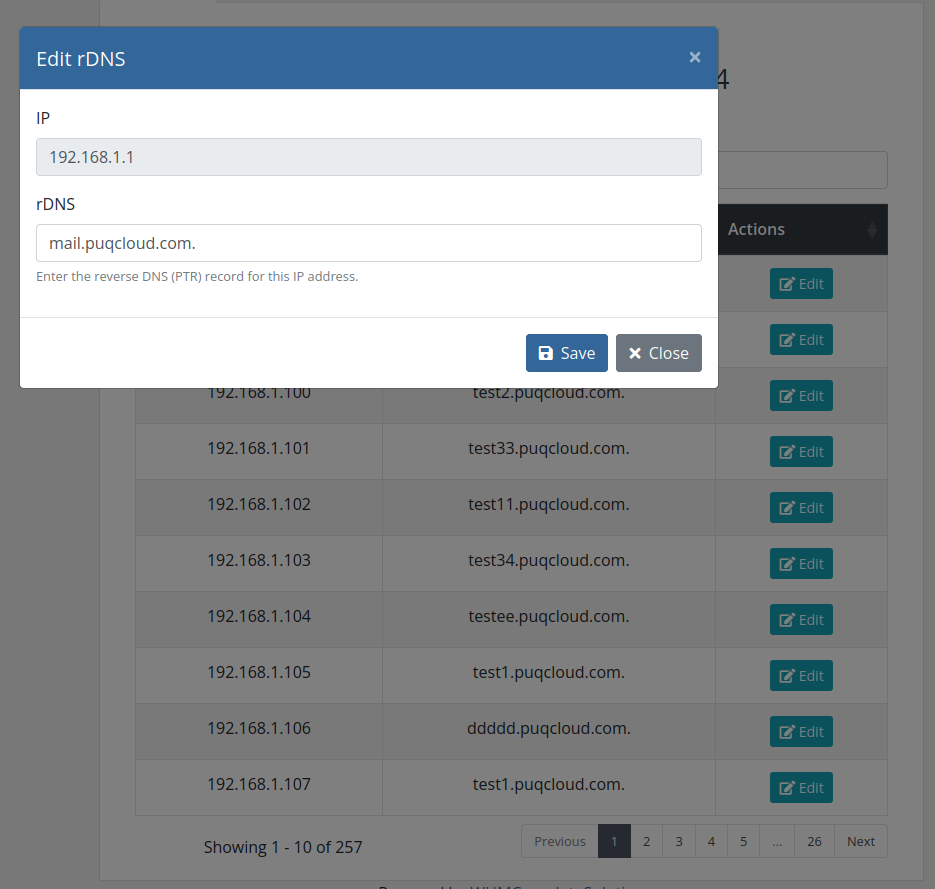](https://doc.puq.info/uploads/images/gallery/2025-07/image-1752356034611.png)# Changelog ### ReverseDNS module **[WHMCS](https://puqcloud.com/link.php?id=77)** ##### [Order now](https://puqcloud.com/whmcs-module-reversedns.php) | [Download](https://download.puqcloud.com/WHMCS/servers/PUQ_WHMCS-ReverseDNS/) | [FAQ](https://faq.puqcloud.com/) ##### ##### v1.1 Released 14-07-2025 1. Added links to products and domains in the IP table 2. Updated AJAX paths to respect the custom admin URL 3. Changed the table layout in the client area - - - - - - ##### v1.0 Released 12-07-2025 First version# Installation and configuration guide # WHMCS setup(install/update) ### ReverseDNS module **[WHMCS](https://puqcloud.com/link.php?id=77)** ##### [Order now](https://puqcloud.com/whmcs-module-reversedns.php) | [Download](https://download.puqcloud.com/WHMCS/servers/PUQ_WHMCS-ReverseDNS/) | [FAQ](https://faq.puqcloud.com/)**Module is coded ionCube v13**
Supported php version: - php 7.4 WHMCS 8.11.0 - - php 8.1 WHMCS 8.11.0 + - php 8.2 WHMCS 8.11.0 +To install and update a module, you must perform one and the same action.
##### 1. Download the latest version of the module. PHP 8.2 ```Powershell wget https://download.puqcloud.com/WHMCS/servers/PUQ_WHMCS-ReverseDNS/php82/PUQ_WHMCS-ReverseDNS-latest.zip ``` PHP 8.1 ```Powershell wget https://download.puqcloud.com/WHMCS/servers/PUQ_WHMCS-ReverseDNS/php81/PUQ_WHMCS-ReverseDNS-latest.zip ``` PHP 7.4 ```Powershell wget https://download.puqcloud.com/WHMCS/servers/PUQ_WHMCS-ReverseDNS/php74/PUQ_WHMCS-ReverseDNS-latest.zip ```All versions are available via link: [https://download.puqcloud.com/WHMCS/servers/PUQ\_WHMCS-ReverseDNS/](https://download.puqcloud.com/WHMCS/servers/PUQ_WHMCS-ReverseDNS/)
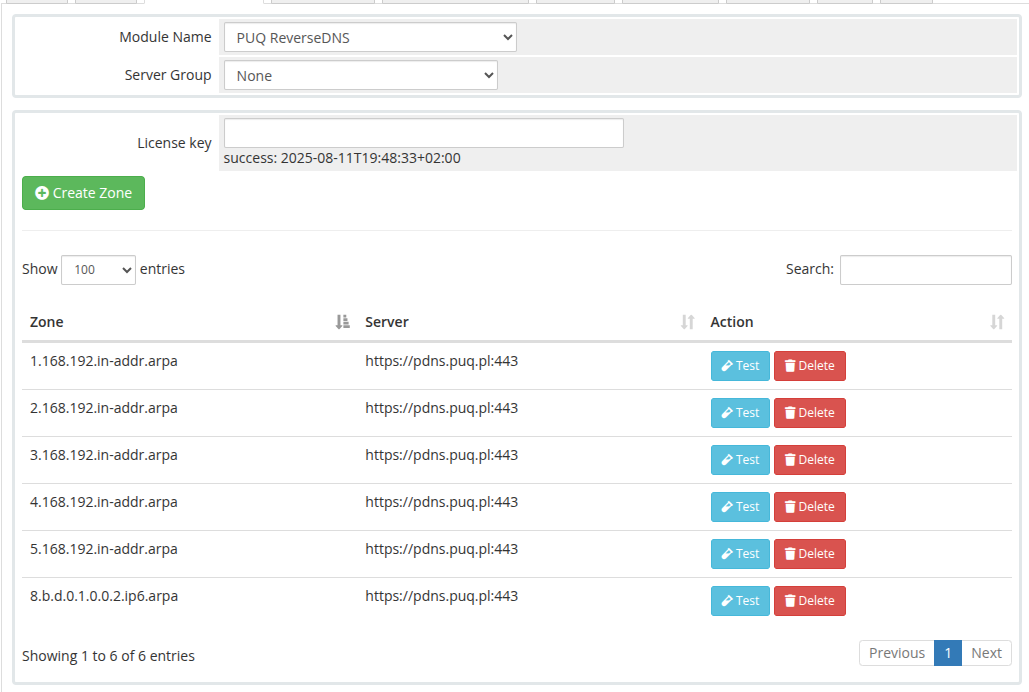
##### 2. Unzip the archive with the module. ```Powershell unzip PUQ_WHMCS-ReverseDNS-latest.zip ``` ##### 3. Copy and Replace "puqReverseDNS" to "WHMCS\_WEB\_DIR/modules/servers/" # Product Configuration ### ReverseDNS module **[WHMCS](https://puqcloud.com/link.php?id=77)** ##### [Order now](https://puqcloud.com/whmcs-module-reversedns.php) | [Download](https://download.puqcloud.com/WHMCS/servers/PUQ_WHMCS-ReverseDNS/) | [FAQ](https://faq.puqcloud.com/) ##### Add new product to WHMCS ``` System Settings->Products/Services->Create a New Product ``` In the **Module settings** section, select the **"PUQ ReverseDNS"** module [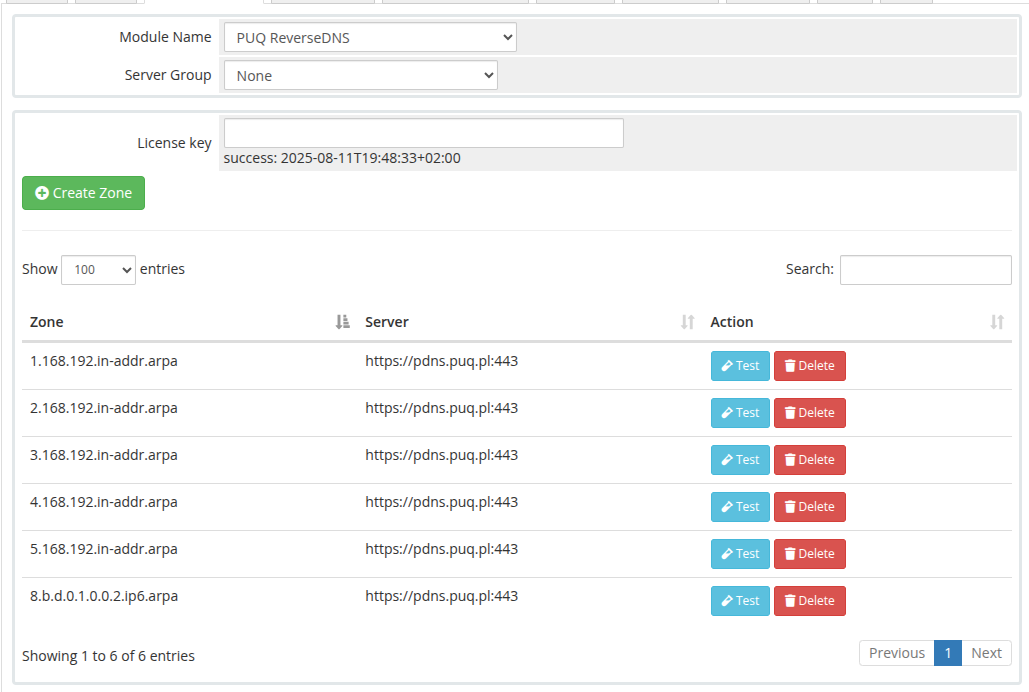](https://doc.puq.info/uploads/images/gallery/2025-07/image-1752357014654.png) In the product settings, you must assign all rDNS zones that should be available for this product. It is strongly recommended to include all reverse zones for IP addresses that are used in your services — such as virtual machines, dedicated servers, or other offerings.**Important:** If a reverse zone is not added to the product configuration, the client will not be able to manage rDNS records for IPs within that zone. Those IP addresses will not even be visible in the client area. In other words, clients can only manage rDNS records for IPs that belong to the zones explicitly added to the product settings. All other IPs will be hidden from view and unavailable for modification rDNS record.
[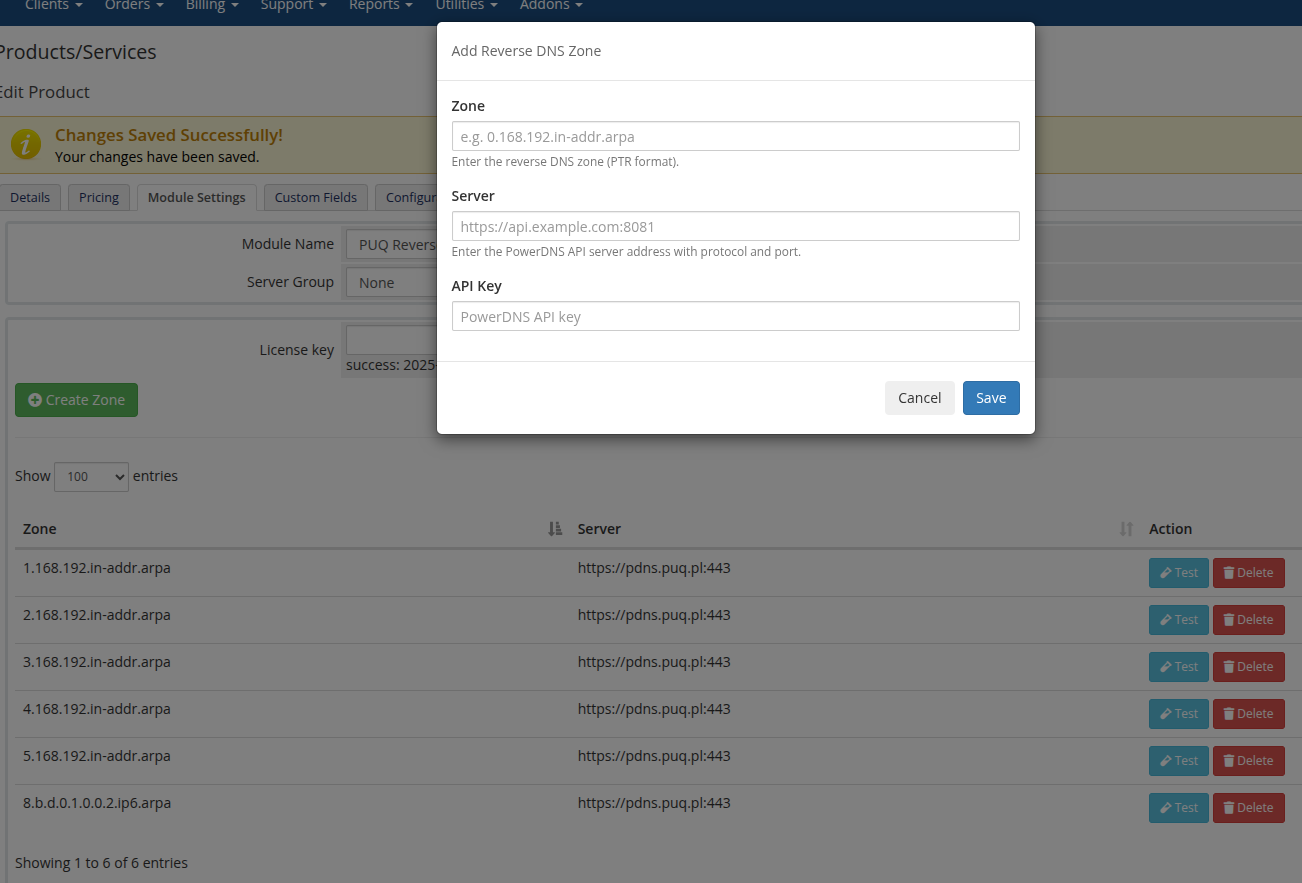](https://doc.puq.info/uploads/images/gallery/2025-07/image-1752357451292.png) To add a new rDNS zone, click the **"Add Zone"** button. A popup window will appear where you can enter the required zone details. **Fields to fill:** - **Zone** For IPv4, enter the reverse zone in the format: `1.168.192.in-addr.arpa` — this corresponds to a /24 subnet. For IPv6, enter the zone in /64 format like: `8.b.d.0.1.0.0.2.ip6.arpa` - **Server** Enter the hostname or IP address of the PowerDNS server or Admin PowerDNS panel. - **API Key** Provide the API key used to authenticate with the PowerDNS server. These settings allow the module to connect and manage the specified reverse DNS zone. [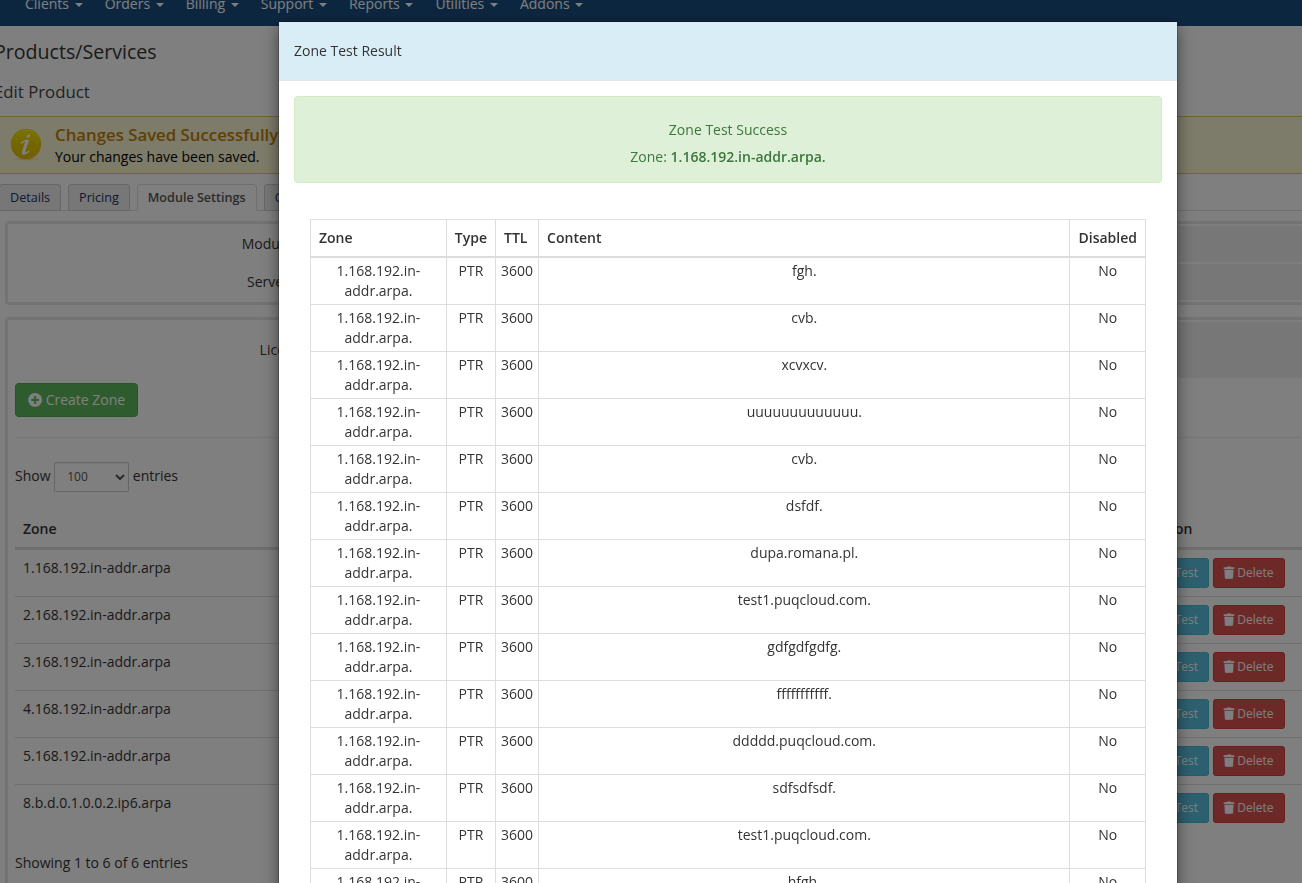](https://doc.puq.info/uploads/images/gallery/2025-07/image-1752360071233.png) To verify the availability of a zone and the connection to the PowerDNS server, use the **"Test"** button. When clicked, a modal window will appear displaying the result: - If the connection is successful, the modal will show a list of records retrieved from the specified zone. - If there is an error, the modal will display detailed error information, helping you diagnose connectivity or configuration issues. [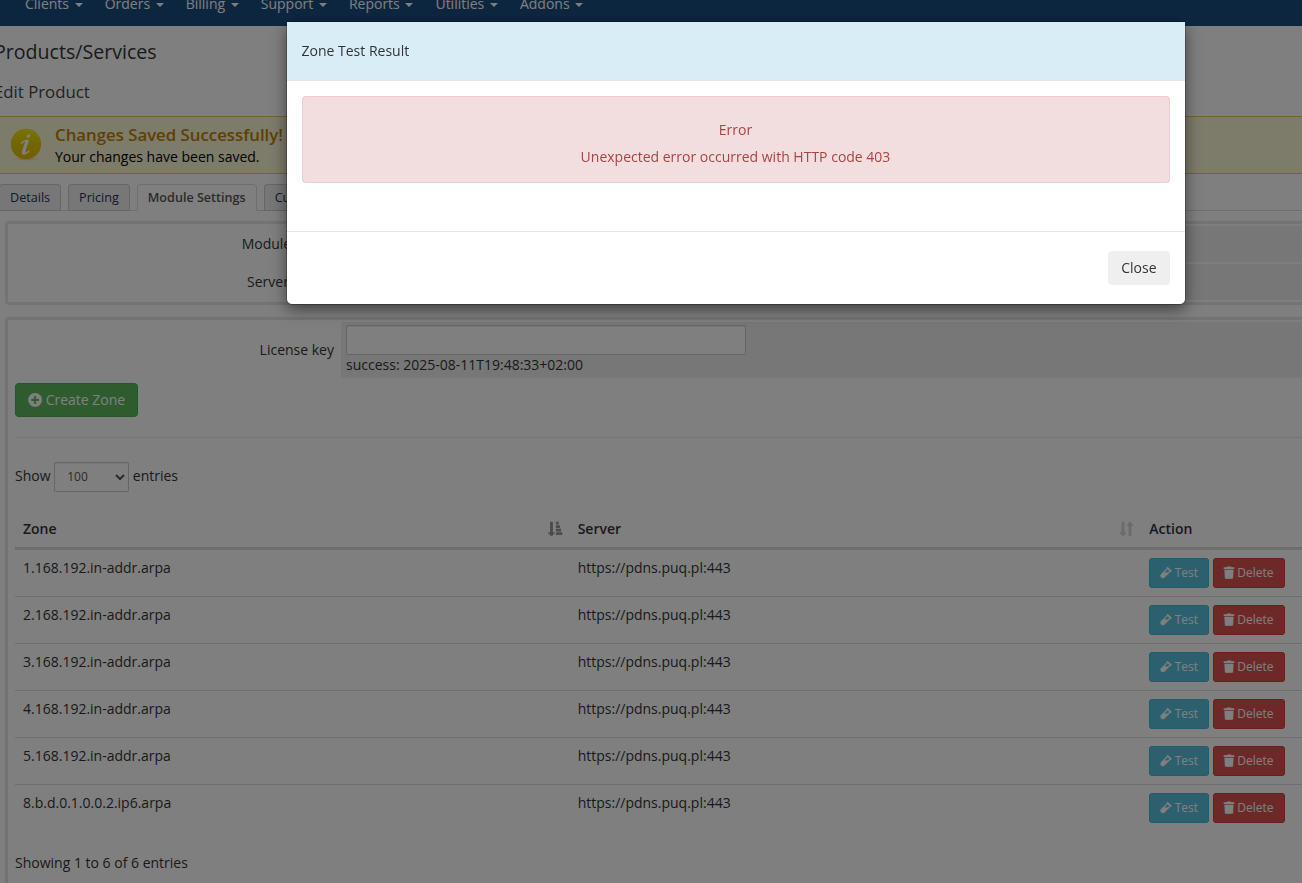](https://doc.puq.info/uploads/images/gallery/2025-07/image-1752360102957.png) # Client Area # Home screen ### ReverseDNS module **[WHMCS](https://puqcloud.com/link.php?id=77)** ##### [Order now](https://puqcloud.com/whmcs-module-reversedns.php) | [Download](https://download.puqcloud.com/WHMCS/servers/PUQ_WHMCS-ReverseDNS/) | [FAQ](https://faq.puqcloud.com/) On the client area homepage of the service, clients will immediately see a list of all IP addresses assigned to their services. Each IP has an editable rDNS record. When a client updates a record, the change is instantly applied to the corresponding zone in **PowerDNS** — no manual action is required. [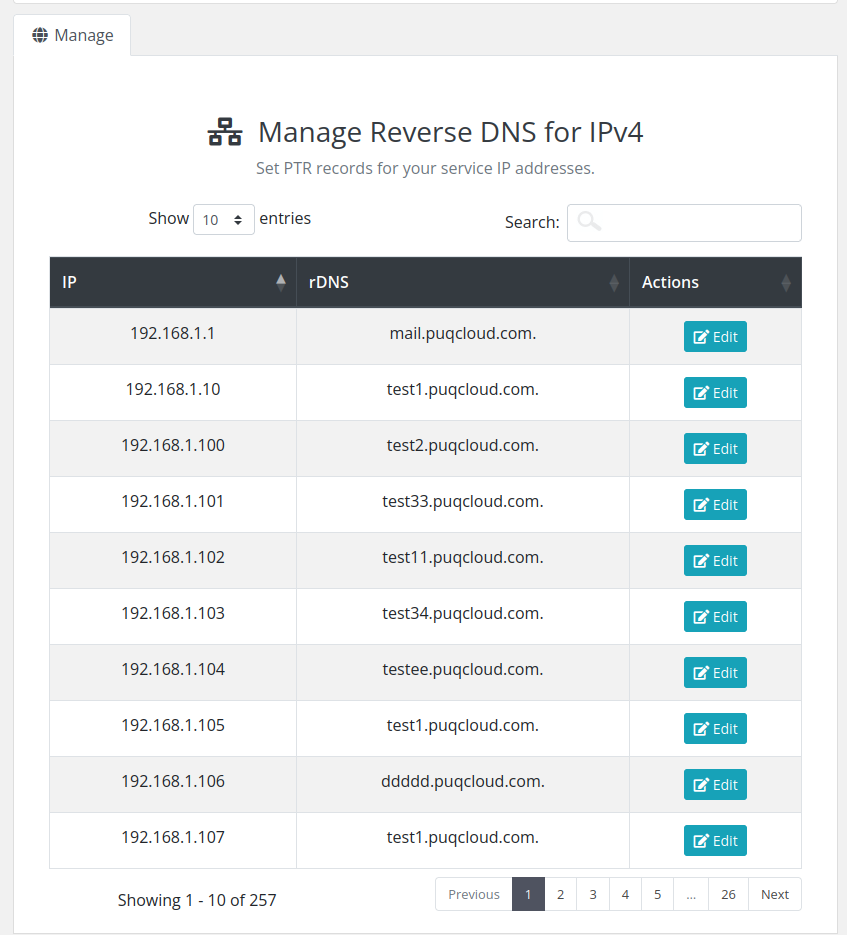](https://doc.puq.info/uploads/images/gallery/2025-07/image-1752360870517.png) [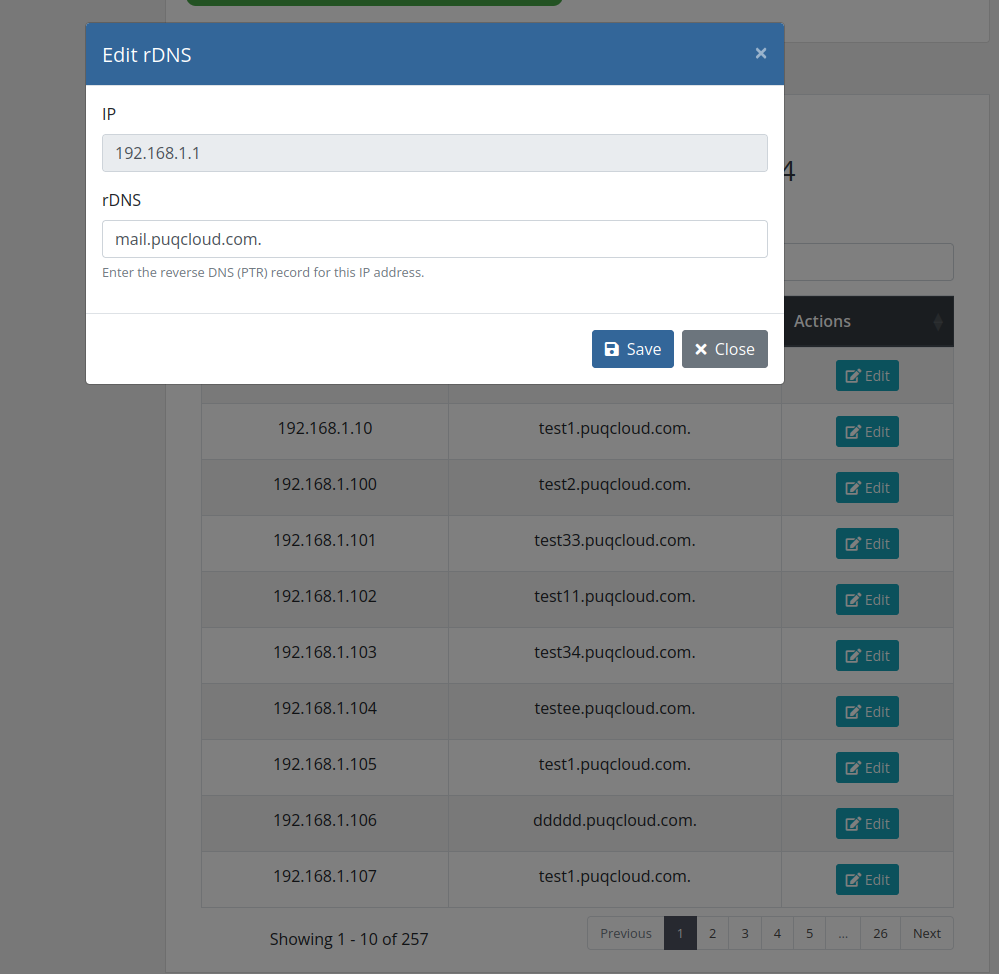](https://doc.puq.info/uploads/images/gallery/2025-07/image-1752360922509.png) # Admin Area # Product Information ### ReverseDNS module **[WHMCS](https://puqcloud.com/link.php?id=77)** ##### [Order now](https://puqcloud.com/whmcs-module-reversedns.php) | [Download](https://download.puqcloud.com/WHMCS/servers/PUQ_WHMCS-ReverseDNS/) | [FAQ](https://faq.puqcloud.com/) In the admin area, under the product management section, you can view a complete list of all client-assigned IP addresses and their corresponding rDNS records. Just like in the client area, administrators have the ability to edit rDNS records directly from this interface. All changes are instantly applied to the PowerDNS server. [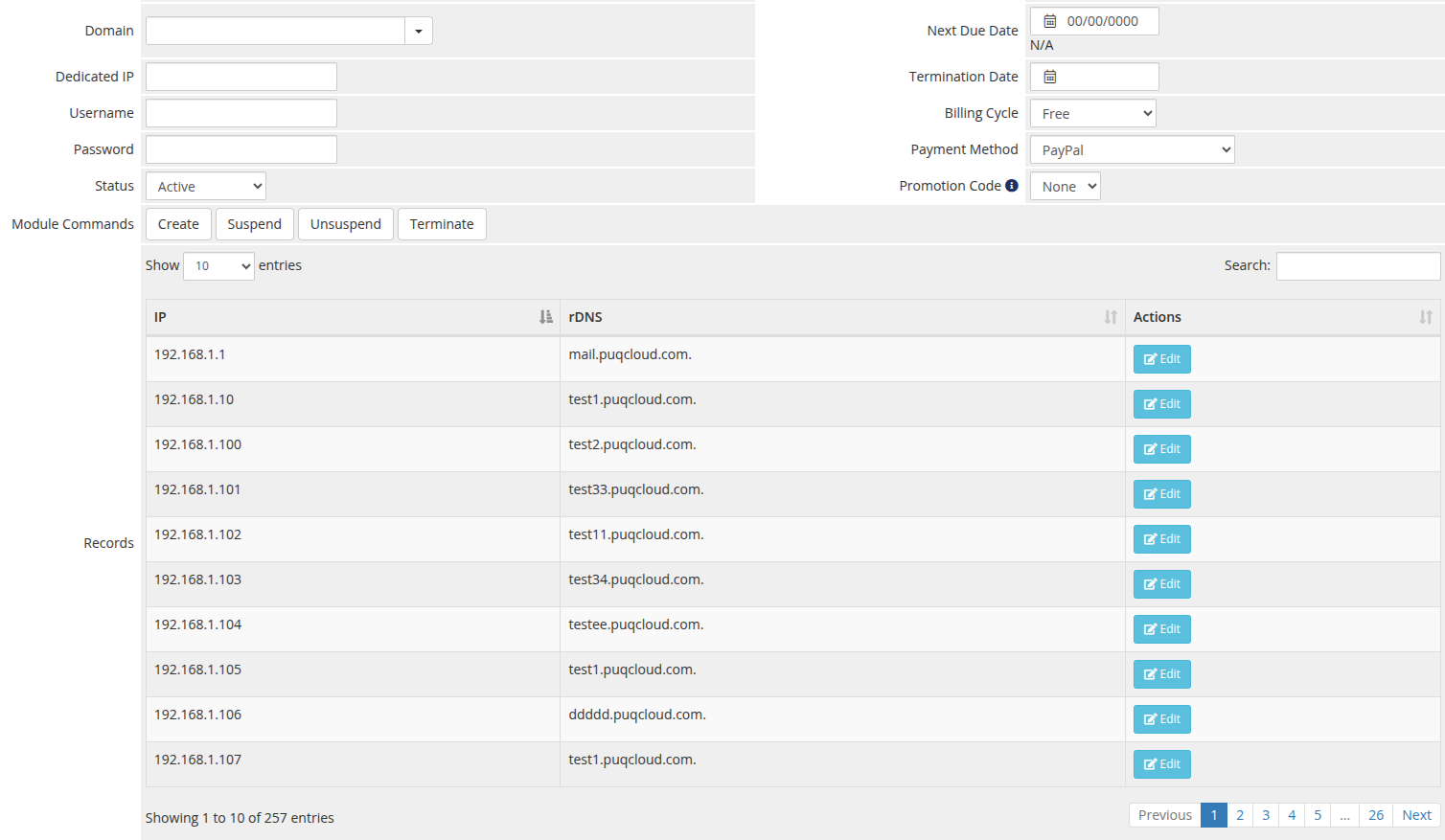](https://doc.puq.info/uploads/images/gallery/2025-07/image-1752361413407.png) [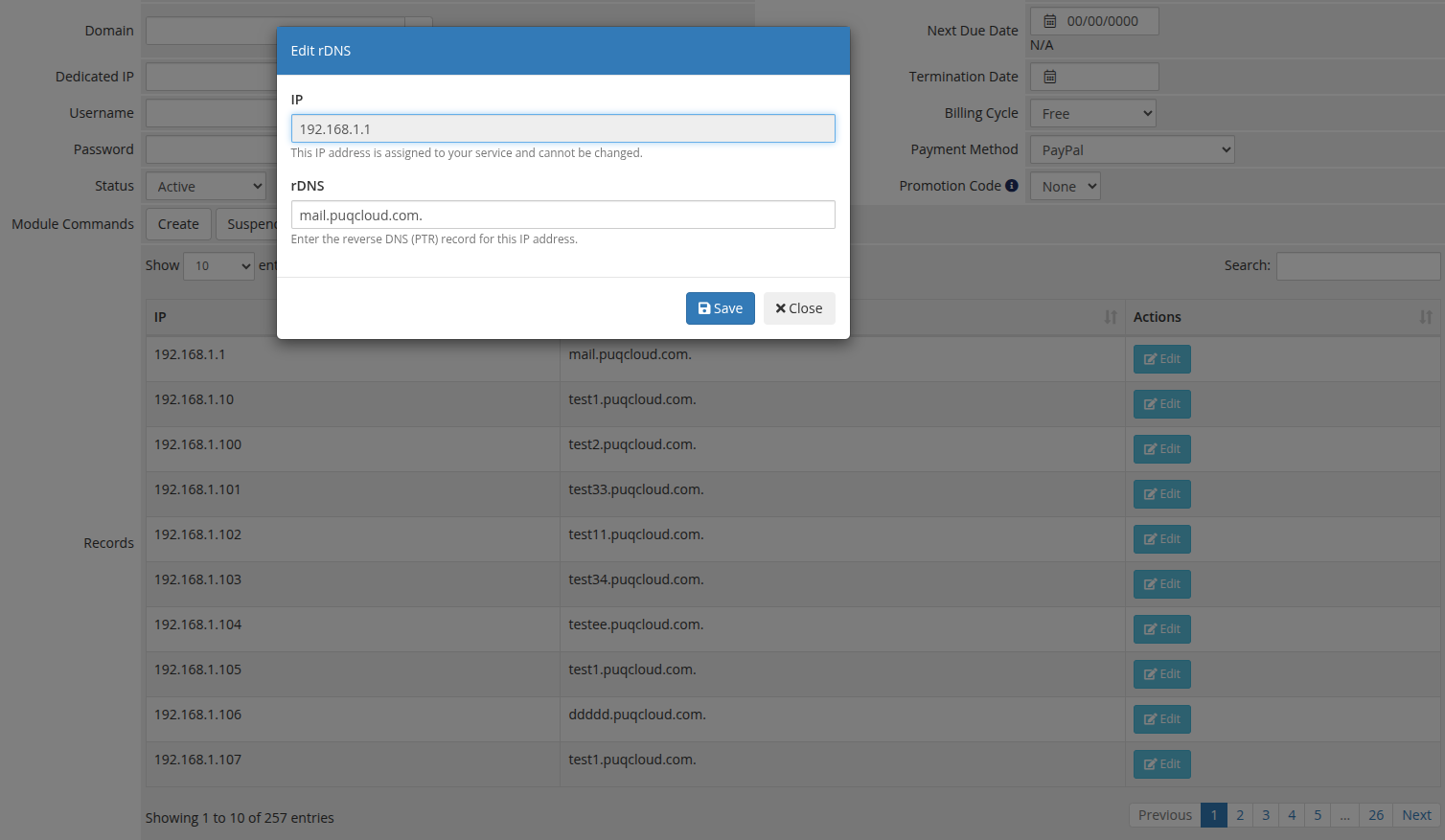](https://doc.puq.info/uploads/images/gallery/2025-07/image-1752361435126.png)