# Support by Time WHMCS module
# Description
### Support by Time module **[WHMCS](https://puqcloud.com/link.php?id=77)**
##### [Order now](https://puqcloud.com/whmcs-module-support-by-time.php) | [Download](https://download.puqcloud.com/WHMCS/servers/PUQ_WHMCS-Support-by-time/) | [Community](https://community.puqcloud.com/)
## Support by Time WHMCS module
The **Support by Time WHMCS module** turns your WHMCS into a fully automated platform for selling paid technical support measured in hours. It lets you sell a recurring support plan that includes a fixed amount of hours per month, with an automatically calculated hourly rate for time used outside the package — or a one-time bucket of hours that the service consumes until it auto-terminates.
Operators log time directly from the ticket page — manually or with a built-in start/stop timer — the module aggregates totals per ticket, per service and per month, keeps a full audit trail of who logged what, and WHMCS billable items are created automatically by the daily cron.
- - - - - -
## Main features
- **Hour packages** — configurable number of support hours included per month per product
- **Overtime billing** — per-currency hourly rate charged for hours used outside the package
- **Two billing modes** — recurring (monthly reset) or One Time (fixed bucket of hours, auto-terminate when depleted)
- **Time granularity** — time tracked and entered in HH:MM (minute precision)
- **Manual time entry** — operators log spent time directly when responding to a ticket
- **Live timer** — start/stop a server-anchored timer on the ticket; a floating widget shows all running timers on every admin page
- **Multi-entry per ticket** — every save (or timer stop) is recorded as its own entry, so "10 min triage + 30 min fix" is preserved as two lines with individual notes and operators
- **Notes & operator tracking** — each entry stores an optional note and the WHMCS admin who logged it
- **Audit trail** — append-only log of every action (time logged, edited, deleted, timer start/stop/cancel, service ordered, ticket billed) shown on the ticket and on the service page
- **Operator report** — per-operator hours and entry counts for the current and previous month
- **Two save actions** — save time without closing the ticket, or close the ticket and save time
- **Quick service ordering** — when a client without an active support service opens a ticket, the operator can order one straight from the ticket page
- **Ticket protection** — once a ticket has been billed, its time entries are locked against edit/delete/reopen
- **Past-month tickets** — tickets logged in earlier months are flagged as already charged and require splitting/re-creating
- **Automatic monthly billing** — daily cron creates one WHMCS billable item per ticket for the previous month's overage hours
- **Configurable invoice action** — choose between *Invoice on next cron*, *Add to user's next invoice* or *Do not invoice*
- **Usage notifications** — email the client when monthly usage crosses configurable thresholds (e.g. 80%, 100%)
- **Client transparency** — card-based client area with a usage progress bar, an interactive cost calculator and a 12-month usage chart; an optional toggle reveals the operator note + name per ticket
- **Multi-currency** — separate hourly rate per WHMCS-configured currency
- **Multi-language** — 26 language files (25 languages + dual Ukrainian aliases) with automatic fallback to English
- **Modern architecture (v4.0.0+)** — unencoded `hooks.php` wrapper for ionCube 15 compatibility, Guzzle HTTP client for robust licensing, and CSRF token protection on all AJAX endpoints
- - - - - -
## System requirements
| Requirement | Minimum |
|---|
| **WHMCS** | 8.x+, 9.x+ |
| **PHP** | 7.4, 8.1, 8.2, 8.3, 8.4 |
| **ionCube Loader** | v15+ |
> **Note:** The module uses ionCube encoding. Make sure ionCube Loader is installed and active on your server.
- - - - - -
## Links
- **Product page:** [https://puqcloud.com/whmcs-module-support-by-time.php](https://puqcloud.com/whmcs-module-support-by-time.php)
- **Documentation:** [https://doc.puq.info/books/support-by-time-whmcs-module](https://doc.puq.info/books/support-by-time-whmcs-module)
- **Support:** [https://puqcloud.com/submitticket.php?step=2&deptid=1](https://puqcloud.com/submitticket.php?step=2&deptid=1)
- **Community:** [https://community.puqcloud.com/](https://community.puqcloud.com/)
- - - - - -
## Screenshots
### Client area — home screen
*09-client-home.png*
### Client area — usage history
*11-client-history.png*
### Admin area — service page
*12-admin-product-page.png*
### Admin area — ticket time form
*15-ticket-time-form.png*# Changelog
### Support by Time module **[WHMCS](https://puqcloud.com/link.php?id=77)**
##### [Order now](https://puqcloud.com/whmcs-module-support-by-time.php) | [Download](https://download.puqcloud.com/WHMCS/servers/PUQ_WHMCS-Support-by-time/) | [Community](https://community.puqcloud.com/)
- - - - - -
## v4.0.0 (2026-10-07)
- **Dynamic Ticket Service Selection & Status Guard**:
- Automatically pre-selects the first usable active service when opening a ticket, prioritizing packages with available quota.
- Reactive service dropdown updates time forms and quota displays immediately without page reload, preserving entered notes.
- Action buttons and live timer dynamically adapt to service lifecycle: non-active (Terminated/Suspended) services and depleted One Time packages are strictly locked.
- Server-side validation rejecting timer start or time saves on non-active services.
- **One Time vs Recurring Package Architecture**:
- Detailed separation of billing mechanics: Recurring packages track billable overage, while One Time packages enforce hard quota limits.
- Automated termination hook (`AfterCronJob`) that terminates One Time services upon 100% hour consumption.
- **Inline Package Ordering & Service Activation**:
- Direct order placement form embedded in ticket header for clients without an active support package.
- One-click activation button for pending support services directly from the ticket view.
- **Modernized Client Area UI**:
- Card-based layout with visual progress bar and real-time overage indicators.
- Interactive cost calculator with preset buttons (`+30m`, `+1h`, `+2h`, `+5h`, `0`) and clean 2-decimal currency formatting.
- Expandable per-ticket time entry accordions.
- **Full 26-Language Localization (i18n)**:
- Canonical 146-key coverage across all 26 WHMCS languages with zero missing keys or English fallbacks.
- Complete sync of `ukranian.php` and `ukrainian.php`.
- Typographic apostrophe compliance (`’` / `\u2019`) across all translation files.
- **Unencoded Hooks Architecture (v4.0.0+ / ionCube 15)**: `hooks.php` distributed as unencoded plain PHP wrapper for ionCube 15 and WHMCS dynamic hook loading.
- **Guzzle HTTP Client**: API and license verification requests migrated to `GuzzleHttp\Client` with timeouts and robust error handling.
- - - - - -
## v3.0.1
- **Quieter migration logging**: the schema migration runner no longer writes a "Migration N applied" entry to the WHMCS **Module Log** on every successful step (that log is reserved for provisioning / API calls). Success is now recorded only in the `puq_module_versions` table; failures are still logged.
- - - - - -
## v3.0 (2026-06-04)
- **Compatibility**: supports PHP **7.4 / 8.1 / 8.2+** and **WHMCS 8.x / 9.x**. Published as a separate ionCube build per PHP version — `php74`, `php81`, `php82` (use `php82` for PHP 8.2 and any newer PHP). WHMCS 8 runs on PHP 7.4 / 8.1 / 8.2; WHMCS 9 runs on PHP 8.2.
- Module rewritten on the new PUQ module skeleton:
- License class moved into the main module file (`puqSupportByTime.php`)
- New `puqSupportByTimeModuleSettings` class for product configuration with structured JSON in `configoption24`
- Product configuration UI rendered through the `AdminAreaFooterOutput` hook
- License alert added on the WHMCS admin homepage (`AdminHomepage` hook)
- **Schema versioning**: new `puq_module_versions` table + migration runner so updates apply schema changes automatically and idempotently on first load.
- Redesigned client area (cards, progress bar, modern stat panels)
- Redesigned ticket header (Bootstrap panels, icons)
- Redesigned admin product page (summary table, history navigator)
- **AJAX ticket header**: the entire time-logging header on the admin ticket page is now rendered and driven by AJAX. Save / Close+Save / Reopen / Start-Stop timer / Order service no longer reload the page.
- **Multi-entry per ticket**: every Save Time (and every timer stop) is recorded as its own entry instead of overwriting, so a ticket keeps a full breakdown of sessions. Each entry has its own note, operator and timestamp.
- **Per-entry notes + operator tracking**: every time entry can carry an optional note (shown to the client when *Show work log to client* is enabled) and stores the WHMCS admin who logged it. Columns on `puqSupportByTime_items`: `note`, `admin_id`, `created_at`, `ticket_record_id`.
- **Parent ticket records**: new `puqSupportByTime_tickets` table holds per-ticket billing state (one billable item per ticket) and a snapshot of package hours / hourly rate, while `puqSupportByTime_items` becomes a pure time log.
- **Live timer**: Start / Stop / Cancel on the ticket page with a server-anchored running clock. New table `puqSupportByTime_timers`. Stop rounds up to the nearest minute and saves a regular time entry. A floating widget on every admin page lists all of the operator's running timers.
- **Audit trail**: append-only log of every state change (time logged / updated / deleted, timer start / stop / cancel, service ordered, ticket billed). New table `puqSupportByTime_audit`. Shown on the ticket header and on the service page.
- **Operator report**: per-operator hours and entry counts for the current and previous month on the service page.
- **Cost calculator** in the client-area home screen — interactive "if I use \_\_\_ more hours" predictor.
- **Usage chart** in the client-area history tab — last 12 months as a Google ComboChart with a package line and bars coloured by overage status.
- **Usage notifications**: email the client when monthly usage crosses configured thresholds (e.g. 80 %, 100 %). New table `puqSupportByTime_notifications` for idempotent per-(month, threshold) tracking.
- **Show work log to client** toggle per product — reveals the operator name + note per ticket in the client area.
- Date filter rewritten to use `Y-m-t` instead of the literal `-31`
- Custom admin path now read from `configuration.php` consistently
- **Backward-compatible settings migration**: legacy values stored in `configoption3` (hours / invoice action / item name) and `configoption4` (per-currency hourly rate) are read transparently when the new `configoption24` slot is empty, so existing v2.x products keep working without any reconfiguration. The first save through the v3.0 form moves everything into `configoption24`.
> **Note:** No manual reconfiguration is required after updating to v3.0 — settings are migrated automatically on first read. Re-saving the product through the new form is recommended but not mandatory.
- - - - - -
## v2.1 (2025-09-20)
- Support for custom admin path
- - - - - -
## v2.0 (2024-09-23)
- Module coded with ionCube v13
- Supported PHP versions: 7.4, 8.1, 8.2
- Compatible with WHMCS 8.11.0+
- - - - - -
## v1.3 (2023-10-19)
- Added the ability to delete reserved time positions from the admin panel
- One-Time package validation moved from daily cron to every cron run
- - - - - -
## v1.2.5 (2023-10-11)
- WHMCS 8.8.0 support
- 25 language translations added/updated
- - - - - -
## v1.2 (2023-08-02)
- One-Time support packages with hour limit
- Human-readable time display in client and admin areas
- Display and logic improvements
- - - - - -
## v1.1 (2023-03-21)
- Client area redesign
- Translation support
- WHMCS 8.6, IonCube v12, PHP 8.1 and PHP 7.4 support
- Invoice item description field
- - - - - -
## v1.0 (2022-10-01)
- First release# Installation and Configuration Guide
Step-by-step instructions for installing and configuring the Support by Time WHMCS module: WHMCS deployment, product creation, hour package and per-currency hourly rate setup.
# WHMCS Installation and Update
### Support by Time module **[WHMCS](https://puqcloud.com/link.php?id=77)**
##### [Order now](https://puqcloud.com/whmcs-module-support-by-time.php) | [Download](https://download.puqcloud.com/WHMCS/servers/PUQ_WHMCS-Support-by-time/) | [Community](https://community.puqcloud.com/)
## System requirements
| Requirement | Minimum |
|-------------|---------|
| **WHMCS** | 8.x+, 9.x+ |
| **PHP** | 7.4, 8.1, 8.2, 8.3, 8.4 |
| **ionCube Loader** | v15+ |
> **Note:** The module uses ionCube encoding. Make sure ionCube Loader is installed and active on your server.
---
## Download
The module can be ordered and downloaded from PUQ Cloud:
- **Order / Download:** [https://puqcloud.com/whmcs-module-support-by-time.php](https://puqcloud.com/whmcs-module-support-by-time.php)
- **Community:** [https://community.puqcloud.com/](https://community.puqcloud.com/)
- **Direct download link for the latest version:**
```bash
wget https://download.puqcloud.com/WHMCS/servers/PUQ_WHMCS-Support-by-time/PUQ_WHMCS-Support-by-time-latest.zip
```
> All versions can be found at this link:
> [https://download.puqcloud.com/WHMCS/servers/PUQ_WHMCS-Support-by-time/](https://download.puqcloud.com/WHMCS/servers/PUQ_WHMCS-Support-by-time/)
>
> Older module versions for WHMCS 8 are available in the archive directory:
> [https://download.puqcloud.com/WHMCS/servers/PUQ_WHMCS-Support-by-time/archive/](https://download.puqcloud.com/WHMCS/servers/PUQ_WHMCS-Support-by-time/archive/)
After downloading, extract the archive:
```bash
unzip PUQ_WHMCS-Support-by-time-latest.zip
```
---
## Installation
### Upload files
Extract the module archive and copy the `puqSupportByTime` directory to the WHMCS servers module directory:
```text
WHMCS_WEB_DIR/modules/servers/puqSupportByTime
```
Once the files are uploaded, proceed to the [Product Configuration](02-product-configuration.md) guide to configure the product and support packages.
---
## Update
The update procedure is the same as installation — replace the existing files with the new version:
1. Download the latest version as described in the Download section.
2. Unzip the archive.
3. Replace the existing `WHMCS_WEB_DIR/modules/servers/puqSupportByTime` directory with the new one.
4. Verify the version number in the module interface matches the new release.
# Product Configuration
### Support by Time module **[WHMCS](https://puqcloud.com/link.php?id=77)**
##### [Order now](https://puqcloud.com/whmcs-module-support-by-time.php) | [Download](https://download.puqcloud.com/WHMCS/servers/PUQ_WHMCS-Support-by-time/) | [Community](https://community.puqcloud.com/)
## Add a new product to WHMCS
Navigate to **System Settings** → **Products/Services** → **Create a New Product**.
In the **Module Settings** tab select the **PUQ Support by Time** module (leave **Server Group** as *None* — this is a server module without a remote node). Two billing modes are supported, determined by the product's WHMCS billing cycle:
- **Recurring billing cycle** (Monthly, Quarterly, Annually, …) — the included hours reset every month and overage hours are billed automatically by the daily cron at the end of each month.
- **One Time** — the included hours are a fixed bucket that the service consumes ticket by ticket. When all hours are used, the service is automatically terminated by the next cron run.
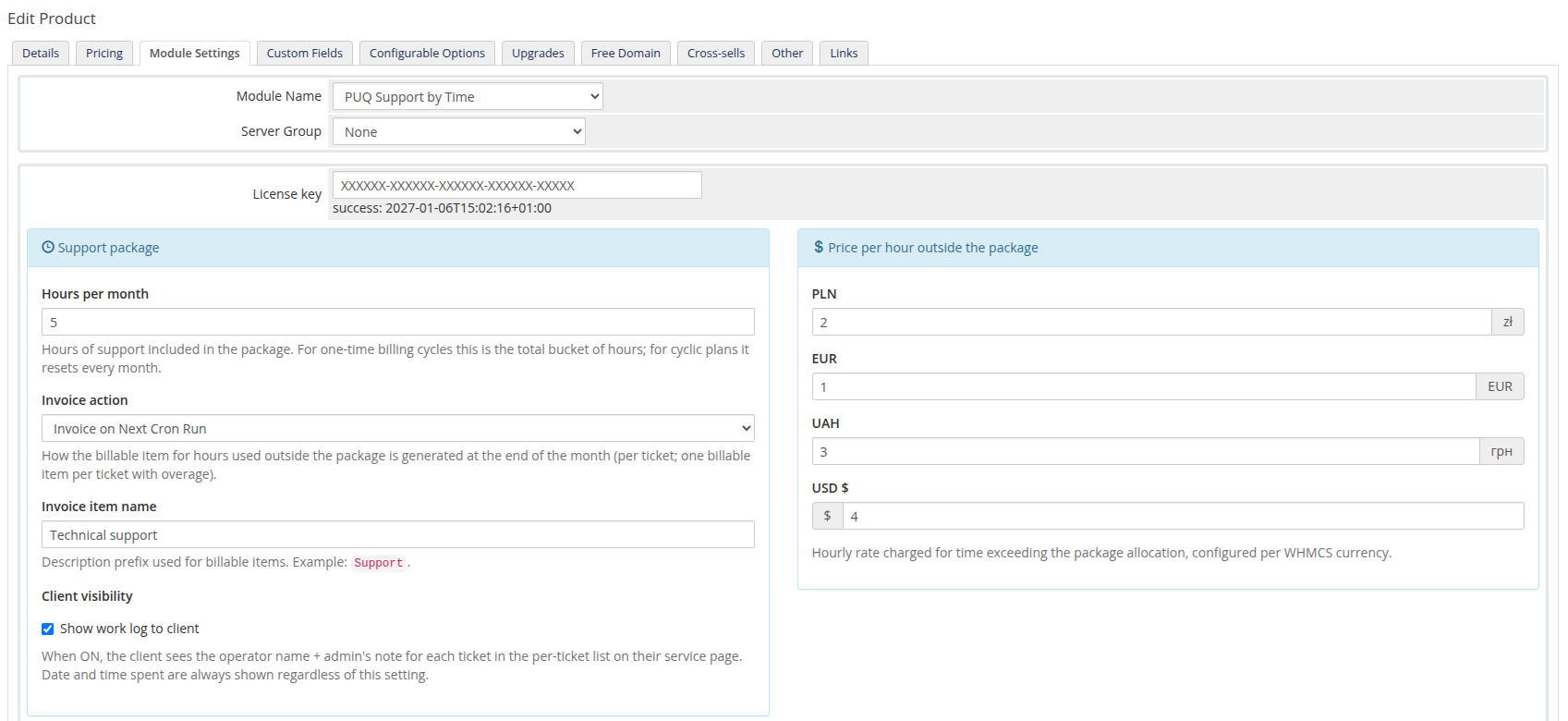
*05-product-config.png*
---
## Configuration parameters
All settings live in the **Module Settings** tab. Saving the product persists them as a single JSON document in `tblproducts.configoption24` (the license key stays in `configoption1`).
| Parameter | Description |
|-----------|-------------|
| **License key** | A pre-purchased license key for the PUQ Support by Time module. The license must be active for correct operation. After saving, the verification status (and the period it is valid until) is displayed below the field. |
| **Hours per month** | Number of support hours included in the package. For *One Time* billing cycles this is the total bucket of hours. |
| **Invoice action** | How the billable item for overage hours is generated at month-end: **Invoice on Next Cron Run**, **Add to User's Next Invoice**, or **Do not invoice**. |
| **Invoice item name** | Description prefix used for billable items (default: `Support`). The final description is composed as ` # Hour(s) ( /Hour)`. |
| **Show work log to client** | When ON, the client sees the operator name and the per-entry note for each ticket in their service-page ticket list. Date and time spent are always shown regardless of this setting. |
| **Price per hour outside the package** | Hourly rate charged for time exceeding the package allocation, configured per WHMCS currency. |
| **Notify thresholds (% of package)** | Comma-separated percentages (e.g. `80,100`). When a client's monthly usage reaches a threshold, the email template below is sent — once per threshold per month. Empty disables notifications. |
| **Notification email template** | WHMCS Product/Service email template used for usage alerts. Available custom variables: `$puq_used_hours`, `$puq_package_hours`, `$puq_used_percentage`, `$puq_threshold`, `$puq_hours_left`, `$puq_used_hours_outside_package`, `$puq_price_per_hour`, `$puq_currency_prefix`, `$puq_currency_suffix`, `$puq_how_much_pay`. |
### Support package
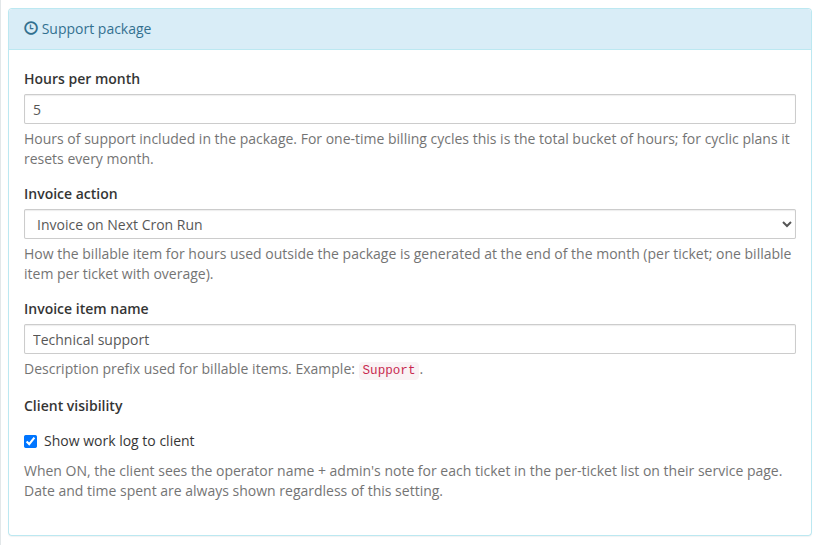
*06-product-support-package.png*
### Price per hour (per currency)
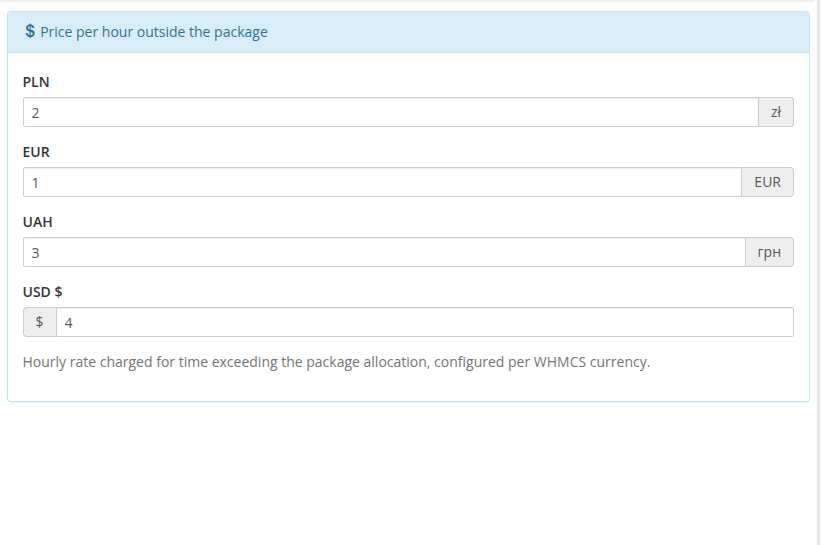
*07-product-pricing.png*
### Usage notifications
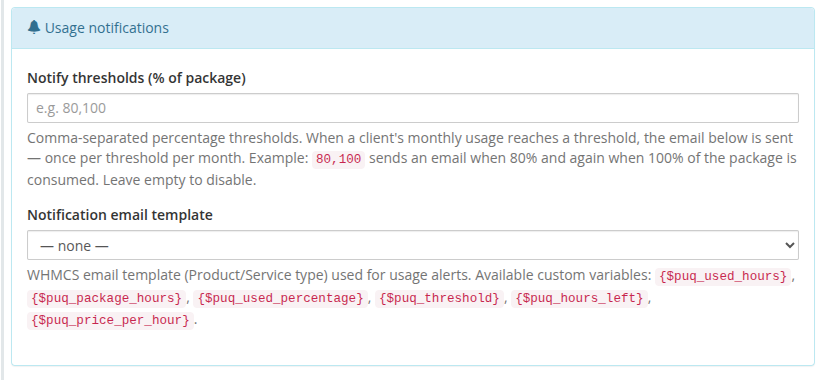
*08-product-usage-notifications.png*
---
---
## How billing works: One Time vs Recurring packages
The module supports two distinct operational and billing models, selected via the product's **Payment Type** / **Billing Cycle** in WHMCS:
| Characteristic | Recurring Package (Monthly, Quarterly, Annually, etc.) | One Time Package |
|---|---|---|
| **WHMCS Payment Type** | **Recurring** (with active billing cycles such as Monthly, Annually) | **One Time** |
| **Hours Allocation** | Included allowance **per month** (e.g. 5 hours each month) | Fixed single bucket of hours (e.g. 5 hours total) |
| **Monthly Reset** | **Yes.** On the 1st of each calendar month, the usage bucket resets. Unused hours do not roll over. | **No reset.** The bucket remains until depleted, regardless of how many months pass. |
| **Hours Outside Package (Overage)** | **Allowed.** If client exceeds included hours, additional time runs "outside package" and is tracked as billable overage. | **Strictly prohibited.** When remaining hours reach 0:00, no further time can be added to the service. |
| **Overage Rate & Billing** | Charged at the configured **Price per hour outside the package** in the client's currency. Generated as a WHMCS Billable Item at month-end. | **None.** No post-payment overage invoices are created. Additional support requires purchasing a new package. |
| **Ticket Time Input Limits** | **No upper cap.** Operators can enter any number of hours/minutes. An orange notice informs of overage rates. | **Capped.** The HH:MM time picker is capped at the remaining bucket hours (`used_hours_left`). Operators cannot enter more time than remains. |
| **Ticket Button State when Depleted** | **Always active.** Action buttons (*Save time*, *Close & save*, *Start*) remain enabled even if the monthly quota is exceeded. | **Blocked.** When hours reach 0, action buttons and inputs are disabled with a red warning banner: *Package hours exhausted*. |
| **Live Timer Behavior** | Can run indefinitely; extra time automatically goes to overage. | Blocked from starting if hours left is 0. If stopped with time exceeding available bucket, hours are capped at the remaining balance. |
| **Service Lifecycle & Termination** | Stays **Active** continuously as long as the recurring WHMCS subscription invoice is paid. | When 100% of hours are consumed, the daily cron runs `ModuleTerminate` and sets the service to **Terminated**. |
| **Client Area Interface** | Shows monthly stats, overage cost calculator, and a multi-month **History** tab with a 12-month usage graph. | Shows single bucket progress bar, remaining hours, and ticket list. No monthly overage calculator and no History tab. |
| **Next Service Purchase** | Automatic through WHMCS renewal invoices. | Operator can use the inline **Order another service** form directly in the ticket header once hours run low or deplete. |
---
### Recurring billing cycle workflow
1. **Active tracking throughout the month:** Operators log work on tickets via **Save time**, **Close ticket and save time**, or the live timer. Each log entry is saved into `puqSupportByTime_items` and linked to the parent ticket record in `puqSupportByTime_tickets`. At this stage, all entries are unbilled (`billableid = ''`).
2. **Quota and overage calculation:** Throughout the active month, WHMCS tracks hours used against the product's `hours_per_month`:
- If total usage is within quota, it is covered by the customer's subscription.
- If usage exceeds quota, the difference is tracked as *Hours outside package* (overage). Both admin and client area display the overage hours and calculate the projected cost based on the configured rate per hour.
3. **Monthly settlement via WHMCS daily cron (`PreCronJob` hook):** When the WHMCS daily cron runs, the module's `PreCronJob` hook processes all unbilled tickets from the **previous calendar month** (`date = date('Y-m', strtotime('-1 month'))`):
- **Deterministic ticket pool allocation:** All unbilled tickets for the service from that month are sorted by ticket ID in ascending order (`ksort($unbilled_tickets, SORT_NUMERIC)`).
- **Package allowance distribution:** The service's included monthly hours (`package_hours`) are allocated to tickets starting from the lowest ticket ID:
- If a ticket's logged time is fully covered by the remaining monthly package hours, no billable item is needed. The ticket is marked with the sentinel `billableid = '0'`.
- When the included package pool is exhausted (`remaining_pkg = 0`), any remaining time on that ticket or subsequent tickets becomes billable overage (`overage = hours - covered`).
- **Creation of WHMCS Billable Items:** For each ticket with overage (unless *Invoice action* is set to *Do not invoice*), the module calls the WHMCS `AddBillableItem` local API:
- `clientid`: Customer ID
- `description`: ` # Hour(s) (/Hour)` (e.g. `Support #259 2026-10 1.5 Hour(s) ($10.00/Hour)`)
- `amount`: `overage_hours × price_per_hour`
- `unit`: `'hours'`
- `hours`: `overage`
- `invoiceaction`: Configured product option (*Invoice on Next Cron Run*, *Add to User's Next Invoice*, or *Do not invoice*)
- **Database stamping & audit logging:** The generated WHMCS `billableid` (or `'0'` if covered) is written to both `puqSupportByTime_tickets` and `puqSupportByTime_items`, along with `billed_hours` and `billed_at` timestamps. An audit event `ticket_billed` is logged.
4. **Post-billing lock & immutability:** Once a ticket has been stamped with a `billableid` (either an actual billable ID or `'0'`), its time entries are permanently locked. Attempting to edit logged time or use the **ReOpen** button on closed tickets is refused by the system. This prevents accidental double-billing or discrepancies with generated invoices.
5. **Invoice generation & live status linking:** Depending on the configured *Invoice action*:
- If set to **Invoice on Next Cron Run**, WHMCS generates an invoice on its next billable items cron run.
- If set to **Add to User's Next Invoice**, WHMCS includes the billable item in the customer's next renewal invoice.
- The module automatically resolves generated invoices by joining `tblinvoiceitems` (`type = 'Item'`, `relid = billableid`) with `tblinvoices`. In both the admin product view and the client area History tab, tickets display direct clickable links to the invoice (`#12345`) along with real-time payment status (`Paid` / `Unpaid`).
---
### One Time billing cycle workflow
1. **Prepaid bucket consumption:** The client purchases a fixed package (e.g., 5 or 10 hours total). Each logged ticket entry permanently deducts time from this bucket until `used_hours_left` reaches zero.
2. **Zero overage & no billable items:** One Time packages **never** produce monthly overage billable items (`SetAddBillableItem` immediately exits with 0). All support is prepaid.
3. **Strict exhaustion locking:** Once all prepaid hours have been consumed:
- The ticket header blocks time-logging buttons and displays a notice: *All prepaid hours for this One Time service have been used. Additional time cannot be added. Please order a new support package.*
- Starting a live timer is refused by both frontend and backend validation.
- The ticket header presents the inline **Order another service** form so the operator or customer can immediately order a new support package.
4. **Automatic service termination (`AfterCronJob` hook):** During the daily cron run, `puqSupportByTimeHooks::afterCronJob()` checks all active One Time services. When `package_hours <= used_hours` (100% of hours consumed):
- The module executes WHMCS `localAPI('ModuleTerminate', ['serviceid' => $service_id])`, moving the service status to **Terminated**.
- All items and parent ticket records are stamped with `billableid = '0'` so they are excluded from any candidate scans in the future.
---
## Important notes
> **Warning:** This module is a **server module** (Products/Services). It cannot be used as an addon. Attempting to use it as an addon will return an error.
> **License gate:** Every entry point (Create / Suspend / Unsuspend / Change Package / Terminate, ticket header, configuration page) verifies the license. If `license.puqcloud.com` is unreachable and the offline cache has expired, module actions fail until connectivity is restored.
> **Configuration storage:** The entire product configuration (hours, invoice action, item name, work-log visibility, per-currency rates, notification settings) is stored as a JSON document in `tblproducts.configoption24`. Existing installations are migrated automatically on first read.
# Client Area
Overview of the client-facing features of the Support by Time WHMCS module: home screen with the current month's hour usage and overage cost, and the per-month history view.
# Home screen
### Support by Time module **[WHMCS](https://puqcloud.com/link.php?id=77)**
##### [Order now](https://puqcloud.com/whmcs-module-support-by-time.php) | [Download](https://download.puqcloud.com/WHMCS/servers/PUQ_WHMCS-Support-by-time/) | [Community](https://community.puqcloud.com/)
## Client area home screen
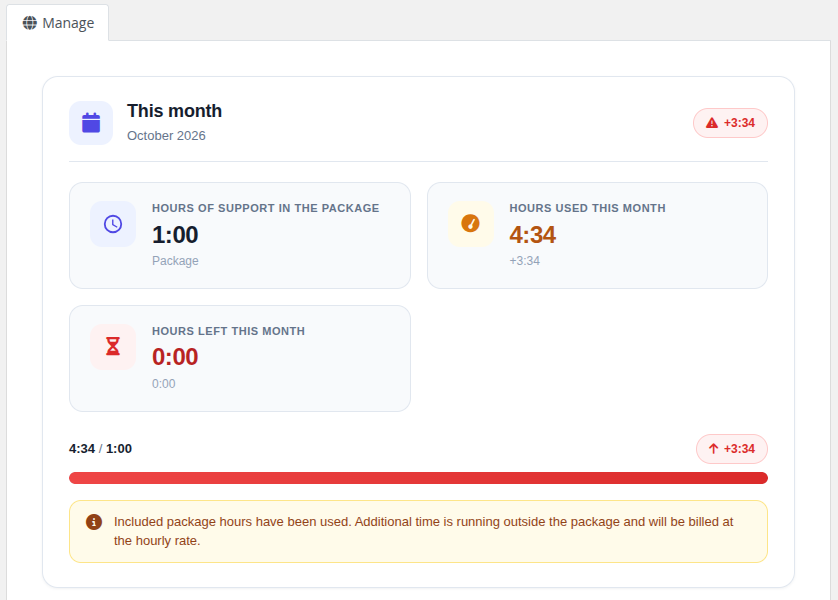
After logging in to the client area and opening their support service, the customer sees a modern card-based layout with the following sections.
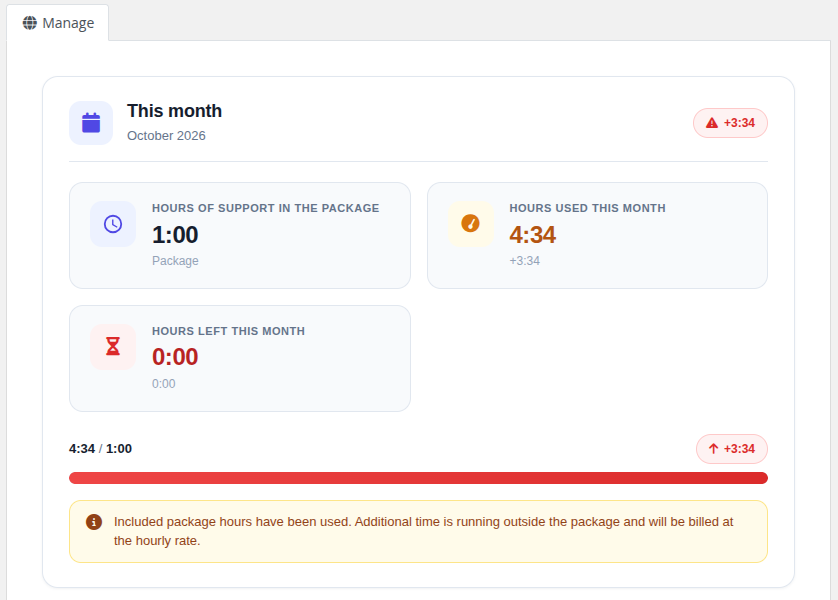
*09-client-home.png*
### This month / Support package
A summary of the current period as three stat cards:
- **Hours of support in the package** — the hour allocation included in the product
- **Hours used this month** (or *Hours used* for One Time) — total hours logged in the current month / bucket
- **Hours left this month** (or *Hours left*) — remaining hours in the allocation
A progress bar shows the percentage of the allocation that has been consumed (it turns amber as the package fills and red at 100%).
### Billing (recurring billing cycle only)
- **Price per hour** — hourly rate charged for overage hours, in the client's currency
- **Hours outside package** — hours that have already exceeded the included allocation
- **How much to pay this month** — running total of overage cost (`hours outside package × price per hour`)
#### Cost calculator
An interactive predictor: the client enters a number of additional hours (or uses quick preset buttons `+30m`, `+1h`, `+2h`, `+5h`) and instantly sees the estimated total for the month, with the underlying `overage hours × rate` calculation shown beneath it.
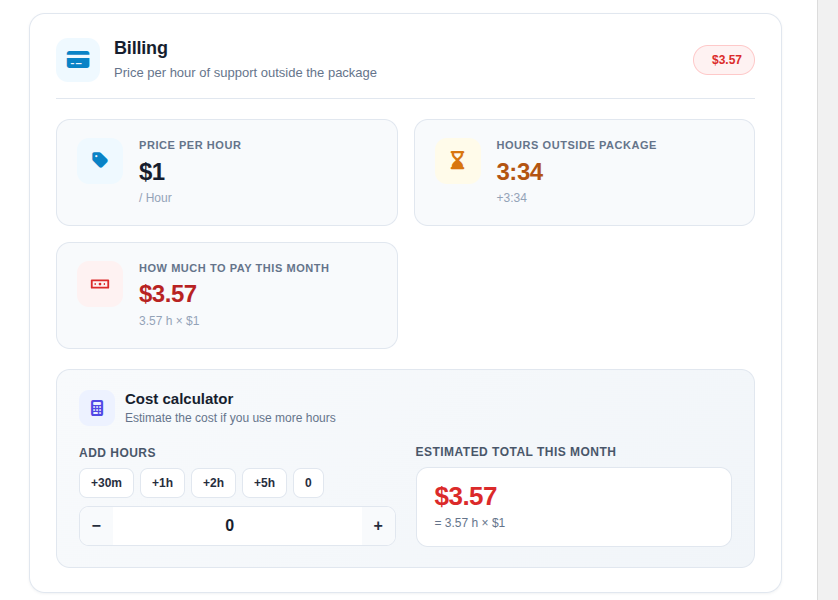
*09b-client-billing.png*
### List of tickets
A table with all tickets that have time logged in the current period:
- Ticket number and title (clickable, opens the ticket), with the number of time entries
- Total time spent (human-readable)
- **Operator** and **Note** — shown only when *Show work log to client* is enabled for the product
- Date of the most recent entry
- A status badge (Open / Billed / Paid / Unpaid)
Each ticket row can be expanded to reveal its individual time entries (date, time, operator, note):
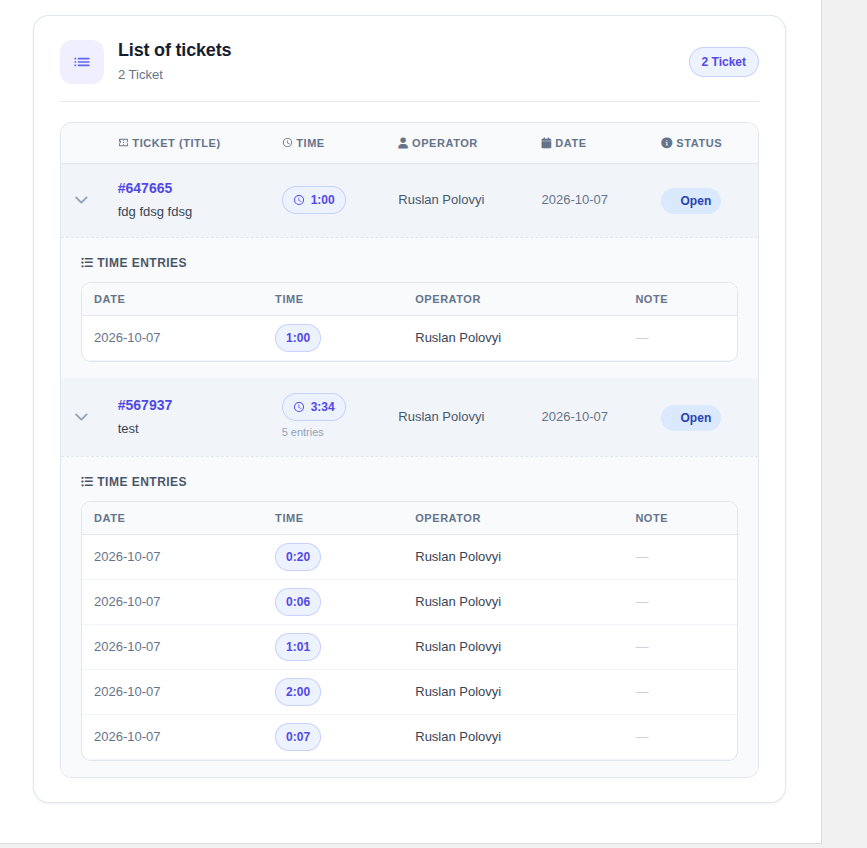
*10-client-home-entries.png*
### Sidebar navigation
The client area sidebar contains two menu items:
- **Information** — the home screen described above
- **History** — per-month history view (only for recurring billing cycles, see [History](02-history.md))
> **Note:** For *One Time* services, only the *Information* tab is shown — there is no per-month history because the service uses a single bucket of hours.
# History
### Support by Time module **[WHMCS](https://puqcloud.com/link.php?id=77)**
##### [Order now](https://puqcloud.com/whmcs-module-support-by-time.php) | [Download](https://download.puqcloud.com/WHMCS/servers/PUQ_WHMCS-Support-by-time/) | [Community](https://community.puqcloud.com/)
## Client area history
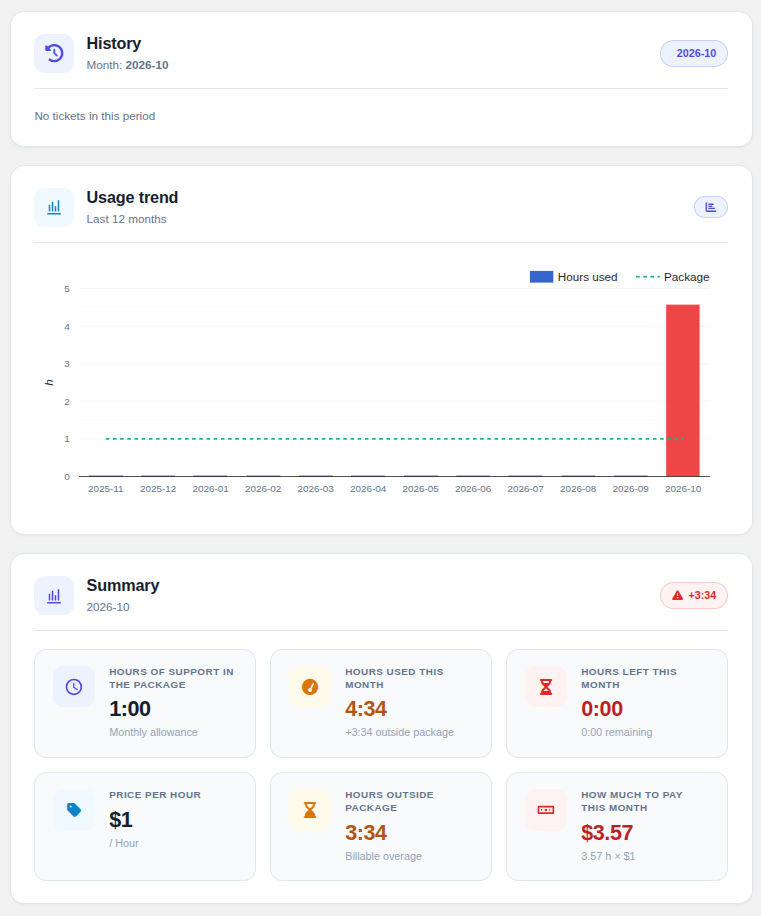
The **History** tab is available in the sidebar for support services with a recurring billing cycle. It shows a per-month archive of all tickets that consumed hours, together with a 12-month usage chart.
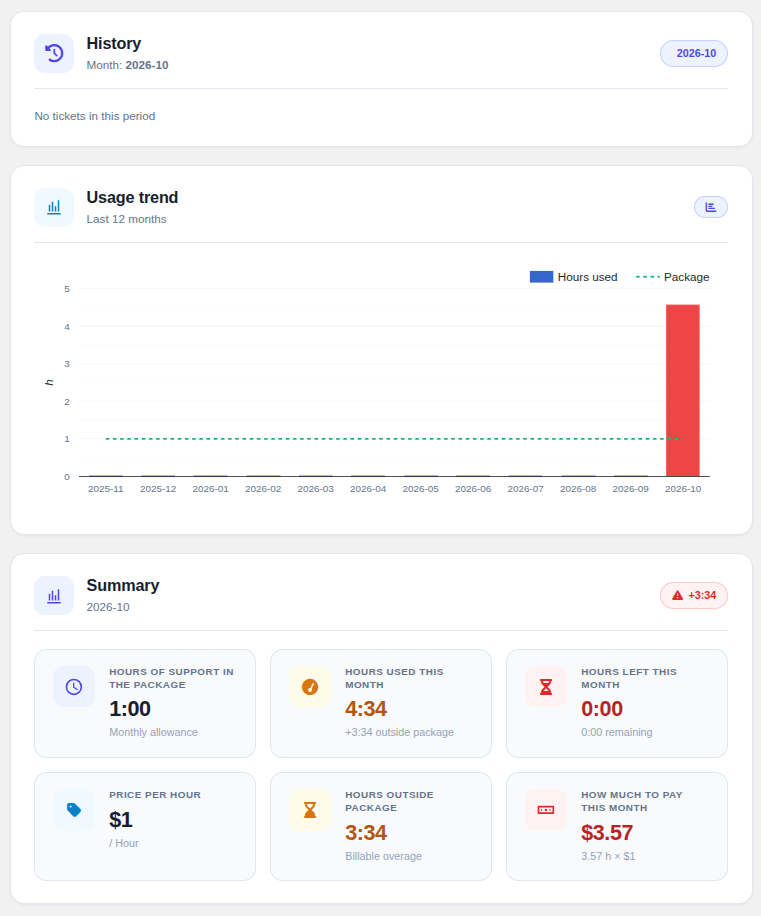
*11-client-history.png*
### Month navigator
A row of buttons lists every past month for which time has been logged. Clicking a month switches the view to that period (loaded via AJAX); the currently selected month is highlighted.
### Usage trend chart
A *Last 12 months* chart (Google ComboChart) plots **Hours used** as bars against the **Package** allocation as a dashed line. Bars are coloured by status so months with overage stand out at a glance.
### Monthly summary
For the selected month the summary panel shows the package allocation, hours used, hours left, the overage rate, overage hours and the overage cost — all using the package size and hourly rate that were **active when the time was logged**.
> **Why a snapshot?** Each ticket stores the package size and hourly rate that were active when the time was logged, so the history view always reflects what the customer was actually charged — even if the product configuration changes later.
### Tickets table
For every ticket logged in the selected month the table shows the ticket number and title, total time spent, the most-recent date, a status badge, and — when an overage billable item exists — a direct link to the WHMCS invoice that contains it. As on the home screen, the operator and note are shown when *Show work log to client* is enabled, and each row can be expanded to its individual entries.
# Admin Area
Administrative features available in the WHMCS admin panel: per-service summary and history on the product page, and the time-logging header injected into every ticket.
# Product Home Screen
### Support by Time module **[WHMCS](https://puqcloud.com/link.php?id=77)**
##### [Order now](https://puqcloud.com/whmcs-module-support-by-time.php) | [Download](https://download.puqcloud.com/WHMCS/servers/PUQ_WHMCS-Support-by-time/) | [Community](https://community.puqcloud.com/)
## Admin area service page
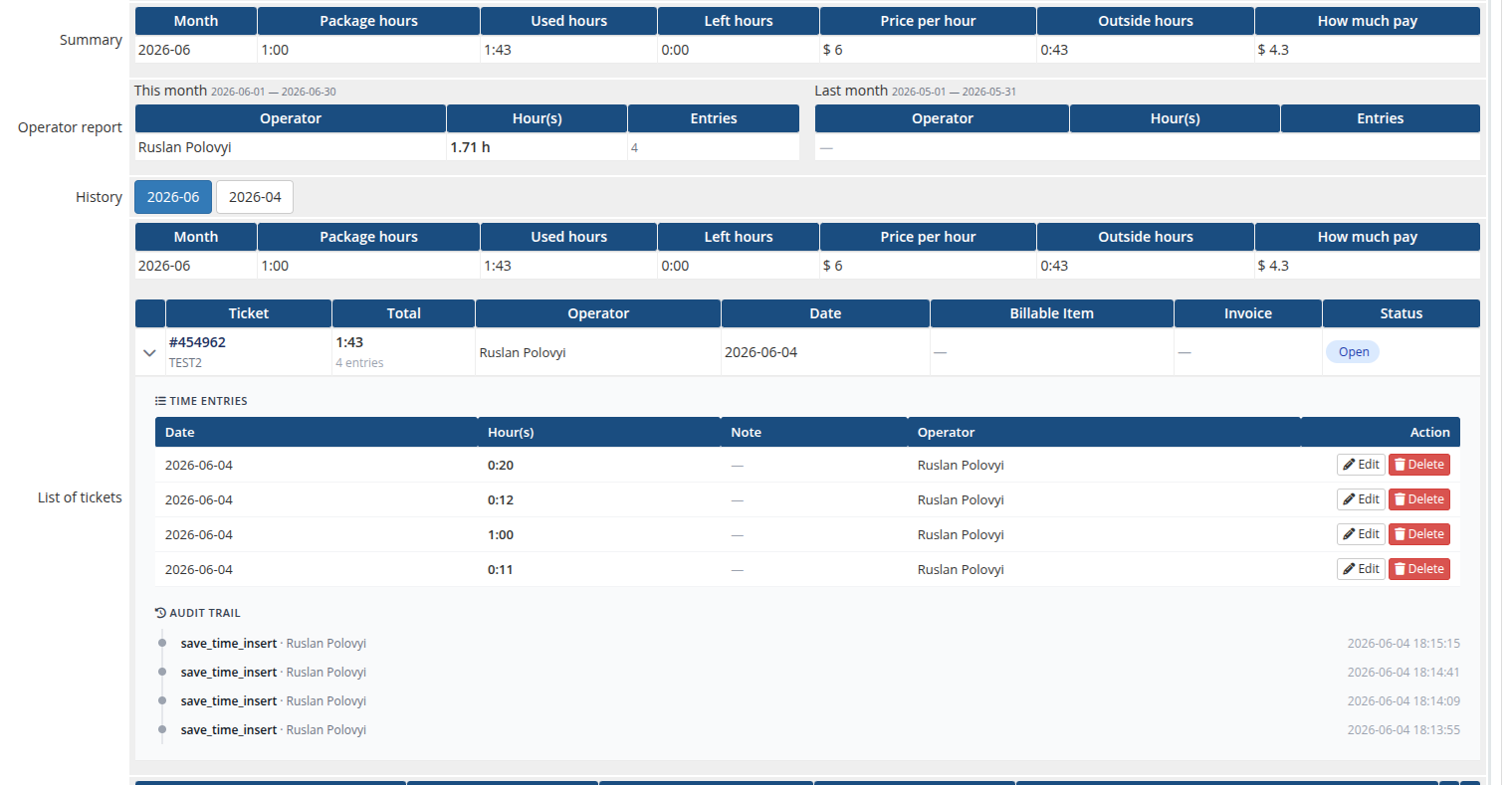
When the administrator opens a customer's Support by Time service in WHMCS, the module adds the following panels to the service page.
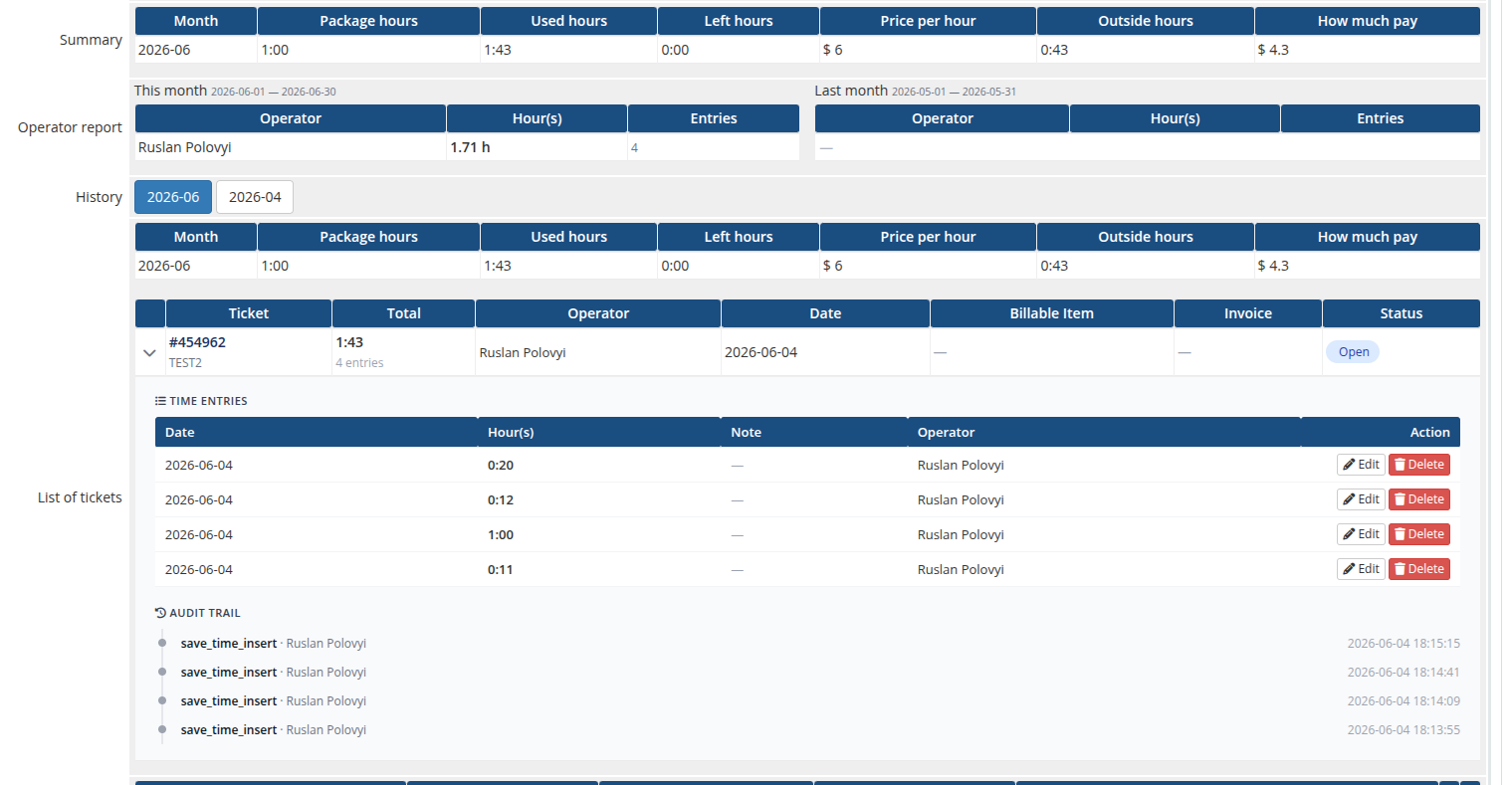
*12-admin-product-page.png*
### License verification
If the license is invalid or unreachable, a red bar with the error message is shown. While the license is invalid, the module's lifecycle hooks (Create / Suspend / Unsuspend / Change Package / Terminate) all return errors.
### Summary
A one-row summary table for the current month: month, package hours, used hours, hours left, price per hour, hours outside the package, and the calculated overage amount.
### Operator report
Two side-by-side tables — **This month** and **Last month** — listing each operator who logged time on this service with their total hours and number of entries.
### History (recurring billing cycle)
A row of buttons that switches the **List of tickets** table to any past month for which time has been logged. The current month is the default. Clicking a button reloads the list via AJAX without leaving the WHMCS service page.
### List of tickets
One row per ticket logged in the selected month:
| Column | Description |
|--------|-------------|
| **Ticket** | Ticket number and title (links to the support ticket) |
| **Total** | Total time logged on the ticket, plus the number of entries |
| **Operator** | The operator(s) who logged time |
| **Date** | Date of the most recent entry |
| **Billable Item** | Link to the WHMCS billable item created for this ticket (if any) |
| **Invoice** | Link to the invoice that contains the billable item |
| **Status** | Open / Billed / Paid / Unpaid |
Expanding a ticket row reveals its **time entries** (date, time, note, operator) — each with **Edit** and **Delete** actions — followed by the per-ticket **audit trail**. Entries belonging to a ticket that has already been billed are locked (shown with a lock icon instead of the Edit/Delete buttons) so billed time cannot be altered.
Before any time has been logged for the selected month, the tickets list shows an empty state. The panels sit on the WHMCS service page below the standard product/billing fields:
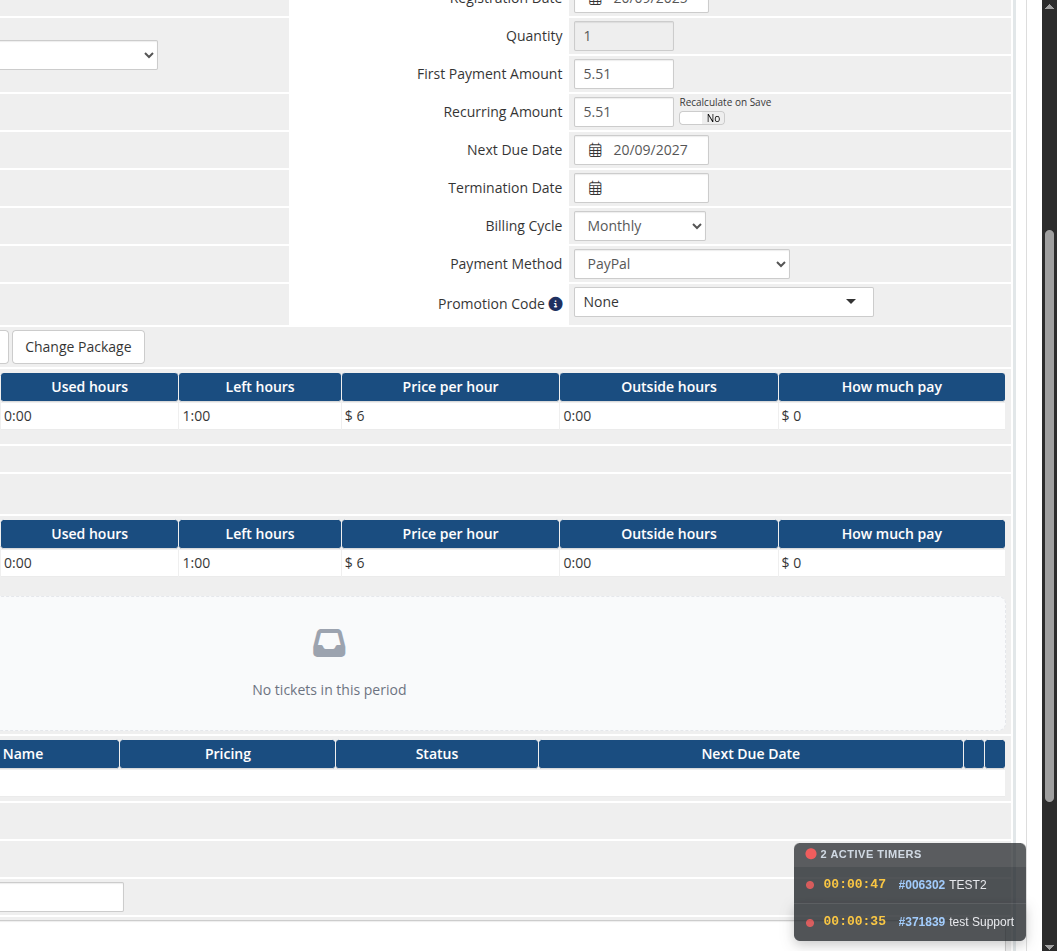
*13-admin-product-overview.png*
### One Time services
For services with the *One Time* billing cycle the panel is simplified: a single **Status** block with package / used / left hours, and a list of all tickets that have consumed hours from the bucket.
---
## Floating active-timers widget
On every admin page the module shows a small floating widget in the bottom-right corner listing all timers the current operator has running, each with a live elapsed clock and a link to the ticket. It polls in the background and ticks every second, so a running timer is never lost when navigating away from the ticket.
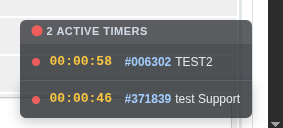
*14-admin-floating-timers.png*
---
## License alert on the admin homepage
The module also adds an alert to the WHMCS admin **Home** page that lists every Support by Time product whose license is currently invalid or unreachable. Each entry links directly to the corresponding product configuration page so the operator can fix it in one click.
# Ticket header
### Support by Time module **[WHMCS](https://puqcloud.com/link.php?id=77)**
##### [Order now](https://puqcloud.com/whmcs-module-support-by-time.php) | [Download](https://download.puqcloud.com/WHMCS/servers/PUQ_WHMCS-Support-by-time/) | [Community](https://community.puqcloud.com/)
## Time-logging header
Whenever an administrator opens a ticket in the WHMCS admin area, the module injects a context-aware header above the ticket. The header loads its state over AJAX and renders entirely client-side — every action (save, close, reopen, timer, order) happens **without reloading the page**. It detects the situation (active service, terminated service, no service, ticket charged in a previous month, ticket closed, license issue) and renders the appropriate UI.
---
### Open ticket — time form
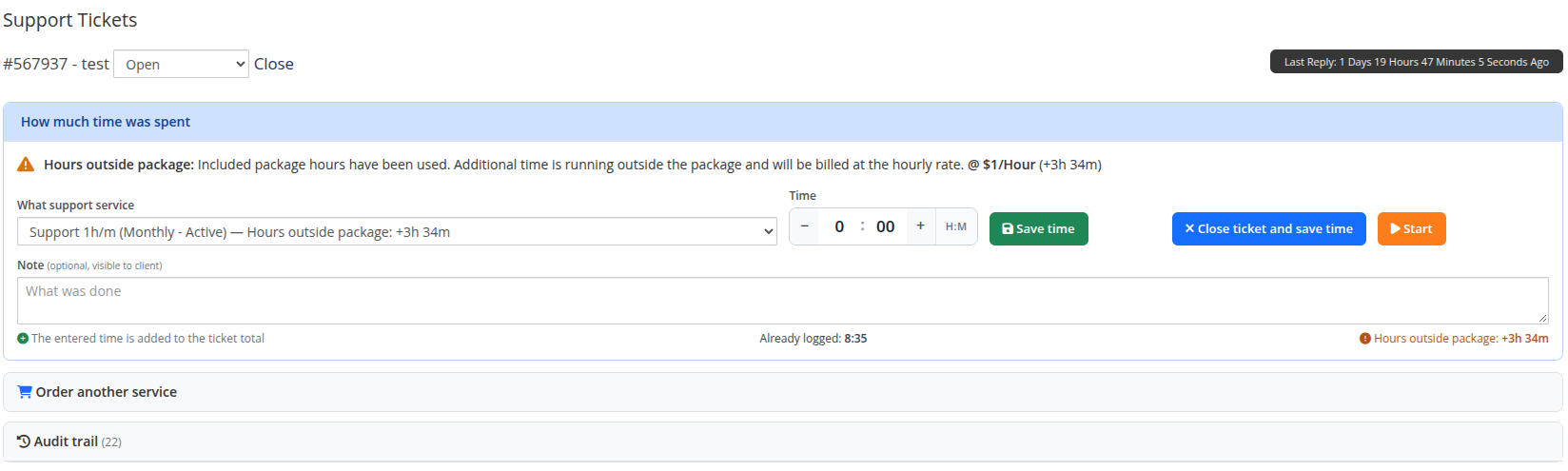
*15-ticket-time-form.png*
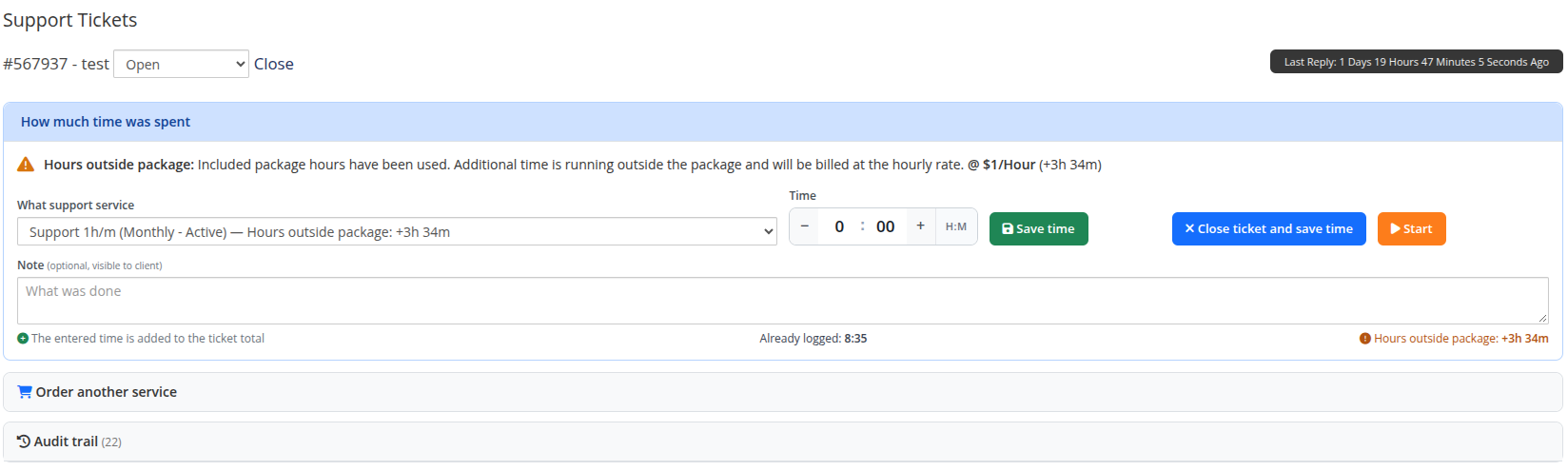
The default view is a panel containing:
- **Service selector:** A drop-down listing all customer support services. Active services are listed first with `Active` priority, followed by suspended and terminated services. Each entry displays package allocation and remaining hours: `Service name (cycle - status) — Available: 3h 17m / 5h`.
- **Smart default selection:** When opening a ticket with no hours logged yet, the header automatically pre-selects the first usable **Active** service (prioritizing packages with available quota).
- **Reactive switching:** Switching services updates the form immediately without page reload, recalculating available time and adjusting controls while preserving any text already typed into the **Note** field.
- An **HH:MM** time input with `−` / `+` buttons (minute steps; minutes roll over into hours). For *One Time* services the value is automatically capped at the hours remaining in the bucket.
- An optional **Note** field (visible to the client when *Show work log to client* is enabled on the product).
- Action buttons:
- **Save time** — appends the entered time as a new entry; the ticket stays open.
- **Close ticket and save time** — appends the entry and sets the WHMCS ticket status to *Closed*.
- **Start** — starts a live timer (see below).
> Each save **adds** a new entry to the ticket — it does not overwrite previous entries. The running total ("Already logged") and the full breakdown are shown in the audit trail.
#### Dynamic button state and status guard
The action buttons and time picker adapt dynamically to the selected service's status and remaining quota:
- **Active recurring service:** Buttons and inputs are always enabled. If usage exceeds included quota, an orange notice displays the overage rate per hour.
- **Active One Time service with hours remaining:** Buttons and inputs are enabled; the maximum loggable time is capped at the remaining bucket hours.
- **Active One Time service exhausted (0 hours left):** Action buttons (**Save time**, **Close & save**, **Start**) and the time input are disabled. A red notice informs: *Package hours exhausted. All prepaid hours for this One Time service have been used. Additional time cannot be added. Please order a new support package.*
- **Non-Active service (Terminated / Suspended):** Action buttons and inputs are disabled, and a warning alert is displayed: *Selected service is {Status}. You cannot log time to this service.*
- **Instant unblocking:** If an operator switches in the drop-down from a Terminated or Suspended service to an Active service, the alert banner disappears immediately and all action buttons and inputs are unblocked without reloading the page.
- **Backend security validation:** All backend endpoints (`save_time`, `timer_start`, `SetItem`) enforce `domainstatus === 'Active'`. Any attempt to log time or start a timer against a non-Active service is rejected at the server level.
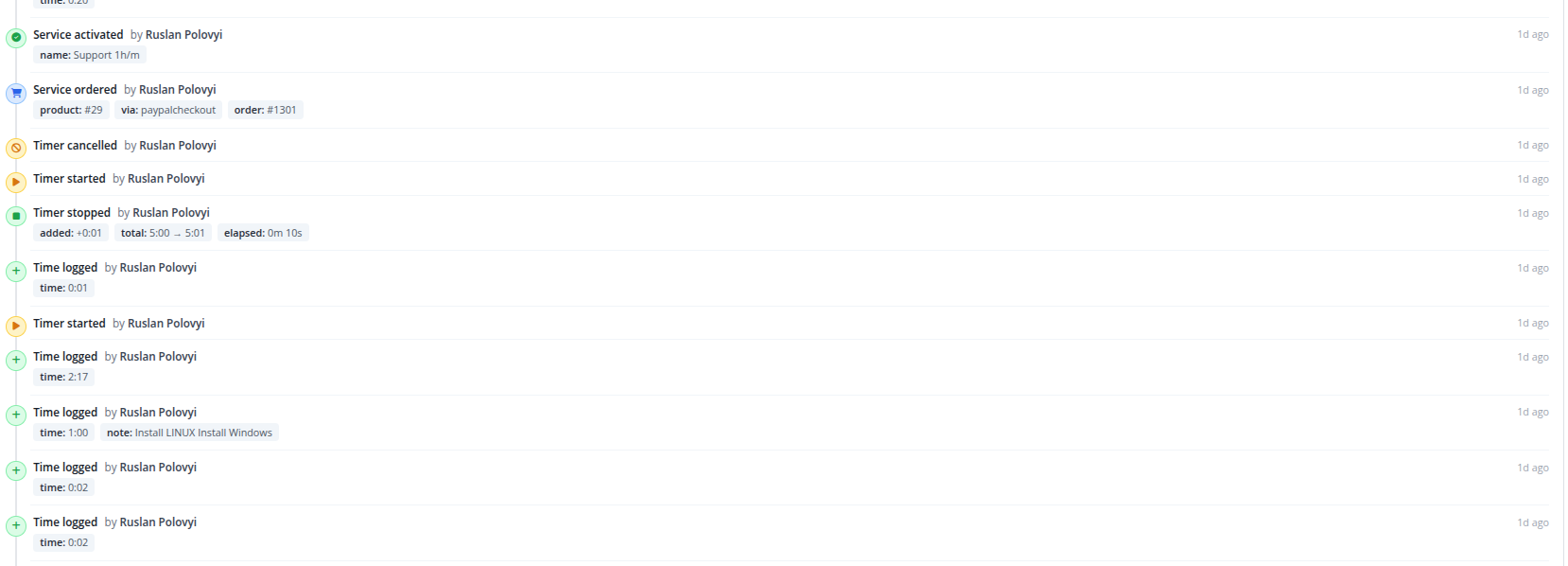
#### Audit trail
Below the form, a timeline lists every action taken on the ticket (time logged, edited, deleted, timer start/stop/cancel, service ordered), with the operator name and a relative timestamp.
*16-ticket-time-form-audit.png*
---
### Live timer
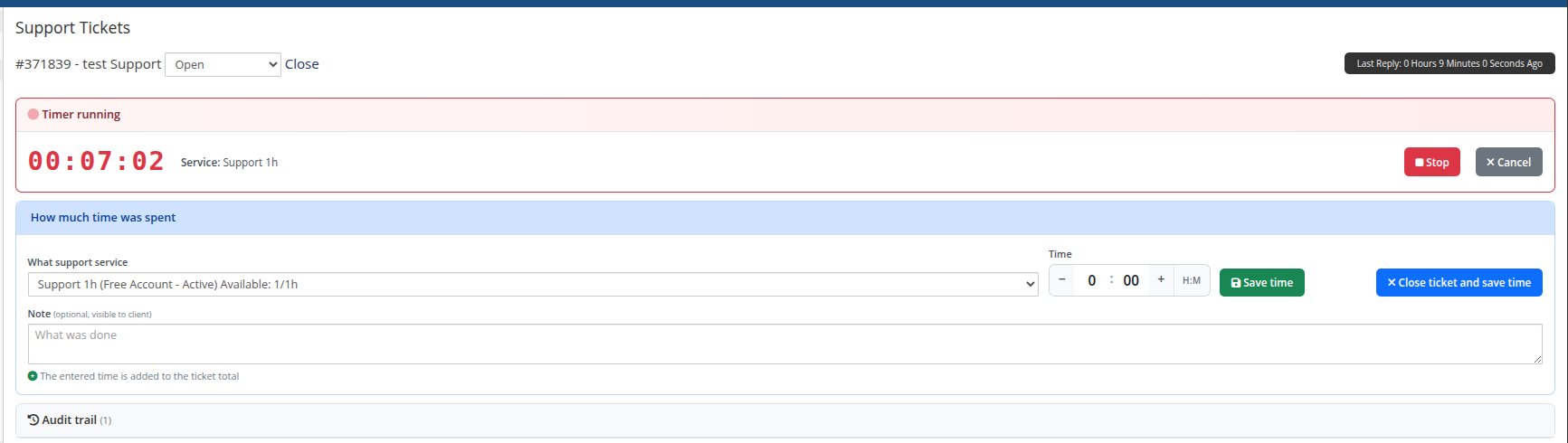
Pressing **Start** opens a red *Timer running* panel with a server-anchored running clock and **Stop** / **Cancel** buttons. **Stop** rounds the elapsed time up to the nearest minute and appends it as a regular time entry (with the note, if any); **Cancel** discards it.
*17-ticket-timer-running.png*
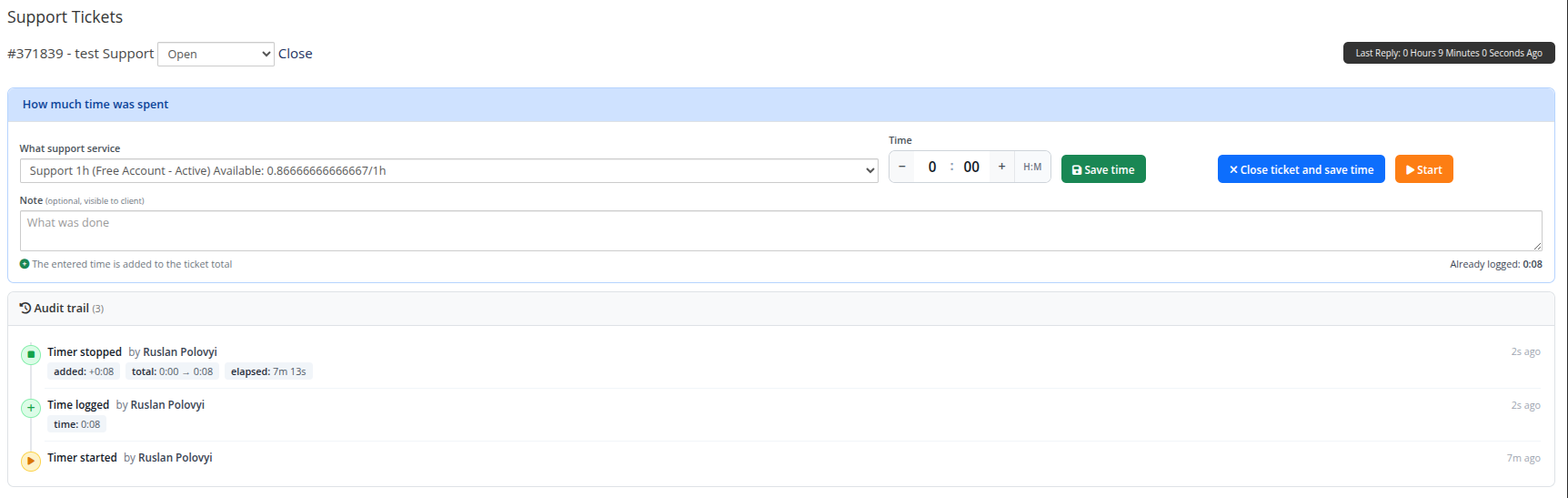
After stopping, the action is recorded in the audit trail (elapsed time, added hours, new total):
*18-ticket-timer-audit.png*
---
### Closed ticket

*19-ticket-closed.png*
When the ticket is closed, the header shows a compact summary (logged time + service) plus a **ReOpen** button that switches the WHMCS ticket status back to *Open* so the operator can log more time. If the ticket has already been billed, ReOpen is refused (the time is locked).
---
### Ticket charged in a previous month

*20-ticket-past-month.png*
If the ticket's time belongs to a previous month, editing is locked: the header shows a red panel with the recorded time, the service, and a hint to **recreate or split the ticket** if more time needs to be logged. This prevents retroactive changes after the monthly billable item has been created.
---
### Inactive or terminated service handling
If a ticket has existing logged time associated with a service that has since been terminated or suspended:
- The header displays an alert informing that the selected service is not active and time cannot be added to it.
- If the customer has other active services, the operator can simply switch to an active service in the drop-down — the buttons unblock immediately.
- If the customer has no active services, the operator can order or activate a new package directly from the ticket header using the inline order form.
---
### Client without a support service
*21-ticket-order-service.png*
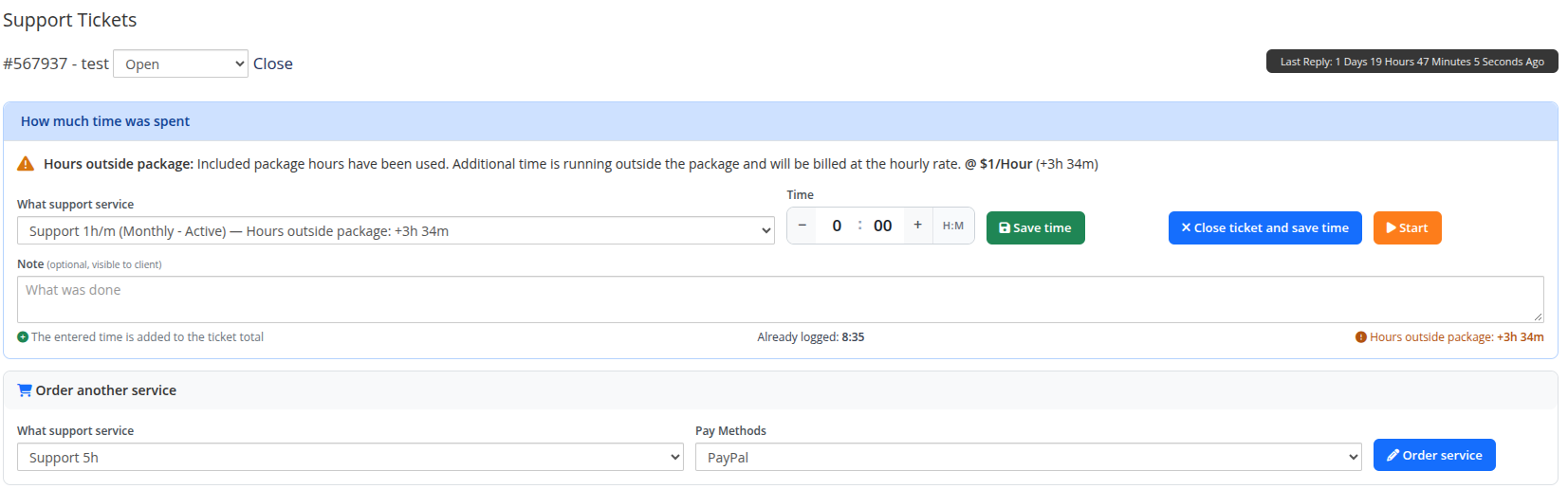
If the client does not yet have an Active or Suspended Support by Time service, the header shows an inline order form: a drop-down with all available Support by Time products and a drop-down with available WHMCS payment methods. Submitting it creates a WHMCS order, accepts it, runs auto-setup and reloads the ticket.
---
### License issue
When any of the customer's Support by Time products has an invalid or unreachable license, the header shows a red banner instead of the time form, with the product name and the error message returned by the license server.