# Product Configuration
### WireGuard Business-VPN module **[WHMCS](https://puqcloud.com/link.php?id=77)**
##### [Order now](https://puqcloud.com/whmcs-module-wireguard-business-vpn.php) | [Download](https://download.puqcloud.com/WHMCS/servers/PUQ_WHMCS-WireGuard-Business-VPN/) | [FAQ](https://faq.puqcloud.com/)
##### Add new product to WHMCS
```
System Settings->Products/Services->Create a New Product
```
In the **Module settings** section, select the **"PUQ WireGuard Business-VPN"** module
[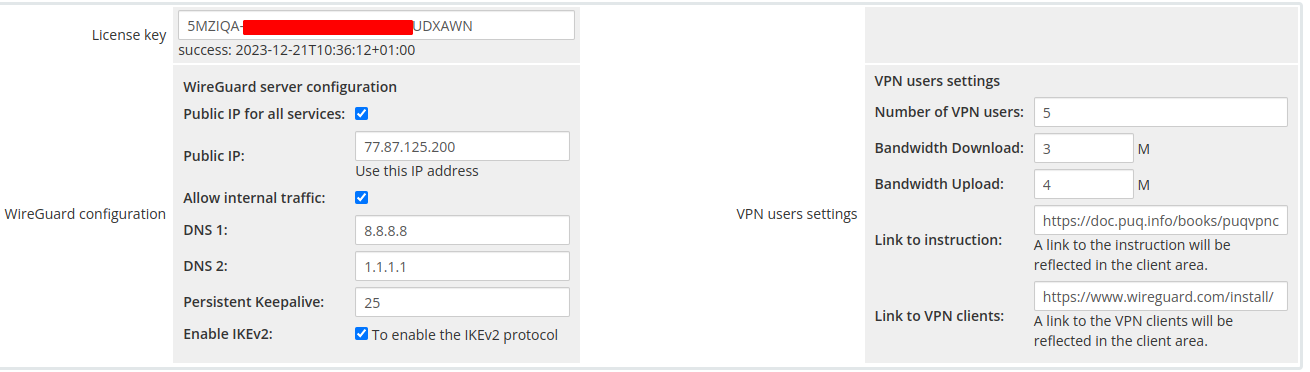](https://doc.puq.info/uploads/images/gallery/2023-01/image-1673191608638.png)
- **License key:** A pre-purchased license key for the **"PUQ WireGuard Business-VPN"** module. For the module to work correctly, the key must be active
##### WireGuard configuration
- **Public IP for all services -** If you want to assign one public IP address to all services (IP must be configured on the **[PUQVPNCP](https://doc.puq.info/books/puqvpncp/page/description)** server)
- **Public IP -** If you want to assign one public IP address to all services (IP must be configured on the **[PUQVPNCP](https://doc.puq.info/books/puqvpncp/page/description)** server)
- **Allow internal traffic-** If you want to enable traffic exchange between VPN clients **(package change)**
- **DNS1, DNS2 -** DNS servers if they differ from the configuration in the **[PUQVPNCP](https://doc.puq.info/books/puqvpncp/page/description)** panel **(package change)**
##### VPN users settings
- **Number of VPN users -** Number of vpn accounts per service **(package change)**
- **Bandwidth Download** - Bandwidth Download of VPN accounts **(package change)**
- **Bandwidth Upload-** BandwidthUpload of VPN accounts **(package change)**
- **Link to instruction-** If you have prepared instructions for your customers on how to use the service, then a link to the instructions is provided here (If filled, it will be shown in the client area)
- **Link to VPN clients-** Link to download the VPN client. For example [https://www.wireguard.com/install/](https://www.wireguard.com/install/) (If filled, it will be shown in the client area)
- **Persistent Keepalive-** sets the Keepalive parameter in the WireGuard server client configuration **(package change)**
- **Enable IKEv2-** Enable IKEv2 protocol support **(package change)**