# Product Configuration
### WireGuard VPN module **[WHMCS](https://puqcloud.com/link.php?id=77)**
##### [Order now](https://panel.puqcloud.com/index.php?rp=/store/whmcs-module-wireguard-vpn) | [Download](https://download.puqcloud.com/WHMCS/servers/PUQ_WHMCS-WireGuard-VPN/) | [FAQ](https://faq.puqcloud.com/)
##### Add new product to WHMCS
```
System Settings->Products/Services->Create a New Product
```
In the **Module settings** section, select the **"PUQ WireGuard VPN"** module
[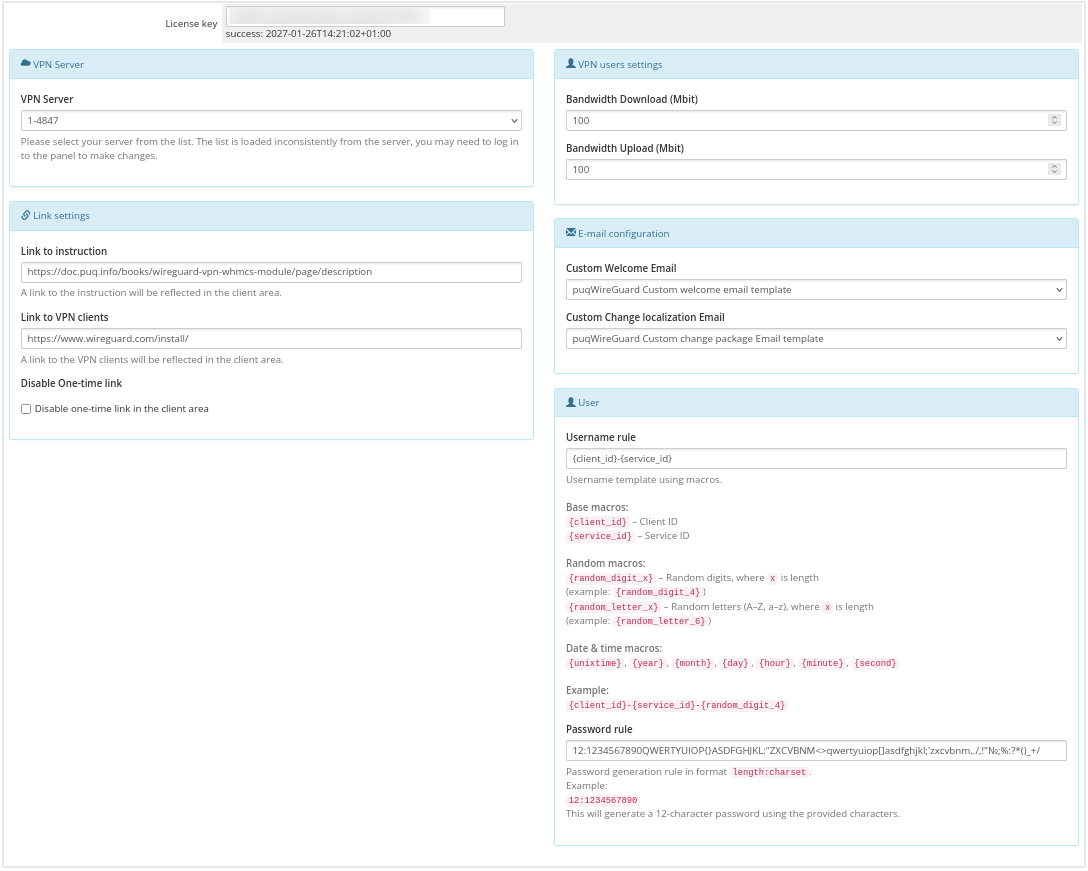](https://doc.puq.info/uploads/images/gallery/2026-02/image-1770297378271.png)
- **License key:** A pre-purchased license key for the **"PUQ WireGuard VPN"** module. For the module to work correctly, the key must be active
##### VPN Server
- Please select your server from the list. The list is loaded inconsistently from the server **[PUQVPNCP](https://doc.puq.info/books/puqvpncp/page/description)**, you may need to log in to the panel to make changes.
##### Link settings
- **Link to instruction -** If you have prepared instructions for your customers on how to use the service, then a link to the instructions is provided here (If filled, it will be shown in the client area)
- **Link to VPN clients -** Link to download the VPN client. For example [https://www.wireguard.com/install/](https://www.wireguard.com/install/) (If filled, it will be shown in the client area)
- **Disable One-time link** - When this option is enabled, a one-time link to the VPN clients will be disabled in the client area, preventing the customer from using a single-use link for downloading the VPN clients.
##### E-mail configuration
- **Custom Welcome Email -** Drop-down list of available e-mail templates for the action of creating a new client account. Please note that it is necessary to disable the standard welcome email in order to avoid double notification
- **Custom Change localization Email -** Drop-down list of available e-mail templates for the localization change action (package change) for the client account. Please note that you need to disable the standard package change email to avoid double notification.
##### VPN users settings
- **Bandwidth Download -** Bandwidth Download of VPN accounts **(package change)**
- **Bandwidth Upload -** BandwidthUpload of VPN accounts **(package change)**
##### Metric Billing
[](https://doc.puq.info/uploads/images/gallery/2024-06/image-1719051111208.png)[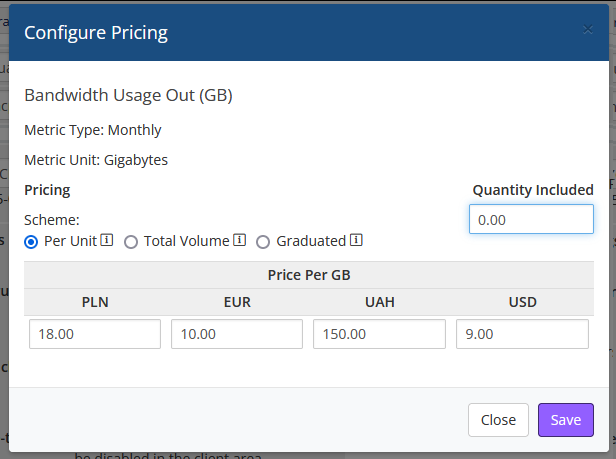](https://doc.puq.info/uploads/images/gallery/2024-06/image-1719051131599.png)
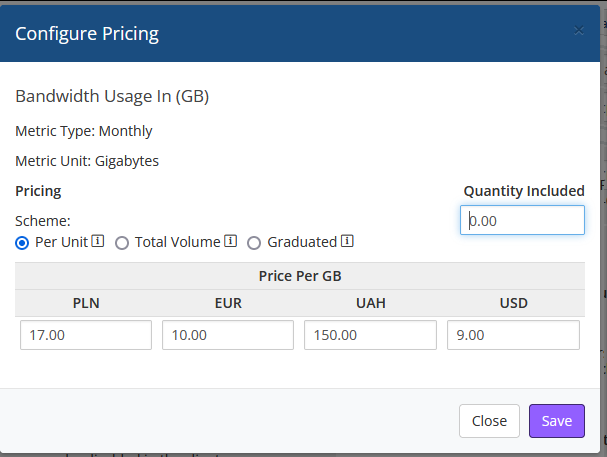
- **Bandwidth Usage In (GB)**:
- **Metric Type**: Monthly
- **Metric Unit**: Gigabytes (GB)
- **Pricing Scheme**:
- **Per Unit**: Billing for each gigabyte of traffic.
- **Total Volume**: Billing for the total volume of traffic.
- **Graduated**: Billing on a graduated scale.
- **Quantity Included**: Allows you to set how many gigabytes are included in the plan.
- **Price Per GB**: Allows you to specify the cost per gigabyte of traffic in various currencies.
- **Bandwidth Usage Out (GB)**:
- **Metric Type**: Monthly
- **Metric Unit**: Gigabytes (GB)
- **Pricing Scheme**:
- **Per Unit**: Billing for each gigabyte of traffic.
- **Total Volume**: Billing for the total volume of traffic.
- **Graduated**: Billing on a graduated scale.
- **Quantity Included**: Allows you to set how many gigabytes are included in the plan.
- **Price Per GB**: Allows you to specify the cost per gigabyte of traffic in various currencies.
##### Overages Billing
[](https://doc.puq.info/uploads/images/gallery/2024-06/image-1719051698563.png)
- **Check to Enable**: Enables overage billing.
- **Soft Limits**:
- **Disk Usage**: not use.
- **Bandwidth**: Sets a soft limit for bandwidth usage (units: MB, GB, TB). For example, you can set a soft limit of 1 GB for bandwidth.
- **Overage Costs**:
- **Disk Usage**: not use.
- **Bandwidth**: Specifies the cost per unit over the soft limit for bandwidth usage.
- **Price Per Unit Over Above**: Sets the pricing for overage units.
-