 Skip to main content

Gateway Configuration
NOWPayments Payment Gateway module WHMCS
Order now | Download | Community
Activate Payment Gateway in WHMCS
- Log in to your WHMCS Admin Area.
- Navigate to System Settings → Payment Gateways (or Setup → Payments → Payment Gateways in older WHMCS versions).
- Switch to the All Payment Gateways tab.
- Locate PUQ NOWPayments in the list and click to activate.
Configure Payment Gateway
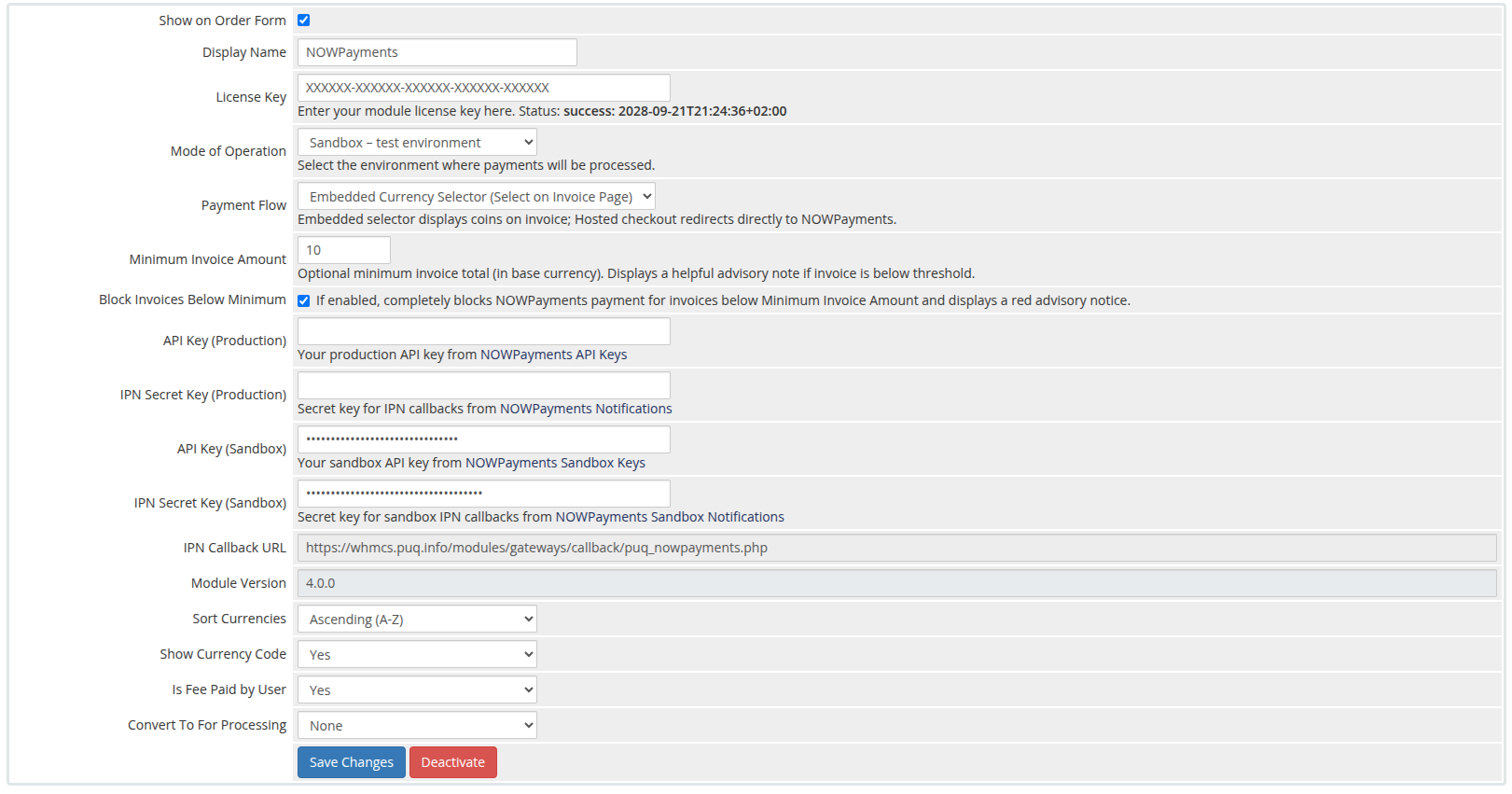
After activating, WHMCS redirects to the Manage Existing Gateways tab (or navigate there directly via System Settings → Payment Gateways → Manage Existing Gateways). Locate the PUQ NOWPayments section.
 gateway-configuration.png
Configure the following parameters:
| Parameter | Type | Description |
|---|---|---|
| Show on Order Form | Checkbox | Check this box to enable NOWPayments as an available payment option on customer checkouts and invoices. |
| Display Name | Text | The public title displayed to customers (default: NOWPayments). |
| License Key | Text | Your PUQ module license key. The validation status is displayed inline. |
| Mode of Operation | Dropdown | Choose between Production – live payments or Sandbox – test environment. Always test in sandbox mode before going live. |
| Payment Flow | Dropdown | Choose between Embedded Currency Selector (customer selects coin on WHMCS invoice) and Direct Hosted Checkout (customer redirects to NOWPayments checkout). |
| Minimum Invoice Amount | Text (Number) | Optional minimum invoice total in your WHMCS base currency. If set, invoices below this value display an advisory notice. |
| Block Invoices Below Minimum | Checkbox | When enabled, completely blocks payment processing for invoices below the minimum amount and displays a red notice asking the client to select another payment method. |
| API Key (Production) | Password | Production API Key from your NOWPayments Production Store Settings. |
| IPN Secret Key (Production) | Password | Production IPN Secret Key from NOWPayments Notifications. |
| API Key (Sandbox) | Password | Sandbox API Key for development/testing from NOWPayments Sandbox Keys. |
| IPN Secret Key (Sandbox) | Password | Sandbox IPN Secret Key from NOWPayments Sandbox Notifications. |
| IPN Callback URL | Read-only | Automatically generated webhook endpoint URL. Copy this into your NOWPayments dashboard settings. |
| Module Version | Read-only | Displays the currently installed module version (e.g. 4.0.0). |
| Sort Currencies | Dropdown | Sorting order for coins in the dropdown: Ascending (A-Z), Descending (Z-A), or Do Not Sort (Merchant Default). |
| Show Currency Code | Dropdown | Choose Yes to display ticker symbols next to names (e.g. Bitcoin (BTC)). |
| Is Fee Paid by User | Dropdown | Choose Yes if the customer pays the gateway commission fee, or No if absorbed by merchant. |
| Convert To For Processing | Dropdown | Optional WHMCS setting to convert invoice amounts into a selected currency prior to processing. |
Click Save Changes at the bottom of the page.
Webhook / IPN Setup in NOWPayments
To receive automated payment confirmations:
- Copy the IPN Callback URL shown in your WHMCS gateway settings:
https://yourdomain.com/modules/gateways/callback/puq_nowpayments.php - Open your NOWPayments account settings:
- Paste the callback URL and ensure the generated IPN Secret matches the secret entered in WHMCS.
- Click Save Changes.
Important: The webhook callback URL must be publicly accessible over HTTPS so that NOWPayments servers can post real-time IPN notifications to your WHMCS.