 Skip to main content
Service page
Jellyfin Family module WHMCS
Order now | Download | Community
On the WHMCS admin service page (Clients → (client) → Products/Services) the module adds an information tab and the standard module command buttons.
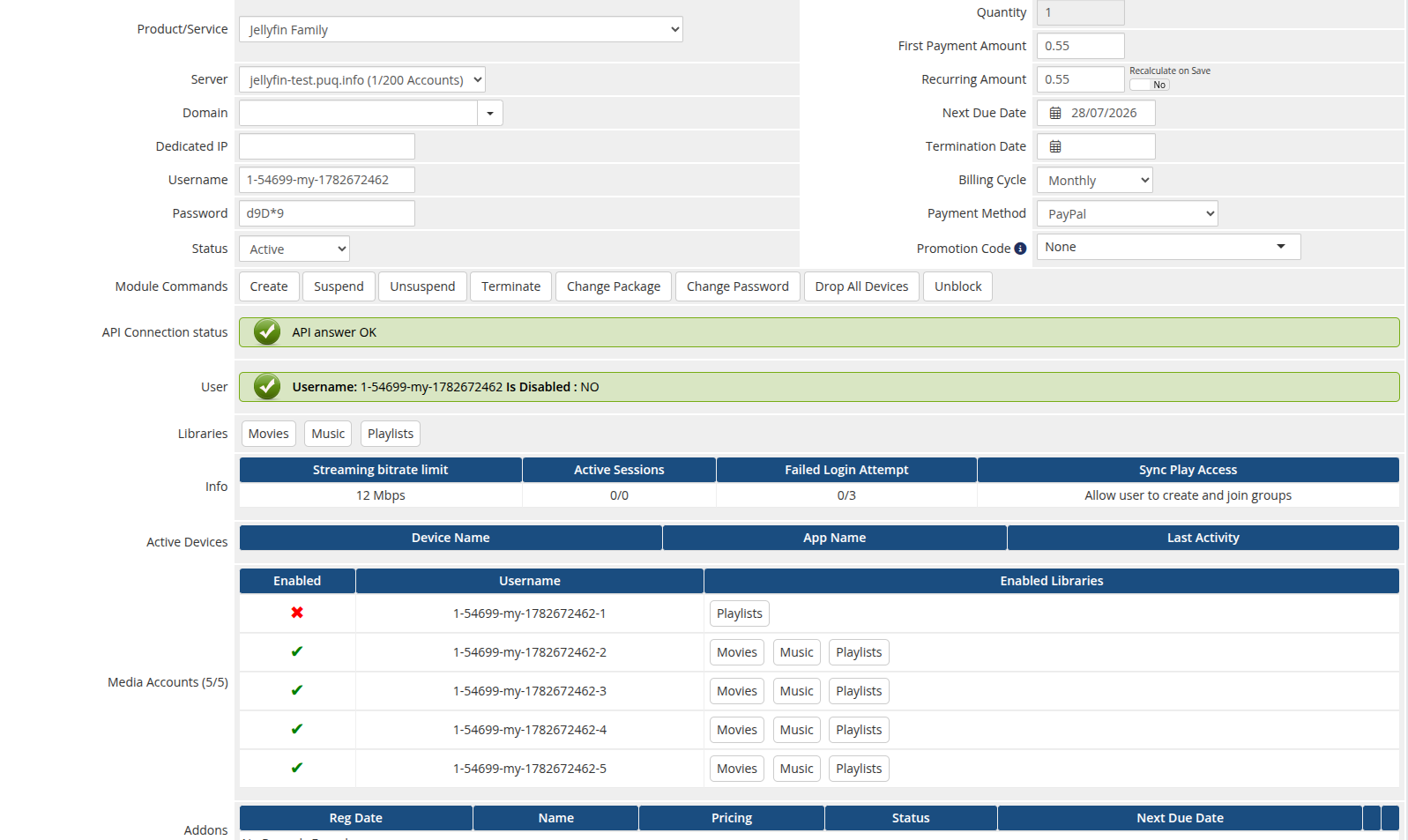
Module commands
- Create — generates credentials, creates the Jellyfin user and applies the policy.
- Suspend / Unsuspend — toggles the user's IsDisabled flag.
- Change Package — re-applies the product policy to the existing user and to every media account.
- Change Password — resets and sets a new password.
- Terminate — deletes the Jellyfin user and all of its media accounts.
Custom buttons
- Drop All Devices — removes all of the user's registered devices.
- Unblock — re-enables a disabled account (requires the service to be Active).
Information tab
- API Connection status — confirms the module can reach Jellyfin.
- User — username and disabled state (with a too-many-failed-logins warning).
- Libraries — the libraries the user can access.
- Info — streaming bitrate limit, active sessions, failed-login counter and SyncPlay access.
- Active Devices — device name, app and last activity.
-
Media Accounts (when enabled on the product) — a table of the client's sub-users: enabled state, username and the libraries each one can access. The tab header shows the
used / limitcount.
All lifecycle actions are license-gated: if the license cache is stale and the license server is unreachable, the action is refused with the license error.