 Skip to main content
Configuration Overview
Admin Panel Unique addon WHMCS
Order now | Download | FAQ
The Configuration page is available at: Addons > PUQ Admin Panel Unique > Configuration
This page is the main workspace for setting up the admin panel theme: enable/disable customization, dark mode, preset selection, manual color tuning, and save.
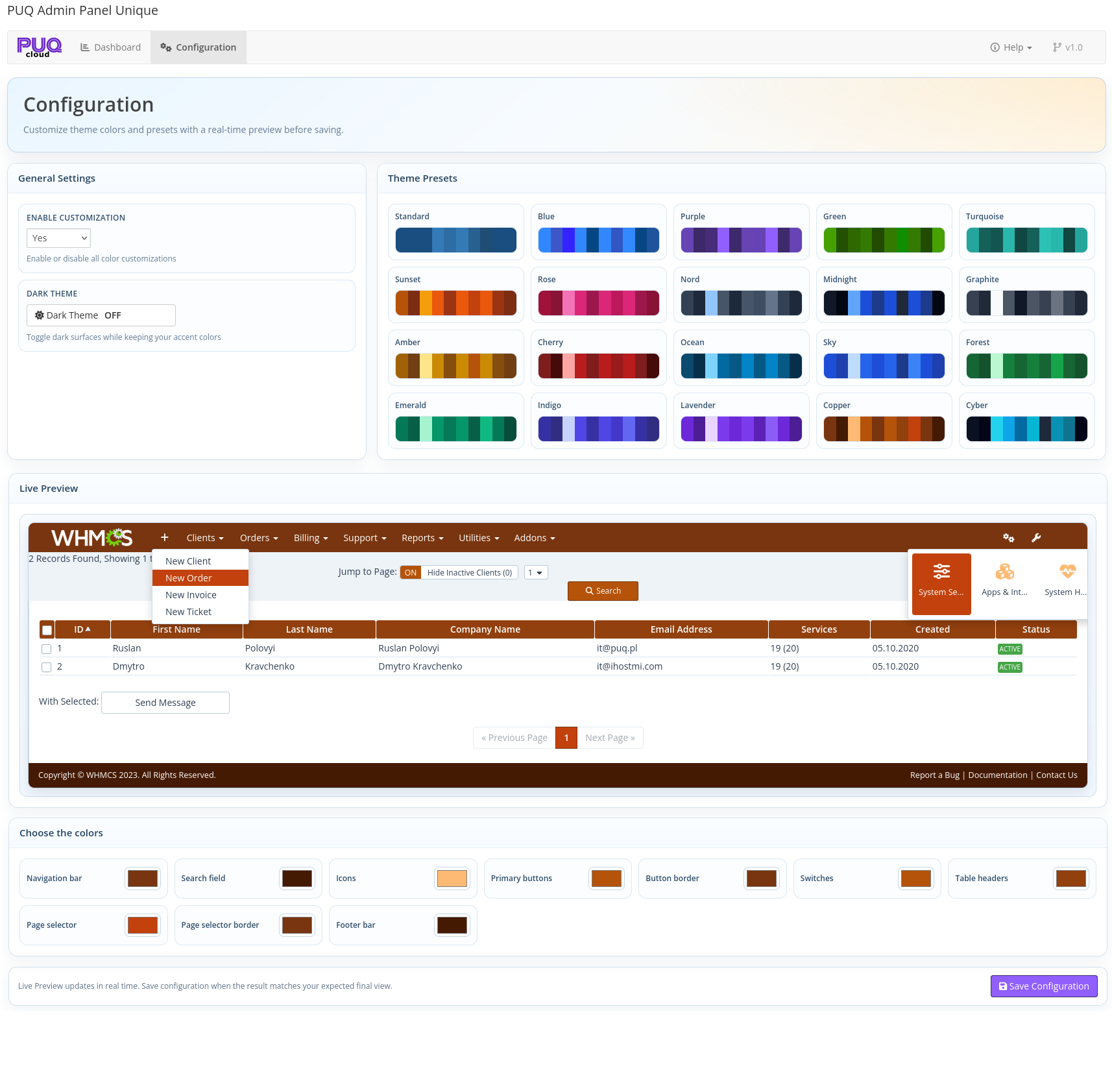 03-configuration.png
Configuration Flow
Recommended workflow:
- Enable customization.
- Choose a preset as a base theme.
- Fine-tune individual colors if needed.
- Check the result in Live Preview.
- Save configuration.
Changes are not applied to WHMCS globally until you click Save Configuration.
General Settings
Enable customization
- Yes: module CSS is injected into WHMCS admin area and all selected colors are applied.
- No: custom styles are disabled and WHMCS default styling remains active.
When disabled, preset and color controls become inactive in the configuration form.
Dark Theme
- Toggles dark surfaces for admin interface blocks while keeping your accent colors.
- Works together with your selected preset or manual colors.
- State is shown as ON/OFF in the toggle button and reflected in live preview immediately.
Theme Presets
The module includes 20 built-in presets.
Clicking a preset instantly fills all color fields in the form:
After selecting a preset, you can still manually adjust any color before saving.
Manual Color Controls
The Choose the colors section provides direct per-element color editing via native color pickers.
| Color Field | Affects |
|---|---|
| Navigation bar | Left navigation background |
| Search field | Top search input and button background |
| Icons | Icons in navigation dropdown menus |
| Primary buttons | .btn-primary elements |
| Button border | Borders for primary buttons |
| Switches | Bootstrap switch handles |
| Table headers | Datatable and themed table headers |
| Page selector | Active pagination and selector backgrounds |
| Page selector border | Borders for active pagination/selectors |
| Footer bar | Admin footer bar background |
Live Preview
Live Preview shows how the admin UI will look with the current form values before saving.
 04-live-preview.png
How it works:
- Any change in a color picker updates preview styles instantly.
- Preset click updates preview instantly.
- Dark mode toggle updates preview instantly.
- If customization is set to No, preview resets to default (non-customized) appearance.
- Checkbox/radio, table, pagination, navigation, search, and button elements are rendered in preview with current settings.
This allows safe visual tuning without affecting the production admin interface until save.
Save, Validation, and Security
When you click Save Configuration, the module:
- Validates CSRF token.
- Normalizes boolean fields (
enabled,dark_mode) toyes/no. - Validates color fields as HEX values.
- Saves values to
mod_puq_admin_panel_unique_config. - Redirects back to Configuration page (PRG flow) and shows success/error message.
License Note
Configuration page requires a valid license.
- If the license is invalid, Configuration is locked with a License Required screen.
- Dashboard remains accessible in read-only mode.
No Comments