 Skip to main content

Add Server in WHMCS
PowerDNS module WHMCS
Order now | Download | Community
Register your PowerDNS authoritative server within WHMCS so products can provision against its HTTP API.
1. Add New Server
- In the WHMCS Admin Area, navigate to System Settings → Servers (or Setup → Products/Services → Servers).
- Click Add New Server.
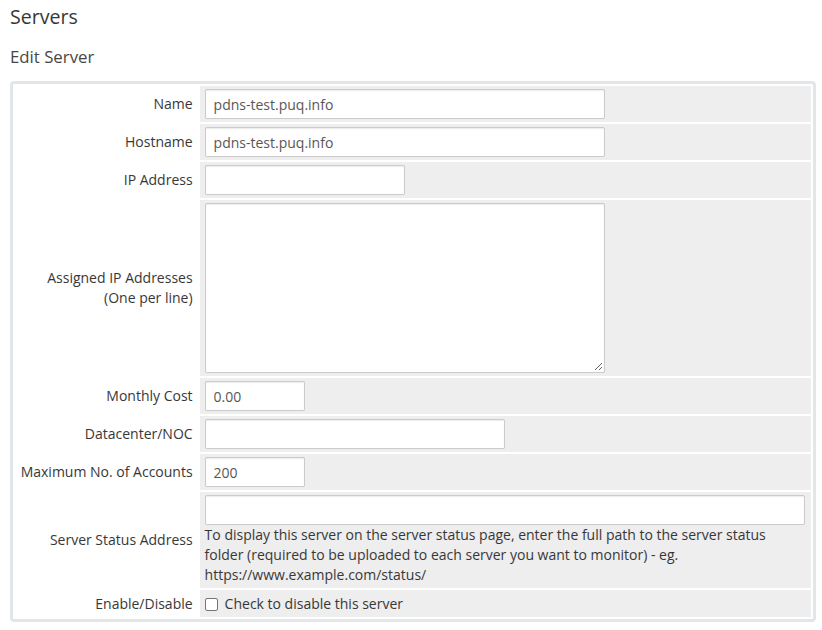
- Fill in the primary server details:
-
Name: A descriptive label for the server (e.g.,
PowerDNS Cluster 1). -
Hostname: The fully qualified domain name or IP address of the PowerDNS server (e.g.,
pdns-test.puq.info). - IP Address: The IP address of the PowerDNS API endpoint (optional if hostname resolves).
-
Max No. of Accounts: Maximum accounts assigned to this server (e.g.,
200).
-
Name: A descriptive label for the server (e.g.,
 admin-server-setup.png
2. Server Details and API Credentials
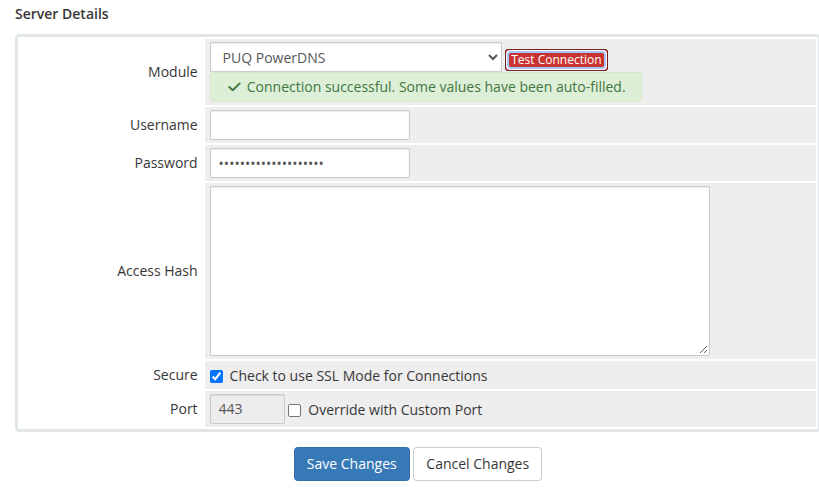
Scroll down to the Server Details section:
| Field | Required | Description |
|---|---|---|
| Type (Module) | Yes | Select PUQ PowerDNS from the dropdown list. |
| Username | No | Leave blank. PowerDNS HTTP API authentication does not use HTTP Basic usernames. |
| Password | Yes | Enter your PowerDNS api-key (from pdns.conf). The module transmits this via the X-API-Key HTTP header. |
| Secure | Optional | Check Tick to use SSL Mode for Connections if PowerDNS API is secured with HTTPS. |
| Access Hash | No | Leave blank. |
Port Configuration:
- When Secure (SSL) is enabled, the module connects via HTTPS on port
443by default. - When Secure (SSL) is disabled, the module connects via HTTP on port
8081by default. - You can override the port by specifying a custom port number in the server settings or hostname (e.g.
pdns.example.com:8443).
3. Verify Connection
- Click the Test Connection button.
- The module calls
GET /api/v1/servers/localhoston your PowerDNS server. - Upon success, WHMCS displays a green notification:
"Success! The test connection was successful." - Click Save Changes to commit the server configuration.
 admin-server-details-test-connection.png
4. Server Groups (Optional)
If you operate multiple PowerDNS nodes or clusters: