 Skip to main content
Setup Guide: Mikrotik Preparation and Configuration
Mikrotik WireGuard VPN module WHMCS
Order now | Download | Community
Prerequisites
- RouterOS version 7 or higher is required.
- Access to the Mikrotik router via terminal (SSH, Winbox terminal, or WebFig terminal).
Important: Enter the following commands one by one and wait for each command to complete before proceeding to the next.
Step I. Check RouterOS Version
Verify that your router is running RouterOS 7 or higher:
system/package/print
Step II. Create Root Certificate Authority
Create a local CA certificate for SSL:
/certificate add name=LocalCA common-name=LocalCA key-usage=key-cert-sign,crl-sign
Step III. Sign the CA Certificate
/certificate sign LocalCA
Step IV. Create Webfig Certificate
Replace XXX.XXX.XXX.XXX with the router's public IP address:
/certificate add name=Webfig common-name=XXX.XXX.XXX.XXX
Step V. Sign the Webfig Certificate
/certificate sign Webfig ca=LocalCA
Step VI. Enable SSL for the Web Interface
/ip service set www-ssl certificate=Webfig disabled=no
Step VII. Enable API-SSL
/ip service set api-ssl certificate=Webfig disabled=no
Step VIII. WireGuard VPN Server Setup
Create and enable the WireGuard VPN server interface through the RouterOS interface.
You can do this via Winbox or WebFig:
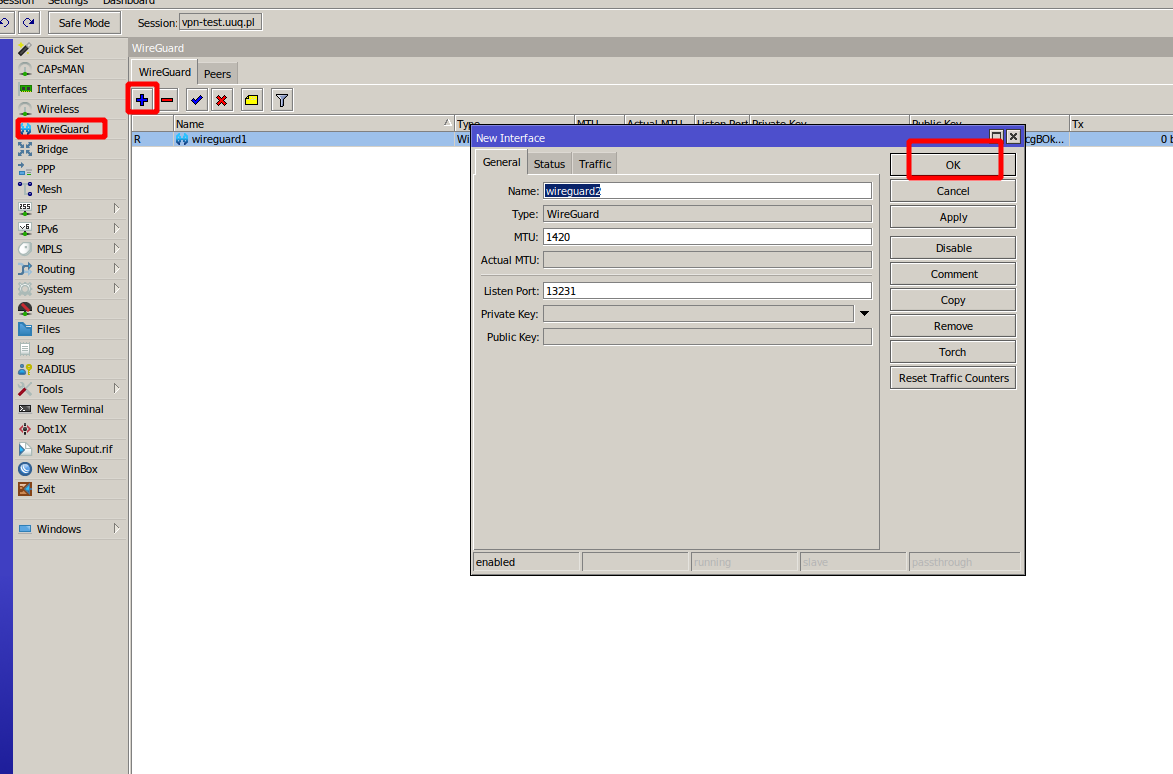 mikrotik-wireguard-setup.png
Step IX. Configure Firewall, NAT and Routing
Important: Please be aware that to ensure proper functionality of VPN connections, it is essential for you, as an administrator, to correctly configure the Mikrotik router. This entails configuring NAT, Firewall, routing, and all the required settings for VPN to operate correctly.
Example NAT masquerade rule (adjust to your network):
/ip firewall nat add chain=srcnat out-interface=ether1 action=masquerade
Example firewall rule to allow WireGuard traffic:
/ip firewall filter add chain=input protocol=udp dst-port=13231 action=accept comment="Allow WireGuard"
Next Steps
After completing the Mikrotik preparation, proceed to Add server (router Mikrotik) in WHMCS.