 Skip to main content
Product Information
Mikrotik WireGuard VPN module WHMCS
Order now | Download | Community
The admin service management page provides a comprehensive view of each VPN service instance.
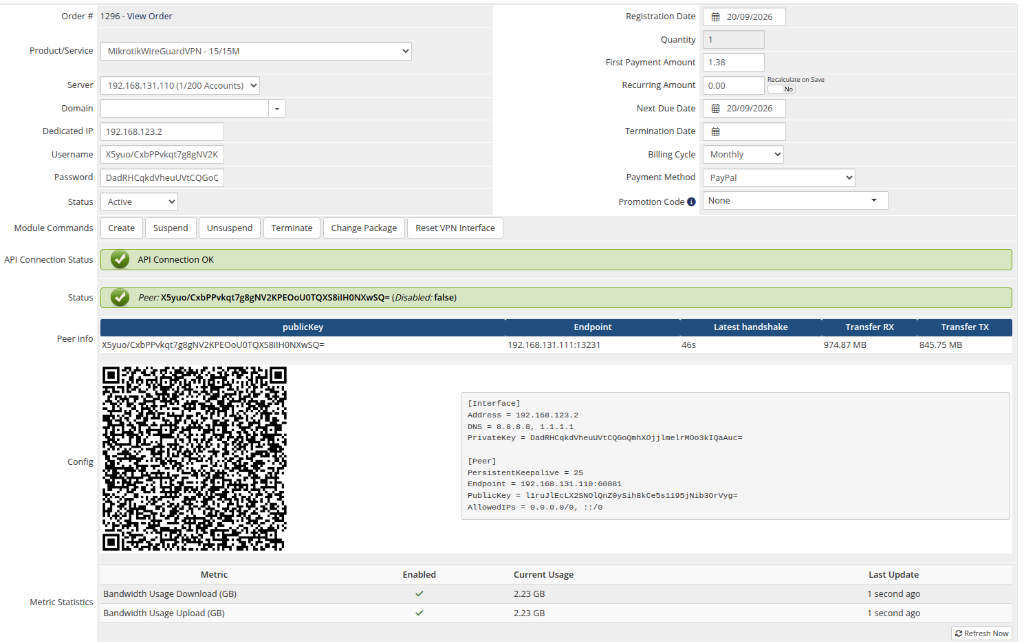 admin-product-info.png
License Verification
Displays the license status for the product. If the license is invalid or expired, an error message is shown.
API Connection Status
Shows whether WHMCS can successfully communicate with the Mikrotik router:
- API Connection OK — the Mikrotik router is reachable and responding
- API connection problem — the router is unreachable or credentials are incorrect
Peer Status
Indicates whether the WireGuard peer exists on the Mikrotik router and its current state:
- Disabled: false — the peer exists and is active (green indicator)
- Disabled: true — the peer exists but is disabled/suspended (red indicator)
- The peer does not exist on the VPN server — no peer found for this service
Peer Info
A table displaying detailed peer information:
| Field | Description |
|---|---|
| publicKey | The client's WireGuard public key |
| Endpoint | The client's current IP address and port (N/A if not connected) |
| Latest handshake | Timestamp of the last successful WireGuard handshake (N/A if never connected) |
| Transfer RX | Total data received by the peer |
| Transfer TX | Total data sent by the peer |
Config
Displays the WireGuard client configuration in two formats:
- QR Code — scannable QR code image
- Text config — the full WireGuard configuration text
Admin Actions
The following management actions are available:
| Action | Description |
|---|---|
| Create | Generate WireGuard keys, allocate IP, create peer and bandwidth queue on Mikrotik |
| Suspend | Disable the WireGuard peer on Mikrotik |
| Unsuspend | Re-enable the WireGuard peer on Mikrotik |
| Terminate | Delete the peer and queue from Mikrotik, clear service data |
| Change Package | Update the peer's WireGuard interface and recreate the bandwidth queue with new limits |
| Reset VPN Interface | Temporarily disable and re-enable the peer to reset a frozen connection |