 Skip to main content
Label Designer
Service Label Designer addon WHMCS
Order now | Download | FAQ
The Label Designer page is available at: Addons > PUQ Service Label Designer > Designer
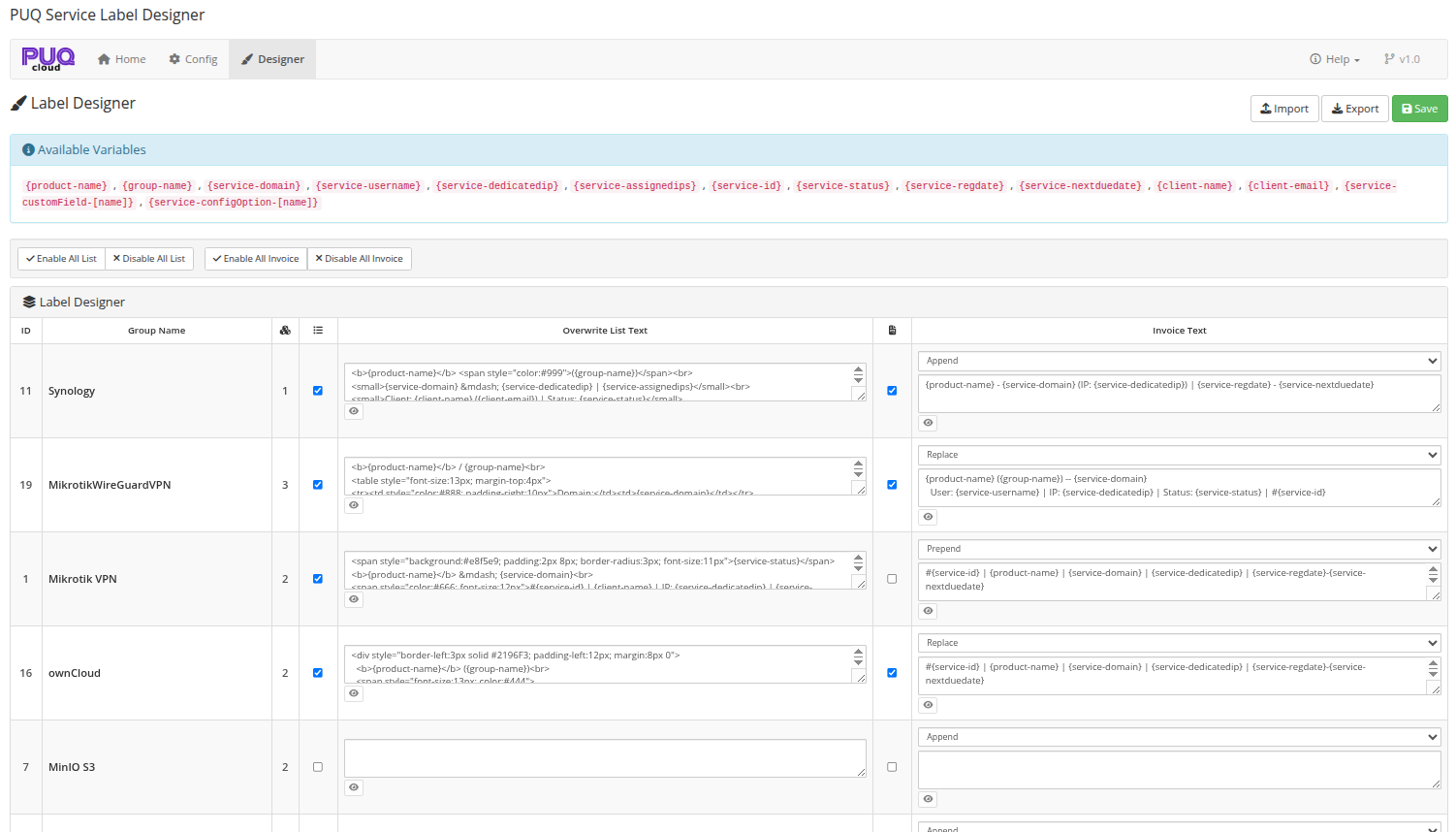
This is the main page of the module where you configure label templates for each product group.
 04-designer.png
Page Layout
The page consists of several sections:
Top Bar
- Import — import settings and templates from a JSON file
- Export — export all settings and templates to a JSON file
- Save — save all changes
Available Variables
A reference panel listing all template variables you can use. See Configuration for a detailed description of each variable.
Bulk Operations
A toolbar with quick actions:
- Enable All List / Disable All List — check or uncheck all "Enable in List" checkboxes
- Enable All Invoice / Disable All Invoice — check or uncheck all "Enable in Invoice" checkboxes
Groups Table
The main table lists all product groups from WHMCS with the following columns:
| Column | Description |
|---|---|
| ID | Product group ID |
| Group Name | Name of the product group |
| Products count (cube icon) | Number of products in this group |
| Enable in List (list icon) | Checkbox — enable overwriting service names in client area |
| Overwrite List Text | Template for the client area services list. Supports HTML and template variables |
| Enable in Invoice (invoice icon) | Checkbox — enable adding custom text to invoice descriptions |
| Invoice Text | Invoice mode selector and template. Supports HTML and template variables |
Overwrite List Text
When the Enable in List checkbox is checked for a group, all services belonging to products in that group will have their names replaced in the client area "My Products & Services" page.
The template supports:
- All template variables (e.g.,
{product-name},{service-domain}) - Full HTML (e.g.,
<b>,<span style="...">,<br>,<table>) - Any combination of text and HTML
Example template:
<b>{product-name}</b> <span style="color:#999">({group-name})</span><br>
<small>{service-domain} — {service-dedicatedip} | {service-assignedips}</small>
Invoice Text
When the Enable in Invoice checkbox is checked, the module modifies invoice line item descriptions for services in that group.
Invoice Mode
Each group has a mode selector above the invoice template textarea:
| Mode | Behavior |
|---|---|
| Append | Adds the template text after the original invoice description (on a new line) |
| Replace | Replaces the original invoice description entirely with the template text |
| Prepend | Adds the template text before the original invoice description (on a new line) |
Example (Append mode):
Original: Mikrotik VPN 10M/10M/10GB (01/03/2026 - 31/03/2026)
Template: {product-name} ({group-name}) — | User: {service-username} | IP: {service-dedicatedip}
Result:
Mikrotik VPN 10M/10M/10GB (01/03/2026 - 31/03/2026)
Mikrotik VPN 10M/10M/10GB (Mikrotik VPN) — | User: 1-5525 | IP: 192.168.222.2
Preview
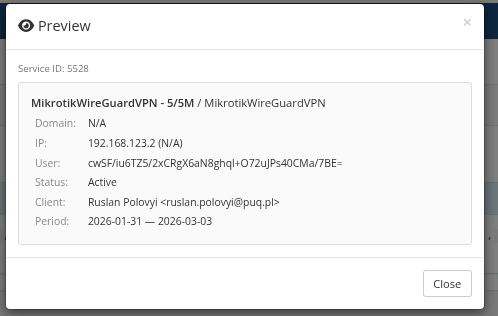
Each template textarea has a preview button (eye icon). Click it to see how the template renders with real service data from that group.
 05-preview.png
The preview modal shows:
- Service ID — which service was used for the preview
- Rendered result — the template with all variables replaced by actual data
Note: The preview uses the current textarea content (not saved data), so you can test your template before saving.
Export / Import
Export
Click the Export button to download a JSON file containing:
- All configuration settings (default values)
- All group templates and settings (enable flags, modes, template text)
Import
Click the Import button and select a previously exported JSON file. The import will:
- Overwrite all configuration settings
- Replace all group templates and settings
Warning: Import replaces all existing settings. Export your current settings first if you want to keep them as a backup.
This feature is useful for:
- Migrating settings between WHMCS instances
- Backing up your configuration before making changes
- Sharing templates between environments (dev/staging/production)