 Skip to main content
Email Template (puqMinIOS3 service Suspension Notification disk limit)
Create an email template for customer notifications when the S3 account is suspended due to exceeding the disk limit.
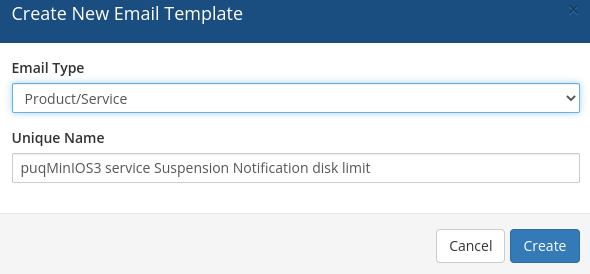
Template configuration
| Parameter | Value |
|---|---|
| Email Type | Product/service |
| Unique Name | puqMinIOS3 service Suspension Notification disk limit |
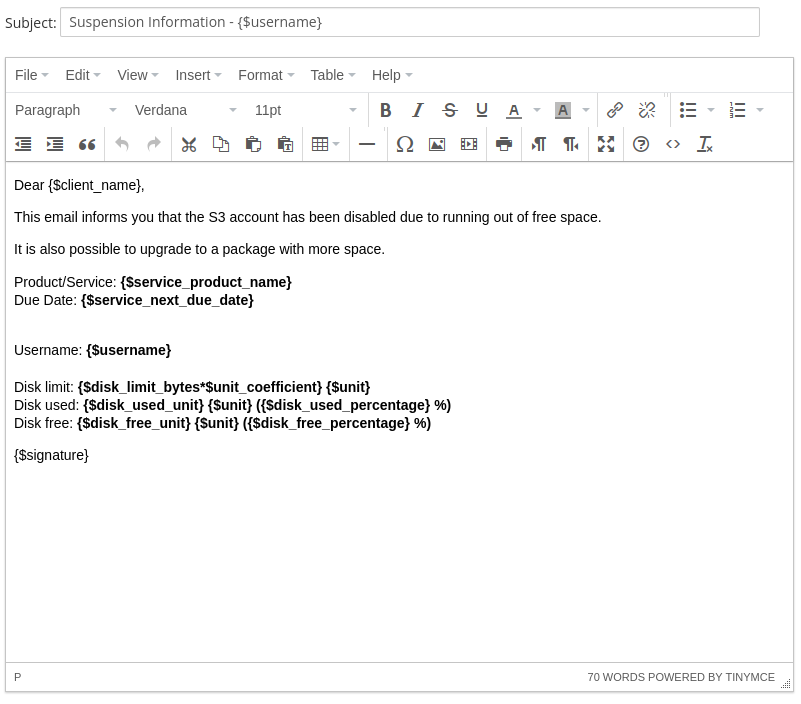
Email Subject
Suspension Information - {$username}
Email Body
Dear {$client_name},

This email informs you that the S3 account has been disabled due to running out of free space.

It is also possible to upgrade to a package with more space.

Product/Service: {$service_product_name}
Due Date: {$service_next_due_date}

Username: {$username}

Disk limit: {$disk_limit_bytes*$unit_coefficient} {$unit}
Disk used: {$disk_used_unit} {$unit} ({$disk_used_percentage} %)
Disk free: {$disk_free_unit} {$unit} ({$disk_free_percentage} %)

{$signature}
Available template variables
| Variable | Description |
|---|---|
{$username} |
MinIO S3 account username |
{$disk_limit_bytes*$unit_coefficient} |
Total disk space limit |
{$disk_used_unit} |
Used disk space |
{$disk_free_unit} |
Free disk space |
{$disk_used_percentage} |
Used disk space percentage |
{$disk_free_percentage} |
Free disk space percentage |
{$unit} |
Disk space unit (MB, GB, TB, PB) |
Note: Standard WHMCS merge fields are also available in this template.
No Comments