 Skip to main content
Client area overview
Jellyfin module WHMCS
Order now | Download | Community
The client opens their Jellyfin service from clientarea.php → My Services → (service) → Information. The page loads its data over AJAX and renders a set of cards.
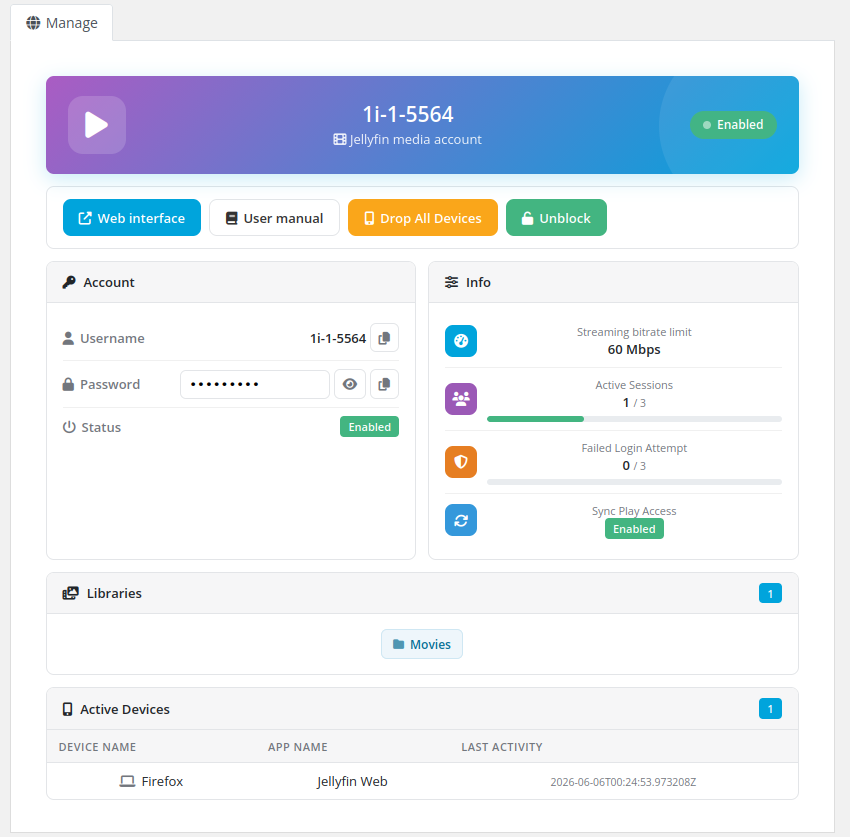
Actions
- Web interface — opens the Jellyfin web UI in a new tab.
- User manual — opens the instruction URL configured on the product (if set).
- Drop All Devices — signs the account out of every device (confirmation required).
- Unblock — re-enables the account when it has been locked/disabled (shown only when disabled).
Account
- Username with a copy button.
- Password — shown as a reveal button, plain text, or hidden, depending on the product's Show password setting; with a copy button.
- Status — Enabled / Disabled badge.
Info
- Streaming bitrate limit, active sessions (with the max), failed-login attempts (with the lockout threshold), and SyncPlay access.
Libraries & Devices
- Libraries — chips for each library the user can access (with a count badge).
- Active Devices — table of device name, app and last activity (with a count badge).
All actions use AJAX and report the result with a toast notification — the page never reloads.