 Skip to main content
Product Information
Mikrotik VPN module WHMCS
Order now | Download | Community
Admin area product information
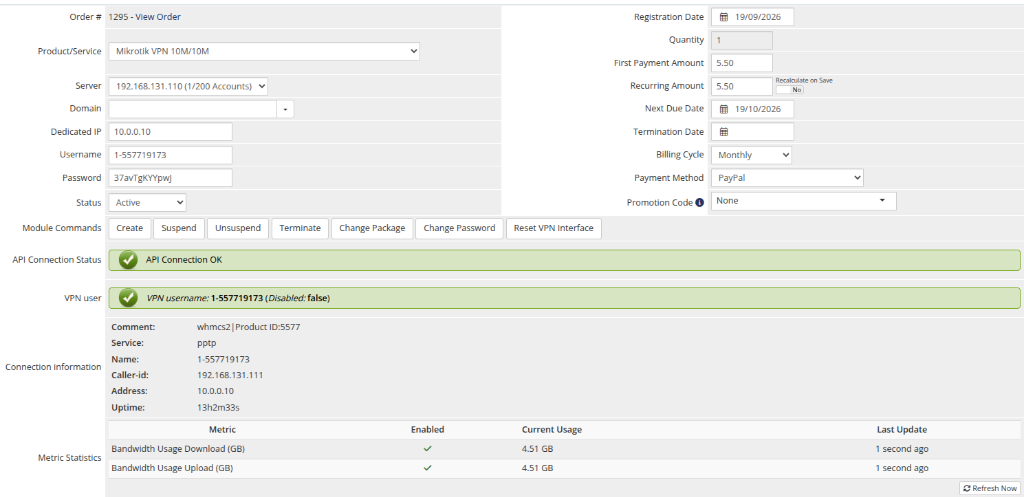
The administrator can view detailed service information in the WHMCS admin panel on the product/service page. The module adds a custom panel in the Module Data section with the following information:
License verification status
Displays the current license status with a colored indicator:
- Green — license is valid and active
- Red — license is invalid, expired, or missing
API connection status
Shows the result of a real-time connection test to the Mikrotik router API-SSL, confirming that the credentials entered for the server are working correctly.
VPN account information
| Field | Description |
|---|---|
| Username | The VPN account username (PPP secret name) on the Mikrotik router |
| Enabled | Whether the VPN account is currently enabled or disabled on the router |
| Profile | The PPP profile assigned to the account |
| Service | The VPN service / protocol (e.g. any, pptp, l2tp, pppoe) |
| IP address | The IP address assigned to the account from the server's IP pool |
| Comment | Includes the configured Comment PREFIX and WHMCS service identifier |
Connection information
- Comment — includes the configured comment prefix and WHMCS service identifier
-
Service — active VPN protocol (e.g.
pptp,l2tp) - Name — VPN user account name
- Caller-id — caller identification / remote IP address
- Address — client IP address assigned by the router
- Uptime — current active session duration (Displays "NOT ONLINE" when the client is disconnected)
Metric Statistics
When Metric Billing is enabled, the admin view displays live metric statistics:
- Bandwidth Usage Download (GB) — current cumulative downloaded traffic (GB) and enabled status
- Bandwidth Usage Upload (GB) — current cumulative uploaded traffic (GB) and enabled status
- Last Update — relative time when the metric was last refreshed
- Refresh Now button — allows immediate on-demand metric recalculation
Available management actions
The standard WHMCS module command buttons are available:
- Create — provision a new VPN account on the Mikrotik router
- Suspend — disable the VPN account
- Unsuspend — re-enable the VPN account
- Terminate — permanently delete the VPN account from the router
- Change Password — reset the account's password
- Change Package — update profile, service, bandwidth limits and traffic configuration (used during upgrades/downgrades)
- Reset VPN Interface — force-disconnect the current active VPN session (useful when the customer needs to re-establish the tunnel)
Screenshot
 admin-product-info.png