 Skip to main content
Email Template (puqNextcloud notification disk limit)
Nextcloud module WHMCS
Order now | Download | Community
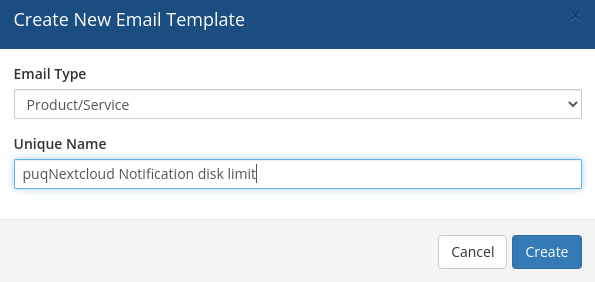
Creating the email template
Template configuration
| Parameter | Value |
|---|---|
| Email Type | Product/service |
| Unique Name | puqNextcloud Notification disk limit |
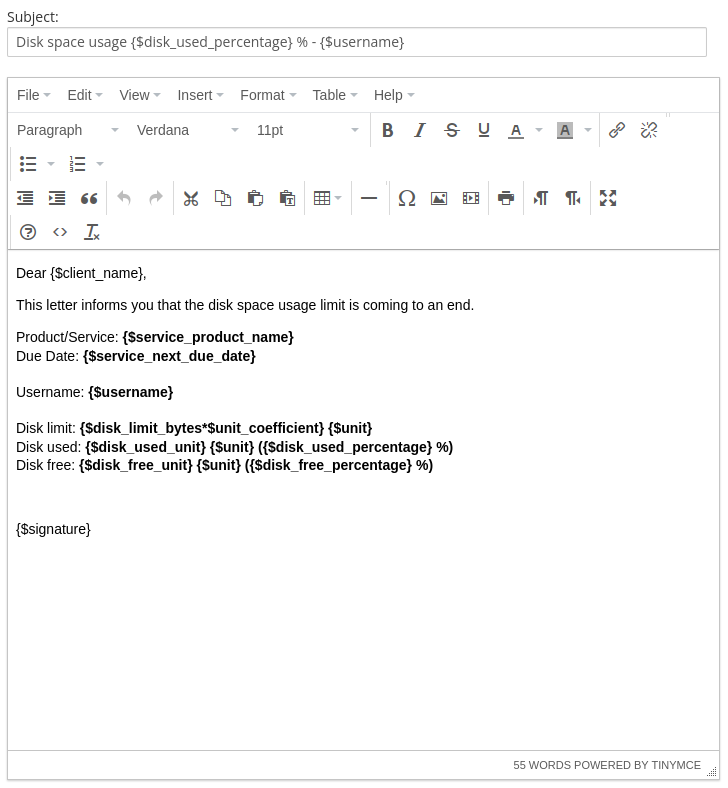
Email subject
Disk space usage {$disk_used_percentage} % - {$username}
Email body
Dear {$client_name},

We would like to inform you that the disk space usage for your
product/service has reached the notification threshold.

Product/Service: {$service_product_name}
Due Date: {$service_next_due_date}
Username: {$username}

Disk Limit: {$disk_limit}
Disk Used: {$disk_used} ({$disk_used_percentage}%)
Disk Free: {$disk_free} ({$disk_free_percentage}%)

Please take the necessary actions to manage your disk space.

{$signature}
Available template variables
The following custom variables are passed to the email template by the module:
| Variable | Description | Example |
|---|---|---|
{$username} |
Nextcloud username | john-42 |
{$disk_limit} |
Total disk quota with unit | 10 GB |
{$disk_used} |
Used disk space with unit | 8.5 GB |
{$disk_free} |
Free disk space with unit | 1.5 GB |
{$disk_used_percentage} |
Used space as percentage | 85 |
{$disk_free_percentage} |
Free space as percentage | 15 |
In addition, all standard WHMCS product/service merge fields are available (e.g. {$client_name}, {$service_product_name}, {$service_next_due_date}, {$signature}).
Note: Notifications are sent automatically during the WHMCS daily cron execution when disk usage reaches the threshold configured in the product settings ("Notify at %").
Screenshots
 07-email-template-1.png
 08-email-template-2.png