 Skip to main content
Screening results
PUQ Sanctions Checker module WHMCS
Order now | Download | Community
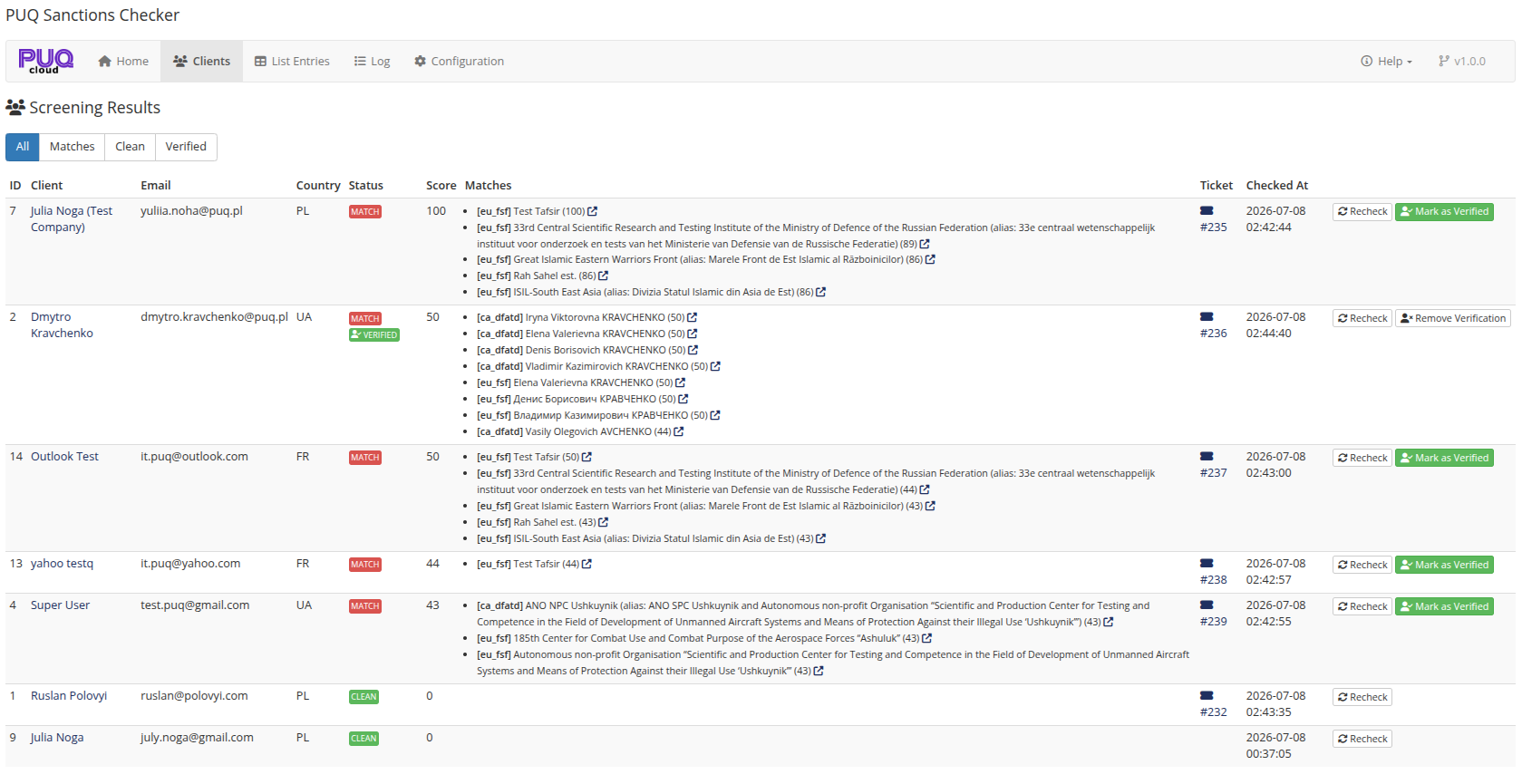
Addons → Sanctions Checker → Clients — every client that has been screened, with the full match details.
Filters
All / Matches / Clean / Verified — one click switches the view. Matches is where the daily review happens; Verified lists clients an admin has marked as reviewed false-positives.
Columns
| Column | Meaning |
|---|---|
| Client | Name and company, linked to the client profile. |
| Status | MATCH (red) / CLEAN (green); a green VERIFIED badge appears next to it for verified clients (hover it to see who verified and when). |
| Score | The highest match percent (see How the matching engine works). |
| Matches | Every matched list entry: source (ca_dfatd, eu_fsf, csl:…, blocked_country), matched name, score. The external-link icon opens the OpenSanctions entity profile so you can see exactly who the client was compared with. |
| Ticket | The support ticket opened for this match. |
| Checked At | Time of the last check. |
Row actions
- Recheck — re-screens the client immediately (always real time, never queued).
- Mark as Verified — appears on matched clients; see Client profile panel & verification.
- Remove Verification — appears on verified clients.