 Skip to main content
History
Support by Time module WHMCS
Order now | Download | Community
Client area history
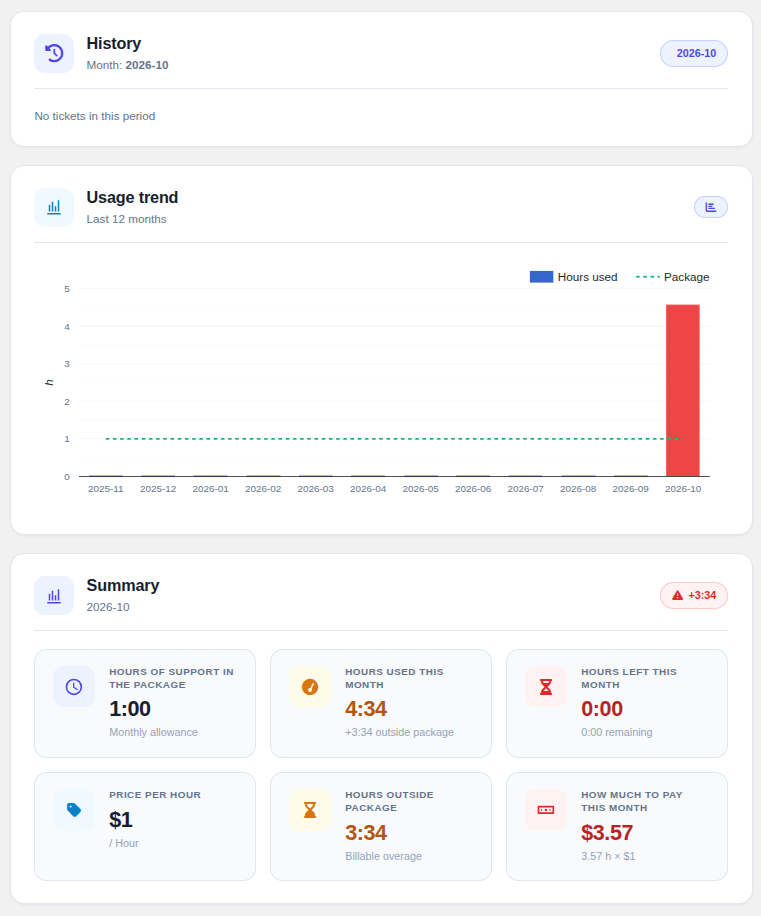
The History tab is available in the sidebar for support services with a recurring billing cycle. It shows a per-month archive of all tickets that consumed hours, together with a 12-month usage chart.
 11-client-history.png
Month navigator
Usage trend chart
A Last 12 months chart (Google ComboChart) plots Hours used as bars against the Package allocation as a dashed line. Bars are coloured by status so months with overage stand out at a glance.
Monthly summary
For the selected month the summary panel shows the package allocation, hours used, hours left, the overage rate, overage hours and the overage cost — all using the package size and hourly rate that were active when the time was logged.
Why a snapshot? Each ticket stores the package size and hourly rate that were active when the time was logged, so the history view always reflects what the customer was actually charged — even if the product configuration changes later.
Tickets table
For every ticket logged in the selected month the table shows the ticket number and title, total time spent, the most-recent date, a status badge, and — when an overage billable item exists — a direct link to the WHMCS invoice that contains it. As on the home screen, the operator and note are shown when Show work log to client is enabled, and each row can be expanded to its individual entries.