 Skip to main content
Description
Support by Time module WHMCS
Order now | Download | Community
Support by Time WHMCS module
The Support by Time WHMCS module turns your WHMCS into a fully automated platform for selling paid technical support measured in hours. It lets you sell a recurring support plan that includes a fixed amount of hours per month, with an automatically calculated hourly rate for time used outside the package — or a one-time bucket of hours that the service consumes until it auto-terminates.
Operators log time directly from the ticket page — manually or with a built-in start/stop timer — the module aggregates totals per ticket, per service and per month, keeps a full audit trail of who logged what, and WHMCS billable items are created automatically by the daily cron.
Main features
- Hour packages — configurable number of support hours included per month per product
- Overtime billing — per-currency hourly rate charged for hours used outside the package
- Two billing modes — recurring (monthly reset) or One Time (fixed bucket of hours, auto-terminate when depleted)
- Time granularity — time tracked and entered in HH:MM (minute precision)
- Manual time entry — operators log spent time directly when responding to a ticket
- Live timer — start/stop a server-anchored timer on the ticket; a floating widget shows all running timers on every admin page
- Multi-entry per ticket — every save (or timer stop) is recorded as its own entry, so "10 min triage + 30 min fix" is preserved as two lines with individual notes and operators
- Notes & operator tracking — each entry stores an optional note and the WHMCS admin who logged it
- Audit trail — append-only log of every action (time logged, edited, deleted, timer start/stop/cancel, service ordered, ticket billed) shown on the ticket and on the service page
- Operator report — per-operator hours and entry counts for the current and previous month
- Two save actions — save time without closing the ticket, or close the ticket and save time
- Quick service ordering — when a client without an active support service opens a ticket, the operator can order one straight from the ticket page
- Ticket protection — once a ticket has been billed, its time entries are locked against edit/delete/reopen
- Past-month tickets — tickets logged in earlier months are flagged as already charged and require splitting/re-creating
- Automatic monthly billing — daily cron creates one WHMCS billable item per ticket for the previous month's overage hours
- Configurable invoice action — choose between Invoice on next cron, Add to user's next invoice or Do not invoice
- Usage notifications — email the client when monthly usage crosses configurable thresholds (e.g. 80%, 100%)
- Client transparency — card-based client area with a usage progress bar, an interactive cost calculator and a 12-month usage chart; an optional toggle reveals the operator note + name per ticket
- Multi-currency — separate hourly rate per WHMCS-configured currency
- Multi-language — 26 language files (25 languages + dual Ukrainian aliases) with automatic fallback to English
-
Modern architecture (v4.0.0+) — unencoded
hooks.phpwrapper for ionCube 15 compatibility, Guzzle HTTP client for robust licensing, and CSRF token protection on all AJAX endpoints
System requirements
| Requirement | Minimum |
|---|---|
| WHMCS | 8.x+, 9.x+ |
| PHP | 7.4, 8.1, 8.2, 8.3, 8.4 |
| ionCube Loader | v15+ |
Note: The module uses ionCube encoding. Make sure ionCube Loader is installed and active on your server.
Links
- Product page: https://puqcloud.com/whmcs-module-support-by-time.php
- Documentation: https://doc.puq.info/books/support-by-time-whmcs-module
- Support: https://puqcloud.com/submitticket.php?step=2&deptid=1
- Community: https://community.puqcloud.com/
Screenshots
Client area — home screen
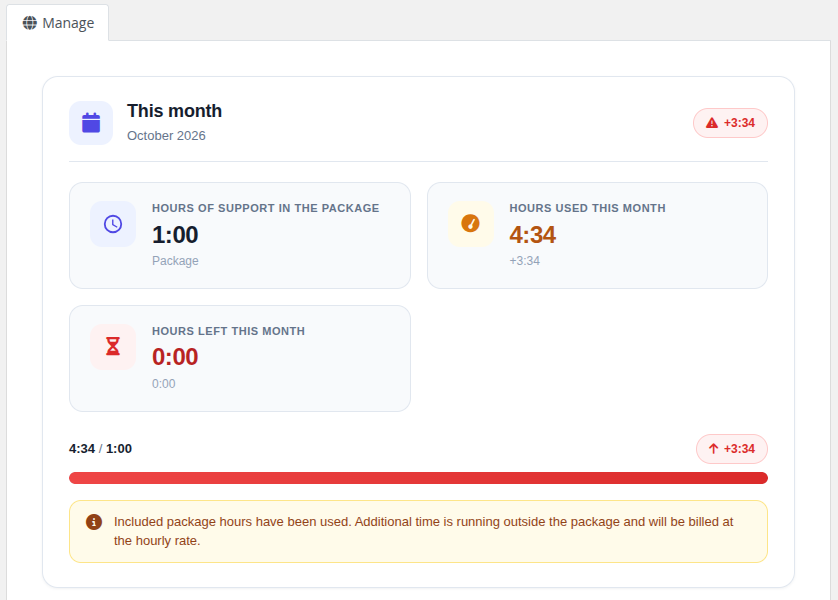 09-client-home.png
Client area — usage history
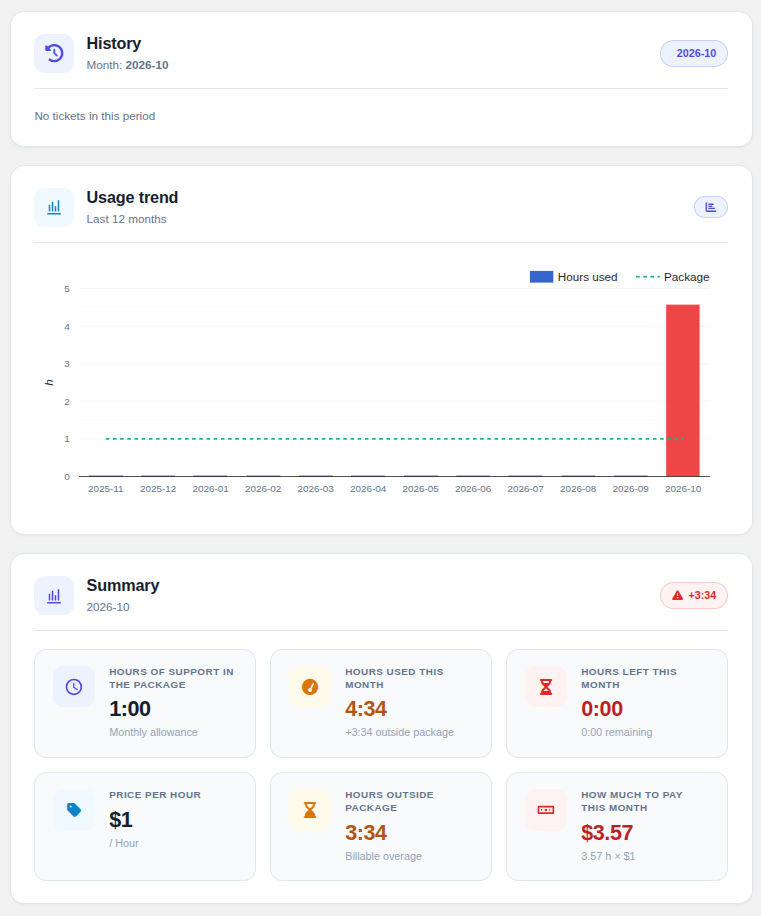 11-client-history.png
Admin area — service page
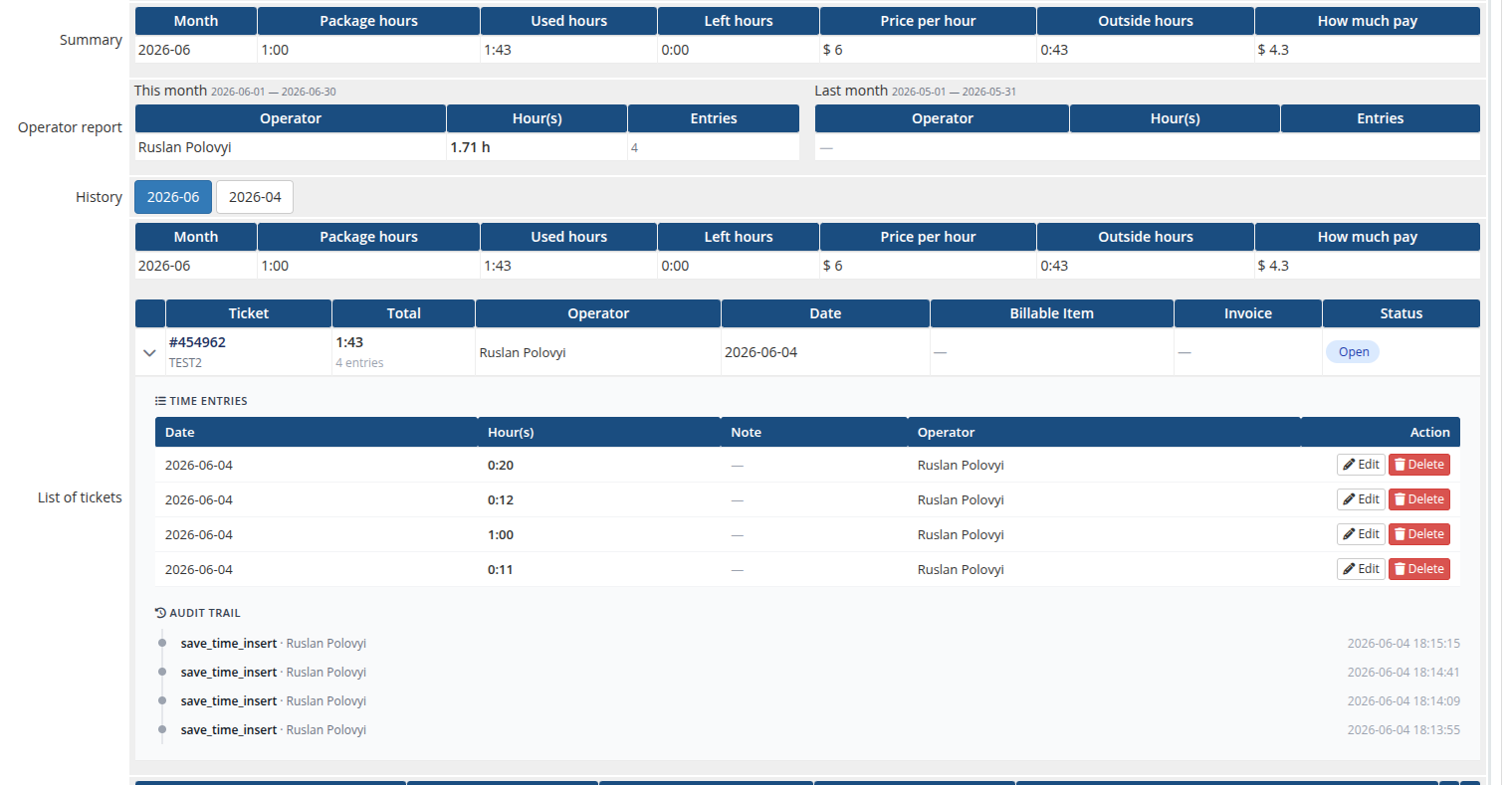 12-admin-product-page.png
Admin area — ticket time form
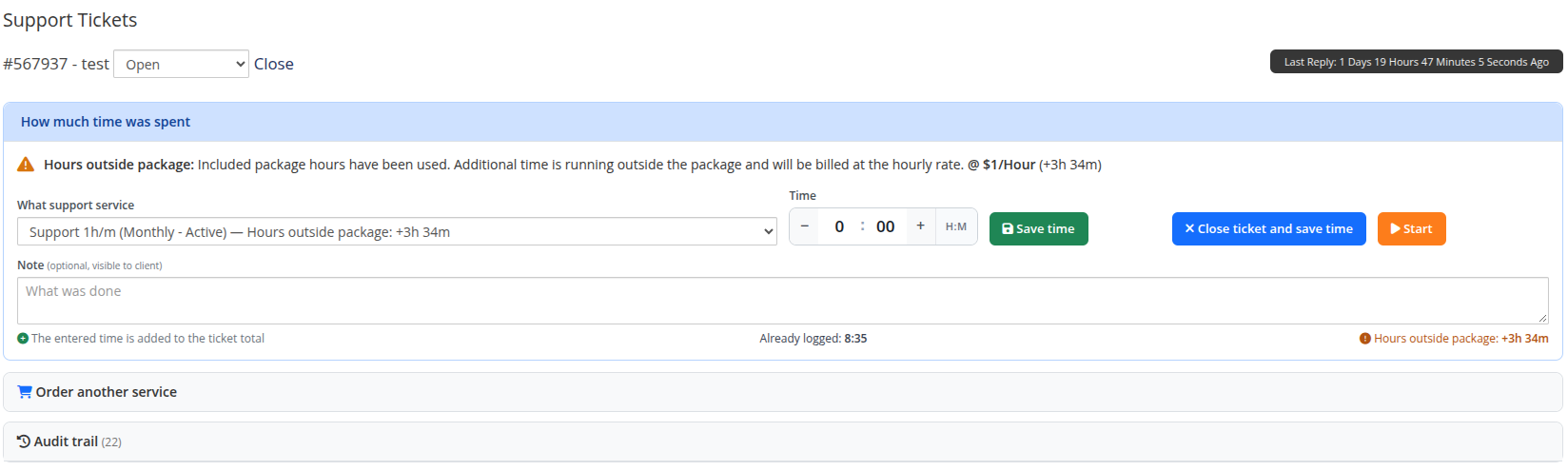 15-ticket-time-form.png