 Skip to main content
Home screen
Mikrotik VPN module WHMCS
Order now | Download | FAQ
Client area home screen
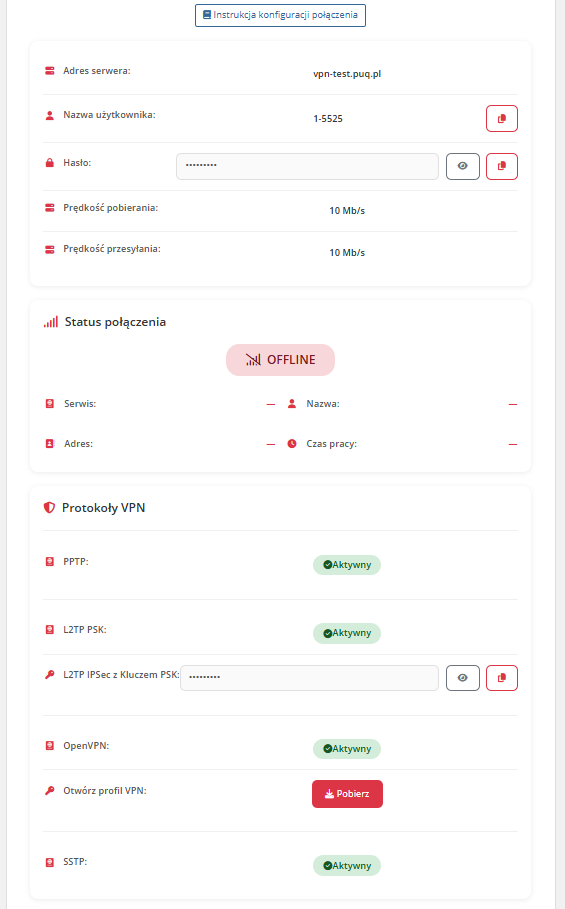
After authenticating to the client panel, the end customer sees the VPN service management page with the following sections:
Service information
- User manual — a button linking to the instruction URL (displayed only if configured by the administrator in product settings, "Link to instruction" field)
- VPN server address — the hostname or IP address the customer should connect to
- VPN protocols — information about which protocols (PPtP, L2TP) are available for this product, based on the "Support PPtP" / "Support L2TP" product settings
- L2TP IPSec PSK key — displayed when L2TP support is enabled
- Username — the VPN username with a copy-to-clipboard button
- Password — the VPN password with a copy-to-clipboard button
- Connection status — real-time indicator of whether the VPN account is currently connected on the router
- Bandwidth limit — displays the configured download / upload speed limits
Traffic information
- Remaining traffic balance — the current traffic balance for the customer
- Traffic that will be added on the next billing cycle
Sidebar navigation
The client area sidebar contains two menu items:
- Information — the main service details page (described above)
- Traffic statistics — historical traffic usage charts (see Traffic statistics page)
Note: If the service status is not Active or if the VPN account cannot be found on the Mikrotik router, an error page is displayed instead.
Screenshot
 10-home-screen.png