 Skip to main content
Product Churn
Product Analytics addon WHMCS
Order now | Download | Community
The Product Churn page is available at: Addons > PUQ Product Analytics > Products > Product Churn
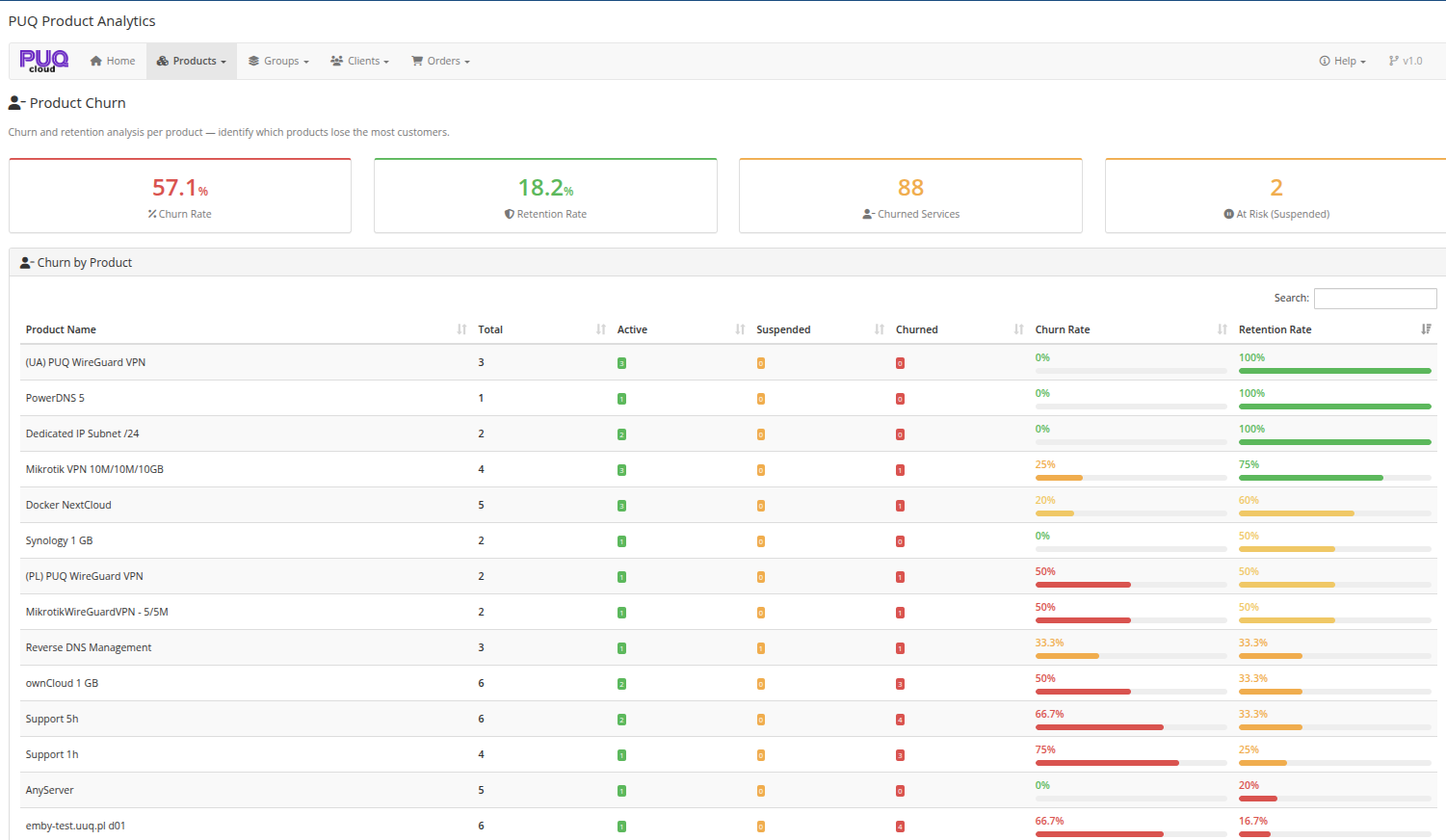
Churn and retention analysis per product — identify which products lose the most customers.
 06-product-churn.png
Summary Cards
The top section displays four key churn metrics:
| Metric | Description |
|---|---|
| Churn Rate | Overall percentage of services that have been terminated or cancelled |
| Retention Rate | Overall percentage of services that remain active |
| Churned Services | Total number of terminated and cancelled services |
| At Risk (Suspended) | Number of currently suspended services that may churn |
Churn by Product
A sortable and searchable table showing churn analysis per product:
| Column | Description |
|---|---|
| Product Name | Name of the product |
| Total | Total number of services (all statuses) |
| Active | Number of active services (green badge) |
| Suspended | Number of suspended services (yellow badge) |
| Churned | Number of terminated/cancelled services (red badge) |
| Churn Rate | Percentage of churned services with color-coded visual bar (green to red) |
| Retention Rate | Percentage of active services with color-coded visual bar (red to green) |
Tip: Products with high churn rate and many total services should be investigated first — they represent the biggest potential for improvement.