 Skip to main content
Schedule Editor
PUQ Account Statement module WHMCS
Order now | Download | Community
The Schedule Editor page is available at: Addons > PUQ Account Statement > Schedules > Add Schedule (or click Edit on an existing schedule)
This page allows you to create or edit an automated statement generation schedule.
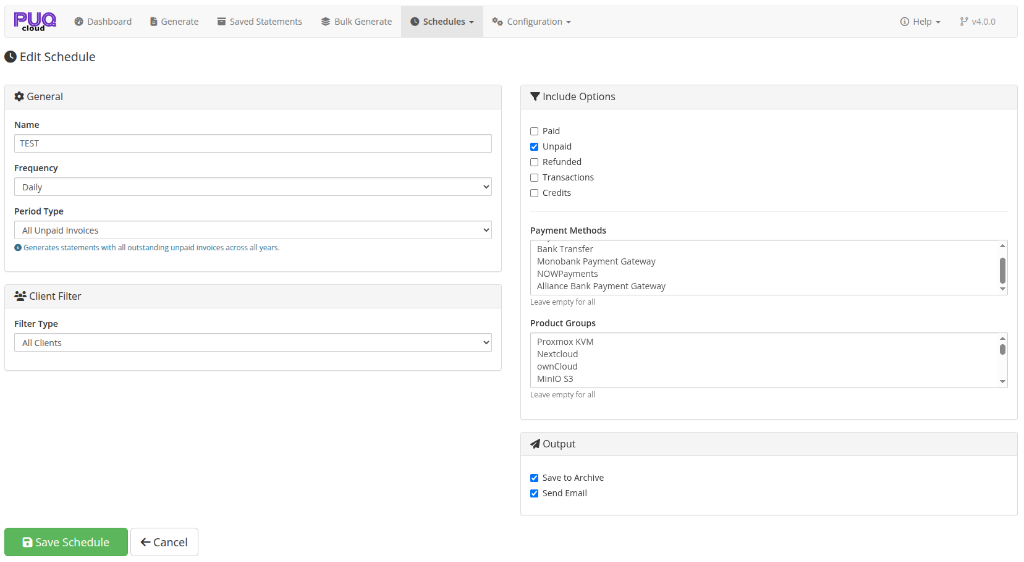 08-schedule-edit.png
General Settings
| Setting | Description |
|---|---|
| Name | A descriptive name for the schedule (e.g., "Monthly Client Statements") |
| Frequency | How often the schedule runs: Daily, Weekly, Monthly, Quarterly, Yearly |
| Period Type | What period the statement covers: Last Week, Last Month, Last Quarter, Last Year, All Time, or All Unpaid Invoices |
[!TIP] All Unpaid Invoices Period Type: Choosing All Unpaid Invoices sets the statement to cover all unpaid and overdue invoices regardless of when they were issued (from
1970-01-01to current date). This ensures clients with unpaid invoices from any prior or current year (e.g., 2025, 2026, 2027) will see all their outstanding balances in one clean statement. Pair this with the With Unpaid Invoices client filter and check only Unpaid under Include Options.
Client Filter
Choose which clients receive statements when the schedule runs:
| Filter | Description |
|---|---|
| All Clients | Generate for every client |
| By Client Group | Only clients in a specific WHMCS client group |
| By Country | Only clients from a specific country |
| With Unpaid Invoices | Only clients with outstanding invoices |
When selecting By Client Group or By Country, a text field appears to enter the filter value.
Include Options
Configure what financial data to include in the generated statements:
- Paid — include paid invoices
- Unpaid — include unpaid invoices
- Refunded — include refunded invoices
- Transactions — include payment transactions
- Credits — include credit entries
Advanced Filters
| Filter | Description |
|---|---|
| Payment Methods | Only include invoices paid via specific gateways (multi-select, leave empty for all) |
| Product Groups | Only include invoices for specific product groups (multi-select, leave empty for all) |
Output
Configure what happens with each generated statement:
| Option | Description |
|---|---|
| Save to Archive | Save the statement to the saved statements archive (checked by default) |
| Send Email | Send the statement to the client via email with PDF attachment |
Saving
Click Save Schedule to create or update the schedule. After saving a new schedule, the page reloads with the schedule ID in the URL for future editing.
Click Cancel to return to the schedules list without saving.