 Skip to main content
Deploy Process
Proxmox KVM module WHMCS
Order now | Download | Community
Overview
When a new virtual machine is provisioned (from a WHMCS order, an admin Create action, or the WHMCS API), the module uses an asynchronous 15-step state machine managed by the Process VMs cron task. Each step is idempotent and resumable: if anything fails, the VM stays at its current step and the next cron tick retries it.
Starting with v4.1.0, the module features Smart Hybrid Provisioning:
- Single-VM Orders and Admin Actions: Can be provisioned directly or queued based on configuration. Direct admin actions from the service details page execute immediately.
-
Bulk Orders (Multi-VM Carts): When an order contains more VMs than the configured
bulk_provision_threshold(default: 2, so orders with 3 or more VMs),puqProxmoxKVM_CreateAccountimmediately registers the service, setsvm_statustocreation, and returnssuccessto WHMCS in milliseconds (~0.04s). This completely eliminates web server timeouts (HTTP 504 Gateway Timeout) during checkout. -
Premature Welcome Email Suppression: WHMCS normally attempts to send the product's Welcome Email synchronously during checkout upon
CreateAccountreturningsuccess. For queued VMs, the module'sEmailPreSendhook automatically intercepts and suppresses this premature email. This saves 5–8 seconds of SMTP latency per VM and ensures clients only receive their access details once the VM is fully running via the "VM Ready" email at the end of the pipeline.
This design makes the module resilient to:
- Proxmox API timeouts and slow storage operations
- Cluster-wide task queue back-pressure
- Transient network failures between the WHMCS host and Proxmox
- Long-running operations (disk resize, full clones, cross-node migration)
- Web server gateway timeouts during multi-item client checkouts
Deploy Pipeline
The pipeline progresses through the following states:
creation → set_ip → clone → set_dns → migrated →
set_cpu_ram → set_system_disk_size → set_system_disk_bandwidth →
set_created_additional_disk → set_additional_disk_size → set_additional_disk_bandwidth →
set_network → set_firewall → set_cloudinit → starting → ready
A state name represents the last completed step — not the current action. When a VM is in state set_ip, the IP has been allocated and the next action to run is "Clone VM".
Step descriptions
| State (done) | Next action | What happens |
|---|---|---|
creation |
Allocate IP | Choose an IP pool matching the server/bridge/VLAN, reserve IPv4 and/or IPv6 addresses, write them into tblhosting and the VM record. |
set_ip |
Clone VM | Clone the template to the target storage. Supports both linked and full clones depending on product config. |
clone |
Configure DNS records | Create forward A/AAAA for the VM's FQDN and PTR records for all assigned IPs. Runs against every matching DNS zone (see DNS Zones & Integration). DNS errors never block deployment — they are logged and the pipeline moves on. |
set_dns |
Migrate to target node | If the template lives on a different Proxmox node than the target, do an offline migration with targetstorage mapping. Skipped when source and target nodes are the same. |
migrated |
Set CPU & RAM | Apply the cores / sockets / memory from the product configuration. |
set_cpu_ram |
Resize system disk | Expand the system disk to the configured size. |
set_system_disk_size |
Set system disk I/O | Apply iops_rd / iops_wr / mbps_rd / mbps_wr bandwidth limits. |
set_system_disk_bandwidth |
Create additional disk | If the product has an additional disk, create it on the configured storage. |
set_created_additional_disk |
Resize additional disk | Expand it to the configured size. |
set_additional_disk_size |
Set additional disk I/O | Apply bandwidth limits to the additional disk. |
set_additional_disk_bandwidth |
Configure network | Set bridge, VLAN, rate limit, and enable the firewall flag on the NIC. |
set_network |
Configure firewall | Apply per-product firewall options (enable, DHCP/NDP, MAC filter, IP filter, log levels), policies, and anti-spoofing IPSet with the allocated IPs. |
set_firewall |
Configure cloud-init | Push hostname, IP addresses, gateway, DNS servers, username, password and SSH keys into the cloud-init drive. |
set_cloudinit |
Start VM | Power on the VM through the Proxmox API. |
starting |
Verify running + email | Wait up to 5 cron ticks for the guest to report running. Send the "VM is ready" email. |
ready |
— | Final state. Client has full access to the service. |
Resumability & retry
Every step is wrapped in this contract:
- Check current state — guards against double execution if the cron fires twice.
- Do one API call (or a short sequence of related calls) — deliberately small so the step either completes quickly or can be retried cheaply.
-
On success — advance
vm_statusto the next state. -
On failure — return the error string;
vm_statusstays the same; the cron log records the step with the error; next tick retries.
There is no retry count limit. A VM that genuinely cannot deploy (misconfigured IP pool, no free node with matching storage) will stay stuck at its current step and keep appearing in the cron log — visible immediately. Admins are expected to fix the root cause (add IPs to the pool, adjust storage mapping) rather than fight a phantom max-retry counter.
DNS configuration during deploy
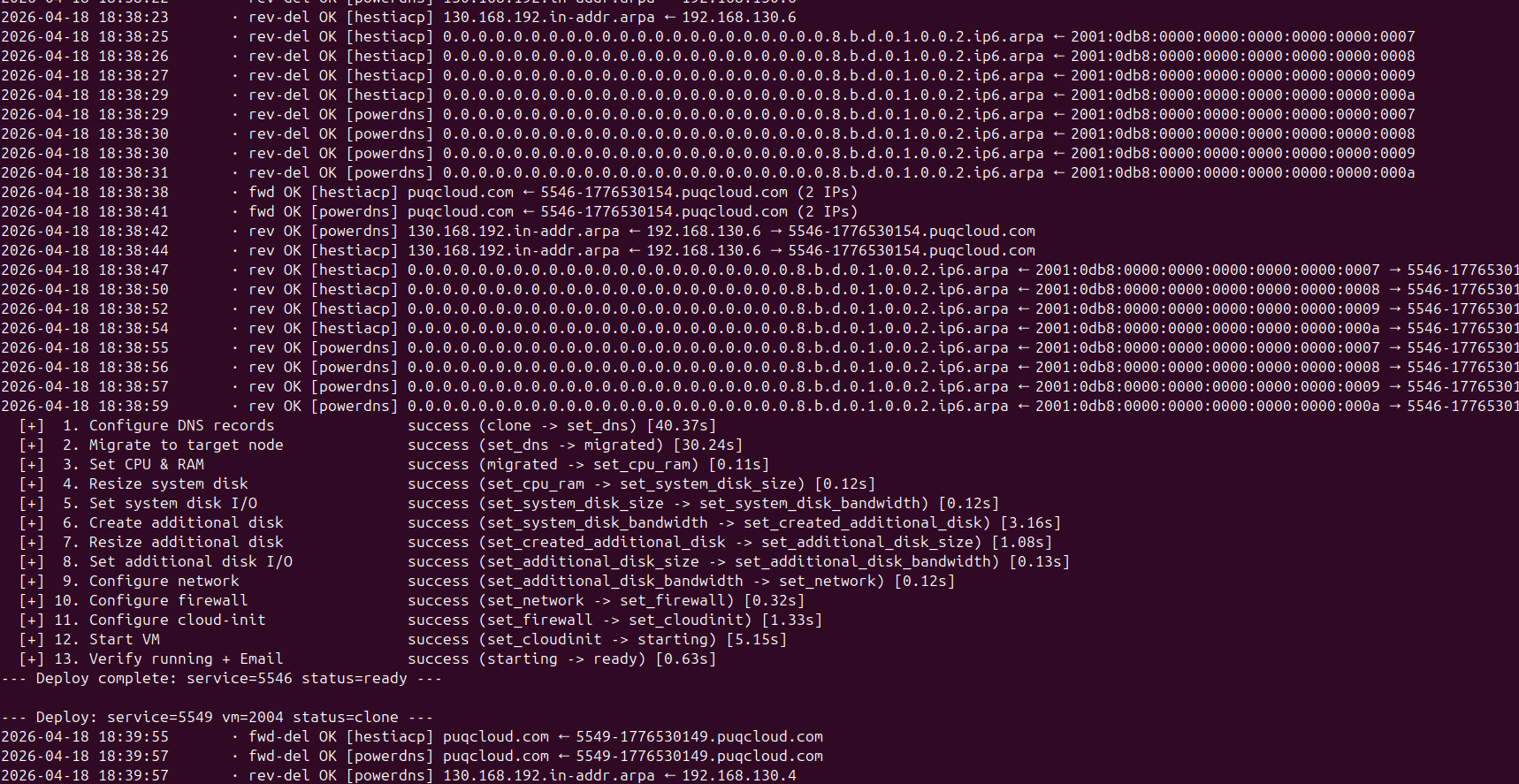
The clone → set_dns transition is where forward and reverse DNS records are registered. With many IPs or many DNS zones, this can involve dozens of API calls. Starting with v3.2 each DNS operation is logged live to the cron output, so admins can watch records being created in real time:
 cron-deploy-dns-and-steps.png
Lines prefixed with · fwd OK are forward (A/AAAA) creations, · rev OK are reverse (PTR) creations. Per-zone failures (for example, one DNS provider is temporarily unreachable) are logged as · fwd ERR / · rev ERR but do not abort deployment — other zones and subsequent steps still run.
Full deploy walkthrough
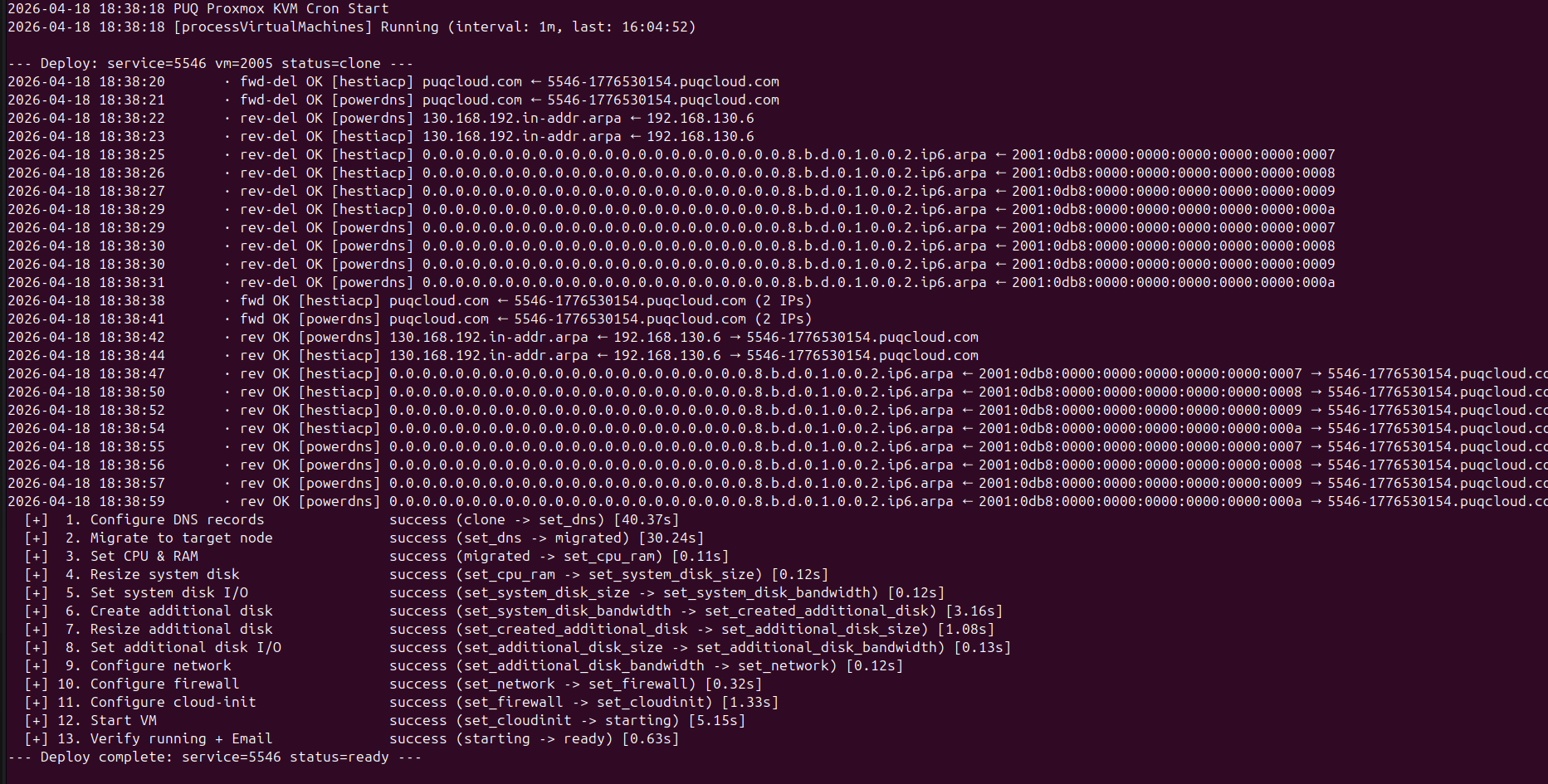
A successful deploy looks like this in the standalone cron output (php cron.php). Each step shows its duration and the state transition:
 cron-deploy-full-pipeline.png
Every line is flushed to stdout immediately — nothing is buffered until the end. This means even during a long-running step (full clone of a large template, cross-node migration) you can tell whether the job is still making progress or has truly stalled.
Deploy log in the admin UI
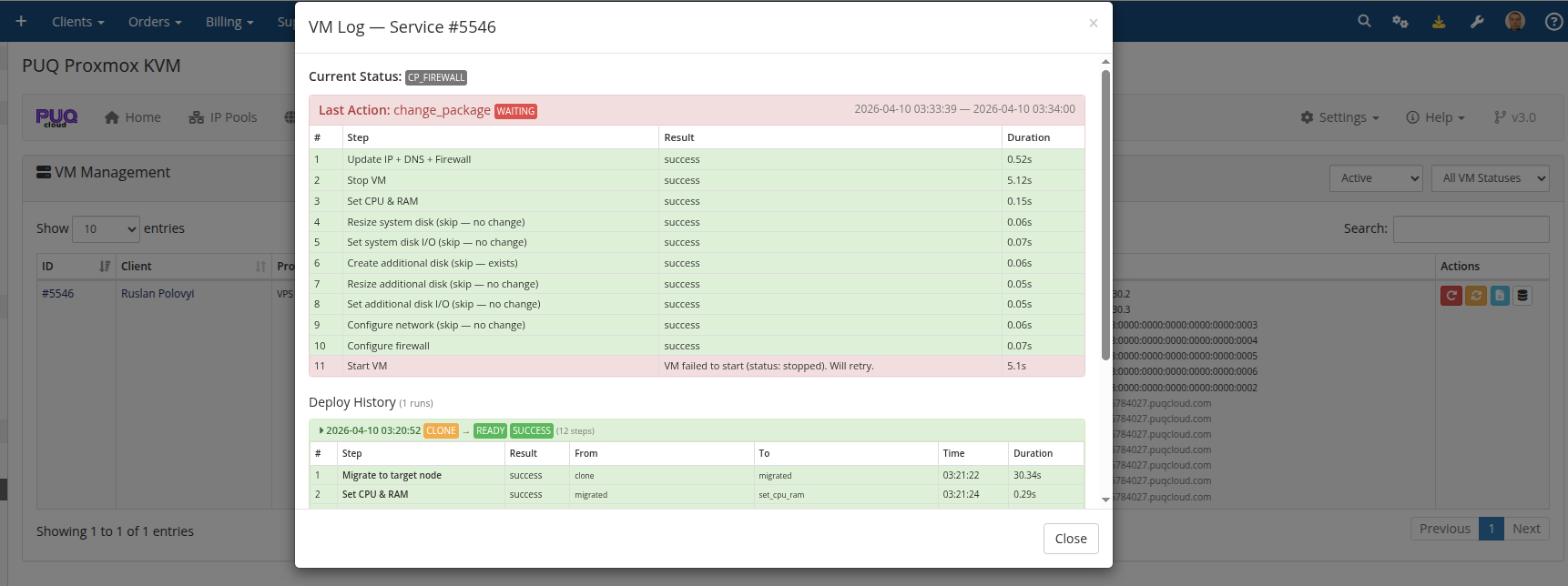
In the addon's VM Management → Log modal, every run is recorded with per-step duration, state transitions, and any errors:
 addon-vm-log-deploy-steps.png
The most recent 50 runs are kept per VM. If the last attempt paused partway, the log is marked waiting with an error field showing why — useful for diagnosing a sticky step.
Migration step in detail
set_dns → migrated handles the common Proxmox cluster topology where templates live on one node (often for storage cost reasons) but client VMs should run on another:
-
set_ip → clonecreates the VM on Template Node A using the template's local storage. -
clone → set_dnsconfigures DNS while the VM is still on Node A. -
set_dns → migratedmigrates the VM from Node A to the Target Node B with atargetstorageremap so disks end up on the right backend on the target. - All subsequent steps (CPU, disk, network, firewall, cloud-init, start) run against the VM on Node B.
Target node selection considers storage availability and free RAM on candidate nodes. If no suitable target is found, the VM stays on Node A and deployment completes there — the VM is still fully functional, just not on the preferred node.
Clone Lock Safeguard
During the set_dns → migrated transition, the module checks whether Proxmox is still finalizing the asynchronous disk clone operation (where Proxmox holds a task lock vm_remote_lock = 'clone'). If Proxmox reports that the VM disk is locked or the clone task has not fully completed:
- The migration step safely pauses with the status
VM not found on any node yet — will retryorVM clone locked. - It does not fail or abort deployment.
- On the next cron tick, once Proxmox finishes the clone task and releases the lock, migration proceeds smoothly.
What triggers a deploy
A deploy starts the moment vm_status is set to creation. That happens when:
- A client's order is provisioned (automatic after payment, or manual accept/provision by an admin).
- An admin clicks Create or Module Create in the service's module commands.
-
ModuleCreateAccountis called through the WHMCS API. - A Redeploy action resets the VM record (deletes the existing VM on Proxmox, clears logs, sets status to
creation).
From the moment creation is written, the next cron tick picks up the VM. At the default 1-minute Process VMs interval, that means provisioning starts within 60 seconds of the trigger.
Web Server & PHP Timeout Recommendations for Deploy & Checkout
Why Timeouts Happen During Checkout
When a client places an order in WHMCS (especially multi-item cart orders with multiple VMs), WHMCS performs a chain of heavy sequential operations inside a single HTTP request (cart.php?a=checkout):
- Invoice Generation: Compiling line items and generating PDF invoices via TCPDF.
- Synchronous Email Delivery: Sending invoice and order confirmation emails via external SMTP servers (each email can take 4–8 seconds depending on mail server latency).
- Payment Processing: Applying account credit or third-party payment gateway callbacks and executing invoice payment hooks.
- Third-Party Hooks: Running fraud detection, sanction checkers, or anti-fraud plugins.
-
Module Provisioning: Invoking
CreateAccountfor each purchased item.
If your web server or PHP interpreter is configured with short default timeouts (such as Nginx's default 30-second or 60-second proxy timeout), the web server will terminate the connection with an HTTP 504 Gateway Timeout. This abruptly terminates PHP execution before WHMCS can finalize the session ($_SESSION['orderdetails']), resulting in:
- The client being redirected to
cart.php?a=completewith an "Invalid Invoice ID" error. - Orders remaining in
Pendingstatus despite the invoice being markedPaid. - Services left unprovisioned.
Recommended Timeout Configuration
While every hosting provider and infrastructure administrator must choose settings appropriate for their specific architecture, we strongly recommend configuring script execution and proxy timeouts to at least 120 seconds, with 300 seconds being optimal for high-volume WHMCS environments.
1. PHP Configuration (php.ini & PHP-FPM www.conf)
In your active PHP configuration (e.g. /etc/php/8.x/fpm/php.ini):
; Maximum execution time of each script, in seconds
max_execution_time = 120    ; Recommended: 120 to 300

; Maximum amount of time each script may spend parsing request data
max_input_time = 120        ; Recommended: 120 to 300
In your PHP-FPM pool configuration (e.g. /etc/php/8.x/fpm/pool.d/www.conf):
; The timeout for serving a single request after which the worker process will be killed
request_terminate_timeout = 300s
2. Nginx with Apache Reverse Proxy
If Nginx operates as a reverse proxy in front of Apache (common in cPanel, Plesk, and HestiaCP):
# /etc/nginx/conf.d/timeout.conf or within the server/location block:
proxy_connect_timeout 300s;
proxy_send_timeout    300s;
proxy_read_timeout    300s;
3. Nginx with PHP-FPM (Standalone Nginx)
If Nginx connects directly to PHP-FPM via FastCGI:
# /etc/nginx/conf.d/timeout.conf or within the location ~ \.php$ block:
fastcgi_connect_timeout 300s;
fastcgi_send_timeout    300s;
fastcgi_read_timeout    300s;
4. Apache Web Server
In the Apache configuration (/etc/apache2/apache2.conf or /etc/httpd/conf/httpd.conf):
# Timeout: The number of seconds before receives and sends time out.
Timeout 300
After modifying these configuration files, reload or restart the respective services (e.g. systemctl reload nginx php8.x-fpm apache2).
Related reading
- Change Package — how upgrades and downgrades use a similar state machine.
- Terminate Process — how services are torn down asynchronously.
-
DNS Zones & Integration — configuring the providers that the
clone → set_dnsstep writes to. - Scheduled Tasks — all cron tasks including Process VMs.