 Skip to main content
IP Pools
Proxmox KVM module WHMCS
Order now | Download | Community
IP Pools allow you to manage blocks of IPv4 and IPv6 addresses that are automatically assigned to virtual machines during provisioning.
Changed in v3.0. IP Pools are now a first-class feature of the dedicated
puq_proxmox_kvmaddon. In v1.3–v2.x the same pool management lived in the separate PUQ Customization addon, which is no longer required — on first activation the new addon automatically imports all pools from the legacypuq_customization_ip_poolstables, including their allocations and per-server assignments. If you are migrating from an older version you do not need to recreate the pools by hand.
Legacy alternative (still supported). If you prefer not to use pools at all, you can still define the IP addresses directly on the WHMCS server entry using the pipe-delimited Assigned IP Addresses format — see Create new server for Proxmox in WHMCS. The server module will pick an IP from whichever source has free entries (pools first, then the legacy list).
IP Pools List
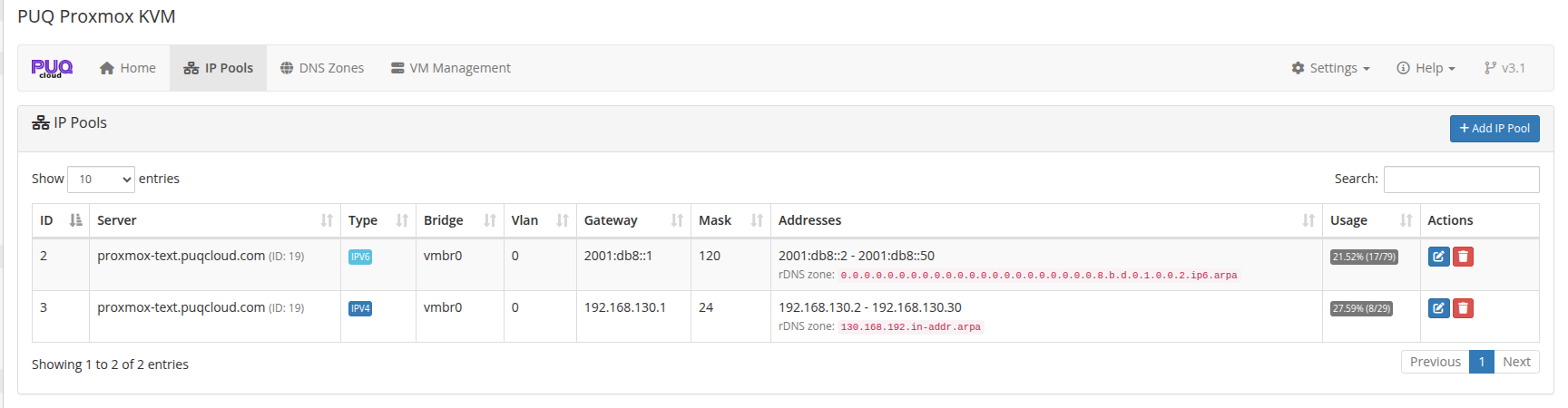 ip-pools-with-rdns-zone-hint.png
New in v3.2. The Addresses column now shows the ready-made rDNS zone name that corresponds to each pool's prefix — copy it directly into the DNS Zones form when you want reverse DNS for that pool's IPs. No need to compute nibble reversals by hand. Both IPv4 (
/8,/16,/24) and IPv6 (any nibble-aligned prefix) are supported.
The table displays:
| Column | Description |
|---|---|
| ID | Pool identifier |
| Server | Associated Proxmox server |
| Type | IPv4 or IPv6 |
| Bridge | Network bridge (e.g., vmbr0) |
| Vlan | VLAN tag (0 = no VLAN) |
| Gateway | Default gateway address |
| Mask | Subnet mask |
| Addresses | Total IPs in pool |
| Usage | Visual bar showing allocated vs available |
| Actions | Edit / Delete buttons |
Adding an IP Pool
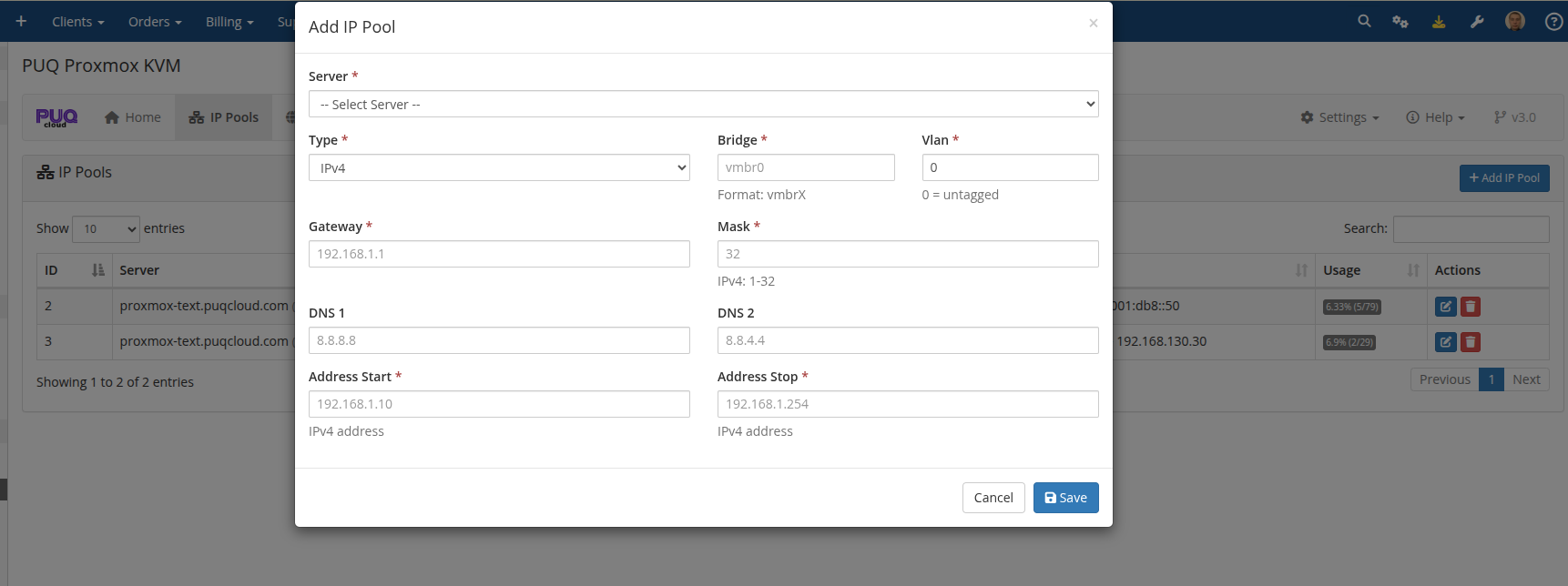
Click + Add IP Pool to open the creation dialog.
 addon-ip-pool-add-modal.png
Fill in the following fields:
| Field | Description | Example |
|---|---|---|
| Server | Select the Proxmox server | pve-waw1 |
| Type | IPv4 or IPv6 | IPv4 |
| Bridge | Network bridge name | vmbr0 |
| Vlan | VLAN tag (0 for untagged) | 0 |
| Gateway | Default gateway address | 192.168.130.1 |
| Mask | Subnet mask (1-32 for IPv4, 1-128 for IPv6) | 24 |
| DNS 1 | Primary DNS server | 8.8.8.8 |
| DNS 2 | Secondary DNS server | 1.1.1.1 |
| Address Start | First IP in the range | 192.168.130.2 |
| Address Stop | Last IP in the range | 192.168.130.254 |
Editing an IP Pool
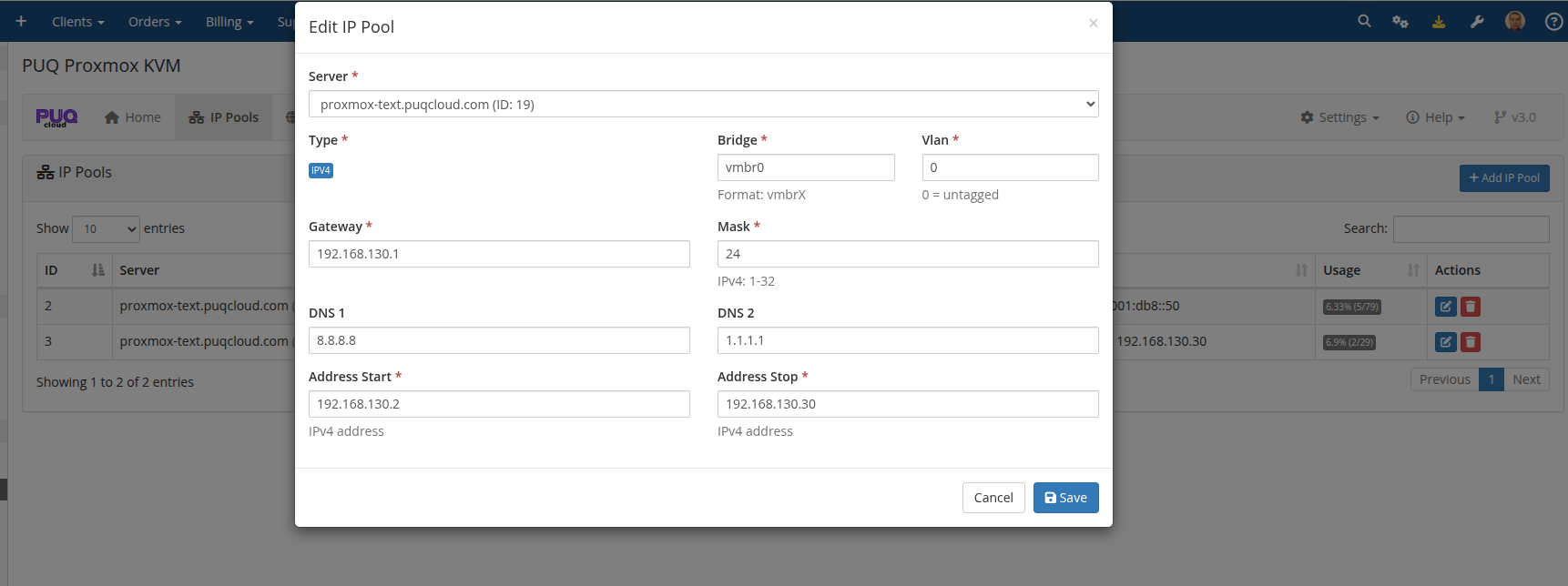
Click the Edit button next to any pool to modify its settings.
 addon-ip-pool-edit-modal.png
Note: Modifying a pool does not affect already-assigned IP addresses. Changes only apply to new allocations.
IP Allocation Process
IPs are automatically allocated from pools during VM provisioning when:
- The server has no assigned IPs configured in WHMCS server settings
- The addon module is installed and activated
- The product's network configuration has Auto bridge/VLAN enabled
The system selects IPs from pools matching the server associated with the product. IPv4 and IPv6 addresses are allocated from separate pools.
Validation Rules
- Bridge must be a valid Proxmox bridge name
- Gateway must match the pool type (IPv4 for IPv4 pools, IPv6 for IPv6 pools)
- Server must be a valid Proxmox server configured in WHMCS
- Address range must be valid for the given type