 Skip to main content
Scheduled Tasks
Proxmox KVM module WHMCS
Order now | Download | Community
Overview
The module runs seven scheduled tasks through the cron system. Each task has a configurable interval and independent lock management to prevent overlapping executions.
Task List
| Task | Default Interval | Description |
|---|---|---|
| Process VMs | 1 minute | Processes the deploy and change package pipelines. Picks up VMs in non-ready states and executes the next step in their pipeline. Also handles DNS record creation and updates. This is the primary task responsible for VM provisioning and modification. |
| Remove Snapshots | 60 minutes | Checks for expired snapshots based on the configured snapshot lifetime setting and automatically removes them from Proxmox for services using lifetime mode. Automatically skips VMs with Snapshot schedule mode enabled. |
| Restore Backup | 5 minutes | Monitors active backup restore tasks on Proxmox. When a restore operation completes, it updates the VM status and sends the "Backup restored" email notification to the client. |
| Backup Status | 5 minutes | Monitors active manual backup tasks on Proxmox. When a backup operation completes, it updates the backup record with the result (success or failure). |
| Schedule Backup | 60 minutes | Executes scheduled backups based on per-VM backup schedules. Checks each VM's configured backup days and initiates a backup if one is due. Runs once per day per VM per scheduled day. |
| Schedule Snapshot (new in v4.0) | 5 minutes | Executes scheduled snapshots based on per-VM snapshot schedules. Checks each VM's configured snapshot days and times, creates an automated snapshot titled Scheduler: YYYY-MM-DD, and automatically rotates (deletes) the oldest snapshot if the service quota is reached. |
| Collect Statistics | 60 minutes | Aggregates network traffic statistics (inbound and outbound bytes) from Proxmox RRD data. Used for WHMCS Metric Billing to enable usage-based network traffic billing. |
Configuring Task Intervals
Task intervals can be adjusted in the addon settings:
The interval specifies the minimum time between executions of a task. For example, a 5-minute interval means the task will run no more frequently than once every 5 minutes.
Tip: For faster VM provisioning, keep the Process VMs interval low (1-2 minutes). For less time-sensitive tasks like statistics collection, longer intervals reduce system load.
Lock Management
Each task uses a lock mechanism to prevent concurrent execution:
- When a task starts, it acquires a lock
- If the lock is already held, the task is skipped for that cron cycle
- When the task completes, the lock is released
- Stale locks (from crashed processes) are automatically detected and cleared based on a timeout
If a task appears to be stuck, you can check and manage locks from the addon's Cron settings page.
CLI Tools
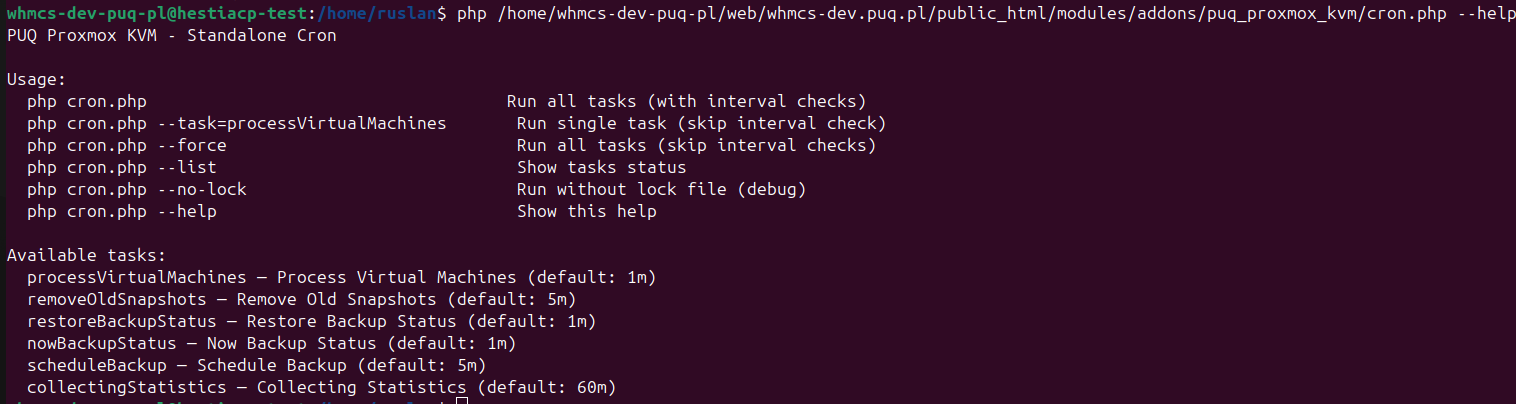
The module provides command-line tools for manual task execution and diagnostics. These can be useful for troubleshooting or for running tasks on demand outside the normal cron schedule.
 addon-cron-cli-help.png
To see available CLI commands, run:
php /path/to/whmcs/modules/addons/puq_proxmox_kvm/cron.php --help
Common CLI Operations
| Command | Description |
|---|---|
--help |
Display available commands and usage information |
--run-task=process_vms |
Manually run the Process VMs task |
--clear-locks |
Clear all stale lock files |
Monitoring
To monitor cron health:
- Check the Last Run timestamp for each task on the Cron settings page
- Verify no tasks have stale locks
- Review the WHMCS activity log for any cron-related errors
- For deploy issues, check the per-VM deploy log in the VM Management section
If tasks are consistently failing or not running, refer to the Cron Configuration guide to verify your cron setup.