 Skip to main content
SSH Keys Management
Proxmox KVM module WHMCS
Order now | Download | Community
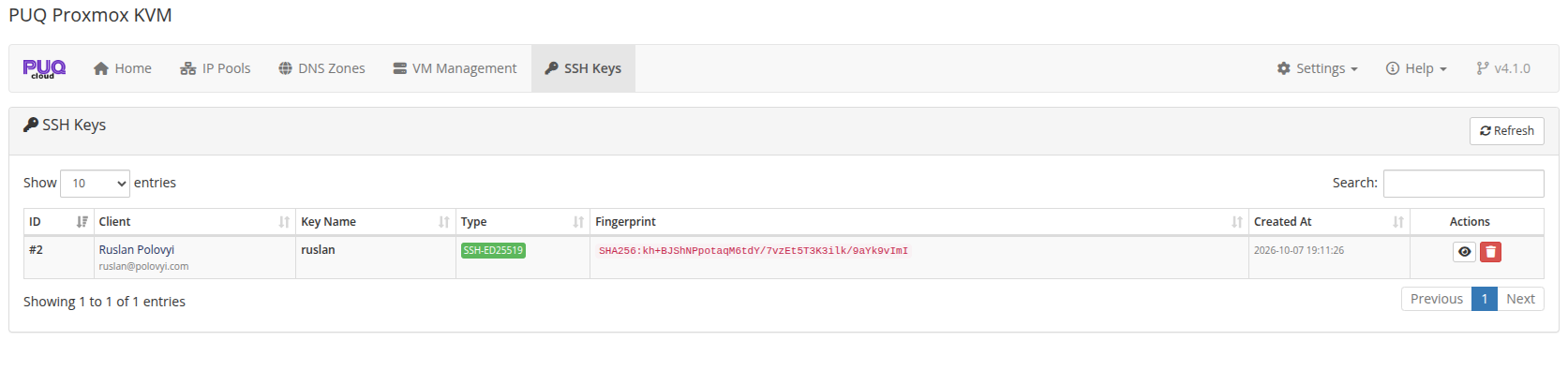
The SSH Keys page in the addon module provides administrators with a centralized overview of all client-managed OpenSSH public keys stored in the WHMCS database.
Overview
 addon-ssh-keys-list.png
From this view, administrators can monitor, search, inspect, and manage SSH public keys uploaded by clients across all accounts.
Table Columns
| Column | Description |
|---|---|
| ID | Unique internal database ID of the SSH key record |
| Client | Client name and email address with direct link to their WHMCS client profile |
| Key Name | Nickname or label assigned to the key by the client |
| Type | Key algorithm badge (SSH-ED25519, SSH-RSA, ECDSA-SHA2-*) |
| Fingerprint | Cryptographic SHA256 fingerprint of the public key |
| Created At | Date and time when the key was added |
| Actions | Quick action buttons: View Key (eye icon) and Delete (trash icon) |
Features
- Instant Search & Filtering: Filter keys by client name, email address, key label, algorithm, or fingerprint.
- View Public Key: Click the View button to inspect the full OpenSSH public key text and copy it if needed.
- Key Deletion: Remove outdated or invalid keys directly from the administrative panel.
-
Secure by Design: Only standard OpenSSH public keys (
ssh-ed25519,ssh-rsa,ecdsa-sha2-*) are stored in the database. Private keys are never accepted or processed. -
Automatic Cloud-Init Integration: Stored keys are made available to the client during service checkout (
cart.php) and operating system reinstallation in the Client Area.
Client Area Controls
To configure whether clients can access the SSH Key Manager or customize where navigation links appear in the Client Area, navigate to:
Addons → PUQ Proxmox KVM → Settings → General → Client Area SSH Keys
See the General Settings documentation for details.