 Skip to main content
Terminate Process
Proxmox KVM module WHMCS
Order now | Download | Community
Overview
Terminating a service means destroying the virtual machine on Proxmox, removing its backups, deleting its DNS records across every configured provider, and cleaning up the WHMCS records. On a service with many backups or many DNS entries this easily takes over a minute — more than a typical PHP request limit allows.
Starting with v3.2 terminate runs asynchronously. When an admin clicks Terminate, the module:
- Sends a fire-and-forget stop request to Proxmox so the VM starts shutting down right away.
- Sets
vm_status = 'terminate'on the VM record. - Returns
successto WHMCS.
WHMCS then marks the service Terminated immediately — the client loses client-area access within the same request. The heavy work (polling for stop, removing backups, deleting DNS records, the Proxmox DELETE call, clearing tblhosting and the VM record) is done by the cron task Process VMs on the next tick.
Terminate Pipeline
The pipeline is a single cron handler, not a multi-step state machine — but each internal phase is logged as a distinct event.
terminate → [stop VM] → [remove backups] → [delete DNS] → [DELETE VM] → [clean DB] → remove
                                                              └─ on error → error_terminate
Phases
| Phase | What happens | Failure handling |
|---|---|---|
| Stop VM | Single stop request, then poll the remote status every 5 seconds for up to 120 seconds (graceful). If still running, send a force-stop and poll another 60 seconds. |
If the VM is still running after both windows, proceed to DELETE anyway — purge=1 can reap a hung VM. |
| Remove backups | Best-effort delete of every backup snapshot for the VM across all configured storages. | Backup deletion errors are caught, logged, ignored. |
| Delete DNS | For every DNS zone whose name matches the VM's domain or an assigned IP, remove the forward A/AAAA and reverse PTR records. | Per-zone, per-IP errors are non-blocking — caught, logged, the next record continues. |
| DELETE VM | The Proxmox DELETE /nodes/<node>/qemu/<vmid>?purge=1 call. This is the only phase that can cause failure — everything else is best-effort. |
On error the VM goes to error_terminate. The DB is not cleaned. |
| Clean DB | Only on DELETE success. Wipes tblhosting.dedicatedip/assignedips/domain and clears identity fields on the VM record. |
— |
Live cron output
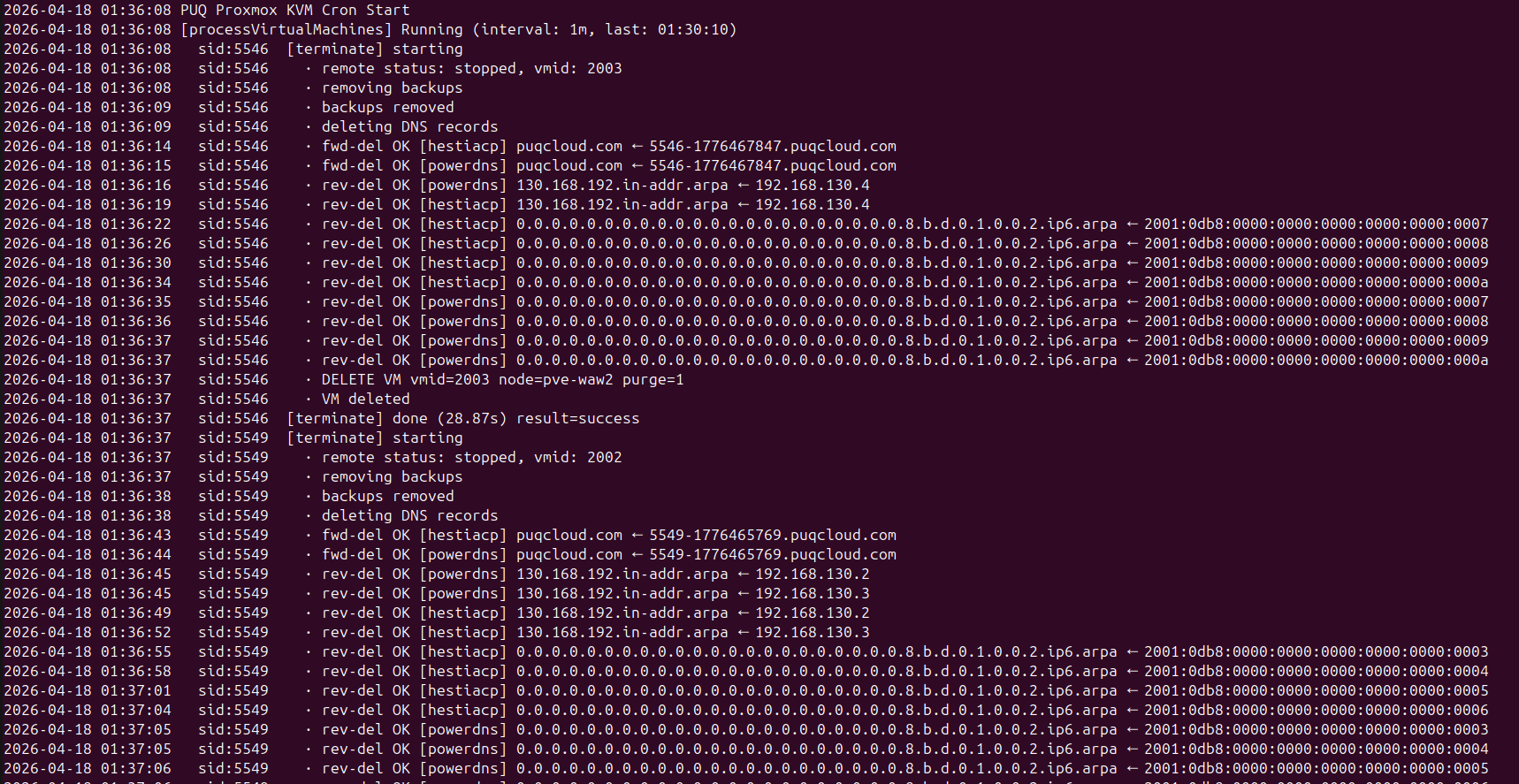
Every phase is streamed to the cron output with timestamps and progress heartbeats. A completed terminate looks like this:
 cron-terminate-live-output.png
Lines you will see:
-
[terminate] starting— pipeline began for this service. -
remote status: running, vmid: 2003— initial state. -
stop request sent— the graceful stop was issued. -
still running, waited 15s / 120s, status: running— heartbeat while waiting. Prints every 15 seconds. -
stopped after ~45s— the guest acknowledged shutdown. -
removing backups/backups removed— backup cleanup. -
deleting DNS records— beginning of the DNS phase. -
rev-del OK [hestiacp] 130.168.192.in-addr.arpa ← 192.168.130.6— individual reverse record deletion. -
rev-del OK [powerdns] 0.0.0.0….8.b.d.0.1.0.0.2.ip6.arpa ← …— same, IPv6. -
fwd-del OK [hestiacp] puqcloud.com ← 5546-1776530141.puqcloud.com— forward record deletion. -
DELETE VM vmid=2003 node=pve-wew2 purge=1— the Proxmox destroy call. -
VM deleted— success. -
[terminate] done (28.67s) result=success— pipeline finished.
If the cron runs in --verbose mode (standalone php cron.php does by default) everything is flushed line-by-line in real time.
What happens on failure
If the DELETE VM API call returns an error (node unreachable, lock conflict, auth expired, etc.), the cron handler switches to the failure path:
-
vm_statusis set toerror_terminate. - The VM record is not cleaned.
tblhosting.dedicatedip/assignedipsstay populated, the VM ID stays on the record, the domain is preserved. - The client gets one entry in the Activity Log:
Service termination FAILED — admin attention required. Error: <reason>. - The VM Log modal in VM Management shows a red banner with the error.
- The cron will not automatically retry —
error_*states are admin-manual.
Why IPs stay allocated on failure
It is deliberate. If the VM still exists on Proxmox but the WHMCS record has been cleared, those IPs are free to be reassigned — and the IP pool will hand them out to the next client. That new client's VM will then conflict with a "zombie" VM still holding the IPs on Proxmox. Keeping the record intact until Proxmox confirms the VM is gone avoids this class of bug entirely.
Admin actions after error_terminate
Open Addons → PUQ Proxmox KVM → VM Management. Rows in error_terminate show a red status badge and a trash icon in the Actions column:
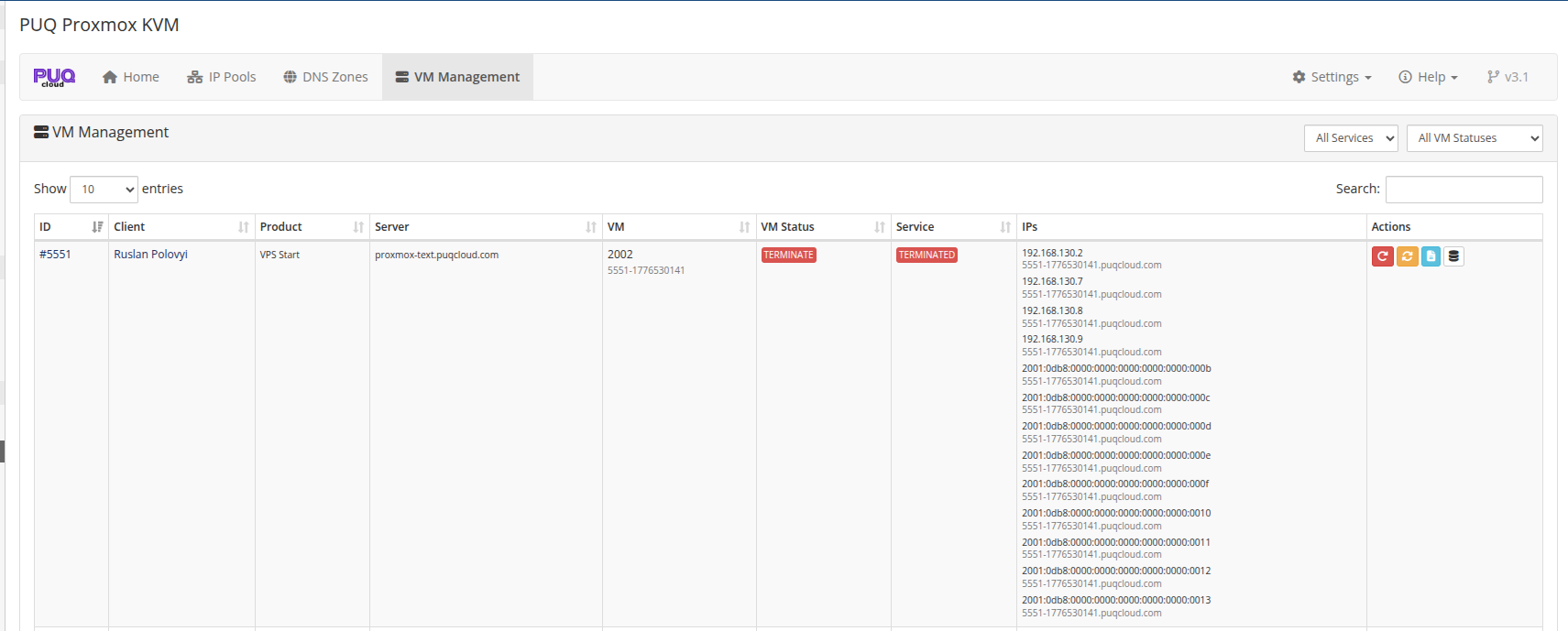 vm-management-terminate-in-progress.png
After the cron finishes:
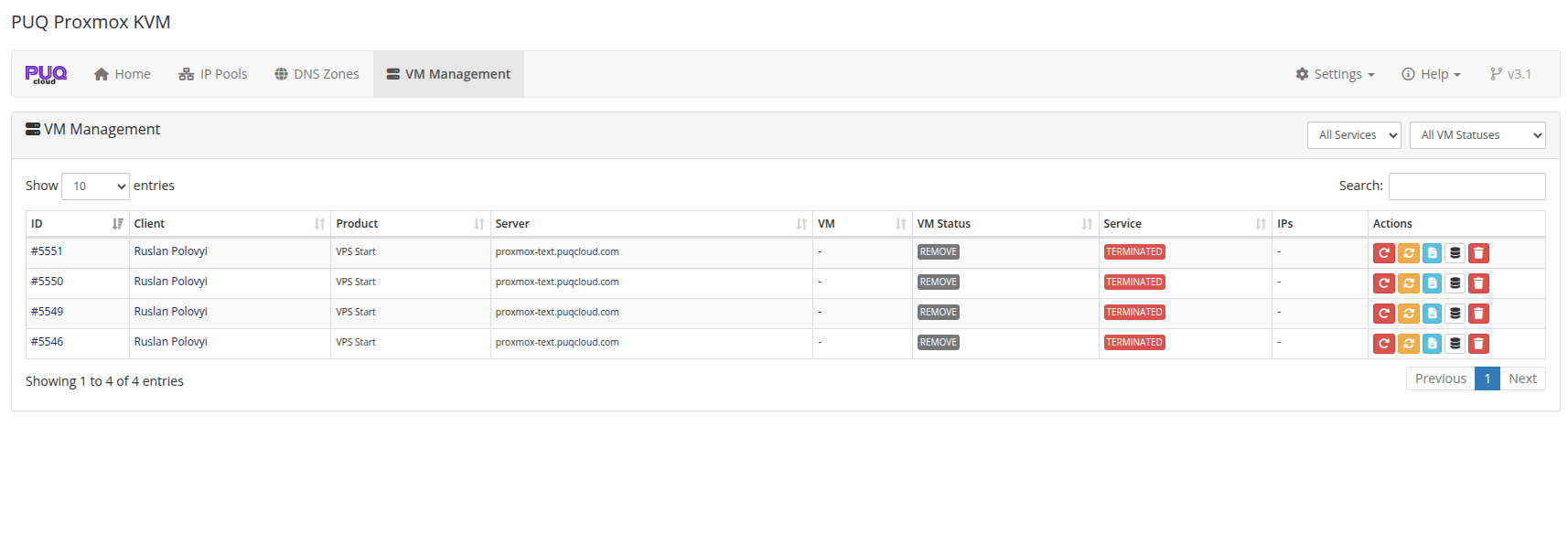 vm-management-terminated-list.png
Reset VM Status modal
Clicking the Reset button opens a modal with a full reference of available target statuses and when to use each:
-
terminate— re-queue the termination. Use this after you've fixed whatever made the original attempt fail (restored node connectivity, re-authed with Proxmox, etc.). -
remove— force-mark the VM record as removed. Does not touch Proxmox. Use this only when you've manually deleted the VM from Proxmox and just want WHMCS to stop showing it. -
ready,creation,set_ip,change_package,set_dns_records— retry other state machines (see the Deploy and Change Package docs).
Delete Record button
Visible only for rows in error_terminate or remove. Removes the VM row from puqProxmoxKVM_vm_info. Does not touch Proxmox or tblhosting. Use this when the VM is long gone from Proxmox but you want to clean up leftover database rows. The confirmation dialog repeats this warning explicitly.
Guarantees
- Client access revoked instantly. The service is Terminated in WHMCS the same moment the admin clicks the button. The client cannot log back in while the actual teardown happens in the background.
- IPs cannot be reassigned before the VM is gone from Proxmox. A failing terminate preserves the allocation until a human confirms the cleanup.
-
One Activity Log entry per attempt. Success → one "terminated successfully" entry. Failure → one "termination FAILED" entry. Cron never writes duplicates on skipped
error_terminaterows. - DNS errors never block termination. A missing or broken DNS provider does not stop the VM from being destroyed.
Logs
- Per-VM action log — in the addon's VM Management → Log modal, every terminate attempt (successful or not) is recorded with duration, phase, and any errors.
- Client Activity Log — visible in the WHMCS client area under My Activity Log.
-
Module log — all Proxmox API calls, DNS provider calls, and non-blocking errors go to WHMCS Utilities → Logs → Module Log with identifier
puqProxmoxKVMandpuq_proxmox_kvm. - Cron output — when running cron in verbose mode, every step is streamed to stdout in real time.
Related reading
- Deploy Process — same state-machine pattern applied to provisioning.
- Change Package — async package changes.
- VM Management — the admin UI with the Reset and Delete Record actions.
- DNS Zones & Integration — what happens in the DNS deletion phase.