 Skip to main content
Server Groups vs. Target Node
Proxmox KVM module WHMCS
Order now | Download | Community
Question
What is the difference between a WHMCS server group and the Target Node parameter in the product configuration? How do I make sure that virtual machines are always deployed on one specific server?
Answer
Allow us to clarify how WHMCS servers, server groups and the Target Node parameter work together.
In WHMCS, a server represents a Proxmox host. If that host is part of a Proxmox cluster, then through that single server entry WHMCS has access to all nodes within the cluster. In this case, the Target Node parameter allows you to specify exactly which node inside that cluster the virtual machine should be deployed on.
Server groups and Target Node are two different levels of control:
- Server group — this is a WHMCS-level setting. When a VM is being deployed, WHMCS selects a server from the group based on the rules you have configured for that group (e.g. fill, round-robin, etc.).
- Target Node — this is a module-level setting. Once WHMCS has selected a server (or cluster), the module then deploys the virtual machine on the specific node defined by the Target Node parameter on that server.
If you want to ensure that virtual machines are always created on one specific standalone server (not part of a cluster), the correct approach is to create a dedicated server group containing only that one server. WHMCS will then always select it for deployment, and Target Node will simply resolve to its single node.
Where the Target Node parameter lives
The Target Node parameter is configured per product in the VM Configuration section of the Module Settings tab (Setup > Products/Services > Products/Services > [product] > Module Settings):
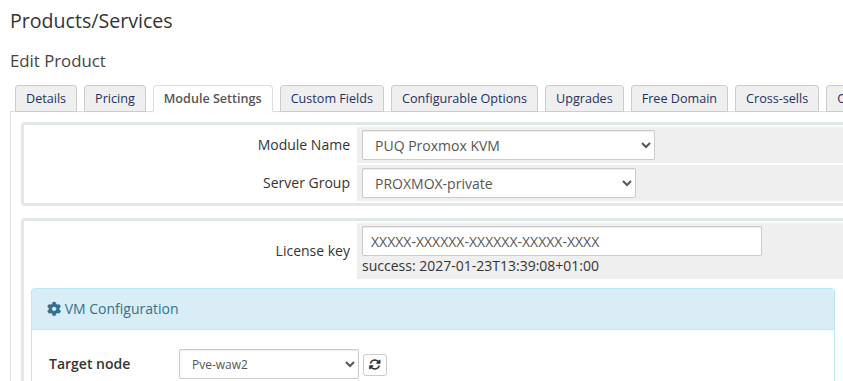 admin-product-config-server-group-target-node.png
The dropdown is populated via AJAX from the Proxmox server (or cluster) selected by WHMCS. Leave the value as automatically to let the module pick the node with the most free resources, or choose a specific node to pin all deployments of this product to it.
Summary
| Level | Setting | Controls |
|---|---|---|
| WHMCS | Server group | Which server (or cluster entry) is chosen for deployment |
| Module | Target Node | Which node inside the chosen Proxmox cluster receives the VM |
To always deploy on one specific standalone host: put that host alone in a dedicated server group, assign the group to the product, and the Target Node will naturally resolve to its only node.