 Skip to main content
Reinstall
Proxmox KVM module WHMCS
Order now | Download | Community
The Reinstall page allows clients to reinstall the operating system on their virtual machine. This is a destructive operation that replaces the current OS with a fresh installation from the selected template.
Process
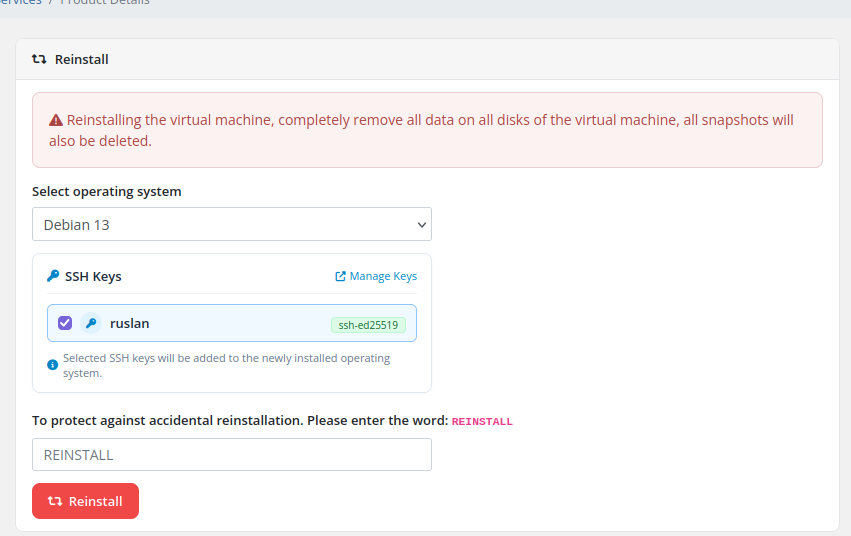 client-area-reinstall.png
What Happens During Reinstall
- The VM is stopped if currently running.
- All data on all disks is destroyed.
- All existing snapshots are deleted.
- The VM is redeployed from the selected OS template using the module's deploy pipeline.
- Cloud-init configuration is reapplied (hostname, IP addresses, DNS, user credentials, and selected SSH public keys).
- Network identity is preserved — the original IPv4/IPv6 addresses, the same network card MAC address, the VLAN tag and the VMID are kept so that inventory systems, firewalls and DNS records continue to work without changes.
- A new root password is generated and sent to the client via email.
Backups survive a reinstall. The reinstall procedure explicitly deletes only the VM's disks and snapshots — any existing backup archives are kept intact. This gives you a safety net: even after reinstalling a brand-new OS, you can still restore a previous backup to return to the pre-reinstall state. Use this carefully.
Important Notes
- This operation is irreversible for the data on the VM disks. All data will be permanently lost.
- The Reinstall feature must be enabled in the product's Client Area Permissions by the administrator.
- Only OS templates approved by the administrator appear in the dropdown list.
- The VM must not be locked by another operation (backup, snapshot, migration) when initiating a reinstall.
- The
REINSTALLconfirmation word must be typed in capital letters exactly — it's an intentional speed-bump to prevent accidental reinstalls.