Domain TLD
PUQ Page Manager module WHMCS
The Domain TLD widget displays domain extension pricing fetched from the WHMCS GetTLDPricing API. TLD entries can be defined manually in the admin editor or pulled randomly from WHMCS. Each TLD supports a promotional label (Hot, New, Sale), an IDN flag, and a custom image.
Admin Settings
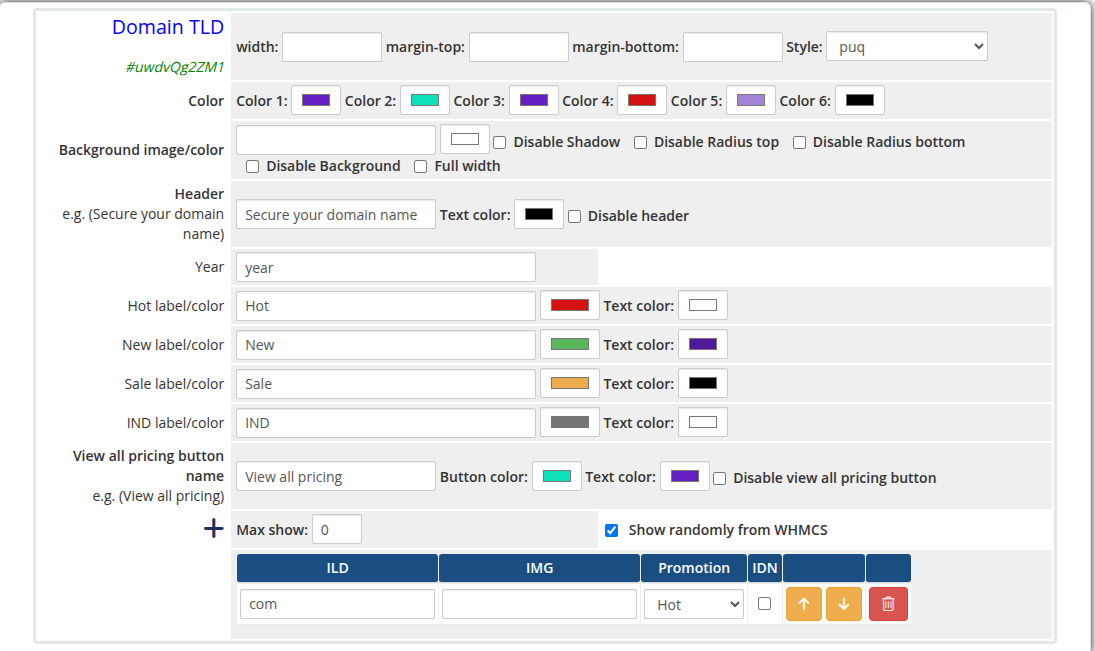 domain-tld-admin.png
Frontend
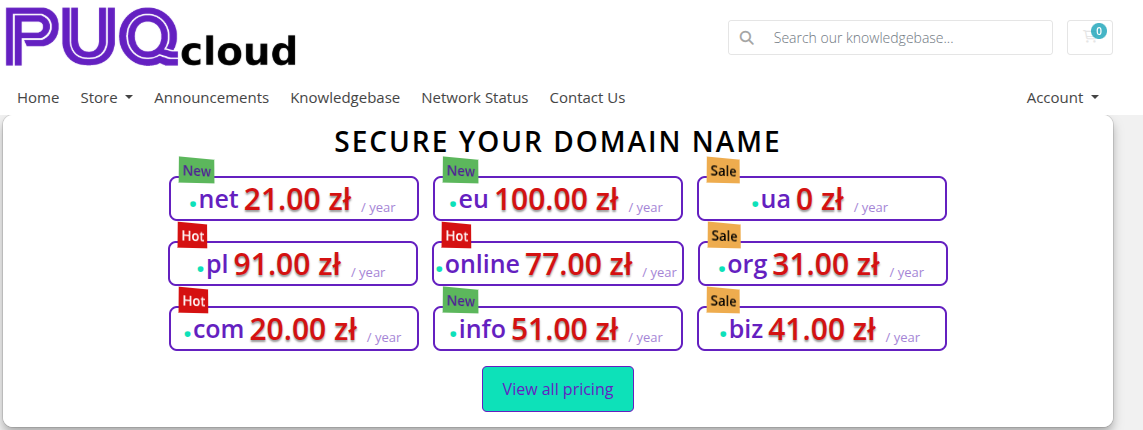 domain-tld-frontend.png
Settings
Display Settings
| Setting |
Type |
Default |
Description |
| max_show |
number |
0 |
Maximum number of TLD entries to display (0 = show all) |
| show_randomly_whmcs |
checkbox |
off |
Pull TLD pricing randomly from WHMCS instead of using the manual list |
| Setting |
Type |
Default |
Description |
| header |
text |
Secure your domain name |
Heading text above the TLD table |
| header_text_color |
color |
#000000 |
Color of the header text |
| disable_header |
checkbox |
off |
Hide the header entirely |
| year |
text |
year |
Label used for the pricing period (e.g. year, /yr) |
| Setting |
Type |
Default |
Description |
| hot_label |
text |
Hot |
Text shown on the Hot badge |
| hot_color |
color |
#d51111 |
Background color of the Hot badge |
| hot_text_color |
color |
#ffffff |
Text color of the Hot badge |
| new_label |
text |
New |
Text shown on the New badge |
| new_color |
color |
#5cb75c |
Background color of the New badge |
| new_text_color |
color |
#4f1998 |
Text color of the New badge |
| sale_label |
text |
Sale |
Text shown on the Sale badge |
| sale_color |
color |
#eeac4e |
Background color of the Sale badge |
| sale_text_color |
color |
#000000 |
Text color of the Sale badge |
| idn_label |
text |
IND |
Text shown on the IDN badge |
| idn_color |
color |
#767676 |
Background color of the IDN badge |
| idn_text_color |
color |
#fdfdfd |
Text color of the IDN badge |
View All Pricing Button
| Setting |
Type |
Default |
Description |
| view_all_pricing_button_name |
text |
View all pricing |
Label on the pricing button |
| view_all_pricing_button_color |
color |
#0de1b9 |
Background color of the pricing button |
| view_all_pricing_button_text_color |
color |
#6420c0 |
Text color of the pricing button |
| disable_view_all_pricing_button |
checkbox |
off |
Hide the view all pricing button |
Color Settings
| Setting |
Type |
Default |
Description |
| color_1 |
color |
#6420c0 |
Primary UI color |
| color_2 |
color |
#0de1b9 |
Secondary UI color |
| color_3 |
color |
#6420c0 |
Tertiary UI color |
| color_4 |
color |
#d41111 |
Quaternary UI color |
| color_5 |
color |
#a484d5 |
Fifth UI color |
| color_6 |
color |
#000000 |
Sixth UI color |
TLD Entries
TLD entries are managed with a visual table editor. Each row defines one TLD:
| Column |
Description |
| TLD |
The domain extension (e.g. .com, .net) |
| IMG |
URL of a logo or flag image for the TLD |
| Promotion |
Badge to display: none, Hot, New, or Sale |
| IDN |
Checkbox — marks the TLD as IDN-supported |
Rows can be added, removed, and reordered using the arrow buttons.
Layout Settings
| Setting |
Type |
Default |
Description |
| width |
text |
— |
CSS width of the widget container (e.g. 800px, 100%) |
| margin_top |
text |
— |
CSS top margin (e.g. 20px) |
| margin_bottom |
text |
— |
CSS bottom margin (e.g. 20px) |
| style |
select |
puq |
Visual style template |
| background_image |
text |
— |
URL of the background image |
| background_color |
color |
#FFFFFF |
Background color of the widget container |
| disable_background_shadow |
checkbox |
off |
Remove the drop shadow from the container |
| disable_background_radius_top |
checkbox |
off |
Remove the top border radius from the container |
| disable_background_radius_bottom |
checkbox |
off |
Remove the bottom border radius from the container |
| disable_background |
checkbox |
off |
Disable the background container entirely |
| full_width |
checkbox |
off |
Stretch the widget to the full page width |
Style Templates
| Template |
Description |
puq |
Default domain TLD pricing table style |
 Skip to main content